
Android中ViewStub组件使用
1. 概述:
ViewStub组件和<include>标签的作用类似,主要是为了提高布局的重用性,及布局的模块化。它们之间最大的差别是,ViewStub中的布局不会随着它所在布局的渲染而渲染,而<include>标签中的布局会随着它所在布局的渲染而渲染,ViewStub中的布局只有在你需要的时候才会渲染到主界面中。
2. 效果图:
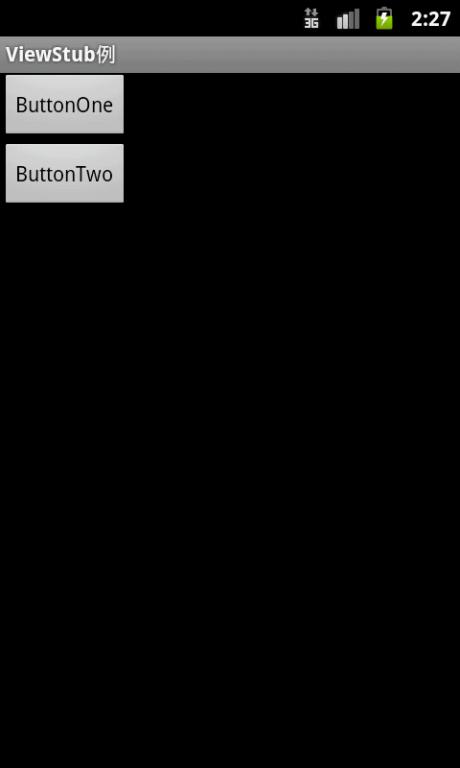
(1)在ButtonOne与ButtonTwo之间存在一个ViewStub布局,如下图:
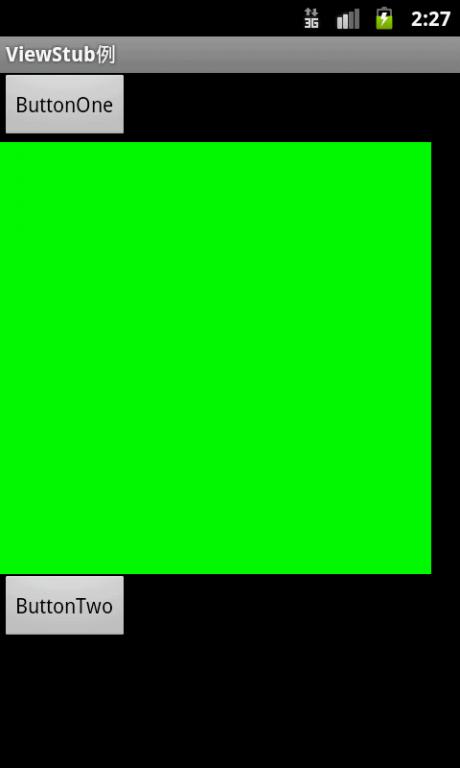
(2)单击ButtonOne后渲染ViewStub中的布局,如下图:
3. 实现代码:
(1)res/layout/main.xml实现:
- <?xml version="1.0" encoding="utf-8"?>
- <LinearLayout xmlns:android = "http://schemas.android.com/apk/res/android"
- android:orientation = "vertical"
- android:layout_width = "fill_parent"
- android:layout_height = "fill_parent"
- >
- <Button
- android:id = "@+id/show"
- android:text = "ButtonOne"
- android:layout_width = "wrap_content"
- android:layout_height = "wrap_content"
- />
- <ViewStub
- android:id = "@+id/viewStub"
- android:layout = "@layout/green_layout"
- android:layout_width = "300dip"
- android:layout_height = "300dip"
- />
- <Button
- android:layout_width = "wrap_content"
- android:layout_height = "wrap_content"
- android:text = "ButtonTwo"
- />
- </LinearLayout>
(2)main.xml中ViewStub组件里的布局实现:
- <?xml version="1.0" encoding="utf-8"?>
- <LinearLayout
- xmlns:android = "http://schemas.android.com/apk/res/android"
- android:layout_width = "match_parent"
- android:layout_height = "match_parent"
- android:background = "@color/green">
- </LinearLayout>
(4)主Activity实现:
- package com.focus.fishme;
- import android.app.Activity;
- import android.os.Bundle;
- import android.view.View;
- import android.view.ViewStub;
- import android.view.View.OnClickListener;
- import android.widget.Button;
- public class ViewStubActivity extends Activity {
- private ViewStub mViewStub;
- private Button mShow;
- @Override
- public void onCreate(Bundle savedInstanceState) {
- super.onCreate(savedInstanceState);
- setContentView(R.layout.main);
- mViewStub = (ViewStub) findViewById(R.id.viewStub);
- mShow = (Button) findViewById(R.id.show);
- mShow.setOnClickListener(new OnClickListener() {
- public void onClick(View view) {
- if (mViewStub != null) {
- mViewStub.inflate();
- }
- }
- });
- }
- }
转自:http://blog.csdn.net/mayingcai1987/article/details/6238609
Android中ViewStub组件使用的更多相关文章
- android中四大组件之间相互通信
好久没有写有关android有关的博客了,今天主要来谈一谈android中四大组件.首先,接触android的人,都应该知道android中有四大组件,activity,service,broadca ...
- Android中Intent组件详解
Intent是不同组件之间相互通讯的纽带,封装了不同组件之间通讯的条件.Intent本身是定义为一个类别(Class),一个Intent对象表达一个目的(Goal)或期望(Expectation),叙 ...
- Android中四大组件总结
android四大组件分别为activity.service.content provider.broadcast receiver. 一.android四大组件详解 1.activity (1)一个 ...
- Android中BroadcastReceiver组件具体解释
Android系统的4个组件最终还剩一种组件了BroadcastReceiver,这个组件是全局监听器,能够监听系统全局的广播消息,能够方便的实现系统中不同组件之间的通信 BroadcastRecei ...
- Android笔记(六) Android中的组件
一个软件可以吸引到用户,除了优秀的功能可以解决用户的问题之外,良好的用户界面也并不可少.一个软件的功能不管多么优秀,但是没有提供友好的界面来让用户操作,将很难吸引到最终用户. Android提供了大量 ...
- Android中各组件的生命周期
1.Activity生命周期图 二.activity三种状态 (1)active:当Activity运行在屏幕前台(处于当前任务活动栈的最上面),此时它获取了焦点能响应用户的操作,属于活动状态,同一个 ...
- Android中四大组件
Activity BroadCast Receiver 广播接收者 Service 服务 Content Provider 内容提供者 四大组件都需要在清单文件里面配置一下
- android中各种组件的生命周期问题
1,activiy生命周期 http://www.ibm.com/developerworks/cn/opensource/os-cn-android-actvt/ 结合ativity的状态转换来看才 ...
- Android中GridView通过自定义适配器(未优化)实现图文视图排列
Android中GridView组件用来以网格方式排列视图,与矩阵类似,当屏幕上有很多元素(文字.图片或其他元素)需要显示时,可以使用该组件.下面我们通过代码实现如下图例(为了方便截图,将事件处理(土 ...
随机推荐
- Javascript 拖拽的一些简单的应用——逐行分析代码,让你轻松了解拖拽的原理
今天我们来看看如何让拖拽的物体不能拖出某个div之外和拖拽的吸附功能 上次讲到我们的拖拽是不可拖出可视区范围的,在这基础上我们加个父级的div,不让他拖出父级.原理和之前的一样,简单吧. <di ...
- MUD江湖_MUD文字游戏_MUD五指_武林群侠_北侠_夺宝江湖_书剑_文字江湖游戏_MUD游戏下载
MUD江湖_MUD文字游戏_MUD五指_武林群侠_北侠_夺宝江湖_书剑_文字江湖游戏_MUD游戏下载 武侠类手机文字游戏,经典再现高度自由玩法宠物 自制装备 师徒自立门派 自造武功欢迎来玩 Q群 1 ...
- 论山寨手机与Android联姻 【3】手机是怎样生产出来的
要说清楚MTK在商业模式上有什么优势,以及Android对于MTK未来的手机开发会有什么影响,首先得了解手机从设计,开发到生产的整个过程.让我们先来看看手机的生产过程.在生产制造环节,山寨手机和正牌手 ...
- C语言的本质(4)——浮点数的本质与运算
C语言的本质(4)--浮点数的本质与运算 C语言规定了3种浮点数,float型.double型和long double型,其中float型占4个字节,double型占8个字节,longdouble型长 ...
- chroot_local_user和chroot_list_enable含义
很多情况下,我们希望限制ftp用户只能在其主目录下(root dir)下活动,不允许他们跳出主目录之外浏览服务器上 的其他目录,这时候我就需要使用到chroot_local_user,chroot_l ...
- 图片缩放JavaScript原生实现
function scalImg(aLi){ for(var i=0,l=aLi.length;i<l;i++){ var oImg = new Image(), oLi = aLi[i], i ...
- LINQ 图解 LINQ学习第三篇 [转]
LINQ,语言集成查询(Language INtegrated Query)是一组用于c#和Visual Basic语言的扩展.它允许编写C#或者Visual Basic代码以查询数据库相同的方式操作 ...
- javaScript 工作必知(十) call apply bind
call 每个func 都会继承call apply等方法. function print(mesage) { console.log(mesage); return mesage; } print ...
- 20141112 WinForm子窗口标签页
(一)标签页 先看看效果: 代码: public partial class 标签页 : Form { string s = ""; public 标签页() { Initiali ...
- XenDesktop 5 PowerShell SDK Primer – Part 2 – Creating Hypervisor Connections and Hosts
One of the new changes that you will see in XenDesktop 5 is the configuration of hypervisor connecti ...