
简单实用angular.js购物车功能
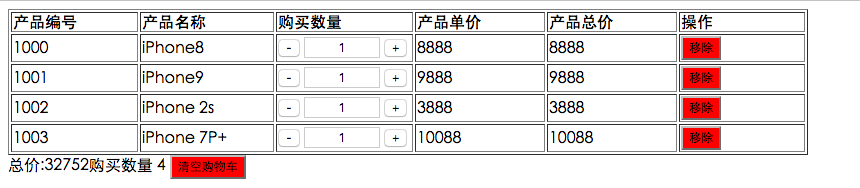
<!DOCTYPE html>

<html>

	<head>

		<meta charset="UTF-8">

		<title></title>

		<script src="http://code.angularjs.org/1.2.5/angular.min.js"></script>

		<style type="text/css">

			td,th{

				width: 150px;

				text-align: left;

			}

			table{

				width: 800px;

			}

			.num{

				width: 70px;

				text-align: center;

			}

			tr td:last-child button {

				background-color: red;

			}

			#foot button{

				background-color: red;

			}

		</style>

	</head>

	<!--ng-bind是从$scope -> view的单向绑定ng-modle是$scope <-> view的双向绑定

		{{}} 与 ng-bind 的区别是后者在加载时用户不会看到渲染之前的东西,前者可能会看到,所以首页一般用后者加载数据

	-->

	<body ng-app="myApp">

		<div ng-controller="VC1">

			<table border="" cellspacing="" cellpadding="">

				<tr><th>产品编号</th><th>产品名称</th><th>购买数量</th><th>产品单价</th><th>产品总价</th><th>操作</th></tr>

				<tr ng-repeat="x in Product" >

					<td>{{x.id}}</td>

					<td>{{x.name}}</td>

					<td>

					<button ng-click="reduce($index)">-</button>

					<input  type="text" class="num" ng-model="x.quantity" ng-change="change($index)" />

					<button ng-click="add($index)">+</button> </td>

					<td >{{x.price}}</td>

					<td>{{x.price * x.quantity}}</td>

					<td><button ng-click="remove($index)">移除</button></td></tr>

			</table>

			<div id="foot"><span>总价:</span><span ng-bind="totalQuantity()"></span><span>购买数量</span>

				<span >{{numAll()}}</span> <button ng-click="removeAll()">清空购物车</button> </div>

		</div>

	</body>

	<script type="text/javascript">

		var app = angular.module("myApp",[]);

		app.controller("VC1",function($scope){

			 $scope.Product = [{

                id: 1000,

                name: "iPhone8",

                quantity: 1,

                price: 8888

            }, {

                id: 1001,

                name: "iPhone9",

                quantity: 1,

                price: 9888

            }, {

                id: 1002,

                name: "iPhone 2s",

                quantity: 1,

                price: 3888

            }, {

                id: 1003,

                name: "iPhone 7P+",

                quantity: 1,

                price: 10088

            }];

            //减少数量

            $scope.reduce = function(index){

            	if(	$scope.Product[index].quantity > 1){

            			$scope.Product[index].quantity--;

            	}else{

            		$scope.remove(index);

            	}

            }

            //添加数量函数

            $scope.add = function(index){

            	$scope.Product[index].quantity++;

            }

            //所有商品总价函数

            $scope.totalQuantity = function(){

            	var allprice = 0

            	for(var i = 0 ; i <$scope.Product.length;i++ ){

            		allprice += $scope.Product[i].quantity *  $scope.Product[i].price;

            	}

            	return allprice;

            }

            //购买总数量函数

            $scope.numAll = function(){

            		var numAlls = 0

            	for(var i = 0 ; i <$scope.Product.length;i++ ){

            		numAlls += $scope.Product[i].quantity;

            	}

            	return numAlls;

            }

            //删除当前商品

            $scope.remove = function(index){

            	if(confirm("确定要清空数据吗")){

            			$scope.Product.splice(index,1)

            	}

            }

            //清空购物车

            $scope.removeAll = function(){

            	if(confirm("你确定套清空购物车所有商品吗?")){

            		$scope.Product  = [];

            	}

            }

            //解决输入框输入负数时变为1

            $scope.change = function(index){

            	if ( $scope.Product[index].quantity >= 1) {

            	}else{

            		$scope.Product[index].quantity = 1;

            	}

            }

            $scope.$watch('Product',function(oldvalue,newvalue){

				console.log(oldvalue);

				console.log(newvalue);

			})

		})

	</script>

</html>
简单实用angular.js购物车功能的更多相关文章
- 【转】Angular.js VS. Ember.js:谁将成为Web开发的新宠?
本文源自于Quora网站的一个问题,作者称最近一直在为一个新的Rails项目寻找一个JavaScript框架,通过筛选,最终纠结于 Angular.js和 Ember.js. 这个问题获得了大量的关注 ...
- Angular JS + Express JS入门搭建网站
3月份开始,接到了新的任务,跟UI开发有关,用的是Angular JS,Express JS等技术.于是周末顺便学习下新技术. 组里产品UI架构如下: 其中前端,主要使用Angular JS框架,另外 ...
- Angular JS的正确打开姿势——简单实用(上)
前 言 絮叨絮叨 在分享了JS和JQuery之后,今天再给大家分享一个好玩并且特别好用JS框架--AngularJS. 一. AngularJS简介 AngularJS 诞生于2009年,由 ...
- js jsp 时间 日期 控件 插件 简单 实用
js时间控件一般都是找网上的用,这东西平常很少涉及到,一用到找起来却烦死人,不是没用就是太复杂,今天向大家推荐一个简单实用的控件,该控件在不断更新,而且有专门的网站对它进行维护,所以值得一看. 先说它 ...
- 利用修改div的位置+js对象存储div信息 实现简单的div自定义布局功能
原文:利用修改div的位置+js对象存储div信息 实现简单的div自定义布局功能 利用修改div的位置+js对象存储div信息 实现简单的div自定义布局功能1.在界面上添加几个checkbox和一 ...
- Victor 串口 VCL 控件 - 简单实用, 功能强大的 C++ Builder 串口控件!
源:Victor 串口 VCL 控件 - 简单实用, 功能强大的 C++ Builder 串口控件! 2014年02月06日发布控件的重要更新版本: Victor 串口控件 1.5.0.2 版本 (包 ...
- javaCV开发详解之技术杂烩:javaCV能帮我们做什么?能实现什么功能?ffmpeg和openCV能实现功能,javaCV如何做到更快、更简单的实现相应的功能?等等一堆实用话题
前言: 该篇文章旨在帮助刚接触javaCV的盆友系统的认识音视频.javaCV.图像处理相关的体系知识和一些实用的知识. 序: javaCV早期因为内置了openCV库,所以常用来做图像识别应用,现在 ...
- JS实现添加至购物车功能
效果图展示: 当将书拖拽至购物车一览时: 首先将页面的基本结构写出来: <!DOCTYPE html> <html lang="en"> <head& ...
- (网页)angular js 终极购物车(转)
转自CSDN: <!DOCTYPE html> <html lang="en"> <head> <meta charset="U ...
随机推荐
- Oracle创建表空间
1.创建表空间 导出Oracle数据的指令:/orcl file=C:\jds.dmp owner=jds 导入Oracle数据的指令:imp zcl:/orcl file=C:\jds.dmp fu ...
- 关于asp.net利用mono部署到Linux上的一些说明
linuxdot.net社区群:102732979(如果你认为你已经在.NET跨平台方面有足够的经验,请参加这个群:103810355). 其中有各种大神,嘿嘿,如果你有问题可以来咨询,完全无偿的免费 ...
- C#中一些常用的加密和哈希处理
URL编码,默认UTF8编码方式 /// <summary> /// URL编码,默认UTF8编码方式 /// </summary> /// <param name=&q ...
- DAO层,Service层,Controller层、View层 的分工合作
DAO层:DAO层主要是做数据持久层的工作,负责与数据库进行联络的一些任务都封装在此,DAO层的设计首先是设计DAO的接口,然后在Spring的配置文件中定义此接口的实现类,然后就可在模块中调用此接口 ...
- Atitit 图像处理和计算机视觉的分类 三部分 图像处理 图像分析 计算机视觉
Atitit 图像处理和计算机视觉的分类 三部分 图像处理 图像分析 计算机视觉 1.1. 按照当前流行的分类方法,可以分为以下三部分:三部分 图像处理 图像分析 计算机视觉1 1.2. 图像处理需要 ...
- 基本数据结构(2)——算法导论(12)
1. 引言 这一篇博文主要介绍链表(linked list),指针和对象的实现,以及有根树的表示. 2. 链表(linked list) (1) 链表介绍 我们在上一篇中提过,栈与队 ...
- .NET Core的文件系统[3]:由PhysicalFileProvider构建的物理文件系统
ASP.NET Core应用中使用得最多的还是具体的物理文件,比如配置文件.View文件以及网页上的静态文件,物理文件系统的抽象通过PhysicalFileProvider这个FileProvider ...
- Deep learning:五十一(CNN的反向求导及练习)
前言: CNN作为DL中最成功的模型之一,有必要对其更进一步研究它.虽然在前面的博文Stacked CNN简单介绍中有大概介绍过CNN的使用,不过那是有个前提的:CNN中的参数必须已提前学习好.而本文 ...
- SQL Tuning 基础概述06 - 表的关联方式:Nested Loops Join,Merge Sort Join & Hash Join
nested loops join(嵌套循环) 驱动表返回几条结果集,被驱动表访问多少次,有驱动顺序,无须排序,无任何限制. 驱动表限制条件有索引,被驱动表连接条件有索引. hints:use_n ...
- 网站实现微信登录之嵌入二维码——基于yii2开发的描述
之前写了一篇yii2获取登录前的页面url地址的文章,然后发现自己对于网站实现微信扫码登录功能的实现不是很熟悉,所以,我会写2-3篇的文章来描述下一个站点如何实现微信扫码登录的功能,来复习下微信扫码登 ...