
如何使用VS在SharePont 2013中插入ashx文件
http://www.lifeonplanetgroove.com/adding-and-deploying-generic-handlers-ashx-to-a-sharepoint-2010-visual-studio-project/
Adding And Deploying Generic Handlers (.Ashx) To A SharePoint 2010 Visual Studio Project
Generic Handlers (.ashx files) deployed to the _layouts directory are not directly supported by Visual Studio 2010 SharePoint projects like custom .aspx application pages are. This post will cover how to add them to your Visual Studio project and deploy them properly to the ISAPI folder.
Overview
Visual Studio Item Templates for Generic Handlers (.ashx files) are not directly supported by Visual Studio 2010 or 2012 SharePoint projects.
IMPORTANT UPDATE 4/30/2013!
I contributed an ASHX ItemTemplate to the CKSDEV team that is now included in the 2010 and 2012 versions of the extensions (see http://www.lifeonplanetgroove.com/2013/04/30/ashx-generic-handlers-and-sharepoint-now-in-cksdev/). The manual approach below is still an option, but the CKSDEV approach makes it much more seamless. Special thanks to Wes Hackett for merging the contribution.
If you try to Add New Item… and select the Web or SharePoint categories in a VS 2010 SharePoint project, you won’t find Generic Handler anywhere.
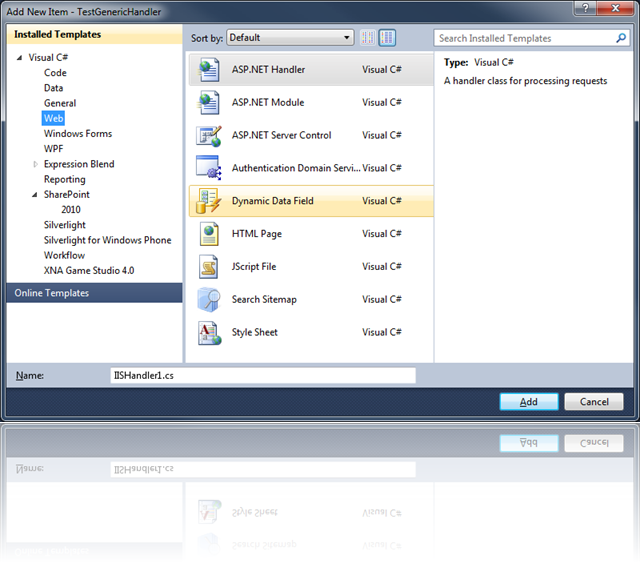
You’ll find ASP.NET Handler, but this will require you to create entries in web.config to make your handler work. In order to add a new .ASHX generic handler and get it to deploy properly, you can use the following steps:
- Right-click the project, and select Add New Item…
- Choose the Application Page template.
- In the name box, enter a name for your file, with an .ashx extension.
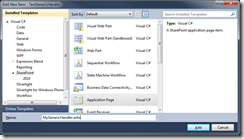
- Open the .ashx file, delete the contents and replace with the following, changing your Class=attribute with your desired namespace and class name:
<%@ Assembly Name="$SharePoint.Project.AssemblyFullName$" %>

<%@ Assembly Name="Microsoft.SharePoint, Version=14.0.0.0, Culture=neutral, PublicKeyToken=71e9bce111e9429c" %>

<%@ WebHandler Language="C#" class="MyNamespace.MyGenericHandler" %>
NOTE
If you want to reference other SharePoint assemblies in your code-behind, you will need to add an @ Assembly directive for each DLL.
- Open the ashx.cs file.
- Add a using statement for System.Web.
- You probably don’t need the using statement for Microsoft.SharePoint.WebControls, so remove it.
- Change your namespace if necessary.
- Change the class to inherit from IHttpHandler.
- Implement the IHttpHandler interface. Your code should now look something like this:
using Microsoft.SharePoint;

using System.Web;

namespace MyNamespace

{

    public partial class MyGenericHandler : IHttpHandler

    {

        #region IHttpHandler Members

        public bool IsReusable

        {

            get { throw new NotImplementedException(); }

        }

        public void ProcessRequest(HttpContext context)

        {

            throw new NotImplementedException();

        }

        #endregion

    }

}
- In the Solution Explorer, delete the ashx.designer.cs file, it is not needed.
- In the Solution Explorer, click the .ashx file, and in the Properties pane, set the Build Action to Content.
- In the Solution Explorer, click the .ashx.cs file, and in the Properties pane, set the Build Action to Compile.
- Make sure to enable Token replacement for .ashx extensions. This will replace the
$SharePoint.Project.AssemblyFullName$token with the full strong name of your assembly, enabling you to reference other classes in your compiled assembly from the ashx code-behind.You can read more about token replacement here. To enable this for your Project, Unload your Project, Edit the .csproj file and add the following text to a PropertyGroup, and Reload your project:<PropertyGroup>
<TokenReplacementFileExtensions>ashx</TokenReplacementFileExtensions>
</PropertyGroup>
如何使用VS在SharePont 2013中插入ashx文件的更多相关文章
- 【转载】在HTML中插入swf文件(转)
在HTML中插入swf文件(转) 在网页里面插入swf,再平常不过了,一般会想到如下代码: Html代码 <object classid="clsid:D27CDB6E-AE6D-11 ...
- Visual C++ 2010项目在Visual Studio 2013中打开.rc文件提示"undefined keyword or key name: SS_REALSIZECONTROL"解决方法
1.以方式打开.rc文件. 2.删除其中包含SS_REALSIZECONTROL定义的内容. 3.在资源编辑器中打开.rc文件,重新设置Real Size Control的属性(不能在代码编辑器里重新 ...
- vs中打开ashx文件没有提示,没有高亮标记解决方法
在VS菜单中 工具 --- 选项 --- 文本编辑器 --- 文件扩展名,在右侧添加 ashx ,选中Microsoft Visual C# 保存后,再打开就行了 ashx文件头部报错后,删除 < ...
- 更改Outlook 2013中Exchange数据文件存放路径
昨天新入职目前所在的公司,在原公司一直都是直接使用Outlook设置用户名和密码后,然后将*.pst邮件的数据文件保存在其他盘符,以防止在更新操作系统时出现邮件丢失的情况:但是目前公司使用的是Exch ...
- latex中插入eps文件
\documentclass{article} \usepackage{graphicx}\usepackage{epstopdf} \begin{document}\begin{figure} \ ...
- 如何在Visio 中插入各种数学公式?
在Visio 2007老版本中,插入公式可以直接在插入图片中选择,但是在后来的Visio2013中却无法直接通过插入图片的方法插入,那么该如何在visio 2013中插入公式呢? 具体的操作步骤如下: ...
- asp.net中.ashx文件接参
如果是在解决方案中的Web项目中创建.ashx文件,没有文件头,不能直接读取到html页面传来的参数值. 用context.Request["参数名"]来获取参数值. 用conte ...
- 如何在 在SharePoint 2013/2010 解决方案中添加 ashx (HttpHandler)
本文讲述如何在 在SharePoint 2013/2010 解决方案中添加 ashx (HttpHandler). 一般处理程序(HttpHandler)是·NET众多web组件的一种,ashx是其扩 ...
- 在 SharePoint 2013 中针对地理位置字段创建地图视图
在 SharePoint 2013 中针对地理位置字段创建地图视图 了解如何通过在 SharePoint 2013 列表中使用地图视图来显示位置信息.您可以通过 SharePoint 用户界面 (UI ...
随机推荐
- [PHP源码阅读]array_slice和array_splice函数
array_slice和array_splice函数是用在取出数组的一段切片,array_splice还有用新的切片替换原删除切片位置的功能.类似javascript中的Array.prototype ...
- ASP.NET MVC Model元数据(四)
ASP.NET MVC Model元数据(四) 前言 前面的篇幅讲解了Model元数据生成的过程,并没有对Model元数据生成过程的内部和Model元数据结构的详细解释.看完本篇后将会对Model元数 ...
- JavaScript的基准测试-不服跑个分?
原文:Bulletproof JavaScript benchmarks 做JavaScript的基准测试并没有想的那么简单.即使不考虑浏览器差异所带来的影响,也有很多难点-或者说陷阱需要面对. 这是 ...
- JavaScript 精粹
数据类型 JavaScript 是 弱类型 语言,但并不是没有类型,JavaScript可以识别下面 7 种不同类型的值: 基本数据类型 Boolean Number String null unde ...
- Binder In Native
关于Binder的设计思想与Driver层实现细节可以看这个:Android Binder设计与实现 - 设计篇,这里首先简要概括一下. Service的每个Binder实体位于Service所属的进 ...
- salesforce 零基础学习(五十八)通过sObject的field返回其对应的基础类型
项目中有时候会要求通过sObject的Field的type类型返回其对应的基本类型,然后对其进行相关的处理,创建sObject的field可以选择的type类型是固定多的. 上述类型可以转换成几种基本 ...
- BootStrap_01之全局样式
1.响应式网页: ①Responsive Web Page:一个可以根据浏览设备的不同,而自动更改布局.图片.文字效果的网页: ②构成:不能固定宽度,必须流式布局:文字和图片大小随容器大小而改变:CS ...
- 从零开始编写自己的C#框架(13)——T4模板在逻辑层中的应用(二)
最近这段时间特忙,公事私事,忙得有时都没时间打开电脑了,这两周只能尽量更新,以后再将章节补回来. 直接进入主题,通过上一章节,大家明白了怎么使用模板类编写T4模板,本章进的是一些简单技巧的应用 1.首 ...
- SpringMVC中定时任务配置
在项目中使用定时任务是常有的事,比如每天定时进行数据同步或者备份等等. 以前在从事C语言开发的时候,定时任务都是通过写个shell脚本,然后添加到linux定时任务中进行调度的. 现在使用Spring ...
- 《你不知道的JavaScript》整理(二)——this
最近在读一本进阶的JavaScript的书<你不知道的JavaScript(上卷)>,这次研究了一下“this”. 当一个函数被调用时,会创建一个活动记录(执行上下文). 这个记录会包含函 ...