
[iOS 多线程 & 网络 - 2.0] - 发送接收 服务器信息
GET
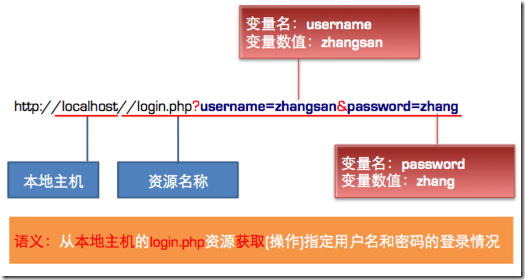
GET的语义是获取指定URL的资源
将数据按照variable=value的形式,添加到action所指向的URL后面,并且两者使用"?"连接,各变量之间使用"&"连接
貌似不安全,因为在传输过程中,数据被放在请求的URL中
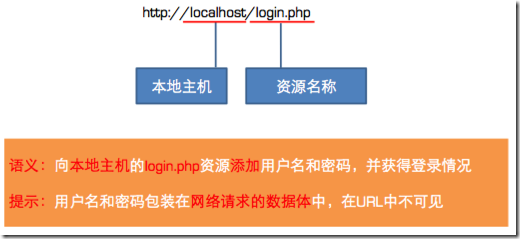
POST的语义是向指定URL的资源添加数据
将数据放在数据体中,按照变量和值相对应的方式,传递到action所指向URL
所有数据对用户来说不可见
可以传输大量数据,上传文件只能使用Post
默认为GET请求
对于POST请求,需要创建请求的数据体
利用URLConnection发送网络请求(建立连接)
获得结果
NSURLConnection提供了两个静态方法可以直接以同步或异步的方式向服务器发送网络请求
同步请求:
sendSynchronousRequest:returningResponse:error:
异步请求:
sendAsynchronousRequest:queue: completionHandler:
服务器开始返回数据,准备工作
(void)connection:didReceiveResponse:
收到服务器返回的数据,本方法会被调用多次
- (void)connection:didReceiveData:
数据接收完毕,做数据的最后处理
(void)connectionDidFinishLoading:
网络连接错误
- (void)connection:didFailWithError:
 ().使用同步方法发送get请求(不常用)

 /** 发送get消息 */

 - (void) testGet {

     NSString *requestStr = [NSString stringWithFormat:@"http://192.168.0.21:8080/MyTestServer/login?user=%@&password=%@", self.userField.text, self.passwordField.text];

     NSURL *url = [NSURL URLWithString:requestStr];

     // 默认就是get请求

     NSURLRequest *request = [NSURLRequest requestWithURL:url];

     // 使用同步方法发送请求

     [self sendSynRequest:request];

 }

 /** 同步发送请求 */

 - (void) sendSynRequest:(NSURLRequest *) request {

     // 同步发送信息

     NSData *data = [NSURLConnection sendSynchronousRequest:request returningResponse:nil error:nil];

     [self dealWithResponseData:data];

 }

 /** 处理返回数据 */

 - (void) dealWithResponseData:(NSData *) data {

     // 解析数据

     if (data) { // 得到返回数据

         // 解除屏幕锁

         [MBProgressHUD hideHUD];

         // 解析json数据

         NSDictionary *dict = [NSJSONSerialization JSONObjectWithData:data options:NSJSONReadingMutableLeaves error:nil];

         // 处理返回的数据

         NSString *result = dict[@"success"];

         if (result) {

             [MBProgressHUD showSuccess:result];

         } else {

             result = dict[@"error"];

             if (result) {

                 [MBProgressHUD showError:result];

             }

         }

     } else {

         [MBProgressHUD showError:@"网络繁忙,请稍后再试~"];

     }

 }
 /** 异步发送请求 */

 - (void) sendAsynRequest:(NSURLRequest *) request {

     NSOperationQueue *queue = [NSOperationQueue mainQueue];

     [NSURLConnection sendAsynchronousRequest:request queue:queue completionHandler:^(NSURLResponse *response, NSData *data, NSError *connectionError) {

         [self dealWithResponseData:data];

     }];

 }
@interface ViewController () <NSURLConnectionDataDelegate>
 /** 使用start & 代理发送、处理异步请求 */

 - (void) sendAsynRequestWithDelegate:(NSURLRequest *) request {

     NSURLConnection *connection = [NSURLConnection connectionWithRequest:request delegate:self];

     [connection start];

 }
 #pragma mark - NSURLConnectionDataDelegate 代理方法

 /** 收到服务器回应 */

 - (void)connection:(NSURLConnection *)connection didReceiveResponse:(NSURLResponse *)response {

     NSLog(@"didReceiveResponse");

     self.data = [NSMutableData data];

 }

 /** 接收到的数据,会调用多次,数据被分割接收 */

 - (void)connection:(NSURLConnection *)connection didReceiveData:(NSData *)data {

     NSLog(@"didReceiveData");

     [self.data appendData:data];

 }

 /** 接收数据完毕 */

 - (void)connectionDidFinishLoading:(NSURLConnection *)connection {

     NSLog(@"connectionDidFinishLoading");

     [self dealWithResponseData:self.data];

 }
 #pragma mark - post

 - (void) testPost {

     NSString *requestStr = [NSString stringWithFormat:@"http://192.168.0.21:8080/MyTestServer/login"];

     NSURL *url = [NSURL URLWithString:requestStr];

     NSMutableURLRequest *request = [NSMutableURLRequest requestWithURL:url];

     request.timeoutInterval = ;

     // 设置为post方式请求

     request.HTTPMethod = @"POST";

     // 设置请求头

     [request setValue:@"ios" forHTTPHeaderField:@"User-Agent"];

     // 设置请求体

     NSString *param = [NSString stringWithFormat:@"user=%@&password=%@", self.userField.text, self.passwordField.text];

     request.HTTPBody = [param dataUsingEncoding:NSUTF8StringEncoding];

     // 发送请求

     // 使用主线程来处理UI刷新

     NSOperationQueue *queue = [NSOperationQueue mainQueue];

     [NSURLConnection sendAsynchronousRequest:request queue:queue completionHandler:^(NSURLResponse *response, NSData *data, NSError *connectionError) {

         [self dealWithResponseData:data];

     }];

 }
     // 使用可变request

     NSMutableURLRequest *request = [NSMutableURLRequest requestWithURL:url];

     // 设置请求超时时间

     request.timeoutInterval = ;
     NSString *requestStr = [NSString stringWithFormat:@"http://192.168.0.21:8080/MyTestServer/login?user=%@&password=%@", self.userField.text, self.passwordField.text];

     // 由于url不能传送中文,所以需要转码

     requestStr = [requestStr stringByAddingPercentEscapesUsingEncoding:NSUTF8StringEncoding];
[iOS 多线程 & 网络 - 2.0] - 发送接收 服务器信息的更多相关文章
- [iOS 多线程 & 网络 - 3.0] - 在线动画Demo
A.需求 所有数据都从服务器下载 动画列表包含:图片.动画名标题.时长副标题 点击打开动画观看 code source: https://github.com/hellovoidworld/Vid ...
- iOS多线程与网络开发之发送接收server信息
郝萌主倾心贡献,尊重作者的劳动成果,请勿转载. (1).使用同步方法发送get请求(不经常使用) 2 /** 发送get消息 */ 3 - (void) testGet { 4 NSString *r ...
- [iOS 多线程 & 网络 - 1.0] - 多线程概述
A.进程 什么是进程进程是指在系统中正在运行的一个应用程序 每个进程之间是独立的,每个进程均运行在其专用且受保护的内存空间内 比如同时打开QQ.Xcode,系统就会分别启动2个进程 通过"活 ...
- [iOS 多线程 & 网络 - 4.0] - AFN框架简单使用
A.AFN基本知识 1.概念 AFNetworking 是对NSURLConnection的封装 运行效率没有ASI高(因为ASI基于CFNetwork),但是使用简单 AFN支持ARC B. ...
- [iOS 多线程 & 网络 - 2.4] - 大文件下载 (边下边写/暂停恢复下载/压缩解压zip/多线程下载)
A.需求 边下边写入硬盘 显示下载进度 暂停/恢复 下载 解压文件 多线程下载 B.基本知识 1.小文件下载 如果文件比较小,下载方式会比较多直接用NSData的+ (id)dataWithCon ...
- [iOS 多线程 & 网络 - 2.10] - ASI框架下载文件
A.ASI框架中的下载 1.实现步骤 在实际的开发中如果要使用asi框架来下载服务器上的文件,只需要执行下面简单的几个步骤即可. (1)创建请求对象:(2)设置下载文件保存的路径:(3)发送下载文件的 ...
- [iOS 多线程 & 网络 - 2.9] - ASI框架
A.ASI基本知识 1.ASI简单介绍 ASI:全称是ASIHTTPRequest,外号“HTTP终结者”,功能十分强大. ASI的实现基于底层的CFNetwork框架,因此运行效率很高. ASI的g ...
- [iOS 多线程 & 网络 - 2.7] - NSURLCache
A.基本知识 1.为什么需要缓存? 有时候一个url会请求多次,得到的内容确实一样的 2.缓存的概念 3.缓存数据的过程 当服务器返回数据时,需要做以下步骤(1)使用服务器的数 ...
- [iOS 多线程 & 网络 - 2.6] - 使用POST上传JSON数据 & 多值参数
A.上传JSON 1.思路: 必须使用POST方法才能上传大量JSON数据 设置请求头:设置Content-Type 设置请求体,JSON实际相当于字典,可以用NSDictionary NSJSONS ...
随机推荐
- Windows Tomcat 安装
JDK的安装可以参考 http://www.cnblogs.com/emanlee/p/3702535.html ,然后安装apache-tomcat step1:http://tomcat.apac ...
- mac 下 apache设置
windows下面的apache配置 apache是mac下是默认就有的,我们只需使用命令开启.暂停和重启就好了 sudo apachectl start sudo apachectl stop su ...
- mac下git中文乱码
今天从window切mac,git使用时各种问题.典型的就是,git commit 可以使用中文注释,但是使用 git log 查看的时候发现都是乱码,乱码效果如下: <B1><E0 ...
- ViewPager介绍和使用说明
1 ViewPager实现的功能 和实际运行的效果图示意 ViewPager类提供了多界面切换的新效果.新效果有如下特征: [1] 当前显示一组界面中的其中一个界面. [2] 当用户通过左右滑动界 ...
- Nlog Layout
Nlog.config <targets> <target type="Console" name="trace" layout=&q ...
- 四种途径将HTML5 web应用变成android应用
作为下一代的网页语言,HTML5拥有很多让人期待已久的新特性.HTML5的优势之一在于能够实现跨平台游戏编码移植,现在已经有很多公司在移动 设备上使用HTML5技术.随着HTML5跨平台支持的不断增强 ...
- Vagrant搭建Ubuntu-JavaEE开发环境——Tomcat+JDK+MySQL+dubbo+测试
Vagrant搭建(Tomcat8+JDK7+MySQL5+dubbo) JDK 1.下载jdk 2.解压JDK tar -xzvf jdk-7u79-linux-x64.tar.gz 3.设置环境变 ...
- 【编程之美】计算1-N中含1的个数
转自:点我 1位数的情况: 在解法二中已经分析过,大于等于1的时候,有1个,小于1就没有. 2位数的情况: N=13,个位数出现的1的次数为2,分别为1和11,十位数出现1的次数为4,分别为10,1 ...
- Centos6.5下编译安装ACE6.0
ACE在Linux下的编译安装步骤(CentOS6.5 64Bit) Linux平台安装(CentOS6.5 64bit) 1, 下载ACE软件包,上传至Linux服务器(假设目录为/opt/ace, ...
- Delphi 让自己的软件实现双击打开文件 转
unit shjAssociateFileType; interface uses Windows, Registry; {将文件类型strFileExtension与程序strExeFileName ...