
android SharedPreferences apply和commit的区别
1.apply没有返回值而commit返回boolean表明修改是否提交成功2.apply是将修改数据原子提交到内存, 而后异步真正提交到硬件磁盘, 而commit是同步的提交到硬件磁盘3.apply方法不会提示任何失败的提示

apply的效率高一些,如果没有必要确认是否提交成功建议使用apply。
The SharedPreferences class provides a general framework that allows you to save and retrieve persistent key-value pairs of primitive data types. You can use SharedPreferences to save any primitive data: booleans, floats, ints, longs, and strings. This data will persist across user sessions (even if your application is killed).
调用 getSharedPreferences()获取对应的的文件,该函数实现功能如下:
- //Context类静态数据集合,以键值对保存了所有读取该xml文件后所形成的数据集合
- private static final HashMap<File, SharedPreferencesImpl> sSharedPrefs =
- new HashMap<File, SharedPreferencesImpl>();
可以看到他有一个Map, 而针对SharedPreferencesImpl里面,由会有map, 这样也就可以证明, 为什么SharedPreference被广泛使用了。 他在普通时刻,内容是从内存里面直接读取的, 只有在第一次启动时,是IO操作。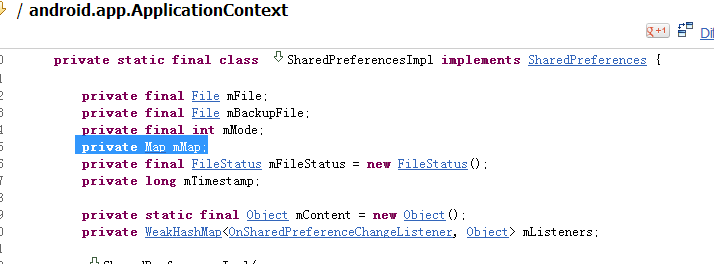
2. apply() 和 commit()的区别
/** boolean commit();的注释如下:
* Commit your preferences changes back from this Editor to the
* {@link SharedPreferences} object it is editing. This atomically
* performs the requested modifications, replacing whatever is currently
* in the SharedPreferences.
*
* <p>Note that when two editors are modifying preferences at the same
* time, the last one to call commit wins.
*
* <p>If you don't care about the return value and you're
* using this from your application's main thread, consider
* using {@link #apply} instead. 如果你不考虑返回值,你在主线程中已经使用commit,那么你可以考虑替换使用apply
*
* @return Returns true if the new values were successfully written
* to persistent storage.
*/
apply方法的注释:
* <p>Unlike {@link #commit}, which writes its preferences out
* to persistent storage synchronously, {@link #apply}
* commits its changes to the in-memory
* {@link SharedPreferences} immediately but starts an
* asynchronous commit to disk and you won't be notified of
* any failures. If another editor on this
* {@link SharedPreferences} does a regular {@link #commit}
* while a {@link #apply} is still outstanding, the
* {@link #commit} will block until all async commits are
* completed as well as the commit itself.
apply不同意commit,commit是同步的去更改硬盘上的东西,而apply是先直接更改内存中的, 然后异步的去更改应硬盘中的内容。
不用去担心线程安全问题, 因为如果一个其他的线程去commit,而刚好有一个还没有完成的apply,commit会被阻塞到异步线程提交完成。
*
* <p>As {@link SharedPreferences} instances are singletons within
* a process, it's safe to replace any instance of {@link #commit} with
* {@link #apply} if you were already ignoring the return value. 如果你真的可以忽略返回值,恰好SharedPreferences又是单例模式的,那就可以安全的用apply来替换commit
*
* <p>You don't need to worry about Android component
* lifecycles and their interaction with <code>apply()</code>
* writing to disk. The framework makes sure in-flight disk
* writes from <code>apply()</code> complete before switching
* states. 也不需要去关心android组件的声明周期。 框架会保证完成所有apply之后,才切换状态。
android SharedPreferences apply和commit的区别的更多相关文章
- SharedPreferences.Editor 的apply()与commit()方法的区别
commit()的文档 官方文档如下: Commit your preferences changes back from this Editor to the SharedPreferences o ...
- Android SharedPreferences中apply和commit的效率差距
Android SharedPreferences中apply和commit的效率差距 经常看到它俩的速度有差别,apply和commit.到底差距多少,下面做一个统计. apply commit ...
- 每日一问:谈谈 SharedPreferences 的 apply() 和 commit()
SharedPreferences 应该是任何一名 Android 初学者都知道的存储类了,它轻量,适合用于保存软件配置等参数.以键值对的 XML 文件形式存储在本地,程序卸载后也会一并清除,不会残留 ...
- Android SharedPreferences一般的读写 的用法。
Android SharedPreferences一般用于轻量级的数据存储,比如用户名和密码等. package com.lixu.testsharepreferences; import andro ...
- Android Library和Android APP、Java Library的区别
Android Library和Android APP.Java Library的区别 Android Library在目录结构上与Android App相同,它能包含构建APP所需的一切(如源代码. ...
- 瞬间记住Javascript中apply与call的区别
关于Javascript函数的apply与call方法的用法,网上的文章很多,我就不多话了.apply和call的作用很相似,但使用方式有区别 apply与call的第一个参数都是一个对象,这个对象就 ...
- 改变this指针的apply,call,bind的区别
apply.call 在 javascript 中,call 和 apply 都是为了改变某个函数运行时的上下文(context)而存在的,换句话说,就是为了改变函数体内部 this 的指向. Jav ...
- apply()和call()的区别
这两个方法的用途都是在特定的作用域中调用函数,实际上等于设置函数体内this对象的值. apply()接收两个参数:一个参数是在其中运行的作用域,另一个是参数数组(可以是Array实例,也可以是arg ...
- 【JavaScript】apply和call的区别在哪?
我在一开始看到javascript的函数apply和call时,非常的模糊,看也看不懂,最近在网上看到一些文章对apply方法和call的一些示例,总算是看的有点眉目了,在这里我做如下笔记,希望和大家 ...
随机推荐
- jQuery学习-----(一)JQuery的'$'符号用法
1.jQuery的三种$() 1)$()可以是$(expresion),即css选择器.Xpath或html元素,也就是通过上述表达式来匹配目标元素. 比如:$("a")构造的 ...
- 锋利的jquery-事件和动画
1 注册事件的触发时机 在jquery中,$(window).load(function(){}) 注册在window下的事件等待页面所有资源加载完成(包括dome树的加载和图片视频的资源的加载) $ ...
- Yii框架中集成phprpc、hprose
在项目开发的过程中有时候会涉及到对外提供接口供第三方程序调用或者是不同程序间需要相互通信,那么最通用的做法是用传统的SOAP方式来实现,用XML的文档格式来作为传输载体.但是这种方式不灵活,支持的数据 ...
- CR0,CR3寄存器
驱动在hook系统函数的时候通常要将只读属性暂时的屏蔽掉,主要有三种方法 1.修改CR0寄存器的WP位,使只读属性失效(这是网上用的最多的方法),切忌使用完之后立马修改回来 2.只读的虚拟地址,通过C ...
- Beaglebone Back学习五(PWM测试)
PWM测试 参考链接 1 Enable PWM on BeagleBone with Device Tree overlays 2Using PWM on the Beaglebone Black 3 ...
- EntityFramework.Extended
记录 Entity Framework扩展,可以实现批量更新.删除,但需要EntityFramework6.0支持,需要支持低版本的EF,可下载该扩展的低版本. https://www.nuget.o ...
- Qt多国语言
项目中需要多语言的部分以tr宏包含 例:setWindowTitle(tr("编辑")); .pro项目文件加入CODECFORTR = utf-8 #or gbk#DEFAULT ...
- (转)关于linux中内核编程中结构体的赋值操作(结构体指定初始化)
网址:http://blog.chinaunix.net/uid-24807808-id-3219820.html 在看linux源码的时候,经常会看到类似于下面的结构体赋值的代码: struct d ...
- ExtJS4.2学习(12)基于表格的右键菜单(转)
鸣谢:http://www.shuyangyang.com.cn/jishuliangongfang/qianduanjishu/2013-11-24/181.html --------------- ...
- BZOJ 3288 Mato矩阵 解题报告
这个题好神呀..Orz taorunz 有一个结论,这个结论感觉很优美: $$ans = \prod_{i=1}^{n}\varphi(i)$$ 至于为什么呢,大概是这样子的: 对于每个数字 $x$, ...