
Executing Raw SQL Queries using Entity Framework
原文 Executing Raw SQL Queries using Entity Framework
While working with Entity Framework developers mostly use LINQ to Entities to query database. However, at times you may need to execute raw queries against the database. A common scenario is when you wish to generate an SQL query dynamically. Luckily, EF allows you to execute raw queries easily. This article explains how that can be done.
In the examples discussed below it is assumed that you have entity data model created for the Customer table of the Northwind database. The following figure shows this model:
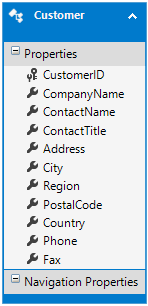
Let's see how SELECT and UPDATE queries can be executed against the Northwind database using the EF context generated by the designer.
Executing SELECT queries that return entities
This technique is useful when you wish to execute a query or stored procedure that returns entities. For example, you may wish to retrieve customers that reside in the USA. To accomplish this task you can write the following code:
DbSqlQuery<Customer> data = db.Customers.SqlQuery("select * from customers

                            where country=@p0", "USA");

foreach(var cust in data)

{

  //do something with cust

}
As you can see the above code calls SqlQuery() method on the Customers DbSet. The SqlQuery() method executes a specified SELECT query and returns the results of that entity type (Customer in this case). The SqlQuery() method accepts two parameters - the SELECT query to be executed and zero or more parameters. It is always recommended to use parameters instead of string concatenation to avoid security issues. In the above example the SELECT query has one parameter with name @p0. The parameter names must be of the form p0, p1, p2 and so on. Index must start from 0. The second parameter of SqlQuery() accepts parameter values in the same sequence of the parameter names. There is an alternate technique of supplying the parameters that is discussed later in this article.
The return value of SqlQuery() is DbSqlQuery and can be used to access / iterate through the data returned by the query.
Executing SELECT queries that return custom types
Not just entities, you can also fetch custom types from the database. For example, you may wish to execute a JOIN statement and retrieve the results. Or you may need to fetch data from a table that is not included in your model at all. Consider the following code:
DbRawSqlQuery<CustomerInfo> data = db.Database.SqlQuery<CustomerInfo>

                                   ("select customerid,companyname,contactname,country

                                   from customers where country=@p0", "USA");

foreach (var custinfo in data2)

{

  //do something custinfo

}
Note a few changes here. In this case, SqlQuery() method is called on the Database object rather than DbSet. This is because the query doesn't return entities. This time SqlQuery() expects the type of the resultant objects in the result. In this case CustomerInfo class is used and is shown below:
public class CustomerInfo

{

  public string CustomerID { get; set; }

  public string CompanyName { get; set; }

  public string ContactName { get; set; }

  public string Country { get; set; }

}
The return type this time is DbRawSqlQuery based on CustomerInfo type. Once the query is executed the results are loaded in CustomerInfo objects. You can access / iterate through the results as in the previous example.
Executing action queries
To execute action queries (INSERT, UPDATE, DELETE) you use ExecuteSqlCommand() method of the Database object. Just like SqlQuery() method, ExecuteSqlCommand() method also takes the same two parameters. The following code fragment shows how ExecuteSqlCommand() can be used:
string sql = "INSERT INTO CUSTOMERS(CUSTOMERID,COMPANYNAME,CONTACTNAME,COUNTRY)

              VALUES(@P0,@P1,@P2,@P3)";

List<object> parameterList = new List<object>();

parameterList.Add("AAAAA");

parameterList.Add("Company 1");

parameterList.Add("Contact 1");

parameterList.Add("USA");

object[] parameters1 = parameterList.ToArray();

int result = db.Database.ExecuteSqlCommand(sql, parameters);
This example uses slightly different approach to execute an INSERT query. The INSERT query is stored in a string variable. Notice how the parameter names are specified as @P0, @P1, @P2 and @P3. Instead of passing these parameters in the ExecuteSqlCommand() method itself, a List of objects is created and parameter values are added to it. This List is then converted to an array of objects. Finally, ExecuteSqlCommand() is called by passing the query and the parameters.
The return value of ExecuteSqlCommand() is an integer that reveals the number of records affected by the query.
Alternate way of passing parameters
In all the above examples you used index based parameter naming convention. Although that worked as expected, the parameter names such as @p1 are far from being readable. Fortunately, you can also specify named parameters in the queries. However, if you wish to use named parameters you must supply the parameters in the form of SqlParameter objects. The following example shows how this can be done.
string sql = "INSERT INTO CUSTOMERS(CUSTOMERID,COMPANYNAME,CONTACTNAME,COUNTRY)

              VALUES(@custid,@company,@contact,@country)";

List<SqlParameter> parameterList = new List<SqlParameter>();

parameterList.Add(new SqlParameter("@custid","AAAAA"));

parameterList.Add(new SqlParameter("@company", "Company 2"));

parameterList.Add(new SqlParameter("@contact", "Contact 2"));

parameterList.Add(new SqlParameter("@country", "USA"));

SqlParameter[] parameters = parameterList.ToArray();

int result = db.Database.ExecuteSqlCommand(sql, parameters);
As you can see the parameters are now specified as @custid, @company, @contact and @country. The List of SqlParameter is then created and parameters are added to it. Note that parameters are now defined as SqlParameter objects that map a parameter name to its value.
That's it for this article! Keep coding!!
Executing Raw SQL Queries using Entity Framework的更多相关文章
- EF: Raw SQL Queries
Raw SQL Queries Entity Framework allows you to query using LINQ with your entity classes. However, t ...
- EF Core 2.1 Raw SQL Queries (转自MSDN)
Entity Framework Core allows you to drop down to raw SQL queries when working with a relational data ...
- 读写分离子系统 - C# SQL分发子系统 - Entity Framework支持
A2D Framework增加了EF支持,加上原先支持ADO.NET: 支持EF方式 支持ADO.NET方式 这次来讲如何让Entity Framework变成nb的读写分离 1. 先设计EF模型, ...
- SQL Server 与 Entity Framework 级联删除
SQL Server 级联设置我就不多说了,网上很多教程. 我想提的是 cycles or multiple cascade paths 的问题. 简单的说如果你的级联设置不是一个树型,而是一个带有循 ...
- [转]How to log queries using Entity Framework 7?
本文转自:https://stackoverflow.com/questions/26747837/how-to-log-queries-using-entity-framework-7
- Creating dynamic/configurable parameterized queries in Entity Framework
https://dillieodigital.wordpress.com/2013/05/09/creating-dynamicconfigurable-parameterized-queries-i ...
- Entity Framework Tutorial Basics(39):Raw SQL Query
Execute Native SQL Query You can execute native raw SQL query against the database using DBContext. ...
- LINQ之路 9:LINQ to SQL 和 Entity Framework(上)
在上一篇中,我们从理论和概念上详细的了解了LINQ的第二种架构“解释查询”.在这接下来的二个篇章中,我们将使用LINQ to SQL和Entity Framework来实践“解释查询”,学习这些技术的 ...
- Entity Framework Code First+SQL Server,改变聚集索引,提高查询性能
.net Entity Framework(调研的是Entity Framework 4.0) code first方式生成数据库时,不能修改数据库表的索引,而SQLServer默认会把数据表的主键设 ...
随机推荐
- MySQL语法语句大全
一.SQL速成 结构查询语言(SQL)是用于查询关系数据库的标准语言,它包括若干关键字和一致的语法,便于数据库元件(如表.索引.字段等)的建立和操纵. 以下是一些重要的SQL快速参考,有关SQ ...
- 如何取消FLEX里模态窗口的毛玻璃效果
在Flex里面,比如使用PopUpManager.createPopUp(this,TipWindow,false)第三个参数设成true 会出现毛玻璃效果让CPU飙升,可不可以改变模态窗口的效果,不 ...
- 用Python作GIS之三:入口程序 - stargui.py
"""gui start file for Space-Time Analysis of Regional Systems#STARS的图形用户界面入口(高级用户可以直接 ...
- Hive内表和外表的区别
本文以例子的形式介绍一下Hive内表和外表的区别.例子共有4个:不带分区的内表.带分区的内表.不带分区的外表.带分区的外表. 1 不带分区的内表 #创建表 create table innerTabl ...
- Team Homework #2
王宇杰,北航计算机学院2011级本科生,学号11061180.本人没有什么特长,典型的死宅一个.学过一点c和java.对于第一次的个人作业就表示亚历山大,希望各位大神不吝分享自己的代码,并做好注释.希 ...
- Xcode8之后 XMPP 重定义问题 Redefinition of module 'dnssd'
在升级Xcode到8之后,原来的关于XMPP的项目运行报错,错误信息为: Redefinition of module 'dnssd' 系统和XMPP框架同时用到了 'dnssd',大概就是错误的原因 ...
- C# 浅谈委托----温故而知新
先看看委托的概述: •委托类似于 C++ 函数指针,但它们是类型安全的. • 委托允许将方法作为参数进行传递. • 委托可用于定义回调方法. • 委托可以链接在一起:例如,可以对一个事件调用多个方法. ...
- android 解决启动页面加载图片空白以及去掉标题栏
有时候启动页面根据白天晚上来启动时实现加载不同的图片效果,但是加载时会出现短暂的空白,解决方法如下: android:theme="@android:style/Theme.Transluc ...
- 1458: 士兵占领 - BZOJ
Description 有一个M * N的棋盘,有的格子是障碍.现在你要选择一些格子来放置一些士兵,一个格子里最多可以放置一个士兵,障碍格里不能放置士兵.我们称这些士兵占领了整个棋盘当满足第i行至少放 ...
- c++ memset 函数 及 坑
#include <string.h> #include <stdio.h> typedef struct ss{ int num; ][]; }tent; tent a; i ...