
.NET/C# 反射的的性能数据,以及高性能开发建议(反射获取 Attribute 和反射调用方法)——转载
原文链接:https://blog.walterlv.com/post/dotnet-high-performance-reflection-suggestions.html
大家都说反射耗性能,但是到底有多耗性能,哪些反射方法更耗性能;这些问题却没有统一的描述。
本文将用数据说明反射各个方法和替代方法的性能差异,并提供一些反射代码的编写建议。为了解决反射的性能问题,你可以遵循本文采用的各种方案。
本文内容
反射各方法的性能数据
反射的高性能开发建议
创建类型的实例
反射获取 Attribute
反射调用公共 / 私有方法
使用预编译框架
附本文性能测试所用的代码
所有反射相关方法
IsDefined 和 GetCustomAttribute 的专项比较
反射各方法的性能数据
我使用 BenchmarkDotNet 基准性能测试来评估反射各个方法的性能。测试的程序基于 .NET Core 2.1 开发。
先直观地贴出我的运行结果:

▲ 各反射不同方法的运行基准测试结果
我把上面的表格复制下来成为文字,这样你也可以拿走我的这部分数据:
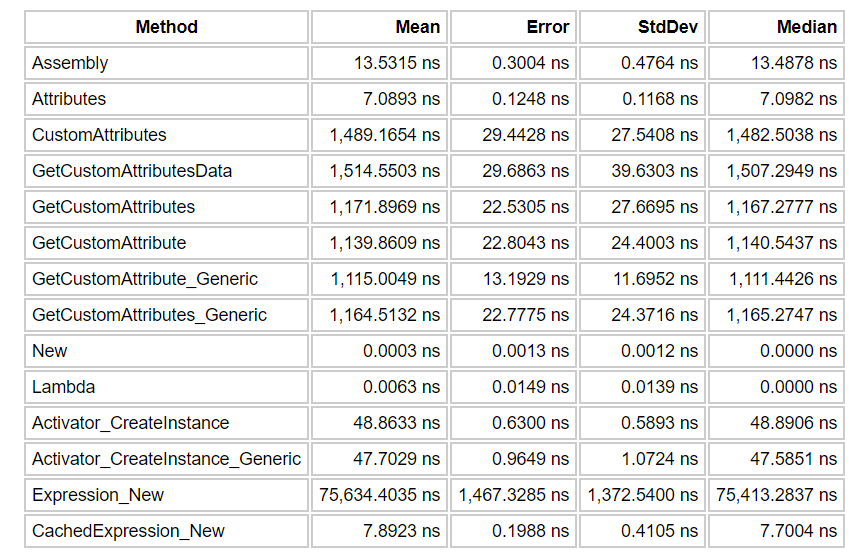
如果你希望了解以上每一项的意思,可以通过阅读本文文末的代码来了解其实现。基本上名称就代表着反射调用相同的方法。
你一定会说这张表不容易看出性能差距。那么我一定会放图:
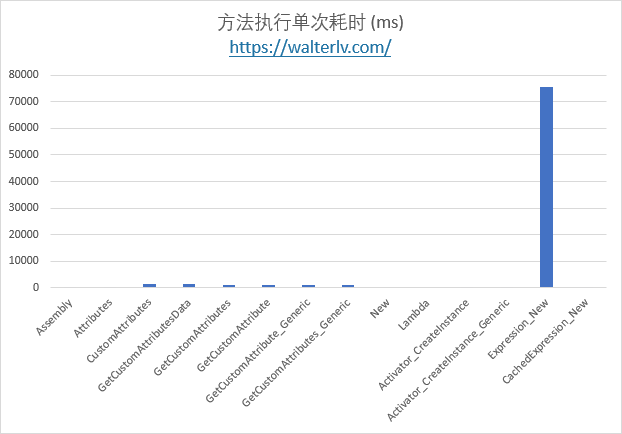
性能差异图 1
那个Expression_New在图中独树一帜,远远把其他方法甩在了后面。那是个什么方法?
那是在使用 Expression 表达式创建一个类型的新实例:
var @new = Expression.New(typeof(ReflectionTarget));

var lambda = Expression.Lambda<Func<ReflectionTarget>>(@new).Compile();

var instance = lambda.Invoke();
也就是说,如果你只是希望创建一个类型的新实例,就不要考虑使用 Expression.New 的方式了。除非此方法将执行非常多次,而你把那个 lambda 表达式缓存下来了。这对应着图表中的 CachedExpression_New。
其他的现在都看不出来性能差异,于是我们把耗时最长的 Expression_New 一项去掉:
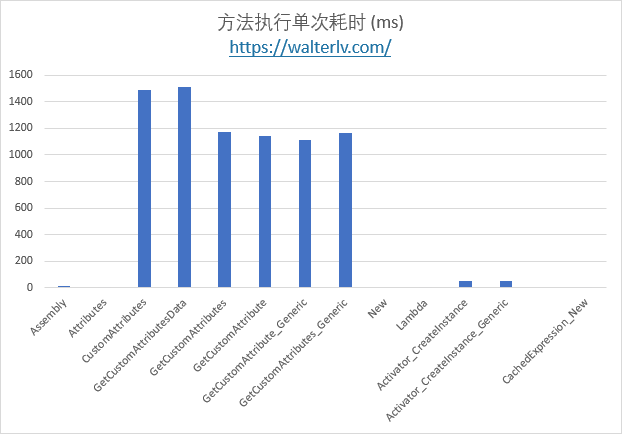
我们立刻可以从图中得到第二梯队的性能巨头 —— 就是 CustomAttributes 系列。我使用了多种不同的 CustomAttribute 获取方法,得到的结果差异不大,都“比较耗时”。不过在这些耗时的方法里面找到不那么耗时的,就是 Type 的扩展方法系列 GetCustomAttribute 了,比原生非扩展方法的性能稍好。
不过其他的性能差异又被淹没了。于是我们把 CustomAttributes 系列也删掉:
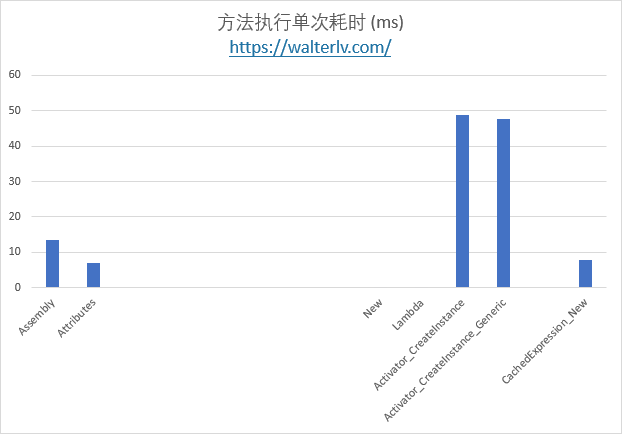
于是我们又得到了第三梯队的性能大头 —— Activator.CreateInstance 系列。而是否调用泛型方法的耗时差异不大。
然后,我们把 Activator.CreateInstance 也干掉,可以得到剩下其他的性能消耗。
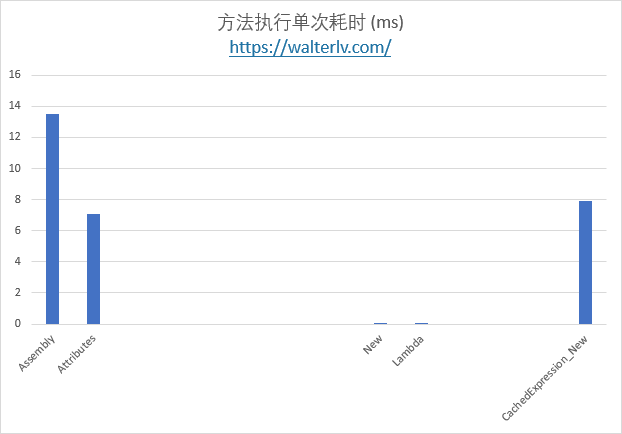
也就是说,只是获取 Type 中的一些属性,例如 Assembly 和 Attributes 也是比较“耗时”的;当然,这是纳秒级别,你可以将它忽略。
要不要试试把第四梯队的也干掉呢?于是你可以得到 new 和 Lambda 的差异:
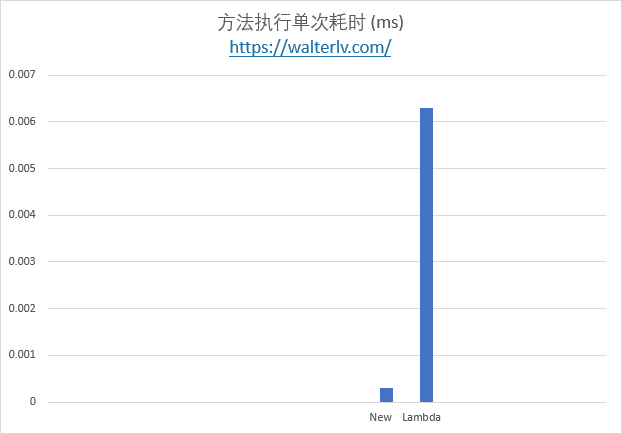
原本在上面所有图中看起来都没有时间的 new 和 Lambda 竟然差异如此巨大;不过,这都是千分之一纳秒级别了;如果你创建的类数量不是百万级别以上,你还真的可以忽略。
而 new 指的是 new Foo(),Lambda 指的是 var func = () => new Foo(); func();。
对于 GetCustomAttribute,还有另一个方法值得注意:IsDefined;可以用来判断是否定义了某个特定的 Attribute。
var isDefined = _targetType.IsDefined(typeof(ReflectionTargetAttribute), false);

if (isDefined)

{

    var attribute = _targetType.GetCustomAttribute<ReflectionTargetAttribute>();

}
而这个方法与 GetCustomAttribute 的性能差距也有些大:
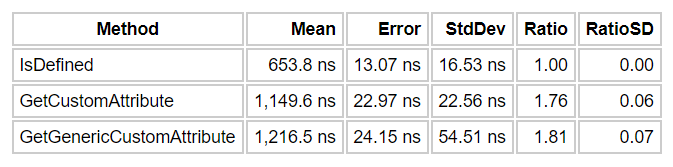
咋看之下似乎与 GetCustomAttribute 方法重复,而且如果先判断再获取,可能总时间更长。不过这种方法就是适用于一次性对大量类型进行判断,如果只有少量类型定义了某种Attribute,那么提前使用 IsDefined 判断可以获得总体更加的性能。
反射的高性能开发建议
创建类型的实例
如果你能访问到类型:
建议直接使用 new,性能最好。
如果不希望直接new 出来,可以考虑使用Func或者Lazy 创建。这时会多消耗一些性能,不过基数小,增量不大。
如果你不能访问到类型:
如果只能从 Type 创建,则使用 Activator.CreateInstance 系列。
如果你使用其他方式创建,请一定使用缓存。
除了使用 Expression 创建,你还可以使用 Emit 创建,不过这也要求能够访问到类型:
使用 Emit 生成 IL 代码 - 吕毅
对于缓存,可以参考:
.NET Core/Framework 创建委托以大幅度提高反射调用的性能 - 吕毅
.NET/C# 推荐一个我设计的缓存类型(适合缓存反射等耗性能的操作,附用法) - 吕毅
对于创建对象更多的性能数据,可以参考:
C# 直接创建多个类和使用反射创建类的性能 - 林德熙
C# 性能分析 反射 VS 配置文件 VS 预编译 - 林德熙
反射获取 Attribute
获取 Attribute 也是耗时的操作。
如果你只是获取极少数类型的 Attribute,建议直接调用 GetCustomAttribute 扩展方法。
如果你需要判断大量类型的 Attribute,建议先使用 IsDefined 判断是否存在,如果存在才使用 GetCustomAttribute 方法获取真实实例。
反射调用公共 / 私有方法
反射调用方法与构造方法几乎是一样的,不同之处就在于公共方法可以创建出委托缓存,而私有方法却不行。
有了委托缓存,你只有第一次才需要真的调用反射,后续可以使用缓存的委托或 Lambda 表达式;而私有方法是无法创建的,你每次都需要通过反射来调用相关方法。
关于私有方法的反射:
C# 使用反射获取私有属性的方法
C# 反射调用私有事件
关于缓存:
.NET Core/Framework 创建委托以大幅度提高反射调用的性能 - 吕毅
.NET/C# 推荐一个我设计的缓存类型(适合缓存反射等耗性能的操作,附用法) - 吕毅
使用预编译框架
使用预编译框架,你可以在编译期间将那些耗时的反射操作编译成类似 new 和属性 get 这样的简单 CLR 调用,性能差距近乎于最开始图表中第二张图和第五张图那样,具有数千倍的差距。
课程 预编译框架,开发高性能应用 - 微软技术暨生态大会 2018 - walterlv
dotnet-campus/SourceFusion: SourceFusion is a pre-compile framework based on Roslyn. It helps you to build high-performance .NET code.
附本文性能测试所用的代码
本文性能测试使用 BenchmarkDotNet,在 Main 函数中调用以下代码跑起来:
BenchmarkRunner.Run<Reflections>();
你可以阅读 C# 标准性能测试 - 林德熙 了解基准性能测试的基本用法,在 C# 标准性能测试高级用法 - 林德熙 中了解到更多基准测试方法的使用。
所有反射相关方法
using BenchmarkDotNet.Attributes;

using System;

using System.Linq;

using System.Linq.Expressions;

using System.Reflection;

namespace Walterlv.Demo.Reflection

{

    public class Reflections

    {

        private static readonly Type _targetType = typeof(ReflectionTarget);

        private static Func<ReflectionTarget> _cachedExpressionFunc;

        private static Func<ReflectionTarget> CachedExpressionFunc

        {

            get

            {

                if (_cachedExpressionFunc == null)

                {

                    var @new = Expression.New(typeof(ReflectionTarget));

                    var lambda = Expression.Lambda<Func<ReflectionTarget>>(@new).Compile();

                    _cachedExpressionFunc = lambda;

                }

                return _cachedExpressionFunc;

            }

        }

        [Benchmark]

        public void Assembly()

        {

            var assembly = _targetType.Assembly;

        }

        [Benchmark]

        public void Attributes()

        {

            var attributes = _targetType.Attributes;

        }

        [Benchmark]

        public void CustomAttributes()

        {

            var attribute = _targetType.CustomAttributes.FirstOrDefault(

                x => x.AttributeType == typeof(ReflectionTargetAttribute));

        }

        [Benchmark]

        public void GetCustomAttributesData()

        {

            var attribute = _targetType.GetCustomAttributesData().FirstOrDefault(

                x => x.AttributeType == typeof(ReflectionTargetAttribute));

        }

        [Benchmark]

        public void GetCustomAttributes()

        {

            var attribute = _targetType.GetCustomAttributes(typeof(ReflectionTargetAttribute), false).FirstOrDefault();

        }

        [Benchmark]

        public void GetCustomAttribute()

        {

            var attribute = _targetType.GetCustomAttribute(typeof(ReflectionTargetAttribute), false);

        }

        [Benchmark]

        public void GetCustomAttribute_Generic()

        {

            var attribute = _targetType.GetCustomAttribute<ReflectionTargetAttribute>(false);

        }

        [Benchmark]

        public void GetCustomAttributes_Generic()

        {

            var attribute = _targetType.GetCustomAttributes<ReflectionTargetAttribute>(false);

        }

        [Benchmark]

        public void New()

        {

            var instance = new ReflectionTarget();

        }

        [Benchmark]

        public void Lambda()

        {

            var instance = new ReflectionTarget();

        }

        [Benchmark]

        public void Activator_CreateInstance()

        {

            var instance = (ReflectionTarget) Activator.CreateInstance(_targetType);

        }

        [Benchmark]

        public void Activator_CreateInstance_Generic()

        {

            var instance = Activator.CreateInstance<ReflectionTarget>();

        }

        [Benchmark]

        public void Expression_New()

        {

            var @new = Expression.New(typeof(ReflectionTarget));

            var lambda = Expression.Lambda<Func<ReflectionTarget>>(@new).Compile();

            var instance = lambda.Invoke();

        }

        [Benchmark]

        public void CachedExpression_New()

        {

            var instance = CachedExpressionFunc.Invoke();

        }

    }

}

IsDefined 和 GetCustomAttribute 的专项比较

using System;

using System.Reflection;

using BenchmarkDotNet.Attributes;

namespace Walterlv.Demo.Reflection

{

    public class IsDefinedVsGetCustomAttribute

    {

        private static readonly Type _targetType = typeof(ReflectionTarget);

        [Benchmark(Baseline = true)]

        public void IsDefined()

        {

            var isDefined = _targetType.IsDefined(typeof(ReflectionTargetAttribute), false);

        }

        [Benchmark]

        public void GetCustomAttribute()

        {

            var attribute = _targetType.GetCustomAttribute(typeof(ReflectionTargetAttribute), false);

        }

        [Benchmark]

        public void GetGenericCustomAttribute()

        {

            var attribute = _targetType.GetCustomAttribute<ReflectionTargetAttribute>(false);

        }

    }

}
.NET/C# 反射的的性能数据,以及高性能开发建议(反射获取 Attribute 和反射调用方法)——转载的更多相关文章
- 原 .NET/C# 反射的的性能数据,以及高性能开发建议(反射获取 Attribute 和反射调用方法)
大家都说反射耗性能,但是到底有多耗性能,哪些反射方法更耗性能:这些问题却没有统一的描述. 本文将用数据说明反射各个方法和替代方法的性能差异,并提供一些反射代码的编写建议.为了解决反射的性能问题,你可以 ...
- 使用反射将DataTable的数据转成实体类
利用反射避免了硬编码出现的错误,但是实体类的属性名必须和数据库名字对应(相同) 1.利用反射把DataTable的数据写到单个实体类 /// <summary> ///利用反射把DataT ...
- 性能测试 基于Python结合InfluxDB及Grafana图表实时采集Linux多主机或Docker容器性能数据
基于Python结合InfluxDB及Grafana图表实时采集Linux多主机性能数据 by:授客 QQ:1033553122 实现功能 1 测试环境 1 环境搭建 3 使用前提 3 使用方法 ...
- .Net最佳实践3:使用性能计数器收集性能数据
本文值得阅读吗? 本文讨论我们如何使用性能计数器从应用程序收集数据.我们将先了解的基本知识,然后我们将看到一个简单的示例,我们将从中收集一些性能数据. 介绍: - 我的应用程序的性能是最好的,像火箭 ...
- 通过ngx-lua来统计Nginx上的虚拟主机性能数据
Web server调研分析 Filed under: Web Server — cmpan @ 2012-10-29 20:38:34 摘要 简单可依赖的架构首先需要有一个简单可依赖的前端WebSe ...
- Performance Monitor采集性能数据
Performance Monitor采集性能数据 Windows本身为我们提供了很多好用的性能分析工具,大家日常都使用过资源管理器,在里面能即时直观的看到CPU占用率.物理内存使用量等信息.此外新系 ...
- Redis各种数据结构性能数据对比和性能优化实践
很对不起大家,又是一篇乱序的文章,但是满满的干货,来源于实践,相信大家会有所收获.里面穿插一些感悟和生活故事,可以忽略不看.不过听大家普遍的反馈说这是其中最喜欢看的部分,好吧,就当学习之后轻松一下. ...
- java反射使用及性能比较
环境准备 package com.lilei.pack09; public class Logger { public void show(){ System.out.println("he ...
- 性能测试 基于Python结合InfluxDB及Grafana图表实时采集Linux多主机性能数据
基于Python结合InfluxDB及Grafana图表实时采集Linux多主机性能数据 by:授客 QQ:1033553122 实现功能 测试环境 环境搭建 使用前提 使用方法 运行程序 效果展 ...
随机推荐
- mysql数据库的查询,添加,删除,还原,备份
18章数据mariadb数据库 1.setup 配置网卡centos6.52.nmtui 网卡图形配置界面3.yum install mariadb mariadb-server4.systemctl ...
- Delphi 2010 新增功能之: IOUtils 单元(6): TPath(结构体) 的方法与属性
以后路径相关的处理, 用 IOUtils.TPath 就很方便了. //较常用的方法: TPath.GetTempPath; {获取临时文件夹路径} TPath.Ge ...
- 当离开浏览器窗口,提示语title更改
head里面插入一下代码 <script> document.addEventListener('visibilitychange',function(){if(document.visi ...
- Mac ssh启动和停止
原文地址:http://blog.csdn.net/cwj649956781/article/details/37913637 mac本身安装了ssh服务,默认情况下不会开机自启 1.启动sshd服务 ...
- Luogu5155 [USACO18DEC]Balance Beam
题目链接:洛谷 这道题看起来是个期望题,但是其实是一道计算几何(这种题太妙了) 首先有一个很好的结论,在一个长度为$L$的数轴上,每次从$x$处出发,不停地走,有$\frac{x}{L}$的概率从右端 ...
- 小程序开发 easy-less 配置
开发支付宝小程序, 不习惯直接写css 了,推动小程序的开发太低效,讲道理默认构建就应该支持less 和sass. vscode 有easy-less 插件,看下配置支持自定义扩展名. { &quo ...
- 测试覆盖率工具EclEmma安装与使用
此文来自于:https://www.cnblogs.com/cnsdhzzl/p/7638883.html EclEmma的简介 一个优秀的开源软件测试工具 eclipse的一个插件 能够对由 Jav ...
- 解决webpack打包报错: Cannot find module '@webassemblyjs/wasm-parser'
出现这个错误时,百度和谷歌中都搜索不出个所以然出来,后来看了一下webpack官网,说建议安装node最新版本: 前提条件 在开始之前,请确保安装了 Node.js 的最新版本.使用 Node.js ...
- VS Code mac版全局搜索失效最简单解法
网上百度到的一些说法,说是添加以下命令行 "search.exclude": { "system/": true, "!/system/**/*.ps ...
- 806. Number of Lines To Write String
806. Number of Lines To Write String 整体思路: 先得到一个res = {a : 80 , b : 10, c : 20.....的key-value对象}(目的是 ...