
C++ otlv4 连接 sql server 数据库小记
otlv4介绍:
http://otl.sourceforge.net/
测试代码
// testotlv4.cpp : 定义控制台应用程序的入口点。

//

#include "stdafx.h"

#include <iostream>

using namespace std;

#include <stdio.h>

#define OTL_ODBC_MSSQL_2008 // Compile OTL 4/ODBC, MS SQL 2008

//#define OTL_ODBC // Compile OTL 4/ODBC. Uncomment this when used with MS SQL 7.0/ 2000

#include "otlv4.h" // include the OTL 4.0 header file

otl_connect db; // connect object

void insert()

// insert rows into table

{

	otl_stream o(10, // buffer size

		"insert into test_tab values(:f1<int>,:f2<char[31]>)",

		// SQL statement

		db // connect object

	);

	o.set_commit(0); // set stream's auto-commit to OFF.

	try {

		o << 1 << "Line1"; // Enter one row into the stream

		o.flush(); // flush the strem buffer, i.e. force

				   // the stream to execute

#if defined(OTL_ANSI_CPP_11_VARIADIC_TEMPLATES)

		otl_write_row(o, 1, "Line1");

#else

				   // when variadic template functions are not supported by the C++

				   // compiler, OTL provides nonvariadic versions of the same template

				   // functions in the range of [1..15] parameters

		otl_write_row(o, 1, "Line1");

		// the old way (operators >>() / <<()) is available as always:

		// o<<1<<"Line1"; // Enter the same data into the stream

		// and cause a "duplicate key" error.

#endif

		o.flush();

	}

	catch (otl_exception& p) {

		if (p.code == 2601) {

			// ... duplicate key ...

			cout << "STREAM ERROR STATE=" << o.get_error_state() << endl;

			o.clean(1); // clean up the stream's buffer

						// and clean up the stream's internal

						// error flag as well. By doing this,

						// it's possible to recover from

						// a database error without closing

						// the stream. Remember, the number of

						// situtation when it's possible is

						// limited and the recovery procedure should

						// be carefully designed.

		}

		else

			throw; // re-throw the exception to the outer catch block.

	}

	o << 2 << "Line2"; // Enter one more row of data after

					   // recovering from the "duplicate key"

					   // error

	o.flush();

	db.commit(); // commit transaction

}

void select()

{

	otl_stream i(10, // buffer size

		"select * from test_tab",

		// SELECT statement

		db // connect object

	);

	// create select stream

	int f1;

	char f2[31];

#if (defined(_MSC_VER) && _MSC_VER>=1600) || defined(OTL_CPP_11_ON)

	// C++11 (or higher) compiler

	for (auto& it : i) {

#if defined(OTL_ANSI_CPP_11_VARIADIC_TEMPLATES)

		otl_read_row(it, f1, f2);

#else

		// when variadic template functions are not supported by the C++

		// compiler, OTL provides nonvariadic versions of the same template

		// functions in the range of [1..15] parameters

		otl_read_row(it, f1, f2);

		// the old way (operators >>() / <<()) is available as always:

		// it>>f1>>f2;

#endif

		cout << "f1=" << f1 << ", f2=" << f2 << endl;

	}

#else

	// C++98/03 compiler

	while (!i.eof()) { // while not end-of-data

		i >> f1 >> f2;

		cout << "f1=" << f1 << ", f2=" << f2 << endl;

	}

#endif

}

int main()

{

	otl_connect::otl_initialize(); // initialize ODBC environment

	try {

		//	CString strCon;

		//strCon.Format("driver=sql server;server=%s;UID=%s;PWD=%s;database=%s",

		//	strServerIP.c_str(), strServerUID.c_str(), strServerPWD.c_str(), strServerDatabase.c_str());

		string strCon1 = "DSN=testsqlserver;UID=sa;PWD=12345678;database=aa_note";

		//strCon1 = "driver=sql server;server=127.0.0.1;UID=sa;PWD=12345678;database=aa";

		db.rlogon(strCon1.c_str()); // connect to the database

		otl_cursor::direct_exec

		(

			db,

			"drop table test_tab",

			otl_exception::disabled // disable OTL exceptions

		); // drop table

		otl_cursor::direct_exec

		(

			db,

			"create table test_tab(f1 int, f2 varchar(30))"

		);  // create table

		otl_cursor::direct_exec

		(

			db,

			"create unique index ind001 on test_tab(f1)"

		);  // create unique index

		insert(); // insert records into table

		select(); // select records from table

	}

	catch (otl_exception& p) { // intercept OTL exceptions

		cout << p.code << endl; // print out error code

		cout << p.sqlstate << endl; // print out error SQLSTATE

		cout << p.msg << endl; // print out error message

		cout << p.stm_text << endl; // print out SQL that caused the error

		cout << p.var_info << endl; // print out the variable that caused the error

	}

	db.logoff(); // disconnect from the database

	return 0;

}
string strCon1 = "DSN=testsqlserver;UID=sa;PWD=12345678;database=aa_note";
//strCon1 = "driver=sql server;server=127.0.0.1;UID=sa;PWD=12345678;database=aa";
db.rlogon(strCon1.c_str()); // connect to the database
有3种连接方式 ,
1,数据源odbc连接
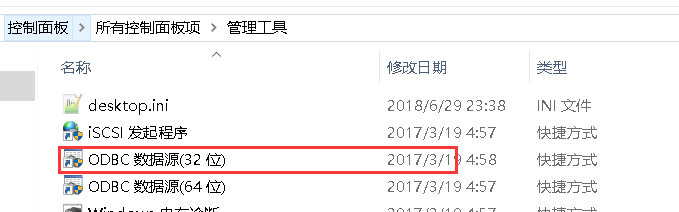

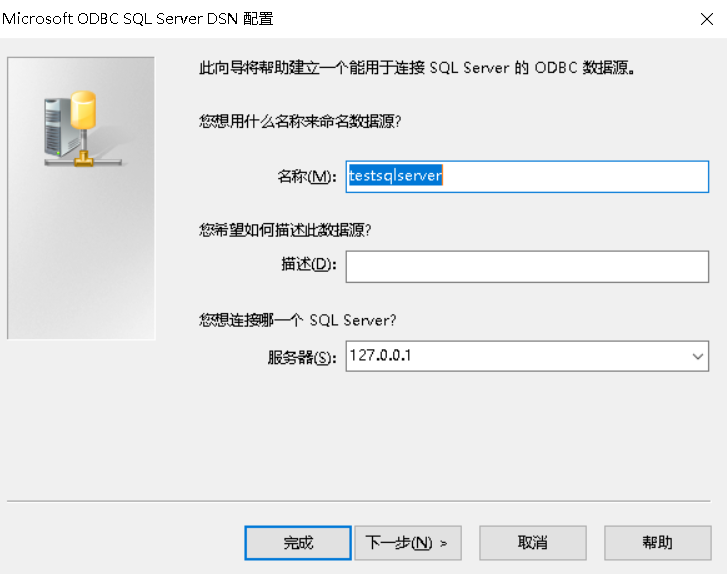

这儿不选择,后面通过 程序来选择.
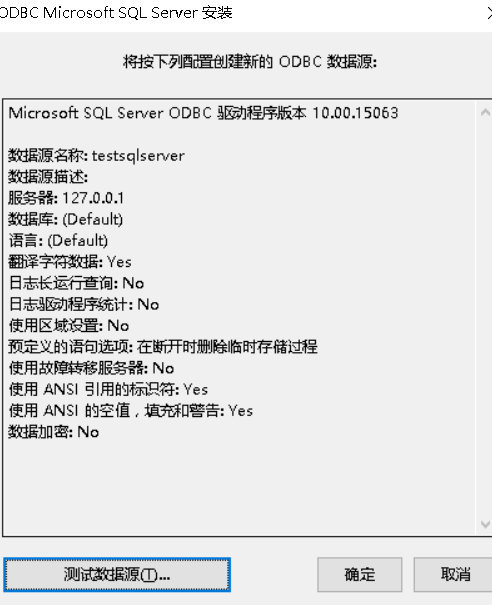
2,代码直接 连接 "driver=sql server;server=127.0.0.1;UID=用户名;PWD=密码;database=数据库";
3,USER/PASSWORD@TNS_ALIAS 这种方式 要注意 数据库密码有@时会报错
C++ otlv4 连接 sql server 数据库小记的更多相关文章
- python 使用pymssql连接sql server数据库
python 使用pymssql连接sql server数据库 #coding=utf-8 #!/usr/bin/env python#------------------------------ ...
- NetBeans连接SQL server数据库教程
不废话,直接开始 1.下载sqljdbc.jar 可以从微软中国官方网站下载 SQLJDBC微软中国 笔者提供一个网盘链接Sqljdbc.jar 4个压缩包视版本选择,SQL 2012 用sqljdb ...
- 【转】PowerShell 连接SQL Server 数据库 - ADO.NET
转至:http://www.pstips.net/connect-sql-database.html PowerShell 通过ADO.NET连接SQL Server数据库,并执行SQL脚本.工作中整 ...
- JDBC连接sql server数据库及其它
JDBC连接sql server数据库的步骤如下: 1.加载JDBC驱动程序: 在连接数据库之前,首先要加载想要连接的数据库的驱动到JVM(Java虚拟机), 这通过java.lang.Class类的 ...
- ThinkPHP连接sql server数据库
亲身经历,在网上找连接sql server数据库的方法,还是不好找的,大多数都是照抄一个人的,而这个人的又写的不全,呵呵,先介绍一下我连接的方法吧.如果你是用THINKPHP连接,那么最重要的就是配置 ...
- JDBC连接sql server数据库的详细步骤和代码
JDBC连接sql server数据库的详细步骤和代码 JDBC连接sql server数据库的步骤如下: 1.加载JDBC驱动程序: 在连接数据库之前,首先要加载想要连接的数据库的驱动到JVM(Ja ...
- python连接sql server数据库实现增删改查
简述 python连接微软的sql server数据库用的第三方模块叫做pymssql(document:http://www.pymssql.org/en/stable/index.html).在官 ...
- 详解连接SQL Server数据库的方法,并使用Statement接口实现对数据库的增删改操作
总结一下,连接SQL Server数据库需要以下几个步骤: 1. 导入驱动Jar包:sqljdbc.jar 2. 加载并注册驱动程序 3. 设置连接路径 4. 加载并注册驱动 5. 连接数据库 6. ...
- Windows 2008服务器环境PHP连接SQL Server数据库的配置及连接方法
背景: PHP程序常用的数据库是Mysql数据库,但是由于实际项目需要,要求PHP网站连接SQL Server数据库查询一些必要信息.因此,本文就来给大家介绍一下如何安装及配置PHP扩展,可以实现PH ...
随机推荐
- mysql8用户管理
查看当前登录用户: 创建用户: create user '用户名'@'主机地址' identified with mysql_native_password by '密码'; 修改密码: alter ...
- word20170106在机场 At the airport有用的词和句子
有用的词: airport terminal: 航站楼 domestic flight: 国内航班 international flight: 国际航班 checked luggage: 托运行李 c ...
- C# - 设计模式 - 模板模式
模板模式 问题场景 咖啡和茶派生于抽象类饮料,咖啡和茶都具有烧水的方法,所以可以将烧水的方法提取到抽象类饮料中去实现,而咖啡具有一个向杯子加咖啡粉的方法,茶具有一个向杯子加茶叶的方法,看起来两个方法是 ...
- SpringBoot文件的上传与下载
⒈文件实体类 package cn.coreqi.security.entities; public class FileInfo { private String path; public File ...
- JustSoso笔记
当时想了大半天,想着到底要怎么绕过MD5呢,结果还是没做出来,即使问了学长,自己还是漏了一个步骤,file=hint.php,特此笔记,又学到了个引用变量的知识 学习自 https://www.ctf ...
- 项目Alpha冲刺(2/10)
1.项目燃尽图 2.今日进度描述 项目进展 完成数据库和服务器的连接部分,完成了一些应用的基本功能. 问题困难 第一次使用服务器,配置环境部署项目都花了很长时间,学习中存在许多问题. 心得体会 应该早 ...
- Light OJ 1085 - All Possible Increasing Subsequences
题目 link 给定一个序列, 求出上升子序列的总数. 分析 Dp[i] 表示序列 以 i 结尾的数目. 可知 Dp[i]=∑Dp[x]+1 这是一个前缀和, 用树状数组维护. Code #inclu ...
- python学习第34天
# 互斥锁# 进程之间的数据共享 # 关于数据安全的问题# 进程池(自己了解,后面线程部分还会讲) # from multiprocessing import Pool# 线程的概念 (面试的重点)# ...
- 【原创】大叔经验分享(48)oozie中通过shell执行impala
oozie中通过shell执行impala,脚本如下: $ cat test_impala.sh #!/bin/sh /usr/bin/kinit -kt /tmp/impala.keytab imp ...
- 如何在MySQL中设置主从复制
mysql主从同步定义 主从同步机制 配置主从同步 配置主服务器 配置从服务器 使用主从同步来备份 使用mysqldump来备份 备份原始文件 主从同步的小技巧 排错 Slave_IO_Running ...