
WordCount
一.Gitee地址:https://gitee.com/zjgss99/WordCount
二.项目分析:
对程序设计语言源文件统计字符数、单词数、行数,统计结果以指定格式输出到默认文件中,以及其他扩展功能,并能够快速地处理多个文件。
命令格式:
wc.exe [para] <filename> [para] <filename> ... -o <filename>
基础功能:
-c:统计文件中的字符数,不包括换行符;
-w:统计文件中的单词数;
-l:统计文件的行数;
-o:指定输出文件;
三.PSP表格:
| PSP2.1 | PSP阶段 | 预估耗时(分钟) | 实际耗时(分钟) |
|---|---|---|---|
| Planning | 计划 | 15 | 10 |
| · Estimate | · 估计这个任务需要多少时间 | 15 | 10 |
| Development | 开发 | 400 | 660 |
| · Analysis | · 需求分析(包括学习新技术) | 30 | 90 |
| · Design Spec | · 生成设计文档 | 30 | 20 |
| · Design Review | · 设计复审(和同事审核设计文档) | 10 | 20 |
| · Coding Standard | · 代码规范(为目前的开发制定合适的规范) | 5 | 5 |
| · Design | · 具体设计 | 30 | 15 |
| · Coding | · 具体编码 | 240 | 450 |
| · Code Review | · 代码复审 | 40 | 30 |
| · Test | · 测试(自我测试,修改代码,提交修改) | 15 | 30 |
| Reporting | 报告 | 65 | 35 |
| · Test Report | · 测试报告 | 20 | 10 |
| · Size Measurement | · 计算工作量 | 15 | 10 |
| · Postmortem & Process improvement Plan | · 事后总结,并提出过程改进计划 | 30 | 15 |
| 合计 | 480 |
705 |
四.解题思路:
项目大致分为三个部分:
1)对用户输入的命令进行判断,读取文件,处理,传递参数给功能处理部分
2)对几种命令对应的功能分别进行实现,接收参数
3)根据命令将输出结果保存到相应的输出文件中
项目构成:
1)主函数:
读取文件,对用户输入的命令分别调用功能处理模块,并对一些异常情况做处理
2)功能处理模块:
对基本功能进行实现,通过主函数传递的参数确定需要输出的输出文件及输出文件需要的内容。
五.代码展示:
1)模块处理方法(通过主方法传递的参数确定输出内容)
import java.io.*;

public class Handle {

    int line = 0;

    int word = 0;

    int charnum = 0;

    public void deal(String readPath,String writePath, String flag) {

        boolean flagexist = true;

        try {

            String str = "";

            String[] linenum;

            File file = new File(readPath);

            BufferedReader br = new BufferedReader(new FileReader(readPath));

            try {

                try {

                    while ((str = br.readLine()) != null) {

                        linenum = str.split(",| ");

                        for (int i = 0; i < linenum.length; i++) {

                            if (linenum[i] != null)

                                word++;

                        }

                        line++;

                        charnum += str.length();

                    }

                   System.out.println("行数:"+line+ " 单次数:" + word+" 字符数:"+ charnum);

                } catch (FileNotFoundException e) {

                    e.printStackTrace();

                }

            } catch (IOException e) {

                e.printStackTrace();

            } finally {

                try {

                    if (br != null) {

                        br.close();

                    }

                } catch (IOException e) {

                    System.out.println("关闭BufferedReader错误");

                }

            }

        } catch (FileNotFoundException e) {

            flagexist = false;

            System.out.println("未找到文件.");

        }

        if(!flagexist){

        }

        else{

            String output = "";

            switch (flag){

                case "-o":

                    output = readPath+",字符数:"+charnum;

                    try{

                        File outputFile = new File(writePath);

                        outputFile.createNewFile();

                        BufferedWriter bw = new BufferedWriter(new FileWriter(outputFile));

                        bw.write(output);

                        bw.flush();

                        bw.close();

                    }catch (IOException e)

                    {

                        e.printStackTrace();

                    }

                    break;

                case "-w":

                    output = readPath+",单词数:"+word;

                    try{

                        File outputFile = new File(writePath);

                        outputFile.createNewFile();

                        BufferedWriter bw = new BufferedWriter(new FileWriter(outputFile));

                        bw.write(output);

                        bw.flush();

                        bw.close();

                    }catch (IOException e)

                    {

                        e.printStackTrace();

                    }

                    break;

                case "-l":

                    output = readPath+",行数:"+line;

                    try{

                        File outputFile = new File(writePath);

                        outputFile.createNewFile();

                        BufferedWriter bw = new BufferedWriter(new FileWriter(outputFile));

                        bw.write(output);

                        bw.flush();

                        bw.close();

                    }catch (IOException e)

                    {

                        e.printStackTrace();

                    }

                    break;

                case "-c":

                    output = readPath+",字符数:"+charnum;

                    try{

                        File outputFile = new File(writePath);

                        outputFile.createNewFile();

                        BufferedWriter bw = new BufferedWriter(new FileWriter(outputFile));

                        bw.write(output);

                        bw.flush();

                        bw.close();

                    }catch (IOException e)

                    {

                        e.printStackTrace();

                    }

                    break;

            }

        }

    }

}
2)主方法(对用户的输入命令进行处理并传递给功能处理模块)
import java.io.*;

public class Main {

    public static void main(String[] args) throws IOException {

        BufferedReader bf = new BufferedReader(new InputStreamReader(System.in));

        String read = null;

        System.out.println("请输入命令(格式:wc.exe [parameter] [input_file_name]):");

        try{

                String readPath = "file.c";

                String writePath = "result.txt";

                read = bf.readLine();

              //  System.out.println(read);

                String [] getRead;

                getRead = read.split(" ");

                if(getRead.length == 3){

                    if(getRead[0].equals("wc.exe")){

                        if(getRead[1].equals("-o")){

                            if(getRead[2].endsWith(".txt")){

                                Handle handle = new Handle();

                                writePath = getRead[2];

                                handle.deal(readPath,writePath,"-o");

                            }

                            else {

                                System.out.println("命令格式输入错误");

                            }

                        }

                        else if(getRead[1].equals("-c")){

                            if(getRead[2].endsWith(".c")){

                                Handle handle = new Handle();

                                readPath = getRead[2];

                                handle.deal(readPath,writePath,"-c");

                            }

                            else {

                                System.out.println("命令格式输入错误");

                            }

                        }

                        else if(getRead[1].equals("-w")){

                            if(getRead[2].endsWith(".c")){

                                Handle handle = new Handle();

                                readPath = getRead[2];

                                handle.deal(readPath,writePath,"-w");

                            }

                            else {

                                System.out.println("命令格式输入错误");

                            }

                        }

                        else if(getRead[1].equals("-l")){

                            if(getRead[2].endsWith(".c")){

                                Handle handle = new Handle();

                                readPath = getRead[2];

                                handle.deal(readPath,writePath,"-l");

                            }

                            else {

                                System.out.println("命令格式输入错误");

                            }

                        }

                        else {

                            System.out.println("命令格式输入错误");

                        }

                    }

                    else{

                        System.out.println("可执行文件名输入错误");

                    }

                }

                else{

                    System.out.println("命令输入格式错误.");

                }

        }catch(Exception e){

            e.printStackTrace();

        }

    }

}
六.测试
正常按格式输入命令
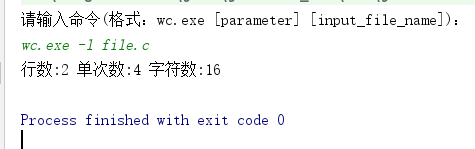
错误的输入
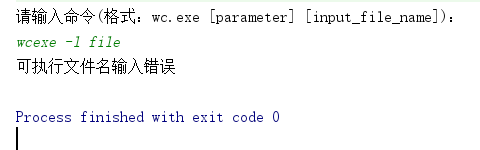


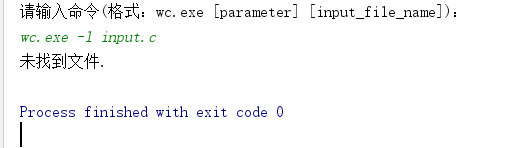

七.参考文献:
java文件操作 https://www.cnblogs.com/xwlych/p/5987022.html
将jar包生成.exe文件 https://blog.csdn.net/u011752272/article/details/80697198
WordCount的更多相关文章
- hadoop 2.7.3本地环境运行官方wordcount
hadoop 2.7.3本地环境运行官方wordcount 基本环境: 系统:win7 虚机环境:virtualBox 虚机:centos 7 hadoop版本:2.7.3 本次先以独立模式(本地模式 ...
- Hadoop3 在eclipse中访问hadoop并运行WordCount实例
前言: 毕业两年了,之前的工作一直没有接触过大数据的东西,对hadoop等比较陌生,所以最近开始学习了.对于我这样第一次学的人,过程还是充满了很多疑惑和不解的,不过我采取的策略是还是先让环 ...
- Eclipse 执行成功的 Hadoop-1.2.1 WordCount 源码
万事开头难.最近在学习Hadoop,先是搭建各种版本环境,从2.2.0到2.3.0,再到1.2.1,终于都搭起来了,折腾了1周时间,之后开始尝试使用Eclipse编写小demo.仅复制一个现成的Wor ...
- 软件工程:Wordcount程序作业
由于时间的关系,急着交作业,加上这一次也不是那么很认真的去做,草草写了“Wordcount程序”几个功能,即是 .txt文件的读取,能计算出文件内容的单词数,文件内容的字符数,及行数. 这次选用C来做 ...
- Spark源码编译并在YARN上运行WordCount实例
在学习一门新语言时,想必我们都是"Hello World"程序开始,类似地,分布式计算框架的一个典型实例就是WordCount程序,接触过Hadoop的人肯定都知道用MapRedu ...
- MapReduce剖析笔记之一:从WordCount理解MapReduce的几个阶段
WordCount是一个入门的MapReduce程序(从src\examples\org\apache\hadoop\examples粘贴过来的): package org.apache.hadoop ...
- 软件工程-构建之法 WordCount小程序 统计文件中字符串个数,单词个数,词频,行数
一.前言 在之前写过一个词频统计的C语言课设,别人说你一个大三的怎么写C语言课程,我只想说我是先学习VB,VB是我编程语言的开始,然后接触到C语言及C++:再后来我是学习C++,然后反过来学习C语言, ...
- eclipse连hadoop2.x运行wordcount 转载
转载地址:http://my.oschina.net/cjun/blog/475576 一.新建java工程,并且导入hadoop相关jar包 此处可以直接创建mapreduce项目就可以,不用下面折 ...
- Hadoop中wordcount程序
一.测试过程中 输入命令: 首先需要在hadoop集群中添加文件 可以首先进行查看hadoop集群中文件目录 hadoop fs -ls / hadoop fs -ls -R / hadoop fs ...
- Hadoop示例程序WordCount详解及实例(转)
1.图解MapReduce 2.简历过程: Input: Hello World Bye World Hello Hadoop Bye Hadoop Bye Hadoop Hello Hadoop M ...
随机推荐
- [Swift]LeetCode823. 带因子的二叉树 | Binary Trees With Factors
Given an array of unique integers, each integer is strictly greater than 1. We make a binary tree us ...
- 性能调优之Transformation
优化之Aggregator组件 优化之Custom组件 优化之Joiner组件 优化之Lookup组件 优化之Normalizer组件 优化之Sequence Generator组件 优化之Sorte ...
- [Abp 源码分析]六、工作单元的实现
0.简介 在 Abp 框架内部实现了工作单元,在这里讲解一下,什么是工作单元? Unit Of Work(工作单元)模式用来维护一个由已经被业务事物修改(增加.删除或更新)的业务对象组成的列表.Uni ...
- C#2.0之细说泛型
C#2的头号亮点 : 泛型 在C#1中,Arraylist总是会给人带来困扰,因为它的参数类型是Object,这就让开发者无法把握集合中都有哪些类型的数据.如果对string类型的数据进行算术操作那自 ...
- 图像检索(1): 再论SIFT-基于vlfeat实现
概述 基于内容的图像检索技术是采用某种算法来提取图像中的特征,并将特征存储起来,组成图像特征数据库.当需要检索图像时,采用相同的特征提取技术提取出待检索图像的特征,并根据某种相似性准则计算得到特征数据 ...
- Azkaban学习之路 (三)Azkaban的使用
界面介绍 首页有四个菜单 projects:最重要的部分,创建一个工程,所有flows将在工程中运行. scheduling:显示定时任务 executing:显示当前运行的任务 history:显示 ...
- -1-7 java 网络编程基本知识点 计算机网络 TCP/IP协议栈 通信必备 tcp udp
计算机网络 是指将地理位置不同的具有独立功能的多台计算机及其外部设备,通过通信线路连接起来, 在网络操作系统,网络管理软件及网络通信协议的管理和协调下,实现资源共享和信息传递的计算机系统. 网络编程 ...
- sed从入门到深入的使用心得
本人已经此系列的sed文章整理到pdf中,欢迎下载:玩透sed:探究sed原理 sed系列文章: sed修炼系列(一):花拳绣腿之入门篇sed修炼系列(二):武功心法(info sed翻译+注解)se ...
- C#实现以太仿DApp合约编译、部署
在网上找了一些关于C#开发以太仿的资料,大概了解了以太仿常用名词,后续可能需要根据资料查看开源的源码进一步熟悉一下. 一.准备合约 这里准备了一个EzToken.sol合约,目前还不会solidity ...
- Smobiler 4.0 正式发布
l Smobiler4.0提供了三大技术亮点:第三方插件.JS.自定义控件等: 强大的插件移动应用引擎 Smobiler支持分插件打包功能和插件扩展机制,让应用开发更加灵活. 分插件打包是指Smo ...