
Lab 10-3
This lab includes a driver and an executable. You can run the executable from anywhere, but in order for the program to work properly, the driver must be placed in the C:\Windows\System32 directory where it was originally found on the victim computer. The executable is Lab10-03.exe, and the driver is Lab10-03.sys.
Questions and Short Answers
What does this program do?
A: The user-space program loads the driver and then pops up an advertisement every 30 seconds. The driver hides the process by unlinking the Process Environment Block (PEB) from the system’s linked list.
Once this program is running, how do you stop it?
A: Once this program is running, there is no easy way to stop it without rebooting.
What does the kernel component do?
A: The kernel component responds to any
DeviceIoControlrequest by unlinking the process that made the request from the linked list of processes in order to hide the process from the user.
Detailed Analysis
We begin with some basic static analysis on the files. When we analyze the driver file, we see the following imports:
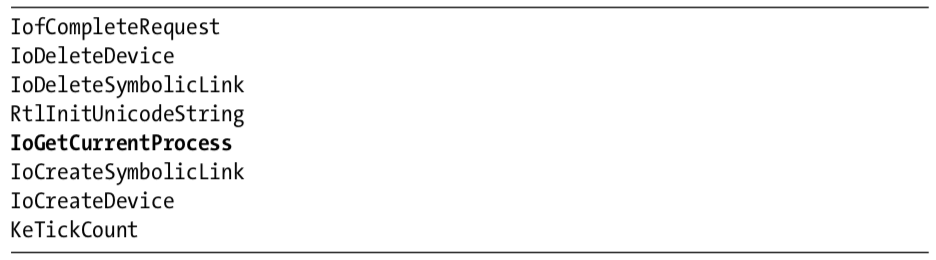
The import for IoGetCurrentProcess is the only one that provides much information. (The other imports are simply required by any driver that creates a device that is accessible from user space.) The call to IoGetCurrentProcess tells us that this driver either modifies the running process or requires information about it.
Next, we copy the driver file into C:\Windows\System32 and double-click the executable to run it. We see a pop-up ad, which is the same as the one in Lab 7-2. We now examine what it did to our system. First, we check to see if the service was successfully installed and verify that the malicious .sys file is used as part of the service. Simultaneously, we notice that after about 30 seconds, the program pops up the advertisement again and does so about once every 30 seconds. Opening Task Manager in an effort to terminate the program, we see that the program isn’t listed. And it’s not listed in Process Explorer either.
The program continues to open advertisements, and there’s no easy way to stop it. It’s not in a process listing, so we can’t stop it by killing the process. Nor can we attach a debugger to the process because the program doesn’t show up in the process listing for WinDbg or OllyDbg. At this point, our only choice is to revert to our most recent snapshot or reboot and hope that the program isn’t persistent. It’s not, so a reboot stops it.
Analyzing the Executable in IDA Pro
Now to IDA Pro. Navigating to WinMain and examining the functions it calls, we see the following:
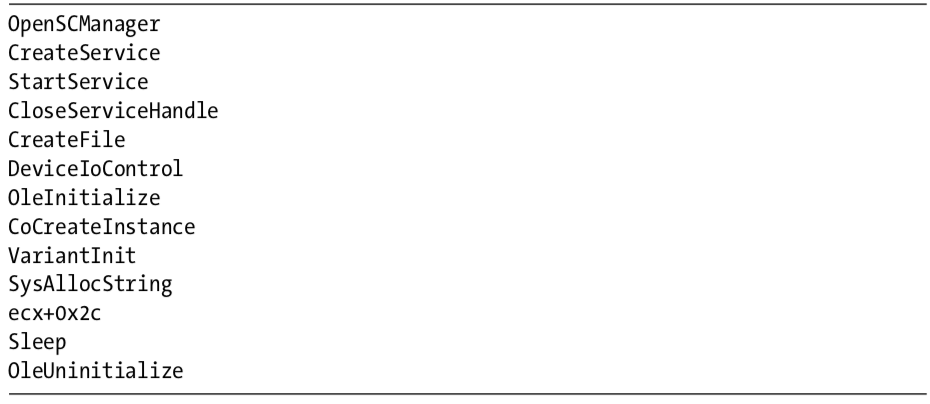
WinMain can be logically broken into two sections. The first section, consisting of OpenSCManager through DeviceIoControl, includes the functions to load and send a request to the kernel driver. The second section consists of the remaining functions, which show the usage of a COM object. At this point, we don’t know the target of the call to ecx+0x2c, but we’ll come back to that later.
Looking at the calls in detail, we see that the program creates a service called Process Helper, which loads the kernel driver C:\Windows\System32 Lab10-03.sys. It then starts the Process Helper service, which loads Lab10-03.sys into the kernel and opens a handle to \\.\ProcHelper, which opens a handle to the kernel device created by the ProcHelper driver.
We need to look carefully at the call to DeviceIoControl, shown in Listing 10-14L, because the input and output parameters passed as arguments to it will be sent to the kernel code, which we will need to analyze separately.
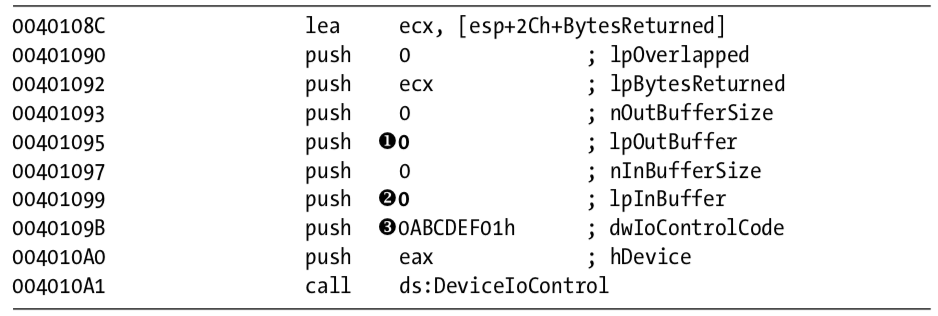
Listing 10-14L: A call to DeviceIoControl in Lab10-03.exe to pass a request to the Lab10-03.sys driver
Notice that the call to DeviceIoControl has lpOutBuffer at \({\color{red}1}\) and lpInBuffer at \({\color{red}2}\) set to NULL. This is unusual, and it means that this request sends no information to the kernel driver and that the kernel driver sends no information back. Also notice that the dwIoControlCode of 0xABCDEF01 at \({\color{red}3}\) is passed to the kernel driver. We’ll revisit this when we look at the kernel driver.
The remainder of this file is nearly identical to the COM example in Lab 7-2, except that the call to the navigate function is inside a loop that runs continuously and sleeps for 30 seconds between each call.
Analyzing the Driver
Next, we open the kernel file with IDA Pro. As shown in Listing 10-15L, we see that it calls IoCreateDevice at \({\color{red}1}\) to create a device named \Device\ProcHelper at \({\color{red}2}\) .
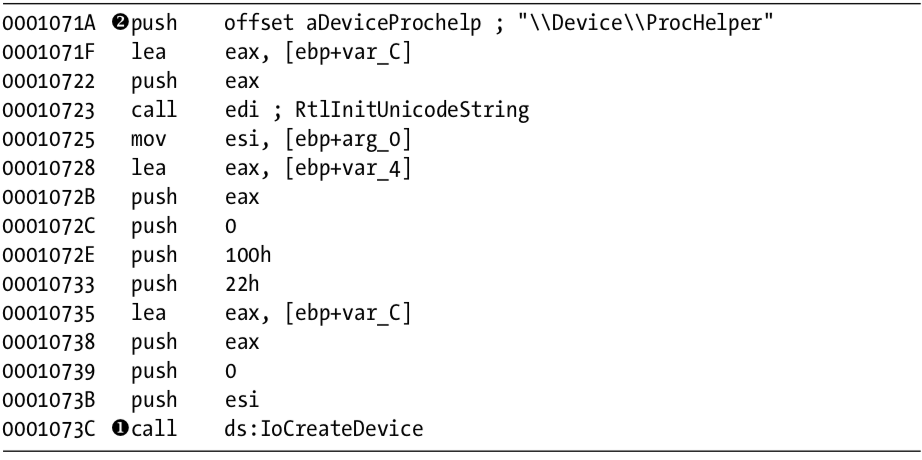
Listing 10-15L: Lab10-03.sys creating a device that is accessible from user space
As shown in Listing 10-16L, the function then calls IoCreateSymbolicLink at \({\color{red}1}\) to create a symbolic link named \DosDevices\ProcHelper at \({\color{red}2}\) for the user-space program to access.
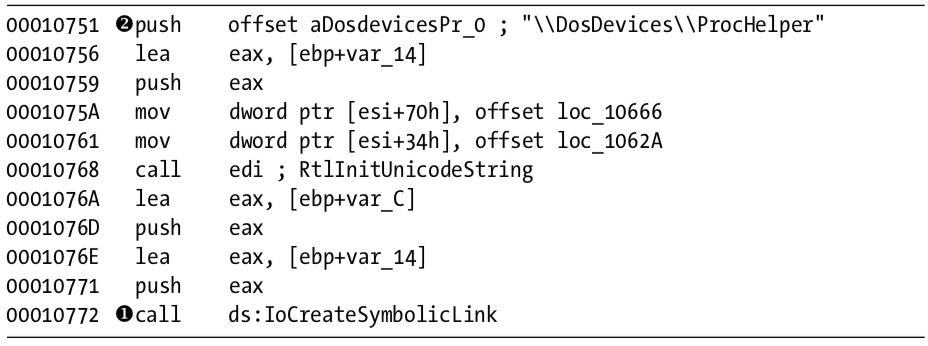
Listing 10-16L: Lab10-03.sys creating a symbolic link to make it easier for user-space applications to access a handle to the device
Finding the Driver in Memory with WinDbg
We can either run the malware or just start the service to load our kernel driver into memory. We know that the device object is at \Device\ProcHelper, so we start with it. In order to find the function in ProcHelper that is executed, we must find the driver object, which can be done with the !devobj command, as shown in Listing 10-17L. The output of !devobj tells us where the DriverObject at \({\color{red}1}\) is stored.

Listing 10-17L: Finding the device object for the ProcHelper driver
The DriverObject contains pointers to all of the functions that will be called when a user-space program accesses the device object. The DriverObject is stored in a data structure called DRIVER_OBJECT. We can use the dt command to view the driver object with labels, as shown in Listing 10-18L.

Listing 10-18L: Examining the driver object for Lab10-03.sys using WinDbg
This code contains several function pointers of note. These include DriverInit, the DriverEntry routine we analyzed in IDA Pro, and DriverUnload, which is called when this driver is unloaded. When we look at DriverUnload in IDA Pro, we see that it deletes the symbolic link and the device created by the DriverEntry program.
Analyzing the Functions of the Major Function Table
Next, we examine the major function table, which is often where the most interesting driver code is implemented. Windows XP allows 0x1C possible major function codes, so we view the entries in the major function table using the dd command:
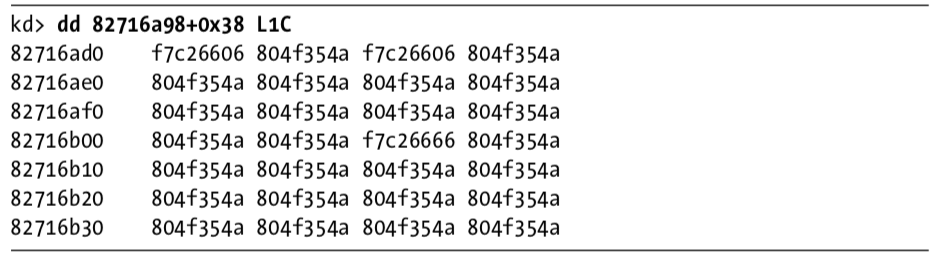
Each entry in the table represents a different type of request that the driver can handle, but as you can see, most of the entries in the table are for the same function at 0X804F354A. All of the entries in the table with the value 0X804F354A represent a request type that the driver does not handle. To verify this, we need to find out what that function does. We could view its disassembly, but because it’s a Windows function, its name should tell us what it does, as shown here:

The function at 0X804F354A is named IopInvalidDeviceRequest, which means that it handles invalid requests that this driver doesn’t handle. The remaining functions from the major function table at offsets 0, 2, and 0xe contain the functionality that we are interested in. Examining wdm.h, we find that offsets of 0, 2, and 0xe store the functions for the Create, Close, and DeviceIoControl functions.
First, we look at the Create and Close functions at offsets 0 and 2 in the major function table. We notice that both entries in the major function table point to the same function (0xF7C26606). Looking at that function, we see that it simply calls IofCompleteRequest and then returns. This tells the OS that the request was successful, but does nothing else. The only remaining function in the major function table is the one that handles DeviceIoControl requests, which is the most interesting.
Looking at the DeviceIoControl function, we see that it manipulates the PEB of the current process. Listing 10-19L shows the code that handles DeviceIoControl.
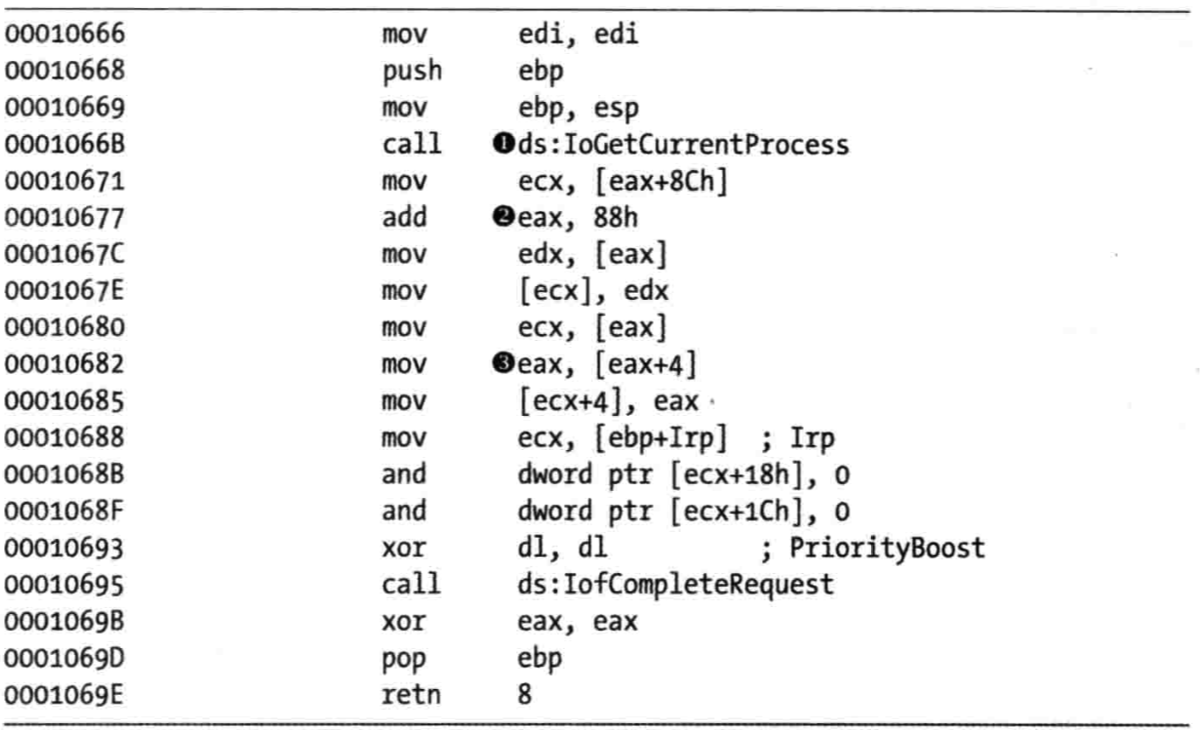
Listing 10-19L: The driver code that handles DeviceIoControl requests
The first thing the DeviceIoControl function does is call IoGetCurrentProcess at \({\color{red}1}\), which returns the EPROCESS structure of the process that issued the call to DeviceIoControl. The function then accesses the data at an offset of 0x88 at \({\color{red}2}\), and then accesses the next DWORD at offset 0x8C at \({\color{red}3}\).
We use the dt command to discover that LIST_ENTRY is stored at offsets 0x88 and 0x8C in the PEB structure, as shown in Listing 10-20L at \({\color{red}1}\).
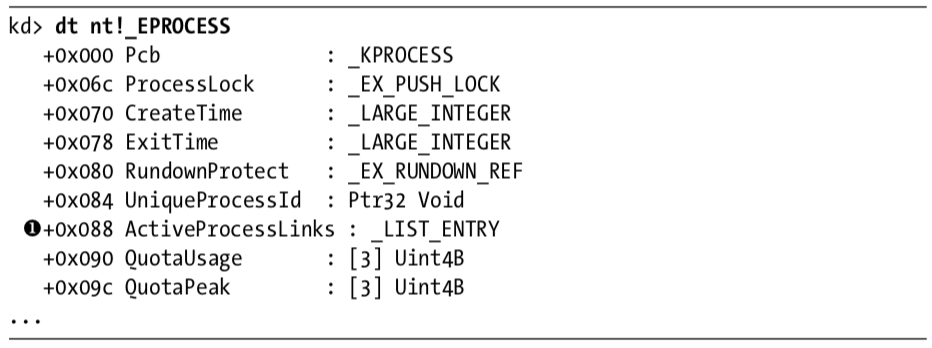
Listing 10-20L: Examining the EPROCESS structure with WinDbg
Now that we know that function is accessing the LIST_ENTRY structure, we look closely at how LIST_ENTRY is being accessed. The LIST_ENTRY structure is a double-linked list with two values: the first is BLINK, which points to the previous entry in the list, and the second is FLINK, which points to the next entry in the list. We see that it is not only reading the LIST_ENTRY structure, but also changing structures, as shown in Listing 10-21L.
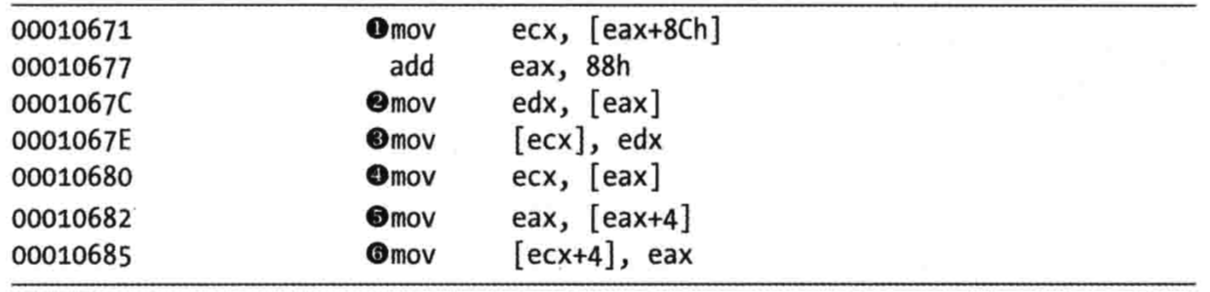
Listing 10-21L: DeviceIoControl code that modifies the EPROCESS structure
The instruction at \({\color{red}1}\) obtains a pointer to the next entry in the list. The instruction at \({\color{red}2}\) obtains a pointer to the previous entry in the list. The instruction at \({\color{red}3}\) overwrites the BLINK pointer of the next entry so that it points to the previous entry. Prior to \({\color{red}3}\), the BLINK pointer of the next entry pointed to the current entry. The instruction at \({\color{red}3}\) overwrites the BLINK pointer so that it skips over the current process. The instructions at \({\color{red}4}\), \({\color{red}5}\), and \({\color{red}6}\) perform the same steps, except to overwrite the FLINK pointer of the previous entry in the list to skip the current entry.
Rather than change the EPROCESS structure of the current process, the code in Listing 10-21L changes the EPROCESS structure of the process in front of it and behind it in the linked list of processes. These six instructions hide the current process by unlinking it from the linked list of loaded processes, as shown in Figure 10-3L.
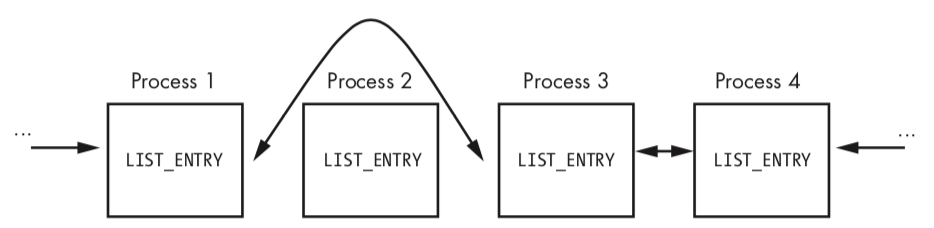
Figure 10-3L: A process being removed from the process list so that it’s hidden from tools such as Task Manager
When the OS is running normally, each process has a pointer to the process before and after it. However, in Figure 10-3L, Process 2 has been hidden by this rootkit. When the OS iterates over the linked list of processes, the hidden process is always skipped.
You might wonder how this process continues to run without any problems, even though it’s not in the OS’s list of processes. To answer this, remember that a process is simply a container for various threads to run inside. The threads are scheduled to execute on the CPU. As long as the threads are still properly accounted for by the OS, they will be scheduled, and the process will continue to run as normal.
Preference
PRACTICAL MALWARE ANALYSIS: KERNEL DEBUGGING WITH WINDBG (LAB 10-03)
Lab 10-3的更多相关文章
- RH033读书笔记(9)-Lab 10 Understanding the Configuration Tools
Lab 10 Understanding the Configuration Tools Sequence 1: Configuring the Network with system-config- ...
- RH133读书笔记(10)-Lab 10 Exploring Virtualization
Lab 10 Exploring Virtualization Goal: To explore the Xen virtualization environment and the creation ...
- 7 天玩转 ASP.NET MVC — 第 3 天
目录 第 1 天 第 2 天 第 3 天 第 4 天 第 5 天 第 6 天 第 7 天 0. 前言 我们假定你在开始学习时已经阅读了前两天的学习内容.在第 2 天我们完成了关于显示 Employee ...
- 网络编程:基于C语言的简易代理服务器实现(proxylab)
本文记录了一个基于c socket的简易代理服务器的实现.(CS:APP lab 10 proxy lab) 本代理服务器支持keep-alive连接,将访问记录保存在log文件. Github: h ...
- vmware目录2
http://www.globalknowledge.com/training/course.asp?pageid=9&courseid=17880&country=United+St ...
- 很好的vmware目录
http://www.globalknowledge.com/training/course.asp?pageid=9&courseid=18023&country=United+St ...
- python迭代器生成器
1.生成器和迭代器.含有yield的特殊函数为生成器.可以被for循环的称之为可以迭代的.而可以通过_next()_调用,并且可以不断返回值的称之为迭代器 2.yield简单的生成器 #迭代器简单的使 ...
- Cygwin Run in the Windows(Simulation of UNIX)
Preface Environment Cygwin Run in the Windows(Simulation of UNIX) Resource Cygwin Install:http://cyg ...
- Ionic Cordova 环境配置window
1.安装java jdk http://www.oracle.com/technetwork/java/javase/downloads/jdk8-downloads-2133151.html 2.安 ...
- Java标签学习
今天早上看Java编程思想第四章控制执行流程,本来很简单的一些东西,但是突然看到了goto发现自己以前还真的没怎么用过,不过Java中对goto作为保留关键字,而是提供了一个叫标签的东西,我们一起来看 ...
随机推荐
- lumen----------A facade root has not been set.
1.新拉下来的lumen源码,直接使用Log::info是不行的.汇报如下图错误 解决办法如下图,因为lumen需要设置一些开关
- PeopleSoft Excel To CI
Excel to CI 链接信息要注意,HTTP还是HTTPS, 端口号从链接可以看到,没有的话可能是默认80端口. 像一下这个页面也可以用CI 导入数据(secondary page)
- Python语言——Python语言概述
Python语言概述 计算机语言概述 语言:交流工具,沟通媒介 计算机语言:人和计算机交流的工具,翻译官 Python语言简述 Python是计算机语言的一种 Python编程语言: 代码:人类语言, ...
- Json和Ajax
LogDao接口 package com.log.dao; import java.util.List; import com.log.Vo.LogInfoVo; import com.log.bea ...
- 关于Xocd升级 cocopoads无法使用的解决
最近由于工作原因,升级了下Xcode,以前是8.1现在升级到了8.3,导致无法使用了cocopoads,研究了好久终于找到了解决办法. 先描述下我的几个问题吧. 1.当运行cocopoads的时候出现 ...
- Spring Boot 2.x中的management.security.enabled=false无效问题
look: https://blog.csdn.net/qq_27385301/article/details/82899303
- python locust 性能测试:HOOKS<钩子方法>
为locust中不同类型的事件,提供的钩子方法: from locust import TaskSet, task, events, Locust from locust.clients import ...
- 指定Gpu range系列函数
tensorflow指定GPU训练 import os os.environ[CUDA_VISIABLE_DEVICES] = '0,1'记住DEVICES是复数 range()返回的是range o ...
- vuex store刷新存储状态
app.vue 平时不想把信息存到session里,只有无可奈何的时候才准备村 <script> export default { name: 'App', created() { //刷 ...
- JSP等模板引擎已死,大前端为趋势
我们先来看一下tomcat版本数据: 我们可以看到,从tomcat8之后JSP就再没有新的支持了,tomcat8大概是2013年发布的,也就是说,从2013年开始jsp技术已经实质上不被官方继续维护了 ...