
Lab 10-3
This lab includes a driver and an executable. You can run the executable from anywhere, but in order for the program to work properly, the driver must be placed in the C:\Windows\System32 directory where it was originally found on the victim computer. The executable is Lab10-03.exe, and the driver is Lab10-03.sys.
Questions and Short Answers
What does this program do?
A: The user-space program loads the driver and then pops up an advertisement every 30 seconds. The driver hides the process by unlinking the Process Environment Block (PEB) from the system’s linked list.
Once this program is running, how do you stop it?
A: Once this program is running, there is no easy way to stop it without rebooting.
What does the kernel component do?
A: The kernel component responds to any
DeviceIoControlrequest by unlinking the process that made the request from the linked list of processes in order to hide the process from the user.
Detailed Analysis
We begin with some basic static analysis on the files. When we analyze the driver file, we see the following imports:
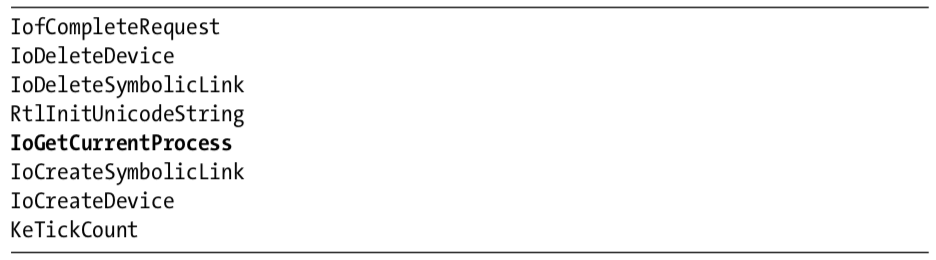
The import for IoGetCurrentProcess is the only one that provides much information. (The other imports are simply required by any driver that creates a device that is accessible from user space.) The call to IoGetCurrentProcess tells us that this driver either modifies the running process or requires information about it.
Next, we copy the driver file into C:\Windows\System32 and double-click the executable to run it. We see a pop-up ad, which is the same as the one in Lab 7-2. We now examine what it did to our system. First, we check to see if the service was successfully installed and verify that the malicious .sys file is used as part of the service. Simultaneously, we notice that after about 30 seconds, the program pops up the advertisement again and does so about once every 30 seconds. Opening Task Manager in an effort to terminate the program, we see that the program isn’t listed. And it’s not listed in Process Explorer either.
The program continues to open advertisements, and there’s no easy way to stop it. It’s not in a process listing, so we can’t stop it by killing the process. Nor can we attach a debugger to the process because the program doesn’t show up in the process listing for WinDbg or OllyDbg. At this point, our only choice is to revert to our most recent snapshot or reboot and hope that the program isn’t persistent. It’s not, so a reboot stops it.
Analyzing the Executable in IDA Pro
Now to IDA Pro. Navigating to WinMain and examining the functions it calls, we see the following:
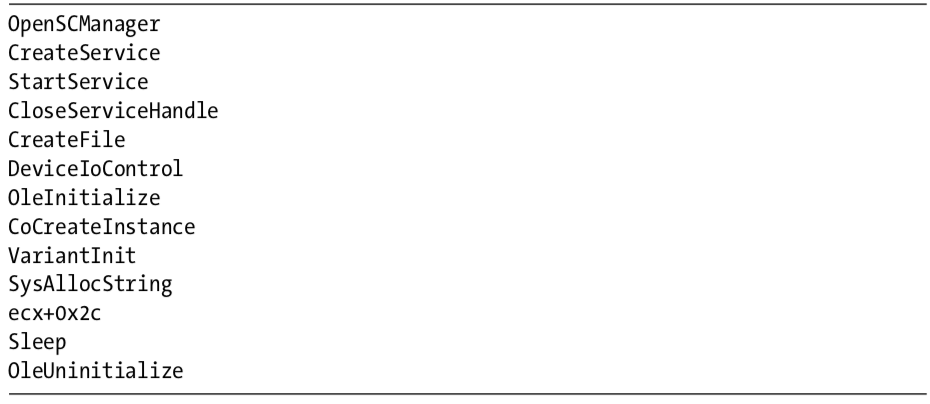
WinMain can be logically broken into two sections. The first section, consisting of OpenSCManager through DeviceIoControl, includes the functions to load and send a request to the kernel driver. The second section consists of the remaining functions, which show the usage of a COM object. At this point, we don’t know the target of the call to ecx+0x2c, but we’ll come back to that later.
Looking at the calls in detail, we see that the program creates a service called Process Helper, which loads the kernel driver C:\Windows\System32 Lab10-03.sys. It then starts the Process Helper service, which loads Lab10-03.sys into the kernel and opens a handle to \\.\ProcHelper, which opens a handle to the kernel device created by the ProcHelper driver.
We need to look carefully at the call to DeviceIoControl, shown in Listing 10-14L, because the input and output parameters passed as arguments to it will be sent to the kernel code, which we will need to analyze separately.
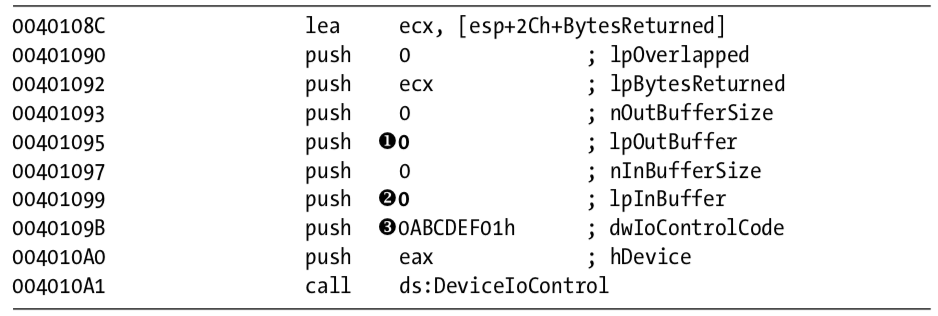
Listing 10-14L: A call to DeviceIoControl in Lab10-03.exe to pass a request to the Lab10-03.sys driver
Notice that the call to DeviceIoControl has lpOutBuffer at \({\color{red}1}\) and lpInBuffer at \({\color{red}2}\) set to NULL. This is unusual, and it means that this request sends no information to the kernel driver and that the kernel driver sends no information back. Also notice that the dwIoControlCode of 0xABCDEF01 at \({\color{red}3}\) is passed to the kernel driver. We’ll revisit this when we look at the kernel driver.
The remainder of this file is nearly identical to the COM example in Lab 7-2, except that the call to the navigate function is inside a loop that runs continuously and sleeps for 30 seconds between each call.
Analyzing the Driver
Next, we open the kernel file with IDA Pro. As shown in Listing 10-15L, we see that it calls IoCreateDevice at \({\color{red}1}\) to create a device named \Device\ProcHelper at \({\color{red}2}\) .
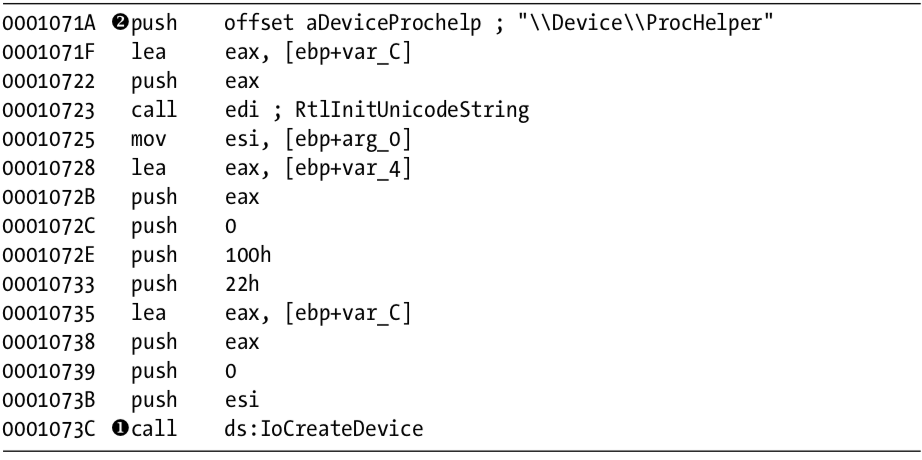
Listing 10-15L: Lab10-03.sys creating a device that is accessible from user space
As shown in Listing 10-16L, the function then calls IoCreateSymbolicLink at \({\color{red}1}\) to create a symbolic link named \DosDevices\ProcHelper at \({\color{red}2}\) for the user-space program to access.
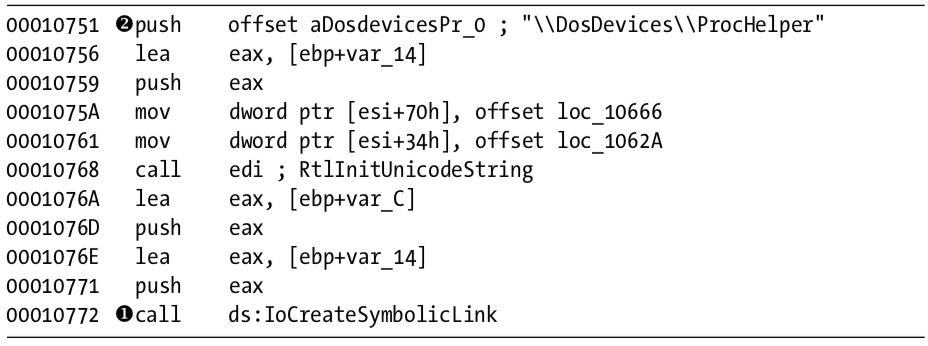
Listing 10-16L: Lab10-03.sys creating a symbolic link to make it easier for user-space applications to access a handle to the device
Finding the Driver in Memory with WinDbg
We can either run the malware or just start the service to load our kernel driver into memory. We know that the device object is at \Device\ProcHelper, so we start with it. In order to find the function in ProcHelper that is executed, we must find the driver object, which can be done with the !devobj command, as shown in Listing 10-17L. The output of !devobj tells us where the DriverObject at \({\color{red}1}\) is stored.

Listing 10-17L: Finding the device object for the ProcHelper driver
The DriverObject contains pointers to all of the functions that will be called when a user-space program accesses the device object. The DriverObject is stored in a data structure called DRIVER_OBJECT. We can use the dt command to view the driver object with labels, as shown in Listing 10-18L.

Listing 10-18L: Examining the driver object for Lab10-03.sys using WinDbg
This code contains several function pointers of note. These include DriverInit, the DriverEntry routine we analyzed in IDA Pro, and DriverUnload, which is called when this driver is unloaded. When we look at DriverUnload in IDA Pro, we see that it deletes the symbolic link and the device created by the DriverEntry program.
Analyzing the Functions of the Major Function Table
Next, we examine the major function table, which is often where the most interesting driver code is implemented. Windows XP allows 0x1C possible major function codes, so we view the entries in the major function table using the dd command:
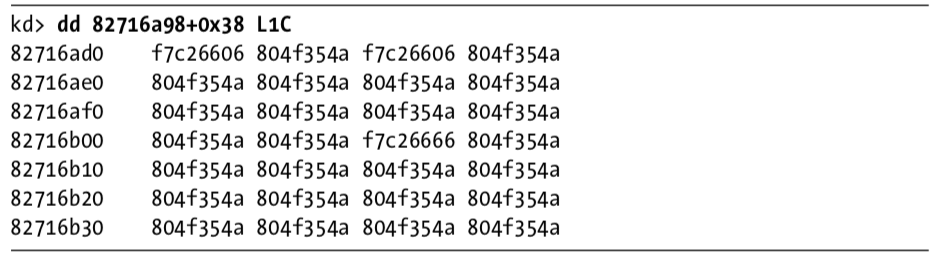
Each entry in the table represents a different type of request that the driver can handle, but as you can see, most of the entries in the table are for the same function at 0X804F354A. All of the entries in the table with the value 0X804F354A represent a request type that the driver does not handle. To verify this, we need to find out what that function does. We could view its disassembly, but because it’s a Windows function, its name should tell us what it does, as shown here:

The function at 0X804F354A is named IopInvalidDeviceRequest, which means that it handles invalid requests that this driver doesn’t handle. The remaining functions from the major function table at offsets 0, 2, and 0xe contain the functionality that we are interested in. Examining wdm.h, we find that offsets of 0, 2, and 0xe store the functions for the Create, Close, and DeviceIoControl functions.
First, we look at the Create and Close functions at offsets 0 and 2 in the major function table. We notice that both entries in the major function table point to the same function (0xF7C26606). Looking at that function, we see that it simply calls IofCompleteRequest and then returns. This tells the OS that the request was successful, but does nothing else. The only remaining function in the major function table is the one that handles DeviceIoControl requests, which is the most interesting.
Looking at the DeviceIoControl function, we see that it manipulates the PEB of the current process. Listing 10-19L shows the code that handles DeviceIoControl.
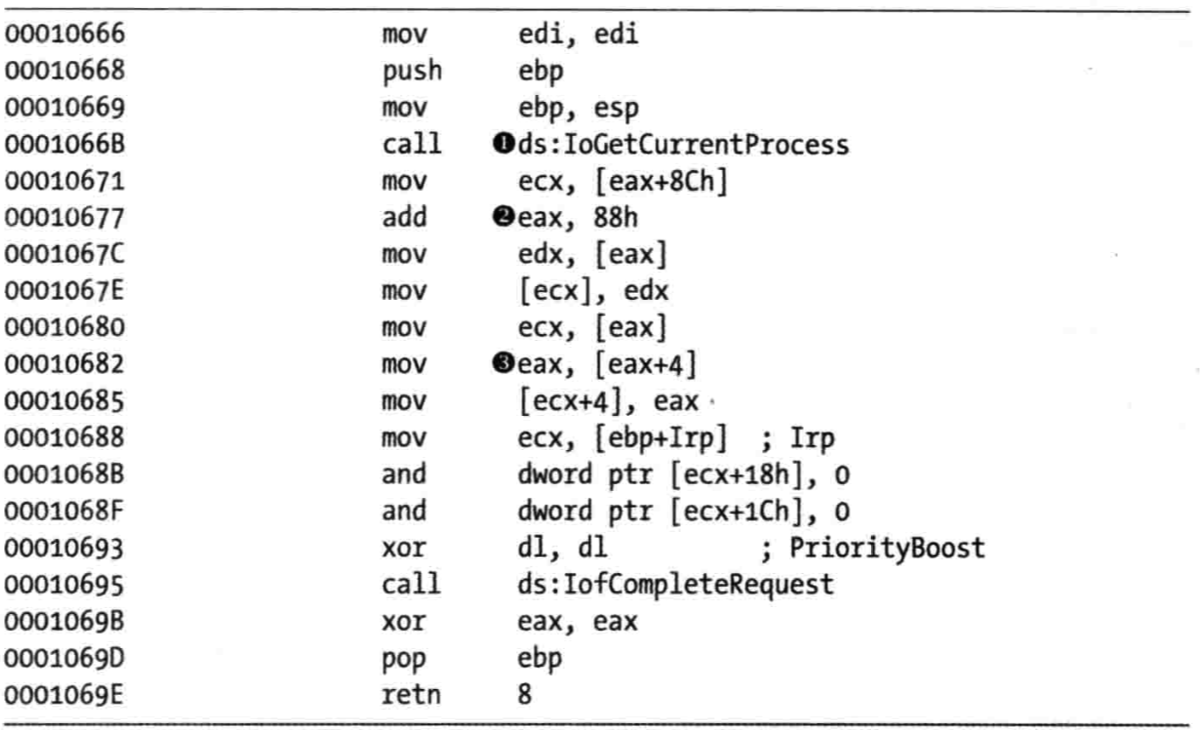
Listing 10-19L: The driver code that handles DeviceIoControl requests
The first thing the DeviceIoControl function does is call IoGetCurrentProcess at \({\color{red}1}\), which returns the EPROCESS structure of the process that issued the call to DeviceIoControl. The function then accesses the data at an offset of 0x88 at \({\color{red}2}\), and then accesses the next DWORD at offset 0x8C at \({\color{red}3}\).
We use the dt command to discover that LIST_ENTRY is stored at offsets 0x88 and 0x8C in the PEB structure, as shown in Listing 10-20L at \({\color{red}1}\).
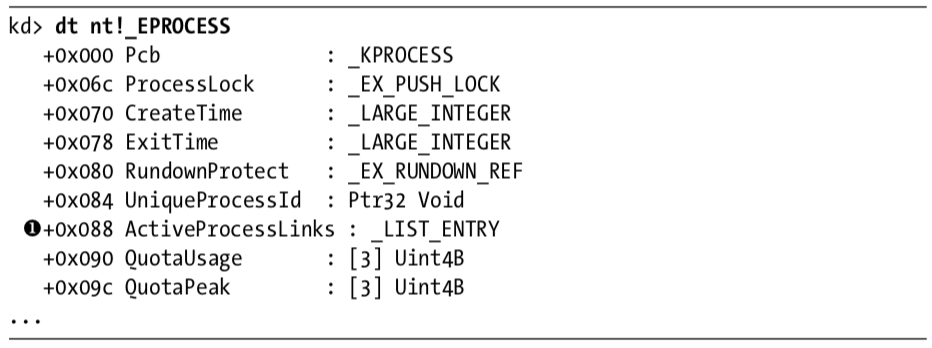
Listing 10-20L: Examining the EPROCESS structure with WinDbg
Now that we know that function is accessing the LIST_ENTRY structure, we look closely at how LIST_ENTRY is being accessed. The LIST_ENTRY structure is a double-linked list with two values: the first is BLINK, which points to the previous entry in the list, and the second is FLINK, which points to the next entry in the list. We see that it is not only reading the LIST_ENTRY structure, but also changing structures, as shown in Listing 10-21L.
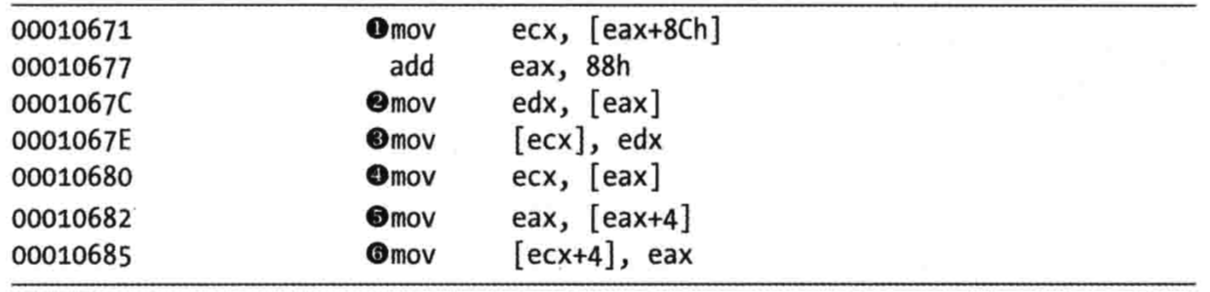
Listing 10-21L: DeviceIoControl code that modifies the EPROCESS structure
The instruction at \({\color{red}1}\) obtains a pointer to the next entry in the list. The instruction at \({\color{red}2}\) obtains a pointer to the previous entry in the list. The instruction at \({\color{red}3}\) overwrites the BLINK pointer of the next entry so that it points to the previous entry. Prior to \({\color{red}3}\), the BLINK pointer of the next entry pointed to the current entry. The instruction at \({\color{red}3}\) overwrites the BLINK pointer so that it skips over the current process. The instructions at \({\color{red}4}\), \({\color{red}5}\), and \({\color{red}6}\) perform the same steps, except to overwrite the FLINK pointer of the previous entry in the list to skip the current entry.
Rather than change the EPROCESS structure of the current process, the code in Listing 10-21L changes the EPROCESS structure of the process in front of it and behind it in the linked list of processes. These six instructions hide the current process by unlinking it from the linked list of loaded processes, as shown in Figure 10-3L.
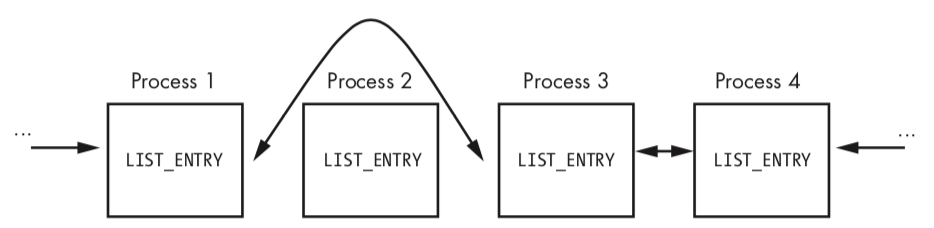
Figure 10-3L: A process being removed from the process list so that it’s hidden from tools such as Task Manager
When the OS is running normally, each process has a pointer to the process before and after it. However, in Figure 10-3L, Process 2 has been hidden by this rootkit. When the OS iterates over the linked list of processes, the hidden process is always skipped.
You might wonder how this process continues to run without any problems, even though it’s not in the OS’s list of processes. To answer this, remember that a process is simply a container for various threads to run inside. The threads are scheduled to execute on the CPU. As long as the threads are still properly accounted for by the OS, they will be scheduled, and the process will continue to run as normal.
Preference
PRACTICAL MALWARE ANALYSIS: KERNEL DEBUGGING WITH WINDBG (LAB 10-03)
Lab 10-3的更多相关文章
- RH033读书笔记(9)-Lab 10 Understanding the Configuration Tools
Lab 10 Understanding the Configuration Tools Sequence 1: Configuring the Network with system-config- ...
- RH133读书笔记(10)-Lab 10 Exploring Virtualization
Lab 10 Exploring Virtualization Goal: To explore the Xen virtualization environment and the creation ...
- 7 天玩转 ASP.NET MVC — 第 3 天
目录 第 1 天 第 2 天 第 3 天 第 4 天 第 5 天 第 6 天 第 7 天 0. 前言 我们假定你在开始学习时已经阅读了前两天的学习内容.在第 2 天我们完成了关于显示 Employee ...
- 网络编程:基于C语言的简易代理服务器实现(proxylab)
本文记录了一个基于c socket的简易代理服务器的实现.(CS:APP lab 10 proxy lab) 本代理服务器支持keep-alive连接,将访问记录保存在log文件. Github: h ...
- vmware目录2
http://www.globalknowledge.com/training/course.asp?pageid=9&courseid=17880&country=United+St ...
- 很好的vmware目录
http://www.globalknowledge.com/training/course.asp?pageid=9&courseid=18023&country=United+St ...
- python迭代器生成器
1.生成器和迭代器.含有yield的特殊函数为生成器.可以被for循环的称之为可以迭代的.而可以通过_next()_调用,并且可以不断返回值的称之为迭代器 2.yield简单的生成器 #迭代器简单的使 ...
- Cygwin Run in the Windows(Simulation of UNIX)
Preface Environment Cygwin Run in the Windows(Simulation of UNIX) Resource Cygwin Install:http://cyg ...
- Ionic Cordova 环境配置window
1.安装java jdk http://www.oracle.com/technetwork/java/javase/downloads/jdk8-downloads-2133151.html 2.安 ...
- Java标签学习
今天早上看Java编程思想第四章控制执行流程,本来很简单的一些东西,但是突然看到了goto发现自己以前还真的没怎么用过,不过Java中对goto作为保留关键字,而是提供了一个叫标签的东西,我们一起来看 ...
随机推荐
- 虚拟机——虚拟机VMware Workstation 的.vmdk格式与VirtualBox 的.vdi格式相互转换
啦啦啦~~~ 由于现在Vmware Workstation的越来越普及,让很多小伙伴不知道怎么把以前用的VirtualBox虚拟机vdi格式转换成vmdk格式,下面我们就来转换一下吧... 第一步:找 ...
- 微信网页浏览器打开链接后跳转到其他浏览器下载APK文件包
做微信营销活动或者APK下载推广时候,是无法直接下载,做到微信中正常使用呢?这就要借助一些工具来实现有效的操作. 安卓手机的话是通过点击链接,直接跳转出微信.自动打开手机默认的浏览器.但是这个方法IO ...
- 快速学习C语言途径,让你少走弯路
1.标准C语言能干什么? 坦白讲,在今天软件已经发展了半个多世纪,单纯的C语言什么都干不了.标准C语言库只提供了一些通用的逻辑运算方法以及字符串处理,当然字符串在C语言看来也是一种操作内存的方法,所以 ...
- Linux 磁盘挂载分区
举例说明: 新增磁盘的设备文件名为 /dev/vdb 大小为100GB. #fdisk -l 查看新增的的磁盘 1.对新增磁盘进行分区 #fdisk /dev/vdb 按提示操作 p打印 n新增 d ...
- maven 安装m2e 报错
Eclipse安装maven插件m2e m2e - http://m2eclipse.sonatype.org/sites/m2e m2e-extras - http://m2eclipse.sona ...
- css3 box-flex
应用地址:http://www.jb51.net/css/467291.html box-flex是css3新添加的盒子模型属性,它的出现打破了我们经常使用的浮动布局,实现垂直等高.水平均分.按比例划 ...
- Genymotion-Android模拟器提示"Unable to connect to the Genymotion server. Please check your Internet connection."解决方法
昨天刚装的Genymotion,昨晚还用得好好的. 今晚开机,重新打开Genymotion,却提示:"Unable to connect to the Genymotion server. ...
- UML类图新手入门级介绍(转)
首先,看动物矩形框,它代表一个类(Class).类图分三层,第一层显示类的名称,如果是抽象类,则就用斜体显示.第二层是类的特性,通常就是字段和属性.第三层是类的操作,通常是方法或行为.前面的符号,+ ...
- CefSharp浏览器网页中文语言设置
设置浏览器语言而非cef语言 ChromiumWebBrowser browser = new ChromiumWebBrowser(url); BrowserSettings browserSett ...
- Git 版本还原命令
转载:https://blog.csdn.net/yxlshk/article/details/79944535 1.需求场景: 在利用github实现多人协作开发项目的过程中,有时会出现错误提交的情 ...