
CentOS7.3 yum install MySQL5.7
安装环境:阿里云服务器 + CentOS7.3
测试工具:Navicat for MySQL
- 参考博客:https://blog.csdn.net/qq_38417808/article/details/81291588
1.更新 yum mysql5.7 源
- #wget http://repo.mysql.com/mysql57-community-release-el6-8.noarch.rpm
- #rpm -ivh mysql57-community-release-el6-8.noarch.rpm
2.yum mysql 源配置
- 禁用MySQL5.6的源:#yum-config-manager --disable mysql56-community
- 启用MySQL5.7的源:#
yum-config-manager --enablemysql57-community-dmr
3.查看 mysql install list
#yum repolist enabled |grepmysql
4.安装 mysql
- #yum install mysql-community-server
这里会报错:
 ,缺少libsasl2.so.2()(64bit)
解决办法:
- 修改 yum mysql 源:#vim /etc/yum.repos.d/mysql-community.repo

[mysql57-community]
name=MySQL 5.7 Community Server
## baseurl=http://repo.mysql.com/yum/mysql-5.7-community/el/6/$basearch/
baseurl=http://repo.mysql.com/yum/mysql-5.7-community/el/7/$basearch/
enabled=1
gpgcheck=0
gpgkey=file:///etc/pki/rpm-gpg/RPM-GPG-KEY-mysql
- 再次安装 mysql: #yum install mysql-community-server
5.配置 mysql 字符集
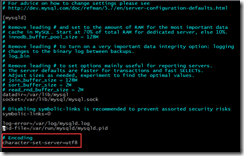
- #vim /etc/my.cnf,在文件末尾加上:character-set-server=utf8
6.启动 mysql 服务
- #service mysqld start
- 停止 mysql 服务:#service mysqld stop
7.查询首次安装随机密码
- #grep 'password' /var/log/mysqld.log |head -n 1

8.登陆数据库
- #mysql –u root –p,输入上面查询的密码登陆
9.修改 root 密码
- 首次登陆进去会出现提示:
You must reset your password using ALTER USER statement before executing this statement.
(在执行此语句之前,必须使用ALTE USER语句重设密码。)
- 个人学习使用,所以密码设为:root,
alter user user() identified by "root";
但是会报 Your password does not satisfy the current policy requirements.(您的密码不符合当前的策略要求。)

- 首先,修改 mysql5.7 的默认密码策略:
1. set global validate_password_policy=0;(密码长度符合即可)

2. set global validate_password_length=1;(修改密码默认长度为最小值,即4位)

- 再次设置密码:alter user user() identified by "root";

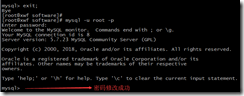
- exit; 退出,使用新密码登陆 mysql
10.远程访问
- 防火墙设置 mysql 端口白名单:#vim /etc/sysconfig/iptables
-A INPUT -p tcp -m state --state NEW -m tcp --dport 3306 -j ACCEPT
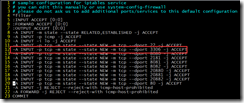
重启防火墙,#service iptables restart
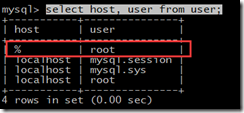
- 登陆 mysql 创建远程访问用户’root',密码为’root’:create user 'root'@'%' identified by 'root';

查询 mysql 库的 user 表:select host, user from user;
- 授权:grant all privileges on *.* to 'root'@'%';

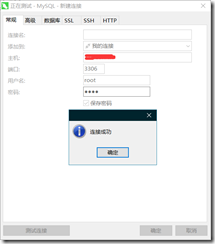
- 测试
CentOS7.3 yum install MySQL5.7的更多相关文章
- 阿里云Centos7使用yum安装MySQL5.6的正确姿势
阿里云Centos7使用yum安装MySQL5.6 阿里云Centos7使用yum安装MySQL5.6 前言:由于某些不可抗力,我要在自己的阿里云服务器上搭建hadoop+hive+mysql+tom ...
- CentOS7 通过YUM安装MySQL5.7 linux
CentOS7 通过YUM安装MySQL5.7 1.进入到要存放安装包的位置 cd /home/lnmp 2.查看系统中是否已安装 MySQL 服务,以下提供两种方式: rpm -qa | grep ...
- Centos7使用yum安装Mysql5.7.19的详细步骤(可用)
Centos7的yum源中默认是没有mysql,因为现在已经用mariaDB代替mysql了. 首先我们下载mysql的repo源,我们可以去mysql官网找最新的repo源地址 地址: https: ...
- CentOS7使用yum安装mysql5.7
提前说一下,网速不好不要用yum安装,等得时间太长. 第一步.获取yum源 [root@youxi1 ~]# rpm -ivh https://repo.mysql.com/yum/mysql-5.7 ...
- CentOS7 通过YUM安装MySQL5.7
1.进入到要存放安装包的位置 cd /home/lnmp 2.查看系统中是否已安装 MySQL 服务,以下提供两种方式: rpm -qa | grep mysql yum list installed ...
- centos7.6 yum安装mysql5.7版本
由于mysql5.5及之前的版本一些项目上线报错 卸载: 首先删除centos上原来的mysql老版本,注意备份,清理干净. 之前怎么安装的清理,防止卸载不干净会有冲突. 我之前yum安装mysql5 ...
- CentOS7.6 yum install Git
1. yum install git 2. git version or git –version 3. uninstall: git remove
- CentOS7通过YUM安装MySQL5.6
检查系统中的 MySQL,并删除现有的 Mysql 软件包. $ rpm -qa | grep mysql 这里如果没有返回任何东西证明没有安装任何 MySQL 相关的应用.如下图: 由于 cento ...
- Centos7使用yum安装MySQL5.6的正确姿势
centos自带的repo是不会自动更新每个软件的最新版本,所以无法通过yum方式安装MySQL的高级版本. 所以,即使使劲用yum -y install mysql mysql-server mys ...
随机推荐
- 版本号严格遵守semver语义化标准
地址:http://semver.org/lang/zh-CN/?spm=a219a.7629140.0.0.GUJMXE 语义化版本 2.0.0 摘要 版本格式:主版本号.次版本号.修订号,版本号递 ...
- 字符串匹配(二)----KMP算法
什么是KMP算法: KMP算法是一种改进的字符串匹配算法,由D.E.Knuth,J.H.Morris和V.R.Pratt同时发现,因此人们称它为克努特——莫里斯——普拉特操作(简称KMP算法).KMP ...
- Select下拉框使用ajax异步绑定数据
<!--前端样式--> <style> #searchs { width: 200px; position: absolute; border-top: none; margi ...
- [Swift]LeetCode868. 二进制间距 | Binary Gap
Given a positive integer N, find and return the longest distance between two consecutive 1's in the ...
- [Swift]LeetCode883. 三维形体投影面积 | Projection Area of 3D Shapes
On a N * N grid, we place some 1 * 1 * 1 cubes that are axis-aligned with the x, y, and z axes. Each ...
- mybatis 批量更新 Parameter '__frch_item_0' not found. Available parameters are [list]
一次在做批量更新数据的时候报错 Parameter '__frch_item_0' not found. Available parameters are [list] 记过反复查找,最后才发现是一个 ...
- 破解第一课:NOP绕过登录界面
第一步 打开软件,任意输入密码,提示“用户密码错误还有2次机会” 第二步 OD载入软件,右键-----中文搜索引擎---智能搜索 按下CTRL+F,打开查找,输入“密码错误”,在结果中双击找到的结果 ...
- Linux查看系统、核数、CPU、位数
查看系统: cat /etc/os-release 结果为 centOS Linux 7 查看核数和CPU: lscpu 40 个核,处理器为 Intel(R) Xeon(R) CPU E7-8891 ...
- Javascript基本类型回顾
本文是学习和总结ECMAScript5.1规范形成的.是对规范中所提及的Javascript类型进行剖析后的个人观点的表达(如有Bug望各位道友指正).主要是各类型的实例方法,不包含任务构造函数的方法 ...
- nginx系列 2 概述
一. nginx功能概述 nginx 提供的基本功能服务归纳为:基本HTTP服务.高级HTTTP服务.邮件代理服务.TCP/UDP 代理服务等四大类. (1) Nginx提供基本HTTP服务,可以作为 ...