
C#winform datagridview单元格的单击处理
首先看看效果图:
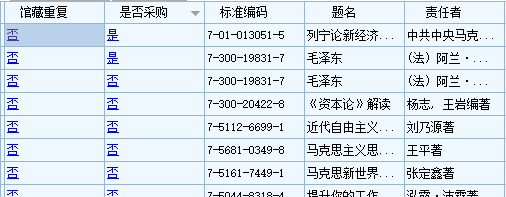
需求:要求是的在datagridview里面绑定数据后,可以任意点击想要点击的某列的单元格进行改变数据。需要在datagridview里面写3个事件
1.RowPrePaint事件:主要设置要点击的某单元对应的某列显示的颜色
   private void dgv_Data_RowPrePaint(object sender, DataGridViewRowPrePaintEventArgs e)

        {

            try

            {

                FontStyle newStyle = this.dgv_Data.DefaultCellStyle.Font.Style;

                newStyle |= FontStyle.Underline;

                Font font = new Font(this.dgv_Data.DefaultCellStyle.Font, newStyle);

                foreach (DataGridViewRow dr in this.dgv_Data.Rows)

                {

                    if (dr.Cells["ID"].Value.ToString() == "")

                    {

                        dr.DefaultCellStyle.ForeColor = Color.Red;

                    }

                    dr.Cells["馆藏重复"].Style.Font = font;

                    dr.Cells["馆藏重复"].Style.ForeColor = Color.Blue;

                    dr.Cells["是否采购"].Style.Font = font;

                    dr.Cells["是否采购"].Style.ForeColor = Color.Blue;

                }

            }

            catch (Exception ex)

            {

                MessageBox.Show(ex.Message, "", MessageBoxButtons.OK, MessageBoxIcon.Error);

            }

        }
2.CellMouseMove事件:主要是鼠标指针移动到单元格时候的样式
private void dgv_Data_CellMouseMove(object sender, DataGridViewCellMouseEventArgs e)

        {

            if (e.ColumnIndex == - || e.RowIndex == -)

            {

                return;

            }

            DataGridViewCell cell = this.dgv_Data.Rows[e.RowIndex].Cells[e.ColumnIndex];

            if (cell == null || cell.Value.ToString() == "" || cell.Value.ToString() == "")

            {

                return;

            }

            string headText = this.dgv_Data.Columns[e.ColumnIndex].HeaderText;

            if (headText == "馆藏重复" || headText == "是否采购")

            {

                this.Cursor = Cursors.Hand;

            }

            else

            {

                this.Cursor = Cursors.Default;

            }

        }
3.CellClick事件:主要是对单元格进行单击的数据库操作
private void dgv_Data_CellClick(object sender, DataGridViewCellEventArgs e)

        {

            try

            {

                if (e.ColumnIndex == - || e.RowIndex == -)

                {

                    return;

                }

                DataGridViewCell cell = this.dgv_Data.Rows[e.RowIndex].Cells[e.ColumnIndex];

                if (cell == null || cell.Value.ToString() == "" || cell.Value.ToString() == "")

                {

                    return;

                }

                Stay_PurchaseData bll = new Stay_PurchaseData();

                string headText = this.dgv_Data.Columns[e.ColumnIndex].HeaderText;

                switch (headText)

                {

                    case "馆藏重复":

                        if (cell.Value.ToString().Trim() == "是")

                        {

                            bll.ChangeGCCF(dgv_Data.Rows[e.RowIndex].Cells["ID"].Value.ToString(), true);

                        }

                        else

                        {

                            bll.ChangeGCCF(dgv_Data.Rows[e.RowIndex].Cells["ID"].Value.ToString(), false);

                        }

                        break;

                    case "是否采购":

                        if (cell.Value.ToString().Trim() == "是")

                        {

                            bll.ChangeSFCG(dgv_Data.Rows[e.RowIndex].Cells["ID"].Value.ToString(), true);

                        }

                        else

                        {

                            bll.ChangeSFCG(dgv_Data.Rows[e.RowIndex].Cells["ID"].Value.ToString(), false);

                        }

                        break;

                }

                //刷新

                btn_Query_Click(sender, e);

            }

            catch (Exception ex)

            {

                MessageBox.Show(ex.Message, "", MessageBoxButtons.OK, MessageBoxIcon.Error);

            }

        }
C#winform datagridview单元格的单击处理的更多相关文章
- Winform Datagridview 单元格html格式化支持富文本
Winform Datagridview 单元格html格式化支持富文本 示例: 源码:https://github.com/OceanAirdrop/DataGridViewHTMLCell 参考: ...
- c# winform DataGridView 单元格的屏幕位置
首先取得DataGridView的坐标位置:int dgvX = dataGridView1.Location.X;int dgvY = dataGridView1.Location.Y;然后取得选中 ...
- Winform DataGridView单元格的提示信息
往往当单元格的内容过多时,显示会变成这样 后缀多了几个点来显示数据未完,当鼠标移到某个单元格时,单元格里的内容会全部显示. 今天偶然发现了一个可以修改提示信息的方法,所以先记下来. 这个方法,可以对于 ...
- winform中dataGridView单元格根据值设置新值,彻底解决绑定后数据类型转换的困难
// winform中dataGridView单元格在数据绑定后,数据类型更改困难,只能迂回实现.有时候需要将数字变换为不同的文字描述,就会出现int32到string类型转换的异常,借助CellFo ...
- WinForm笔记1:TextBox编辑时和DataGridView 单元格编辑时 的事件及其顺序
TextBox 编辑框 When you change the focus by using the mouse or by calling the Focus method, focus event ...
- DataGridView单元格内容自动匹配下拉显示
页面显示数据使用的控件是ComponentFactory.Krypton.Toolkit中的KryptonDataGridView控件.在指定“商品”单元格中需要根据用户输入内容自动匹配数据库中商品信 ...
- DataGridView单元格合并
本文章转载:http://www.cnblogs.com/xiaofengfeng/p/3382094.html 图: 代码就是如此简单 文件下载:DataGridView单元格合并源码 也可以参考: ...
- DataGridView单元格显示GIF图片
本文转载:http://home.cnblogs.com/group/topic/40730.html DataGridView单元格显示GIF图片 gifanimationindatagrid.ra ...
- Winfrom设置DataGridView单元格获得焦点(DataGridView - CurrentCell)
设置DataGridView单元格获得焦点 this.dgv_prescription.BeginEdit(true);
随机推荐
- Comparison of FastText and Word2Vec
Comparison of FastText and Word2Vec Facebook Research open sourced a great project yesterday - fas ...
- project3_NeedToLoginCalculator(需要进行登陆确认的计算器)
下列实现代码说明: 下列代码主要是实现计算器功能.由于之前在莫凡老师开设的<用 python 和 tkinter 做简单的窗口视窗>课程当中学习了tkinter的内容,在该课程的结束部分是 ...
- Parallels Desktop Centos 设置IP
参考链接 Parallels Desktop虚拟的Centos系统设置静态IP连网 https://blog.csdn.net/hotdust/article/details/53812953#com ...
- 20-MySQL-Ubuntu-数据表的查询-子查询(九)
子查询(嵌套查询) select * from students where height=(select max(height) from students);
- linux下使用自带mail发送邮件
linux下使用自带mail发送邮件 mailx工具说明: linux可以通过安装mailx工具,mailx是一个小型的邮件发送程序,一般可以通过该程序在linux系统上,进行监控linux系统状态并 ...
- 使用CSS3开启GPU硬件加速提升网站动画渲染性能
遇到的问题: 网站本身设计初衷就没有打算支持IE8及以下版本浏览器,并不是因为代码兼容性问题,而是真的不想迁就那些懒得更新自己操作系统和浏览器的用户,毕竟是我自己的网站,所以我说了算!哈哈~ 没有了低 ...
- DIV+CSS网页布局常用的一些基础知识
CSS命名规范 一.文件命名规范 全局样式:global.css:框架布局:layout.css:字体样式:font.css:链接样式:link.css:打印样式:print.css: 二.常用类/I ...
- 21-4indexOf
<!DOCTYPE html> <html lang="en"> <head> <meta charset="UTF-8&quo ...
- sparkStreaming结合SparkSql实例
SparkSQL结合SparkStreaming的使用 Flume+Kafka+SparkStreaming已经发展为一个比较成熟的实时日志收集与计算架构,利用Kafka,即可以支持将用于离线分析的数 ...
- C#学习笔记----反射基础
反射基础 反射用于在程序运行过程中,获取类里面的信息或发现程序集并运行的一个过程.通过反射可以获得.dll和.exe后缀的程序集里面的信息.使用反射可以看到一个程序集内部的类,接口,字段,属性,方法, ...