
关于android SDK安装Failed to fetch URL http://dl-ssl.google.com/android/repository/addons_list-1.xml出错
- Fetching http://dl-ssl.google.com/android/repository/addons_list-1.xml
- Failed to fetch URL http://dl-ssl.google.com/android/repository/addons_list-1.xml, reason: Connection to http://dl-ssl.google.com refused
- Fetched Add-ons List successfully
- Fetching URL: <a target="_blank" href="http://dl-ssl.google.com/android/repository/repository-6.xmlFailed">http://dl-ssl.google.com/android/repository/repository-6.xml
- Failed</a> to fetch URL <a target="_blank" href="http://dl-ssl.google.com/android/repository/repository-6.xml">http://dl-ssl.google.com/android/repository/repository-6.xml</a>, reason: Connection to http://dl-ssl.google.com refused
- Done loading packages.
- Fetching <a target="_blank" href="http://dl-ssl.google.com/android/repository/addons_list-1.xml">https://dl-ssl.google.com/android/repository/addons_list-1.xml</a>
- Failed to fetch URL <a target="_blank" href="http://dl-ssl.google.com/android/repository/addons_list-1.xml">https://dl-ssl.google.com/android/repository/addons_list-1.xml</a>, reason: Connection to <a target="_blank" href="http://dl-ssl.google.com">https://dl-ssl.google.com</a> refused
- Fetched Add-ons List successfully
- Fetching URL: <a target="_blank" href="http://dl-ssl.google.com/android/repository/repository-6.xml">https://dl-ssl.google.com/android/repository/repository-6.xml</a>
- Failed to fetch URL <a target="_blank" href="http://dl-ssl.google.com/android/repository/repository-6.xml">https://dl-ssl.google.com/android/repository/repository-6.xml</a>, reason: Connection to <a target="_blank" href="http://dl-ssl.google.com">https://dl-ssl.google.com</a> refused
- Done loading packages.
我就纠结了,一直连接失败,难道是电信把google android屏蔽了,最近有一个想法,电信再怎么屏蔽android 但是不会屏蔽google搜索引擎的,如果电信把google搜索引擎屏蔽了,那电信估计也倒闭了! 呵呵 我就做了一个选择 ,使用www.google.com做代理,详细看截图:
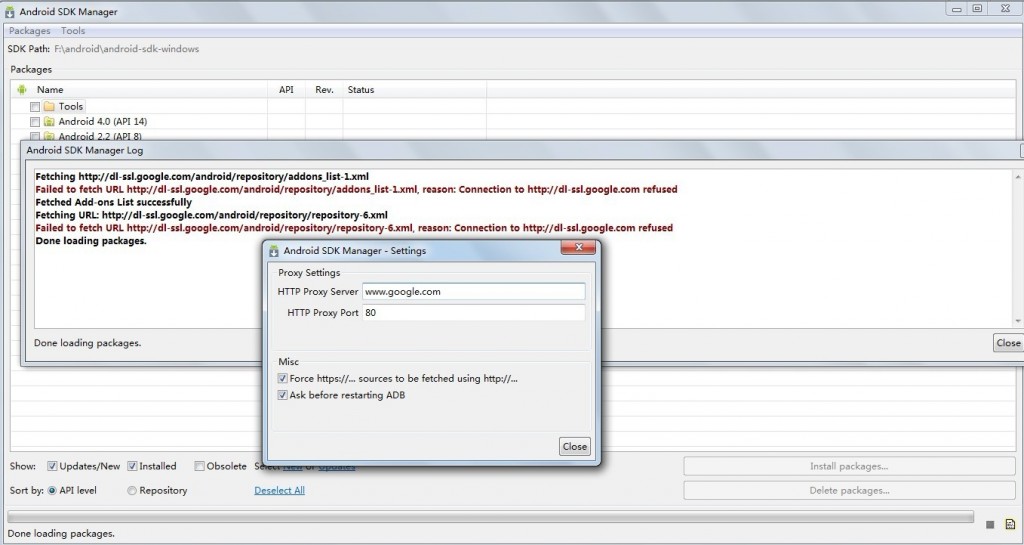
然后点击了一个package下的 reload 重新加载,呵呵 结果API level 全部出来了,真的很爽歪歪 ,呵呵 分享给大家,希望给大家有帮助~
看了一下自己的评论,蛮多的,很高兴能满足很多朋友。不过本人也折腾android好几年了,说一下自己的一些心得吧:
如果要把android学好,必须要走出自己的路,不然的去独立思考,做不出来就画图,任何绝决不了的问题都是思路或者逻辑没想通的,我曾经很多问题没解决,最后都是逼着自己必须把问题解决,这就是坚持和负责!今天,我已经养成了习惯,养成了不屈不服的心,要知道,如果别人能实现的功能,你肯定也可以,因为你不比别人差多少,只是比别人花费的时间少而已!对自己要有信心,学程序对了一个阶段后,不是写代码,是一个思考的心,这是一种全新的境界,这个境界如果早点到到底人就能把世界看的更透彻!人在不同层次,境界也是不一样的,平静如水的态度,坚持不屈不服的心,将会注定一个人的不凡!一句话,人一定要靠自己,希望大家以后遇到困难都要多思考多尝试!能发现问题是好事,能解决问题更是好事!
----spring sky
顺便说一下,本人年纪不小了,为了能做出自己的一些事情,有点创业的想法,如果有创业的朋友缺忠诚的合作伙伴,请联系我!(专注于android ios开发,没有神一样的智商,但拥有不屈不服的心,不为困难而低头,只为理想而拼搏)
关于android SDK安装Failed to fetch URL http://dl-ssl.google.com/android/repository/addons_list-1.xml出错的更多相关文章
- [转载]关于android SDK安装Failed to fetch URL http://dl-ssl.google.com/android/repository/addons_list-1.xml出错
原文地址为:http://blog.csdn.net/springsky_/article/details/7442388 因为入行移动测试,所以很多测试环境的搭建.从中遇到了和这个GG同样的问题.怕 ...
- 关于android SDK安装Failed to fetch URL 一点思考
最近SDK出问题了,然后在google下载了一个android-sdk-windows.rar,然后点击SDK Manager,结果一直不能刷新API Level,然后就开始在网上找了好多资料,解决这 ...
- android SDK安装Failed to fetch URL http://dl-ssl.google.com/android/repository/addons_list-1.xml出错 解决方案
更换代理服务器:http://mirrors.neusoft.edu.cn 端口:80 reload 解决 若以上不成功在hosts文件中添加以下内容 #Google主页203.208.46.146 ...
- Failed to fetch URL http://dl-ssl.google.com/android/repository/addons_list-2.xml, reason: Connectio (andriod sdk manager) http://dl-ssl.google.com/android上不去解决方案
Fetching https://dl-ssl.google.com/android/repository/addons_list-2.xml Fetched Add-ons List succes ...
- Failed to fetch URl https://dl-ssl.google.com/android/repository/addo Android SDK更新以及ADT更新出现问题的解决办法
问题描述 使用SDK Manager更新时出现问题Failed to fetch URL https://dl-ssl.google.com/android/repository/repository ...
- android SDK Manager更新不了,出现错误提示:"Failed to fetch URL..."!
可以用以下办法解决: 使用SDK Manager更新时出现问题 Failed to fetch URL https://dl-ssl.google.com/android/repository/rep ...
- Android SDK Manager检查更新时遇到Failed to fetch URL xxxxxxx reason: Connection to xxxxxx的错误的解决办法!
首先说明的是这个问题并不是每个人都存在,但是我和我的一个同学都有这种情况,所以我同学百度了一下,找出了解决办法. 问题描述: 使用Android SDK Manager检查在线更新,提示以下错误: & ...
- Failed to fetch URL http://dl-ssl.google.com/android/repository/addons_list-2.xml, reason:
http://blog.csdn.net/gyming/article/details/8168166/ 最近接受的这个项目需要Android SDK Tools revision 22.6.2 or ...
- "Failed to fetch URL https://dl-ssl.google.com/android/repository/addons_list.xml,reason: Connection
"Failed to fetch URL https://dl-ssl.google.com/android/repository/addons_list.xml,reason: Conne ...
随机推荐
- HZOI2019序列
题目链接:https://www.cnblogs.com/Juve/articles/11186805.html(密码是我的一个oj用户名) 题解: 这题我考试打的暴力,只有5分. 一开始理解错题意了 ...
- conda、pip换源以及conda、pip命令比较
conda换源: conda config --add channels https://mirrors.tuna.tsinghua.edu.cn/anaconda/pkgs/free/ conda ...
- Jeecms之JSP访问action类
因为Jeecms采用spring容器管理类,在web容器加载的时候类都已经实例化好了.我们可以通过在JSP中访问spring上下文的方式来调用action业务类例: ApplicationContex ...
- PAT甲级——A1046 Shortest Distance
The task is really simple: given N exits on a highway which forms a simple cycle, you are supposed t ...
- 1.appium工作原理及环境搭建
1.appium: 是一个自动化测试开源工具,支持 iOS 平台和 Android 平台上的原生应用,web应用和混合应用. 2.工作原理: 3.搭建appium环境: (1)安装python和nod ...
- Leetcode109. Convert Sorted List to Binary Search Tree有序链表转换二叉搜索树
给定一个单链表,其中的元素按升序排序,将其转换为高度平衡的二叉搜索树. 本题中,一个高度平衡二叉树是指一个二叉树每个节点 的左右两个子树的高度差的绝对值不超过 1. 示例: 给定的有序链表: [-10 ...
- 解释性语言和非解释性语言,GIL锁
解释性语言:python写的代码就被称为程序,cpu硬件能运行二进制代码指令.demo.py需要经过python解释器编译才做才能执行. 非解释性语言:例如c语言程序,同样需要写代码.demo.c这个 ...
- FTP主动模式与被动模式说明
FTP是仅基于TCP的服务,不支持UDP.与众不同的是FTP使用2个端口,一个数据端口和一个命令端口(也可叫做控制端口).通常来说这两个端口是21(命令端口)和20(数据端口).但FTP工作方式的不同 ...
- NOSQL数据库之 REDIS
NOSQL数据库之 REDIS 一.NOSQL 1.简介 NoSQL ,(Not Only SQL),泛指非关系型数据库. 特点: NoSQL 通常是以key-value形式存储, 不支持SQL语句, ...
- Django项目:CRM(客户关系管理系统)--47--38PerfectCRM实现全局账号登录注销02
图片另存为 16*16 名字修改为 global_logo.jpg /*! *bootstrap.js * * Bootstrap v3.3.7 (http://getbootstrap ...