
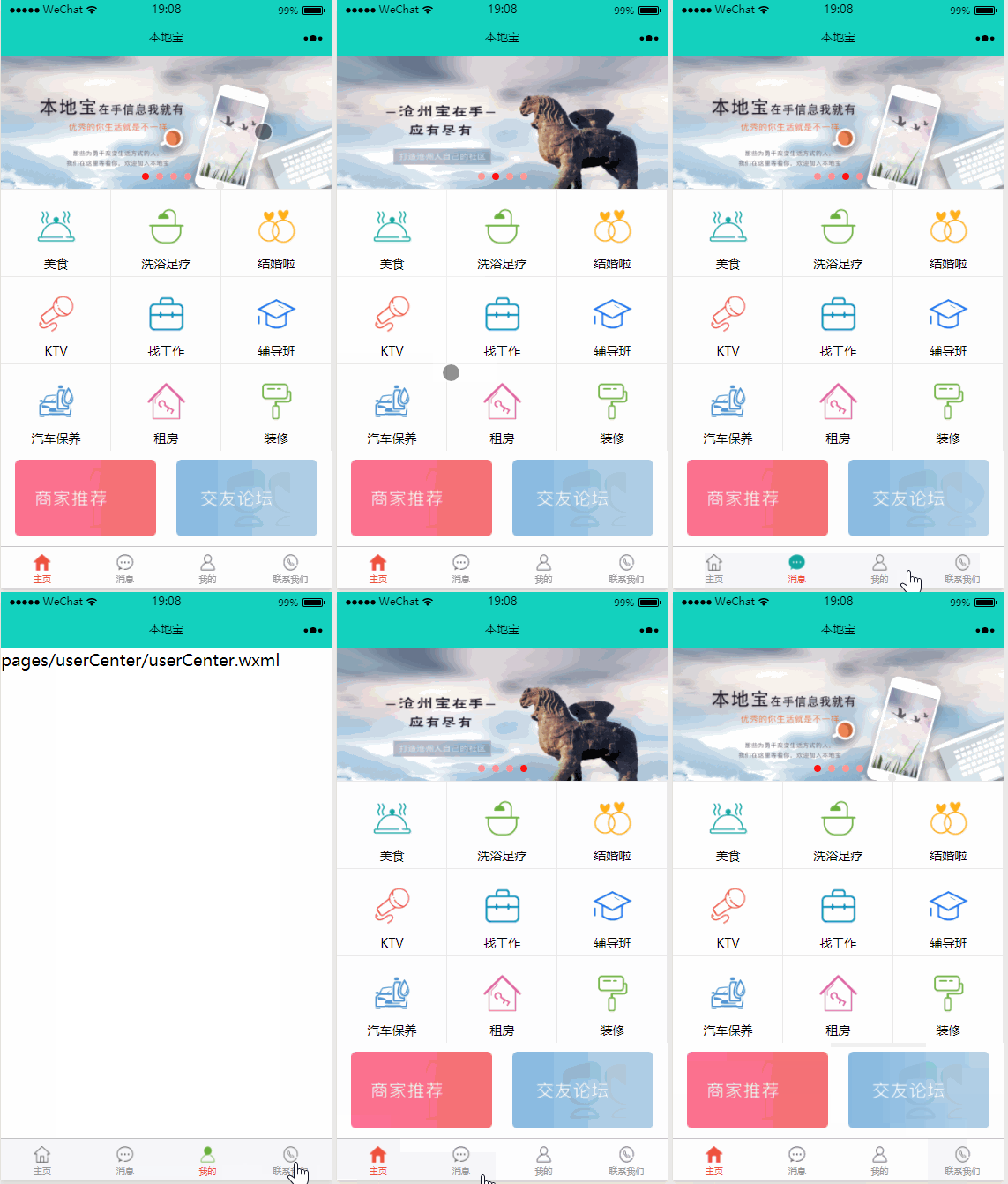
微信小程序--轮播图,标题,盒子,tab栏的合成例子
小程序是什么?
微信小程序,是一种不需要下载安装即可使用的应用,用户扫一扫或搜一下即可打开应用,在微信-发现-小程序可打开应用。
一.小程序的样式编写:
目录结构:

app.json
 {

   "pages": [

     "pages/index/index",

     "pages/message/message",

     "pages/userCenter/userCenter",

     "pages/contact/contact"

   ],

   "window": {

     "navigationBarBackgroundColor": "#13d1be",

     "navigationBarTextStyle": "black",

     "navigationBarTitleText":"本地宝",

     "backgroundColor": "#eeeeee",

     "backgroundTextStyle": "light",

     "enablePullDownRefresh": false

   },

     "tabBar": {

         "selectedColor":"rgb(238, 82, 61)",

         "list": [{

             "pagePath": "pages/index/index",

             "text": "主页",

             "iconPath": "tabs/home.png",

             "selectedIconPath": "tabs/home-active.png"

         },

         {

             "pagePath": "pages/message/message",

             "text": "消息",

             "iconPath": "tabs/message.png",

             "selectedIconPath": "tabs/message-active.png"

         },

         {

             "pagePath": "pages/userCenter/userCenter",

             "text": "我的",

             "iconPath": "tabs/profile.png",

             "selectedIconPath": "tabs/profile-active.png"

         },

         {

             "pagePath": "pages/contact/contact",

             "text": "联系我们",

             "iconPath": "tabs/contact.png",

             "selectedIconPath": "tabs/contact-active.png"

         }

         ]

     }

 }
公共样式:
 /*公共的样式  */

 /*伪元素边框-不占位置  */

 .bd-r,.bd-t{

     position: relative;

 }

 .bd-r::after,.bd-t::before{

     content: "";

     position: absolute;

     left:0;

     top:0;

     width: 100%;

     height: 1rpx;

     background-color: rgb(239, 239, 239);

 }

 .bd-r::before{

     right: 0;

     left: auto;

     width:1rpx;

     height: 100%;

 }

 .h100-block{

     height: 10rpx;

     background-color: #f0f0f0;

 }

 /*利用flex伸缩盒属性,实现栅格化布局  */

 .row{

     display: flex;

 }

 .row .col{

     flex: 1;

 }
主页页面编写:
index.wxml
 <!--pages/index/index.wxml-->

 <block>

   <swiper indicator-dots="true" autoplay="true" interval="3000" duration="500" indicator-color='#f99' indicator-active-color='#f11' circular='true'>

     <swiper-item>

       <image src="../../images/banner-01.png" width="375" height="150" />

     </swiper-item>

     <swiper-item>

       <image src="../../images/banner-02.png" width="375" height="150" />

     </swiper-item>

     <swiper-item>

       <image src="../../images/banner-01.png" width="375" height="150" />

     </swiper-item>

     <swiper-item>

       <image src="../../images/banner-02.png" width="375" height="150" />

     </swiper-item>

   </swiper>

 </block>

 <block>

   <view class='index-nav'>

     <navigator>

       <view class='img bd-r bd-t'>

         <image src='../../icons/grid-01.png'></image>

         <text>美食</text>

       </view>

     </navigator>

     <navigator>

       <view class='img bd-r bd-t'>

         <image src='../../icons/grid-02.png'></image>

         <text class='xizu'>洗浴足疗</text>

       </view>

     </navigator>

     <navigator>

       <view class='img bd-r bd-t'>

         <image src='../../icons/grid-03.png'></image>

         <text class='jiehuntxt'>结婚啦</text>

       </view>

     </navigator>

     <navigator>

       <view class='img bd-r bd-t'>

         <image src='../../icons/grid-04.png'></image>

         <text class='ktvtxt'>KTV</text>

       </view>

     </navigator>

     <navigator>

       <view class='img bd-r bd-t'>

         <image src='../../icons/grid-05.png'></image>

         <text class='findworktext'>找工作</text>

       </view>

     </navigator>

     <navigator>

       <view class='img bd-r bd-t'>

         <image src='../../icons/grid-06.png'></image>

         <text class='fudao'>辅导班</text>

       </view>

     </navigator>

     <navigator>

       <view class='img bd-r bd-t'>

         <image src='../../icons/grid-07.png'></image>

         <text class='qichetext'>汽车保养</text>

       </view>

     </navigator>

     <navigator>

       <view class='img bd-r bd-t'>

         <image src='../../icons/grid-08.png'></image>

         <text>租房</text>

       </view>

     </navigator>

     <navigator>

       <view class='img bd-r bd-t'>

         <image src='../../icons/grid-09.png'></image>

         <text>装修</text>

       </view>

     </navigator>

   </view>

 </block>

 <view class='h100-block'></view>

 <view class='index-enter row'>

   <view class='col'>

     <navigator>

     <image src='../../images/link-01.png'></image>

    </navigator>

     </view>

   <view class='col'>

     <navigator>

     <image src='../../images/link-02.png'></image>

    </navigator>

     </view>

 </view>
主页样式:index.wxss
 /* pages/index/index.wxss */

 swiper-item image{

     width: 750rpx;

     height: 340rpx;

 }

 .index-nav{

     overflow: hidden;

 }

 .img{

     text-align: center;

     font-size: 14px;

     float: left;

     width:33.3%;

     height: 198rpx;

     /* box-sizing: border-box;

     border-left: 1rpx solid rgb(239, 239, 239);

     border-bottom: 1rpx solid rgb(239, 239, 239);  */

 }

 /*选择第三个元素的倍数,把修饰用的边框隐藏  */

 /*nth-of-type:选中类型的的第几个

     ::before需要配合content:''使用

 */

 .img:nth-of-type(3n)::before{

     background-color: transparent;

 }

 .img image{

     width: 90rpx;

     height: 90rpx;

     display: block;

     margin: 40rpx auto 20rpx;

 }

 .img text{

     display: block;

 }

 .xizu{

     left: 21%!important;

 }

 .jiehuntxt{

     left: 29%!important;

 }

 .findworktext{

     left: 29%!important;

 }

 .fudao{

     left: 29%!important;

 }

 .qichetext{

     left: 21%!important;

 }

 .index-enter image{

     width: 320rpx;

     height: 175rpx;

 }

 .index-enter{

     text-align: center;

     padding: 10rpx ;

 }
微信小程序--轮播图,标题,盒子,tab栏的合成例子的更多相关文章
- 图解微信小程序---轮播图
图解微信小程序---轮播图 代码笔记 第一步:在页面创建swiper组件 第二步:编写js页面 注意事项:wx:for渲染我们js中的图片数组,item默认写法,获取我们的图片数组中的图片,可通过增加 ...
- 微信小程序------轮播图
swiper 微信小程序实现轮播图,和网站,APP的效果差不多,代码少,效率高. 先来看看效果图: 主要用swiper + swiper-item来实现 <view class='swiper' ...
- 微信小程序——轮播图实现
小程序的轮播图,也就是他其中的一个控件可以算是直接上代码: 这是WXML 页面 代码: <view class='carousel_div'> <swiper class=" ...
- 微信小程序轮播图的制作与跳转
<!--轮播图 --> <view class='swiperBanner'> <swiper indicator-dots='{{indicatorDots}}' au ...
- 微信小程序轮播图组件 swiper,swiper-item及轮播图片自适应
官网地址:https://developers.weixin.qq.com/miniprogram/dev/component/swiper.html index.wxml文件 indicator-d ...
- 微信小程序轮播图
swiper标签 <!--index.wxml--> <swiper class="swiper" indicator-dots="true" ...
- 一分钟学会如何自定义小程序轮播图(蜜雪冰城Demo)
最近开发小程序项目用到了轮播图,默认的有点单调,作为后端程序员,研究一番最终实现了.本文会从思路,代码详细介绍,相信读过此文后,不管以后在开发中碰到轮播图还是需要自定义修改其他的样式都可以按这个思路解 ...
- 02微信小程序-轮播的宽度100%显示和轮播的基础配置
1==>如何让轮播的宽度100%显示? 你先给swiper 外面添加一个大盒子,给大盒子一个类 . <view class='lunbobox'> 然后wxss 里面设置 image ...
- 微信小程序轮播组件
在index.wxml中添加以下代码 <view> <swiper indicator-dots="{{indicatorDots}}" autoplay=&qu ...
随机推荐
- Spring MVC(八)--控制器接受简单列表参数
有些场景下需要向后台传递一个数组,比如批量删除传多个ID的情况,可以使用数组传递,数组中的ID元素为简单类型,即基本类型. 现在我的测试场景是:要从数据库中查询minId<id<maxId ...
- org.apache.commons工具类方法解释 转
在Java中,工具类定义了一组公共方法,这篇文章将介绍Java中使用最频繁及最通用的Java工具类.以下工具类.方法按使用流行度排名,参考数据来源于Github上随机选取的5万个开源项目源码. 一. ...
- springboot 2 修改端口号
springboot 废弃了EmbeddedServletContainerCustomizer ,修改端口,从官方文档上看到的方法, 1 import org.springframework.boo ...
- 深度学习(二十六)Network In Network学习笔记
深度学习(二十六)Network In Network学习笔记 Network In Network学习笔记 原文地址:http://blog.csdn.net/hjimce/article/deta ...
- vue.js_08_vue-组件的定义
1.vue组件常用定义方式 <body> <div id="app"> <!--1.3使用组件--> <mycom1></my ...
- 在三维场景中加载shp(skyline)
在场景中添加shp图层有两个方法: (1)直接调用Command命令,SGWorld.Command.Execute(1013,5);这样的话,和在场景中的工程树中右键添加特征图层的过程是一样的.有个 ...
- Activiti实战01_认识Activiti
什么是Activiti Activiti是为解决工作流而创建的一套流程引擎.举个最简单的例子,请假流程就是一个工作流,从开始到审批到结束,像流一样的贯穿整个流程.在工作中最常见的就是OA了.工作流总是 ...
- day65-test
目录 一.点击事件控制标签颜色 二.实现点击次数,变换页面标签的颜色 三.周期性实现颜色的旋转变色 练习题 一.点击事件控制标签颜色 1.有 红.黄.蓝 三个按钮,以及一个200x200矩形框box, ...
- 网易DMARC设置详解
网易企业邮箱DMARC协议设置详解 发布时间:2013-09-27 尊敬的企业用户: 据统计,全球范围内被投递的钓鱼邮件每天约达到1亿封,无孔不入的钓鱼邮件.诈骗邮件,威胁着用户的信息和财产安全.网易 ...
- Device eth0 does not seem to be present, delaying initialization(VM虚拟机restart service出现此错误)
>从vmware workstation中克隆(clone)了一个redhat6.0的虚拟机,启动之后发现网卡没有启动.于是重启一下network服务,发现提示错误信息“Device eth0 ...