
uploadify前台上传文件,java后台处理的例子
1、先创建一个简单的web项目upload (如图1-1)
2、插件的准备
(1)、去uploadify的官网下载一个uploadify插件,然后解压新建个js文件夹放进去(这个不强求,只要路径对了就可以)
(2)、准备所需要的后端处理上传文件的jar包:commons-fileupload-1.2.1.jar
3、新建一个JSP即index.jsp +servlet即UploadServlet.java
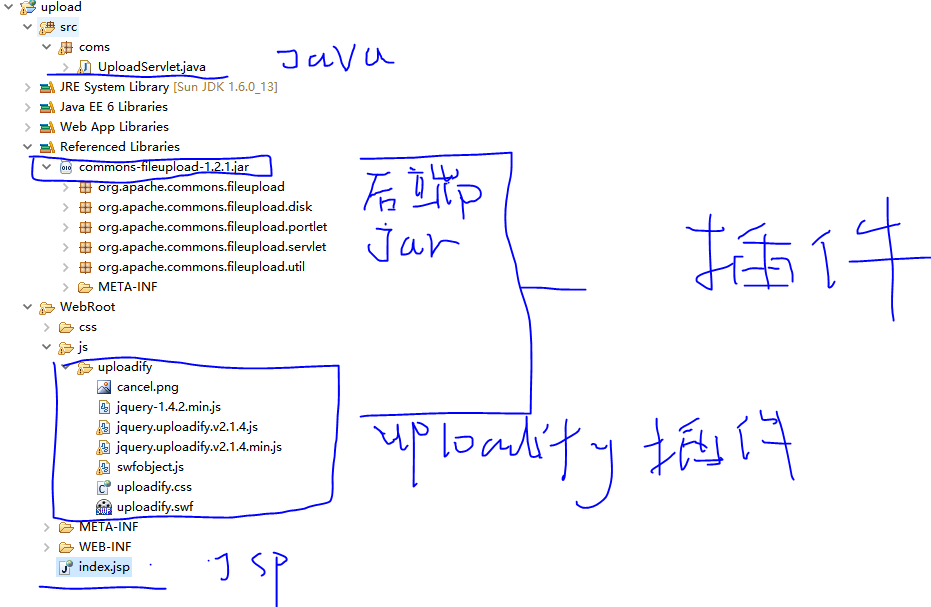
图1-1
4、花几分钟对这些简单的配置完成后就可以看看index.jsp与UoloadServlet.java
(1)index.jsp
<%@ page language="java" import="java.util.*" pageEncoding="UTF-8"%>

<%

String path = request.getContextPath();

String basePath = request.getScheme()+"://"+request.getServerName()+":"+request.getServerPort()+path+"/";

%>

<!DOCTYPE HTML PUBLIC "-//W3C//DTD HTML 4.01 Transitional//EN">

<html>

	<head>

		<base href="<%=basePath%>">

		<title>My JSP 'index.jsp' starting page</title>

		<meta http-equiv="pragma" content="no-cache">

		<meta http-equiv="cache-control" content="no-cache">

		<meta http-equiv="expires" content="0">

		<meta http-equiv="keywords" content="keyword1,keyword2,keyword3">

		<meta http-equiv="description" content="This is my page">

		<meta http-equiv="Content-Type" content="text/html; charset=UTF-8">

		<link rel="stylesheet" type="text/css" href="css/uploadify.css">

		<script src="<%=basePath%>js/uploadify/jquery-1.4.2.min.js"></script>

		<script src="<%=basePath%>js/uploadify/jquery.uploadify.v2.1.4.min.js"></script>

		<script src="<%=basePath%>js/uploadify/swfobject.js"></script>

	</head>

	<body>

		This is my JSP page.

		<br>

		<table class="stable tp0" cellSpacing="0" cellPadding="0" border="0">

            <tr>

                <td width="15%" align="left" colspan="4" style="padding-left: 158px">

                    <input type="hidden" id="fileSize" value="0" />

                    <div id="custom-queue"></div> 附件:<input id="uploadify" type="file"

                    name="Filedata" />

                </td>

            </tr>

        </table>

	</body>

	<script type="text/javascript">

  $(document).ready(function(){

      $(document).ready(function () {

            $("#uploadify").uploadify({

                'uploader': '<%=basePath%>js/uploadify/uploadify.swf',

                'script': '<%=basePath%>servlet/UploadServlet',

                'cancelImg': '<%=basePath%>js/uploadify/cancel.png',

                'folder': 'upload',

                'queueID' : 'custom-queue',

                'auto':true,

                'multi':true,

                'fileDataName':'Filedata',

                 'onCancel' : function(file) {

                },

                'onUploadError' : function(file, errorCode, errorMsg, errorString) {

                    alert(456);

                }

            });

        });

  });

  </script>

</html>
(2).UoloadServlet.java
package coms;

import java.io.File;

import java.io.IOException;

import java.util.Iterator;

import java.util.List;

import java.util.UUID;

import javax.servlet.ServletException;

import javax.servlet.http.HttpServlet;

import javax.servlet.http.HttpServletRequest;

import javax.servlet.http.HttpServletResponse;

import org.apache.commons.fileupload.FileItem;

import org.apache.commons.fileupload.FileUploadException;

import org.apache.commons.fileupload.disk.DiskFileItemFactory;

import org.apache.commons.fileupload.servlet.ServletFileUpload;

public class UploadServlet extends HttpServlet {

    @Override

    protected void doPost(HttpServletRequest request,

            HttpServletResponse response) throws ServletException, IOException {

        String savePath = this.getServletConfig().getServletContext()

                .getRealPath("");

        //保存文件的路径

        savePath = savePath + "/upload/";

        File f1 = new File(savePath);

        System.out.println(savePath);

        //如果文件不存在,就新建一个

        if (!f1.exists()) {

            f1.mkdirs();

        }

        //这个是文件上传需要的类,具体去百度看看,现在只管使用就好

        DiskFileItemFactory fac = new DiskFileItemFactory();

        ServletFileUpload upload = new ServletFileUpload(fac);

        upload.setHeaderEncoding("utf-8");

        List fileList = null;

        try {

            fileList = upload.parseRequest(request);

        } catch (FileUploadException ex) {

            return;

        }

        //迭代器,搜索前端发送过来的文件

        Iterator<FileItem> it = fileList.iterator();

        String name = "";

        String extName = "";

        while (it.hasNext()) {

            FileItem item = it.next();

            //判断该表单项是否是普通类型

            if (!item.isFormField()) {

                name = item.getName();

                long size = item.getSize();

                String type = item.getContentType();

                System.out.println(size + " " + type);

                if (name == null || name.trim().equals("")) {

                    continue;

                }

                // 扩展名格式: extName就是文件的后缀,例如 .txt

                if (name.lastIndexOf(".") >= 0) {

                    extName = name.substring(name.lastIndexOf("."));

                }

                File file = null;

                do {

                    // 生成文件名:

                    name = UUID.randomUUID().toString();

                    file = new File(savePath + name + extName);

                } while (file.exists());

                File saveFile = new File(savePath + name + extName);

                try {

                    item.write(saveFile);

                } catch (Exception e) {

                    e.printStackTrace();

                }

            }

        }

        response.getWriter().print(name + extName);

    }

}
对于jsp与java没有好好说明,如果不懂可以私聊我,其实花了很多个小时才使用这个uploadify,主要是因为以为上传只要uploadify插件就可以,原来还需要:commons-fileupload-1.2.1.jar ,我是一个喜欢分享的人,希望每个人有能力都能写写博客,让更多人好好学习,觉得不错就点一下推荐,让更多人快速掌握。
5.鼓励:觉得写得有帮助就支付宝扫一下吧,对你没有损失,也给我动力

uploadify前台上传文件,java后台处理的例子的更多相关文章
- uploadify+批量上传文件+java
<%@ page language="java" contentType="text/html; charset=UTF-8" pageEncoding= ...
- Linux下开发python django程序(设置admin后台管理上传文件和前台上传文件保存数据库)
1.项目创建相关工作参考前面 2.在models.py文件中定义数据库结构 import django.db import modelsclass RegisterUser(models.Model) ...
- 记录一次node中台转发表单上传文件到后台过程
首发掘金 记录一次node中台转发表单上传文件到后台过程 本篇跟掘金为同一个作者leung 公司几个项目都是三层架构模式即前台,中台(中间层),后台.前台微信端公众号使用vue框架,后台管理前端使 ...
- 完整uploadify批量上传文件插件使用
1.首先准备uploadify的js文件,网上一搜一大堆 2.上传页面UpFilePage.aspx 关键代码: <html xmlns="http://www.w3.org/1999 ...
- 在Struts2中使用Uploadify组件上传文件
Uploadify是一个基于Jquery的文件上传组件,官网http://www.uploadify.com/可以在官网获得该组件,运行演示示例,下载帮助文档. 作为Web前端的增强技术,Jq ...
- 三种方式上传文件-Java
前言:负责,因为该项目他(jetty嵌入式开始SpringMvc)实现文件上传的必要性,并拥有java文件上传这一块还没有被曝光.并 Http 更多晦涩协议.因此,这种渐进的方式来学习和实践上载文件的 ...
- python连接服务器上传文件,后台执行命令
上传文件 import os import paramikoimport logging from django.core.cache import cache from YunTai import ...
- vue element多文件多格式上传文件,后台springmvc完整代码
template: <el-upload class="upload-demo" ref=&quo ...
- 基于Flask开发网站 -- 前端Ajax异步上传文件到后台
大家好,我是辰哥~ 辰哥最近利用空闲时间在写一个在线可视化平台,过程中也觉得一些技术还是比较有意思的,所以就以模块化的形式分享出来.如:从网页界面(前端)上传文件到服务器(后端). 放一下该模块的界面 ...
随机推荐
- Access应用笔记<四>-一个完整的自动化报表搭建过程
距离之前的三篇日志已经很久啦,今天终于完成了一个比较完整的自动化报表搭建过程 基于公司数据保密原则,样板就不放到网上来了,简单说一下背景: 这次access实现的功能包括: 1)为部门整体搭建了一个员 ...
- R语言 ETL+统计+可视化
这篇文章...还是看文章吧 导入QQ群信息,进行ETL,将其规范化 计算哪些QQ发言较多 计算一天中哪些时段发言较多 计算统计内所有天的日发言量 setwd("C:/Users/liyi/D ...
- C和指针 第十章 结构和联合 (二)
结构体传值: 结构体也是标量,像字符和整数一样,可以传递给一个函数,但是传入整个结构体效率很低,可以传入指向结构体的指针来提高效率.如果不希望程序对结构体变量改变可以加入const关键词. typed ...
- CentOS下安装JDK1.7
1.安装包准备: 首先到官网下载jdk,http://www.oracle.com/technetwork/java/javase/downloads/jdk7-downloads-1880260.h ...
- 64位操作系统 通过ODP.NET 访问ORACLE 11g
摘要:64位操作系统部署.NET 程序访问oracle时,无法连接问题.(注意:客户端是64位系统 ,服务端是否64位 还是32位无关.) 1.到oracle 官网搜索相关版本的 ODAC网址: ht ...
- redis该如何分区-译文(原创)
写在最前,最近一直在研究redis的使用,包括redis应用场景.性能优化.可行性.这是看到redis官网中一个链接,主要是讲解redis数据分区的,既然是官方推荐的,那我就翻译一下,与大家共享. P ...
- C#高级编程笔记 Day 7, 2016年9月 19日 (泛型)
1.协变和抗变 泛型接口的协变 如果泛型类型用 out 关键字标注,泛型接口就是协变的.这也意味着返回类型只能是 T. 接口IIndex 与类型T 是协变的,并从一个制度索引器中返回这个类型. pu ...
- PHP的单态类——为了产生唯一的对象
pdo就是使用了单态类,使得对象永远只实例化一次,减少了内存消耗. 单态类: <?php class A{ private static $a = null; private function ...
- AdminLTE 2 开源模版
AdminLTE 2 开源模版: 1. 文档 https://almsaeedstudio.com/themes/AdminLTE/documentation/index.html 2. 代码 ...
- mysql创建定时任务
一.前言 自 MySQL5.1.6起,增加了一个非常有特色的功能–事件调度器(Event Scheduler),可以用做定时执行某些特定任务(例如:删除记录.对数据进行汇总等等),来取代原先只能由操作 ...