
canvas_基于canvan绘制的双半圆环进度条
效果图
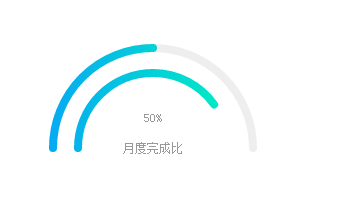
实现原理:
1.使用canvas绘制两个半圆弧,底图灰色半圆弧和颜色进度圆弧。
2.利用setInterval计时器,逐步改变颜色进度条,达到进度条的效果。
效果代码:
 <!DOCTYPE html>

 <html>

     <head>

         <meta charset="UTF-8">

         <title></title>

     </head>

     <body>

         <canvas id="canvas" width="300" height="300">

  </canvas>

         <script type="text/javascript">

             function toCanvas(id, progress, progress2) {

                 //canvas进度条

                 var canvas = document.getElementById(id),

                     ctx = canvas.getContext("2d"),

                     percent = progress,

                     percent2 = progress2,

                     //最终百分比

                     circleX = canvas.width / 2, // 中心x坐标

                     circleY = canvas.height / 2, //中心y坐标

                     radius = 100, //圆环半径

                     lineWidth = 8, // 圆形线条的宽度

                     fontSize = 10; //字体大小

                 /*//两端圆点

                 function smallcircle1(cx, cy, r) {

                     ctx.beginPath();

                     ctx.lineWidth = 1;

                     ctx.fillStyle = '#06a8f3';

                     ctx.arc(cx, cy, r, Math.PI, Math.PI * 2);

                     ctx.fill();

                 }

                 function smallcircle2(cx, cy, r) {

                     ctx.beginPath();

                     ctx.lineWidth = 1;

                     ctx.fillStyle = '#00f8bb';

                     ctx.arc(cx, cy, r, Math.PI, Math.PI * 2);

                     ctx.fill();

                 }*/

                 //画圆

                 function circle(cx, cy, r) {

                     ctx.beginPath();

                     ctx.lineWidth = lineWidth;

                     ctx.strokeStyle = '#eee';

                     ctx.arc(cx, cy, r, Math.PI, Math.PI * 2);

                     //ctx.arc(cx, cy, r, Math.PI * 2 / 3, Math.PI * 1 / 3);

                     ctx.stroke();

                 }

                 //画弧线

                 function sector(cx, cy, r, startAngle, endAngle, anti) {

                     ctx.beginPath();

                     ctx.lineWidth = lineWidth;

                     // 渐变色 - 可自定义

                     var linGrad = ctx.createLinearGradient(

                         circleX - radius - lineWidth, circleY, circleX + radius + lineWidth, circleY

                     );

                     linGrad.addColorStop(0.0, '#06a8f3');

                     linGrad.addColorStop(1.0, '#00f8bb');

                     ctx.strokeStyle = linGrad;

                     //圆弧两端的样式

                     ctx.lineCap = 'round';

                     ctx.arc(cx, cy, r, Math.PI, Math.PI * (1 + endAngle / 100));

                     ctx.stroke();

                 }

                 //画弧线02

                 function sector2(cx, cy, r, startAngle, endAngle, anti) {

                     ctx.beginPath();

                     ctx.lineWidth = lineWidth;

                     // 渐变色 - 可自定义

                     var linGrad = ctx.createLinearGradient(

                         circleX - radius - lineWidth, circleY, circleX + radius + lineWidth, circleY

                     );

                     linGrad.addColorStop(0.0, '#06a8f3');

                     linGrad.addColorStop(1.0, '#00f8bb');

                     ctx.strokeStyle = linGrad

                     //圆弧两端的样式

                     ctx.lineCap = 'round';

                     ctx.arc(cx, cy, r * 3 / 4, Math.PI, Math.PI * (1 + endAngle / 100));

                     ctx.stroke();

                 }

                 //刷新

                 function loading() {

                     var percent3 = progress;

                     if(percent < percent2) percent = percent2;

                     if(process >= percent) clearInterval(circleLoading);

                     if(process2 >= percent) clearInterval(circleLoading);

                     //清除canvas内容

                     ctx.clearRect(0, 0, circleX * 2, circleY * 2);

                     //中间的字

                     ctx.font = fontSize + 'px April';

                     ctx.textAlign = 'center';

                     ctx.textBaseline = 'middle';

                     ctx.fillStyle = '#999';

                     ctx.fillText(parseFloat(process).toFixed(0) + '%', circleX, circleY*4/5);

                     ctx.fillText("月度完成比",circleX, circleY);

                     //圆形

                     circle(circleX, circleY, radius);

                     //圆弧

                     sector(circleX, circleY, radius, Math.PI * 2 / 3, process);

                     sector2(circleX, circleY, radius, Math.PI * 2 / 3, process2);

                     //两端圆点

                     //smallcircle1(50 + Math.cos(2 * Math.PI / 360 * 120) * 100, 150 + Math.sin(2 * Math.PI / 360 * 120) * 100, 5);

                     //smallcircle2(50 + Math.cos(2 * Math.PI / 360 * (120 + process * 3)) * 100, 150 + Math.sin(2 * Math.PI / 360 * (120 + process * 3)) * 100, 5);

                     //控制结束时动画的速度

                     if(process < percent3) {

                         if(process / percent > 0.90) {

                             process += 0.30;

                         } else if(process / percent > 0.80) {

                             process += 0.55;

                         } else if(process / percent > 0.70) {

                             process += 0.75;

                         } else {

                             process += 1.0;

                         }

                     }

                     if(process2 < percent2) {

                         if(process2 / percent > 0.90) {

                             process2 += 0.30;

                         } else if(process2 / percent > 0.80) {

                             process2 += 0.55;

                         } else if(process2 / percent > 0.70) {

                             process2 += 0.75;

                         } else {

                             process2 += 1.0;

                         }

                     }

                 }

                 var process = 0.0;

                 var process2 = 0.0;

                 var circleLoading = window.setInterval(function() {

                     loading();

                 }, 20);

             }

             toCanvas('canvas', 50, 80);

         </script>

     </body>

 </html>
canvas_基于canvan绘制的双半圆环进度条的更多相关文章
- 基于Vue的事件响应式进度条组件
写在前面 找了很多Vue 进度条组件!,都不包含拖拽和点击事件,input range倒是原生包含input和change事件,但是直接基于input range做进度条的话,样式部分需要做大量调整和 ...
- 写了一个基于React+Redux的仿Github进度条
曾经实现过Angular版,这次感觉用了高大上的React却写了更多的代码,需要的配置也更多了,有利有弊吧. 但这个“导航条问题”很有意思,涉及到在Redux中写timer,其实我很困惑,到底如何完美 ...
- 基于HTML5 Ajax文件上传进度条如何实现(jquery版本)
<!DOCTYPE html> <html> <head> <title>html5_2.html</title> <meta htt ...
- 简单实用的纯CSS百分比圆形进度条插件
percircle是一款简单实用的纯CSS百分比圆形进度条插件.你不需要做任何设置,只需要按该圆形进度条插件提供的标准HTML结构来编写代码,就可以生成一个漂亮的百分比圆形进度条. 首先要做的就是引入 ...
- 使用Java高速实现进度条
基于有人问到如何做进度条,以下给个简单的做法: 主要是使用JProgressBar(Swing内置javax.swing.JProgressBar)和SwingWorker(Swing内置javax. ...
- Android 打造形形色色的进度条 实现可以如此简单
转载请标明出处:http://blog.csdn.net/lmj623565791/article/details/43371299 ,本文出自:[张鸿洋的博客] 1.概述 最近需要用进度条,秉着不重 ...
- Android_自定义进度条
转载:http://blog.csdn.net/lmj623565791/article/details/43371299 ,本文出自:[张鸿洋的博客] 1.概述 最近需要用进度条,秉着不重复造轮子的 ...
- 使用Java快速实现进度条(转)
基于有人问到怎样做进度条,下面给个简单的做法: 主要是使用JProgressBar(Swing内置javax.swing.JProgressBar)和SwingWorker(Swing内置javax. ...
- 一个简单、易用的Python命令行(terminal)进度条库
eprogress 是一个简单.易用的基于Python3的命令行(terminal)进度条库,可以自由选择使用单行显示.多行显示进度条或转圈加载方式,也可以混合使用. 示例 单行进度条 多行进度条 圆 ...
随机推荐
- zabbix概念
Zabbix是一个企业级的.开源的.分布式监控解决方案. Zabbix可以监控网络和服务的监控状况. Zabbix利用灵活的告警机制,允许用户对事件发送基于Email的告警. 这样可以保证快速的对问题 ...
- sql sever 数据表
对视图进行操作,要在第三块区域进行添加记录操作,回车,然后会同步到所有相关数据表中. 记录不是列,而是行,不要混淆. 第二块区域是各个属性,就是说明: 第一块区域是要进行显示的字段,选中什么 显示什么 ...
- 新jQuery中attr 与 prop的不同
使用最新版本jquery,在对checkbox操作时发现 attr属性全选,反选等不起作用,后查发现新版本对标签属性的设置发生了变化. 在高版本的jquery引入prop方法后,什么时候该用prop? ...
- 锁-lock,信号量4
1. 全局解释器锁,保证同一时间只有一个线程在执行,但是由于它是把数据copy成了两份,所以 只有全局解释器锁的时候,数据加减照样出错了. 2.用户态的锁,保证同一时间,只有一个线程在真真正正地修改数 ...
- Springboot @Transactional 事务不回滚
一.异常捕获的原因 这里Exception异常,他又分为运行时异常RuntimeException和非运行时异常 可查的异常(checked exceptions):Exception下除了Runti ...
- 【原创】U盘插入磁盘显示脱机解决
问题说明:插入U盘,电脑可识别硬件,打开我的电脑,无显示U盘所在的磁盘.,并且在计算机管理的磁盘管理看到的U盘为脱机状态 解决方案:1.打开命令,输入 diskpart 回车,输入list disk ...
- 【题解】Atcoder AGC#03 E-Sequential operations on Sequence
仙题膜拜系列...首先我们可以发现:如果在截取了一段大的区间之后再截取一段小的区间,显然是没有什么用的.所以我们可以将操作序列变成单调递增的序列. 然后怎么考虑呢?启示:不一定要考虑每一个数字出现的次 ...
- 【题解】NOIP2015推销员
……普及组的题目都做不出来……(:´д`)ゞ……再这样下去要退役了啊…… 不过不管怎样感觉这题还是蛮好的,也要记录一下下~ 我们注意到数据的范围,n 是 1e5, 又有 1e5组询问,暴力大概是 \( ...
- bzoj3110: [Zjoi2013]K大数查询 【树套树,标记永久化】
//========================== 蒟蒻Macaulish:http://www.cnblogs.com/Macaulish/ 转载要声明! //=============== ...
- BZOJ2223:[Coci2009]PATULJCI——题解
http://www.lydsy.com/JudgeOnline/problem.php?id=2223 Description Sample Input 10 3 1 2 1 2 1 2 3 2 3 ...