
springboot+maven+thymeleaf配置实战demo
本案例使用thymeleaf,与springboot配置使用。thymeleaf是一种模板语言,可以动态或者静态显示文本内容。
1 、项目结构

2、构建springboot项目
通过idea的new project构建springboot项目,如果mvn比较慢,建议更改maven目录下的conf中的setting.xml,找到mirrors,在里面加入这段话
     <id>nexus-aliyun</id>

        <mirrorOf>*</mirrorOf>

        <name>Nexus aliyun</name>

        <url>http://maven.aliyun.com/nexus/content/groups/public</url>
3、添加thymeleaf配置
pom.xml中插入
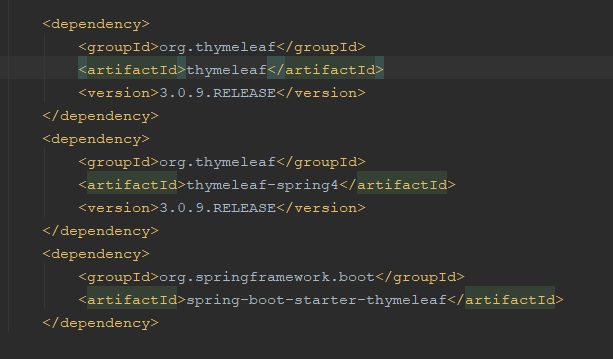 、
、
在application.properties中添加
#thymelea模板配置

spring.thymeleaf.prefix=classpath:/templates/

spring.thymeleaf.suffix=.html

spring.thymeleaf.mode=HTML5

spring.thymeleaf.encoding=UTF-8

#热部署文件,页面不产生缓存,及时更新

spring.thymeleaf.cache=false

spring.resources.chain.strategy.content.enabled=true

spring.resources.chain.strategy.content.paths=/**
4、先运行项目,防止出现问题,启动项目。
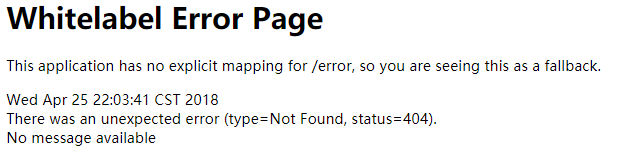
先建个类测试
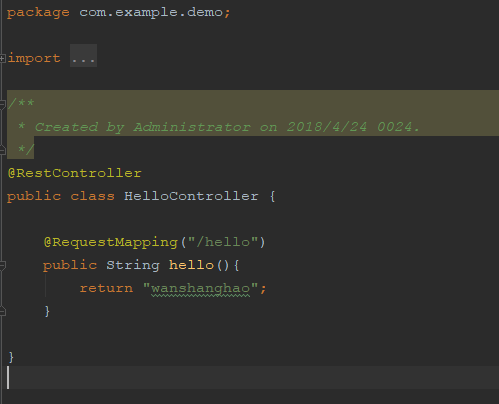
启动项目后,在浏览器中输入http://127.0.0.1:8080/hello,出现 wanshanghao
5 现在开始写mvc
package com.example.demo.controller;

/**

 * Created by Administrator on 2018/4/24 0024.

 */

    import com.example.demo.domain.User;

    import com.example.demo.repository.UserRepository;

    import org.springframework.beans.factory.annotation.Autowired;

    import org.springframework.ui.Model;

    import org.springframework.web.bind.annotation.GetMapping;

    import org.springframework.web.bind.annotation.PathVariable;

    import org.springframework.web.bind.annotation.PostMapping;

    import org.springframework.web.bind.annotation.RequestMapping;

    import org.springframework.web.bind.annotation.RestController;

    import org.springframework.web.servlet.ModelAndView;

    import java.util.List;

/**

     * 用户控制器.

     *

     */

    @RestController

    @RequestMapping("/users")

    public class UserController {

        @Autowired

        private UserRepository userRepository;

        /**

         * 从 用户存储库 获取用户列表

         * @return

         */

        private List<User> getUserlist() {

            return userRepository.listUser();

        }

        /**

         * 查询所用用户

         * @return

         */

        @GetMapping

        public ModelAndView list(Model model) {

            model.addAttribute("userList", getUserlist());

            model.addAttribute("title", "用户管理");

            return new ModelAndView("users/list", "userModel", model);

        }

        /**

         * 根据id查询用户

         * @return

         */

        @GetMapping("{id}")

        public ModelAndView view(@PathVariable("id") Long id, Model model) {

            User user = userRepository.getUserById(id);

            model.addAttribute("user", user);

            model.addAttribute("title", "查看用户");

            return new ModelAndView("users/view", "userModel", model);

        }

        /**

         * 获取 form 表单页面

         * @return

         */

        @GetMapping("/form")

        public ModelAndView createForm(Model model) {

            model.addAttribute("user", new User());

            model.addAttribute("title", "创建用户");

            return new ModelAndView("users/form", "userModel", model);

        }

        /**

         * 新建用户

         * @param user

         * @return

         */

        @PostMapping

        public ModelAndView create(User user) {

            user = userRepository.saveOrUpateUser(user);

            return new ModelAndView("redirect:/users");

        }

        /**

         * 删除用户

         * @param id

         * @return

         */

        @GetMapping(value = "delete/{id}")

        public ModelAndView delete(@PathVariable("id") Long id, Model model) {

            userRepository.deleteUser(id);

            model.addAttribute("userList", getUserlist());

            model.addAttribute("title", "删除用户");

            return new ModelAndView("users/list", "userModel", model);

        }

        /**

         * 修改用户

         */

        @GetMapping(value = "modify/{id}")

        public ModelAndView modifyForm(@PathVariable("id") Long id, Model model) {

            User user = userRepository.getUserById(id);

            model.addAttribute("user", user);

            model.addAttribute("title", "修改用户");

            return new ModelAndView("users/form", "userModel", model);

        }

}
package com.example.demo.domain;

/**

 * Created by nicknailo on 2018/4/24 0024.

 */

import javax.xml.bind.annotation.XmlRootElement;

/**

 * User.

 */

@XmlRootElement // mediatype 转为xml

public class User {

    private long id; // 用户的唯一标识

    private String name;

    private int age;

    public User() {

    }

    public User(String name, int age) {

        this.name = name;

        this.age = age;

    }

    public long getId() {

        return id;

    }

    public void setId(long id) {

        this.id = id;

    }

    public String getName() {

        return name;

    }

    public void setName(String name) {

        this.name = name;

    }

    public int getAge() {

        return age;

    }

    public void setAge(int age) {

        this.age = age;

    }

}
package com.example.demo.repository;

/**

 * Created by nicknailo on 2018/4/24 0024.

 */

import com.example.demo.domain.User;

import java.util.List;

/**

 * 用户仓库.

 */

public interface UserRepository {

    /**

     * 新增或者修改用户

     * @param user

     * @return

     */

    User saveOrUpateUser(User user);

    /**

     * 删除用户

     * @param id

     */

    void deleteUser(Long id);

    /**

     * 根据用户id获取用户

     * @param id

     * @return

     */

    User getUserById(Long id);

    /**

     * 获取所有用户的列表

     * @return

     */

    List<User> listUser();

}
package com.example.demo.repository;

        import java.util.ArrayList;

        import java.util.List;

        import java.util.concurrent.ConcurrentHashMap;

        import java.util.concurrent.ConcurrentMap;

        import java.util.concurrent.atomic.AtomicLong;

        import com.example.demo.domain.User;

        import org.springframework.stereotype.Repository;

/**

 * 用户资源库.

 */

@Repository

public class UserRepositoryImpl implements UserRepository {

    private static AtomicLong counter = new AtomicLong();

    private final ConcurrentMap<Long, User> userMap = new ConcurrentHashMap<Long, User>();

    public UserRepositoryImpl(){

        User user = new User();

        user.setAge(30);

        user.setName("大西瓜");

        this.saveOrUpateUser(user);

    }

    /* (non-Javadoc)

     * @see com.waylau.spring.boot.thymeleaf.repository.UserRepository#saveUser(com.waylau.spring.boot.thymeleaf.vo.UserVO)

     */

    @Override

    public User saveOrUpateUser(User user) {

        Long id = user.getId();

        if (id <= 0) {

            id = counter.incrementAndGet();

            user.setId(id);

        }

        this.userMap.put(id, user);

        return user;

    }

    /* (non-Javadoc)

     * @see com.waylau.spring.boot.thymeleaf.repository.UserRepository#deleteUser(java.lang.Long)

     */

    @Override

    public void deleteUser(Long id) {

        this.userMap.remove(id);

    }

    /* (non-Javadoc)

     * @see com.waylau.spring.boot.thymeleaf.repository.UserRepository#getUserById(java.lang.Long)

     */

    @Override

    public User getUserById(Long id) {

        return this.userMap.get(id);

    }

    /* (non-Javadoc)

     * @see com.waylau.spring.boot.thymeleaf.repository.UserRepository#listUser()

     */

    @Override

    public List<User> listUser() {

        return new ArrayList<User>(this.userMap.values());

    }

}
footer.html
<!DOCTYPE html>

<html lang="en">

<head>

    <meta charset="UTF-8">

    <title>action is everything</title>

</head>

<body>

    <div  data-th-fragment="header">

        <h1> Thyleaf in action </h1>

        <a href = "/users">首页</a>

    </div>

</body>

</html>
header.html
<!DOCTYPE html>

<html lang="en">

<head>

    <meta charset="UTF-8">

    <title>action is everything</title>

</head>

<body>

    <div  data-th-fragment="header">

        <h1> Thyleaf in action </h1>

        <a href = "/users">首页</a>

    </div>

</body>

</html>
form.html
<!DOCTYPE html>

<html xmlns:th="http://www.thymeleaf.org" >

<head>

    <meta charset="UTF-8">

    <title>welcome</title>

</head>

<body>

    <div th:replace="fragments/header :: header">...</div>

    <h3 th:text="${userModel.title}">Welcome to springboot</h3>

    <form action="/users" th:action="@{/users}" method="post" th:object="${userModel.user}" >

        <input type="hidden" name="id" th:value="${userModel.user.id}">

        名称:<br>

        <input type="text" name="name" th:value="*{name}">

        <br>

        年龄:<br>

        <input type="text" name="age" th:value="*{age}">

        <input type="submit" value="提交">

    </form>

    <div th:replace="~{fragments/footer :: footer}">...</div>

</body>

</html>
list.html
<!DOCTYPE html>

<html xmlns:th="http://www.thymeleaf.org" >

<!--<html xmlns="http://www.w3.org/1999/xhtml" xmlns:th="http://www.thymeleaf.org" >-->

<!--<html xmlns:th="http://www.thymeleaf.org"-->

      <!--xmlns:layout="http://www.ultraq.net.nz/thymeleaf/layout">-->

<head>

    <meta charset="UTF-8">

    <title>今晚天气好</title>

</head>

<body>

    <div th:replace="fragments/header :: header">...</div>

    <h3 th:text="${userModel.title}">Welcome to springboot</h3>

    <div>

        <!--<a href="/users/form.html" th:href="@{/users/form}">创建用户</a>-->

        <a th:href="@{/users/form}" >创建用户</a>

    </div>

    <table border="1">

        <thead>

            <tr>

                <td>ID</td>

                <td>Age</td>

                <td>Name</td>

            </tr>

        </thead>

        <tbody>

            <tr th:if="${userModel.userList.size()} eq 0">

                <td colspan="3">没有用户信息!!</td>

            </tr>

            <tr th:each="user : ${userModel.userList}">

                <td th:text="${user.id}">1</td>

                <td th:text="${user.age}">11</td>

                <td>

                    <a href="view.html" th:href="@{'/users/' + ${user.id}}"

                       th:text="${user.name}">wss</a></td>

            </tr>

        </tbody>

    </table>

    <div th:replace="~{fragments/footer :: footer}">...</div>

</body>

</html>
view.html
<!DOCTYPE html>

<html xmlns:th="http://www.thymeleaf.org" >

<head>

    <meta charset="UTF-8">

    <title>Title</title>

</head>

<body>

    <div th:replace="fragments/header :: header">...</div>

    <h3 th:text="${userModel.title}">Welcome to springboot</h3>

    <div>

        <p><strong>ID:</strong><span id="id" th:text="${userModel.user.id}"></span></p>

        <p><strong>Age:</strong><span id="id" th:text="${userModel.user.age}"></span></p>

        <p><strong>Name:</strong><span id="id" th:text="${userModel.user.name}"></span></p>

    </div>

    <div>

        <a  th:href="@{'/users/delete/' + ${userModel.user.id} }">删除</a>

        <a  th:href="@{'/users/modify/' + ${userModel.user.id} }">修改</a>

    </div>

    <div th:replace="~{fragments/footer :: footer}">...</div>

</body>

</html>
代码运行效果,

springboot+maven+thymeleaf配置实战demo的更多相关文章
- OpenFaaS实战之九:终篇,自制模板(springboot+maven+jdk8)
欢迎访问我的GitHub https://github.com/zq2599/blog_demos 内容:所有原创文章分类汇总及配套源码,涉及Java.Docker.Kubernetes.DevOPS ...
- 【原】无脑操作:IDEA + maven + Shiro + SpringBoot + JPA + Thymeleaf实现基础授权权限
上一篇<[原]无脑操作:IDEA + maven + Shiro + SpringBoot + JPA + Thymeleaf实现基础认证权限>介绍了实现Shiro的基础认证.本篇谈谈实现 ...
- 【原】无脑操作:IDEA + maven + Shiro + SpringBoot + JPA + Thymeleaf实现基础认证权限
开发环境搭建参见<[原]无脑操作:IDEA + maven + SpringBoot + JPA + Thymeleaf实现CRUD及分页> 需求: ① 除了登录页面,在地址栏直接访问其他 ...
- IDEA上创建 Maven SpringBoot+mybatisplus+thymeleaf 项目
概述 在WEB领域,Java也是在不断的探索和改进,从开始的JSP--->Struts1--->Struts2+Spring--->Spring MVC--->SpringBo ...
- SpringBoot+Maven 多模块项目的构建、运行、打包实战
前言 最近在做一个很复杂的会员综合线下线上商城大型项目,单模块项目无法满足多人开发和架构,很多模块都是重复的就想到了把模块提出来,做成公共模块,基于maven的多模块项目,也好分工开发,也便于后期微服 ...
- 多环境配置 - SpringBoot 2.7.2 实战基础
优雅哥 SpringBoot 2.7.2 实战基础 - 06 -多环境配置 在一个项目的开发过程中,通常伴随着多套环境:本地环境 local.开发环境 dev.集成测试环境 test.用户接受测试环境 ...
- 清晰梳理最全日志框架关系与日志配置-SpringBoot 2.7.2 实战基础
优雅哥 SpringBoot 2.7.2 实战基础 - 07 - 日志配置 Java 中日志相关的 jar 包非常多,log4j.log4j2.commons-logging.logback.slf4 ...
- SpringBoot热部署配置(基于Maven)
热部署的意思是只要类中的代码被修改了,就能实时生效,而不用重启项目.spring-boot-devtools 是一个为开发者服务的一个模块,其中最重要的功能就是自动应用代码更改到最新的App上面去.原 ...
- 工具IDEA 配置springboot+maven项目
工具IDEA 配置springboot+maven项目 首先安装IDEA,至于怎么安装就不介绍了.. 第一步 配置maven环境 首先安装maven,先在网上下载一个maven包.在IDEA的sett ...
随机推荐
- Google新出品的数据格式:Protocol Buffer
转:http://blog.csdn.net/carson_ho/article/details/70037693
- win7无法登陆linux samba共享
网上查了一下资料,总共有以下几种做法: 1.防火墙 2. Open the Run command and type "secpol.msc". Press "conti ...
- c# 折半查找法实现代码
] { , , , , , , , , , , , , , , , , , , , }; , i; string j, k; , ); ) { k = String.Format("未找到{ ...
- [Luogu 2221] HAOI2012 高速公路
[Luogu 2221] HAOI2012 高速公路 比较容易看出的线段树题目. 由于等概率,期望便转化为 子集元素和/子集个数. 每一段l..r中,子集元素和为: \(\sum w_{i}(i-l+ ...
- mysql 替换
最近贷后好烦,经常让我修改短信模板内容,以前一两个模板手动就直接改了.随着短信模板的增多,手动一个个改内容就不行了. 今天又让我把短信模板中所有的的电话号码修改一下:如:010-44444444改为0 ...
- 取(m堆)石子游戏 HDU2176(Nim博弈)
题目链接:http://acm.hdu.edu.cn/showproblem.php?pid=2176 题目: Problem Description m堆石子,两人轮流取.只能在1堆中取.取完者胜. ...
- Git彻底删除历史提交记录的方法
有时候我们可能会遇到git提交错误的情况,比如提交了敏感的信息或者提交了错误的版本.这个时候我们想将提交到代码库的记录删除,我们要怎么做呢? 首先,我们需要找到我们需要回滚到的提交点的hash,可以使 ...
- perl输出重定向
use utf8; open A, ">&STDOUT"; open STDOUT, ">AA.txt"; print STDOUT 'AB ...
- Java 关于微信公众号支付总结附代码
很多朋友第一次做微信支付的时候都有蒙,但当你完整的做一次就会发现其实并没有那么难 业务流程和应用场景官网有详细的说明:https://pay.weixin.qq.com/wiki/doc/api/js ...
- python 异步IO( asyncio) 协程
python asyncio 网络模型有很多中,为了实现高并发也有很多方案,多线程,多进程.无论多线程和多进程,IO的调度更多取决于系统,而协程的方式,调度来自用户,用户可以在函数中yield一个状态 ...