
Ubuntu下Zabbix结合percona监控mysql数据
按道理来说zabbix就自带的MySQL插件来监控mysql数据库,但是你会发现,自带的mysql监控项是很少的,根本满足不了公司的需求。
由于它本身自带的模板太过简单了,所以需要做更详细的监控,而percona就提供了这个详细监控的模版以及脚本,解决了监控不全面的问题。
percona插件是安装在zabbix-agent端的
1、percona插件安装:
首先需要下载php依赖:
ubuntu@ubuntu:~$ apt-get install php
1、官网下载percona包
https://www.percona.com/downloads/percona-monitoring-plugins/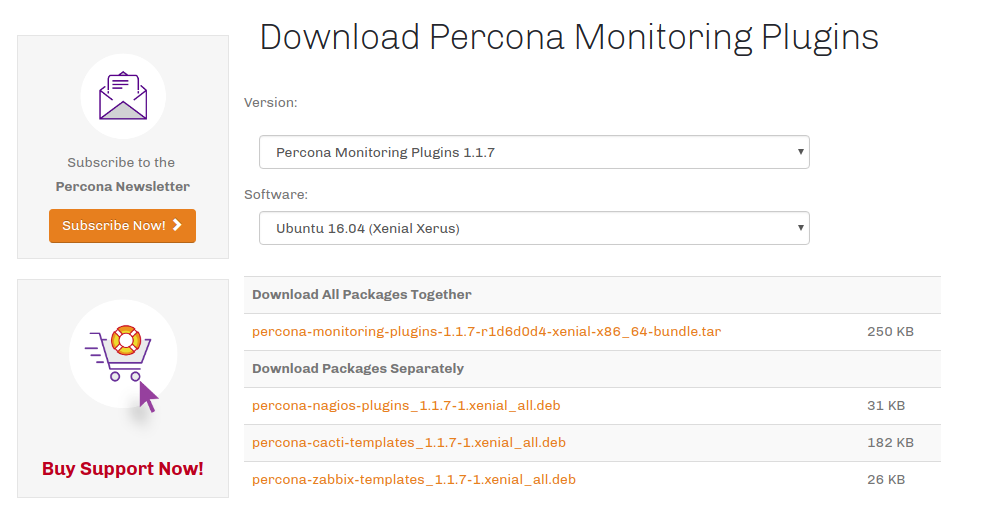 Version: percona的版本
Software:linux server的版本
Download All Packages Together: 一起下载所有包
Download Packages Separately: 单独下载某个包
这里我们选择下载最后一个包-percona-zabbix-templates-1.1.7-1.xenial_all.ded
2、命令下载
ubuntu@ubuntu:~$ wget https://www.percona.com/downloads/percona-monitoring-plugins/1.1.7/binary/debian/xenial/x86_64/percona-zabbix-templates_1.1.7-1.xenial_all.deb
3、安装percona包
ubuntu@ubuntu:~$ sudo dpkg -i percona-zabbix-templates_1.1.7-1.xenial_all.deb

ubuntu@ubuntu:~$ cd /var/lib/zabbix/percona/templates && ll

total 292

drwxr-xr-x 2 root root   4096 Mar 25 14:19 ./

drwxr-xr-x 4 root root   4096 Mar 15 11:39 ../

-rw-r--r-- 1 root root  18866 Dec  8  2016 userparameter_percona_mysql.conf

-rw-r--r-- 1 root root 269258 Dec  8  2016 zabbix_agent_template_percona_mysql_server_ht_2.0.9-sver1.1.7.xml
2、编辑配置文件
1、添加模板文件路径
ubuntu@ubuntu:~$ sudo mv /var/lib/zabbix/percona/templates/userparameter_percona_mysql.conf /etc/zabbix_agentd.conf.d/
2、修改MySQL的执行命令文件,更改mysql的用户与密码:
ubuntu@ubuntu:~$ sudo vim /var/lib/zabbix/percona/scripts/get_mysql_stats_wrapper.sh
RES=`HOME=~ /usr/bin/mysql -uroot -pzabbix -e 'SHOW SLAVE STATUS\G' | egrep '(Slave_IO_Running|Slave_SQL_Running):' | awk -F: '{print $2}' | tr '\n' ','`
mysql -u用户名 -p密码,这里根据自己实际情况修改
3、修改 ss_get_mysql_stats.php文件
ubuntu@ubuntu:~$ sudo vim /var/lib/zabbix/percona/scripts/ss_get_mysql_stats.php
$mysql_user = 'root';
$mysql_pass = 'zabbix';
4、重启zabbix客户端
[root@node2 templates]# /etc/init.d/zabbix_agentd restart
5、导入mysql的监控模板
模板需要先导入桌面
ubuntu@ubuntu:~$ sudo sz /var/lib/zabbix/percona/templates/zabbix_agent_template_percona_mysql_server_ht_2.0.9-sver1.1.7.xml
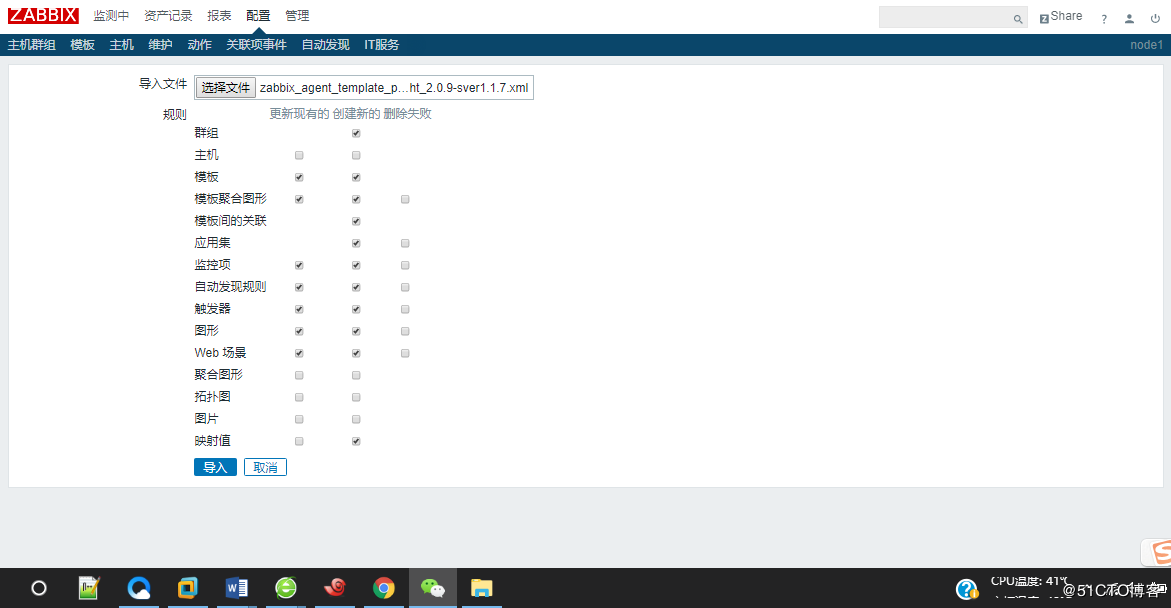
图1
6、导入出错
出现“标签无效 "/zabbix_export/date": "YYYY-MM-DDThh:mm:ssZ" 预计”,如图2所示:
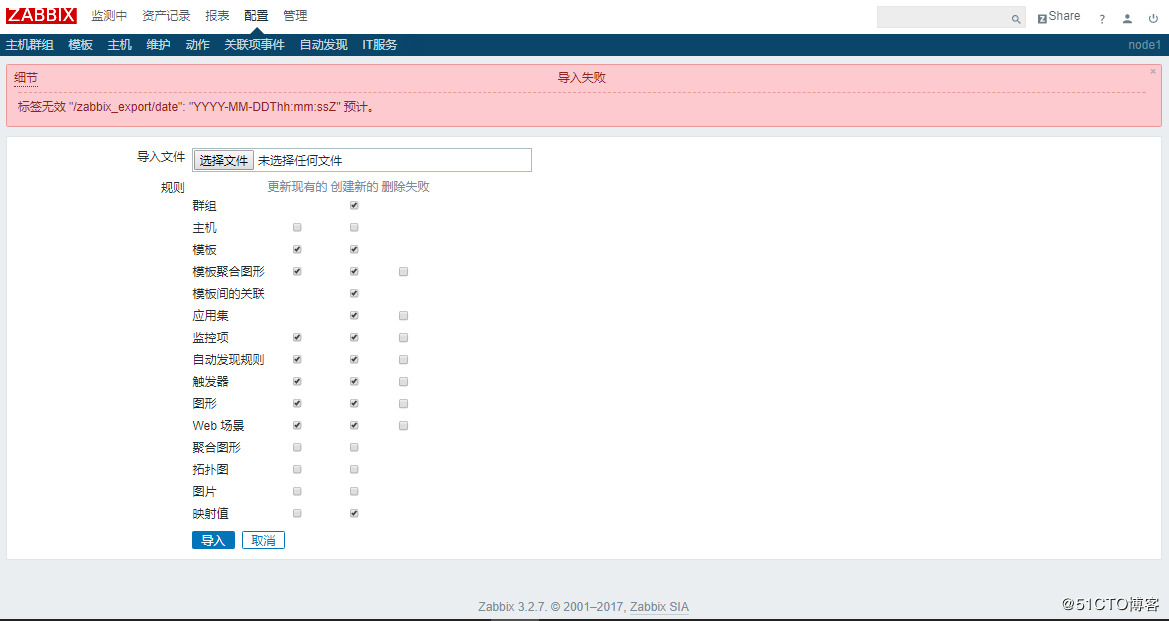
图2
解决方法:百度了一下说将zabbix_agent_template_percona_mysql_server_ht_2.0.9-sver1.1.7.xml导入zabbix2.4版本中再导出。之后将新的导出xml导入到3.2中问题解决。
7、关联模板Template Percona MySQL Server
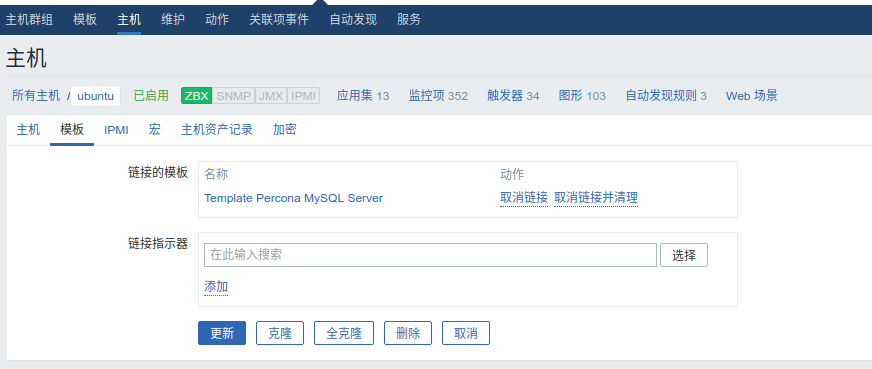
可以发现自带的监控项就一百多了,图形四十多个。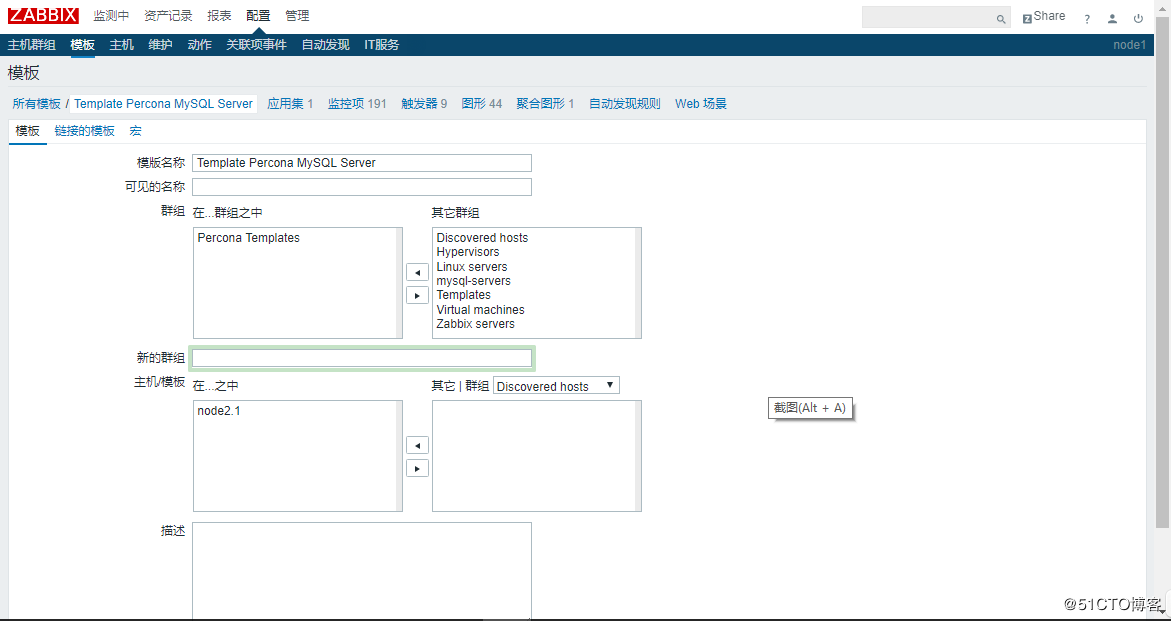
图3
8、查看监控图像,出数据如图4、图5所示:
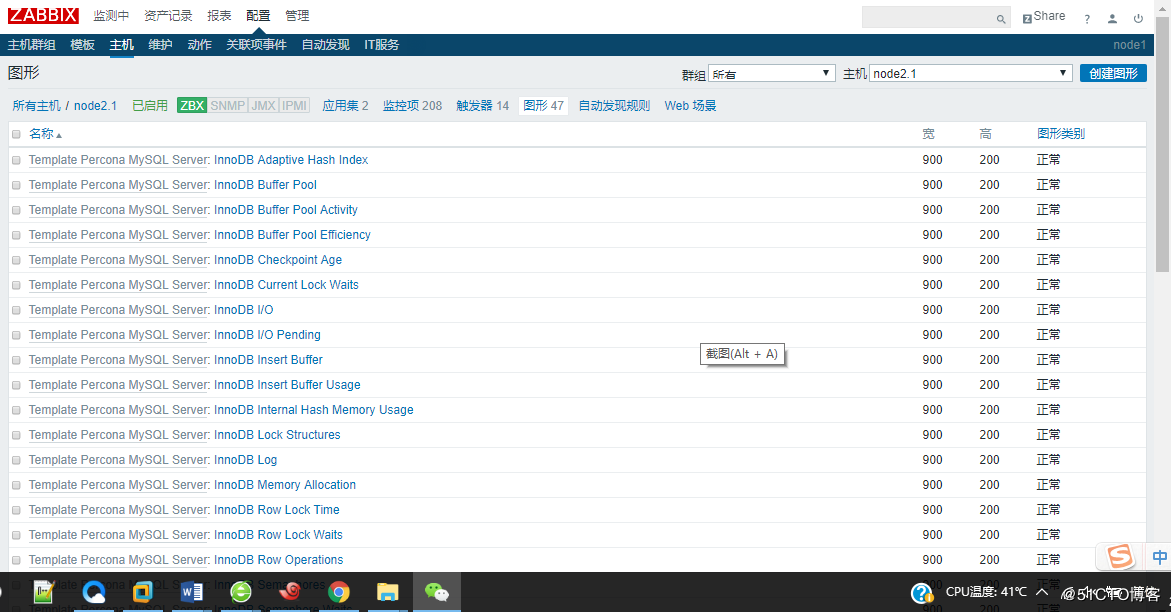
图4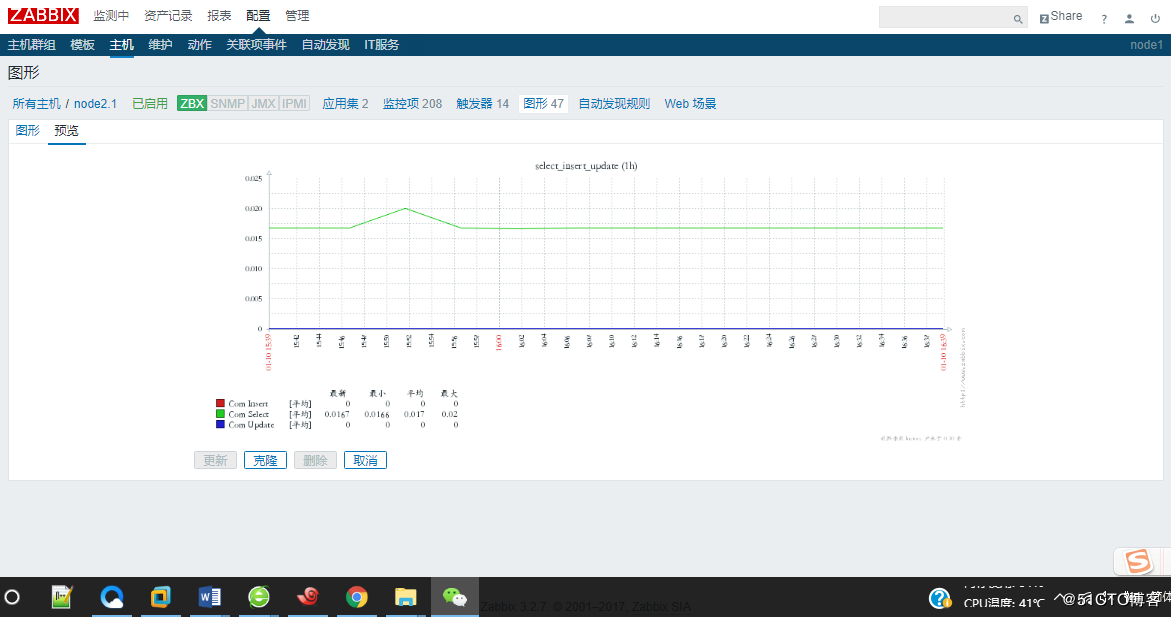
9、碰到问题:
55392:20170914:014811.374 item "SLAVE1:MySQL.State-none" became not supported: Value "rm: cannot remove `/tmp/192.168.174.133-mysql_cacti_stats.txt': Operation not permitted

21" of type "string" is not suitable for value type "Numeric (float)"

55392:20170914:014813.403 item "SLAVE1:MySQL.State-other" became not supported: Value "rm: cannot remove `/tmp/192.168.174.133-mysql_cacti_stats.txt': Operation not permitted

0" of type "string" is not suitable for value type "Numeric (float)"
执行测试发现发现是文件权限不对:
[root@slave1 zabbix]# zabbix_get -s 192.168.174.133 -p 10050 -k  "MySQL.Threads-connected"

rm: cannot remove `/tmp/192.168.174.133-mysql_cacti_stats.txt': Operation not permitted
[root@slave1 zabbix]# ls -alt /tmp/192.168.174.133-mysql_cacti_stats.txt

-rw-r--r--. 1 root root 1422 Sep 14 01:41 /tmp/192.168.174.133-mysql_cacti_stats.txt
修改权限后测试正常:
[root@slave1 zabbix]# chown zabbix:zabbix /tmp/192.168.174.133-mysql_cacti_stats.txt

[root@slave1 zabbix]# zabbix_get -s 192.168.174.133 -p 10050 -k  "MySQL.Threads-connected"

22
[root@slave1 zabbix]# zabbix_get -s 192.168.174.133 -p 10050 -k  "MySQL.Key-read-requests"

152
查看日志也正常:
[root@slave1 zabbix]# tail -f zabbix_server.log

55393:20170914:015126.082 item "SLAVE1:MySQL.innodb-transactions" became not supported: cannot convert value to numeric type

55394:20170914:015127.098 item "SLAVE1:MySQL.Key-buf-bytes-unflushed" became not supported: Value "rm: cannot remove `/tmp/192.168.174.133-mysql_cacti_stats.txt': Operation not permitted

0" of type "string" is not suitable for value type "Numeric (float)"

55392:20170914:015128.100 item "SLAVE1:MySQL.Key-buf-bytes-used" became not supported: Value "rm: cannot remove `/tmp/192.168.174.133-mysql_cacti_stats.txt': Operation not permitted

1530880" of type "string" is not suitable for value type "Numeric (float)"

55392:20170914:015129.120 item "SLAVE1:MySQL.key-buffer-size" became not supported: Value "rm: cannot remove `/tmp/192.168.174.133-mysql_cacti_stats.txt': Operation not permitted

8388608" of type "string" is not suitable for value type "Numeric (float)"

55395:20170914:015130.166 item "SLAVE1:MySQL.Key-read-requests" became not supported: cannot convert value to numeric type

55393:20170914:015131.169 item "SLAVE1:MySQL.Key-reads" became not supported: cannot convert value to numeric type

55393:20170914:015132.182 item "SLAVE1:MySQL.Key-write-requests" became not supported: cannot convert value to numeric type

55392:20170914:015252.792 item "SLAVE1:MySQL.slave-lag" became supported

55393:20170914:015253.795 item "SLAVE1:MySQL.Slave-open-temp-tables" became supported

55393:20170914:015255.830 item "SLAVE1:MySQL.slave-running" became supported

55395:20170914:015256.873 item "SLAVE1:MySQL.slave-stopped" became supported

55393:20170914:015304.906 item "SLAVE1:MySQL.State-closing-tables" became supported

55392:20170914:015305.913 item "SLAVE1:MySQL.State-copying-to-tmp-table" became supported

55395:20170914:015306.925 item "SLAVE1:MySQL.State-end" became supported

55392:20170914:015307.934 item "SLAVE1:MySQL.State-freeing-items" became supported
Ubuntu下Zabbix结合percona监控mysql数据的更多相关文章
- Zabbix通过percona监控MySQL
因为Zabbix自带的MySQL监控没有提供可以直接使用的Key,所以一般不采用,业界的同学们都使用Percona Monitoring Plugins 监控 MySQL的方式 Percona介绍 P ...
- zabbix通过第三方插件percona监控mysql数据库
zabbix通过第三方插件percona监控mysql数据库 ...
- Ubuntu下Zabbix安装及使用问题
1.configure: error: MySQL library not found MySQL library not found root@kallen:~# apt-get install l ...
- Ubuntu下Zabbix服务器监控工具部署
Ubuntu下Zabbix服务器监控工具部署 一 安装安装Apache.Mysql.Php.zabbix sudo apt-get update sudo apt-get install apache ...
- 分布式监控系统Zabbix-3.0.3-完整安装记录(7)-使用percona监控MySQL
前面已经介绍了分布式监控系统Zabbix-3.0.3-完整安装记录(2)-添加mysql监控,但是没有提供可以直接使用的Key,太过简陋,监控效果不佳.要想更加仔细的监控Mysql,业内同学们都会选择 ...
- zabbix自动发现监控mysql
一. 数据库给只读权限 1.1 grant usage on *.* to 'zabbix'@'127.0.0.1' identified by 'zabbix'; flush privileges; ...
- zabbix入门之监控MySQL
zabbix入门之监控MySQL 这里使用的是zabbix官方自带的MySQL监控模板. 首先确保在被监控主机安装zabbix-agent.zabbix-sender,并且将主机加入监控节点.具体操作 ...
- CentOS下使用MyTop实时监控MySQL
CentOS下使用MyTop实时监控MySQL MyTop的项目页面为:http://jeremy.zawodny.com/mysql/mytop/ MyTop安装 $ yum -y install ...
- Ubuntu下使用C语言连接Mysql 8.0客户端教程
Ubuntu下如何C语言程序连接MYSQL 8.0(全教程) 1. 安装GCC(略) 2. 安装mysql(本人使用的是最新MySQL 8.0版本) sudo apt install mysql-cl ...
随机推荐
- Tesseract-OCR-05-主要API功能介绍
Tesseract-05-主要API功能介绍 tesseract本身代码是由c/c++混编而成的,其中有用的简单的接口函数几乎都是在baseapi.h中 从其处理过程中,不难得出: 它还需要有一个im ...
- OC Copy and MutableCopy的使用
#import <Foundation/Foundation.h> @interface Student : NSObject <NSCopying> // copy代表set ...
- linux 安装pip 和python3
前言: python3应该是python的趋势所在,当然目前争议也比较大,这篇随笔的主要目的是记录在linux6.4下搭建python3环境的过程 以及碰到的问题和解决过程. 另外,如果本机安装了py ...
- 制作炫酷雪花背景的jQuery插件
插件使用十分简单,代码已经放至我的GitHub,大家可以下载以及使用或者更新改进代码. HTML代码源码: <!DOCTYPE html> <html> <head> ...
- xwork-2.1.2.jar与xwork-core-2.1.6.jar的区别是什么? 在线等待 先谢谢了
两个包是一样,都是struts2的核心包.不过有时下在的struts2的jar包中只有xwordk-core-2.1.6.jar包.做项目的时候最好两个都导入.
- 洛谷 P4593 【[TJOI2018]教科书般的亵渎】
题目分析 一眼看上去就像是一个模拟题目,但是\(n\)的范围过大. 冷静分析一下发现难点在于如何快速求出幂和. 考虑使用伯努利数. \(B_0=1\) \(B_n=-\frac{1}{n+1}\sum ...
- 简要总结 数据仓库VS数据库
版权声明:本文为博主原创文章,未经博主同意不得转载. https://blog.csdn.net/wl101yjx/article/details/31015367 本文简要总结以下两个问题,旨在高速 ...
- thinkPHP输出sql语句(3.2和5.0通用)
//5.0$qwe = db::table('think_user')->where('id',1)->fetchsql()->column('name'); dump($qwe); ...
- Vue通过input筛选数据
<div id="app"> <input v-model='search' /> <ul> <li v-for="item i ...
- Mabatis入门案例
log4j.properties # Global logging configuration #\u5728\u5f00\u53d1\u9636\u6bb5\uff0c\u8bbe\u7f6e\u4 ...