
nginx安装说明
安装配置如下:
/etc/nginx 目录
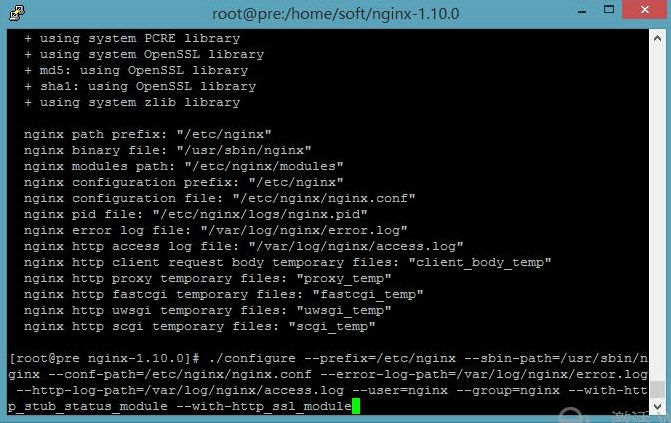
/home/nginx目录
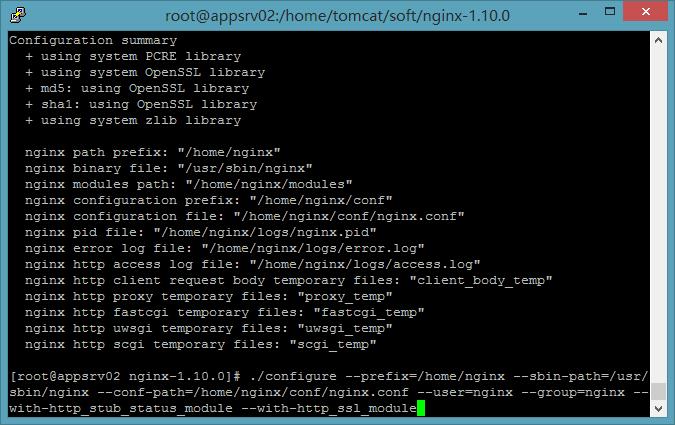
--prefix=/home/nginx --sbin-path=/usr/sbin/nginx --conf-path=/home/nginx/conf/nginx.conf --user=nginx --group=nginx --with-http_stub_status_module --with-http_ssl_module
安装Nginx时报错
下图是没有添加任何配置参数的截图:./configure
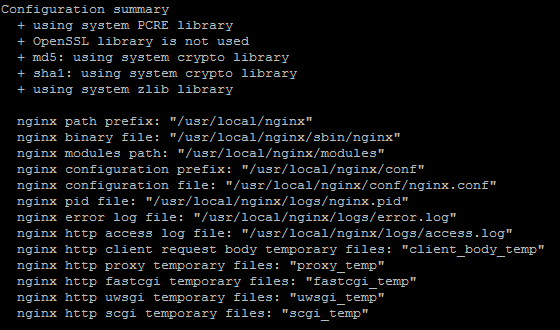
[emerg]: getpwnam(“nginx”) failed
--prefix=/etc/nginx

--sbin-path=/usr/sbin/nginx

--conf-path=/etc/nginx/nginx.conf

--error-log-path=/var/log/nginx/error.log

--http-log-path=/var/log/nginx/access.log

--pid-path=/var/run/nginx.pid

--lock-path=/var/run/nginx.lock

--http-client-body-temp-path=/var/cache/nginx/client_temp

--http-proxy-temp-path=/var/cache/nginx/proxy_temp

--http-fastcgi-temp-path=/var/cache/nginx/fastcgi_temp

--http-uwsgi-temp-path=/var/cache/nginx/uwsgi_temp

--http-scgi-temp-path=/var/cache/nginx/scgi_temp

--user=nginx

--group=nginx

--with-http_ssl_module

--with-http_realip_module

--with-http_addition_module

--with-http_sub_module

--with-http_dav_module

--with-http_flv_module

--with-http_mp4_module

--with-http_gunzip_module

--with-http_gzip_static_module

--with-http_random_index_module

--with-http_secure_link_module

--with-http_stub_status_module

--with-http_auth_request_module

--with-threads

--with-stream

--with-stream_ssl_module

--with-http_slice_module

--with-mail

--with-mail_ssl_module

--with-file-aio

--with-http_v2_module

--with-ipv6
相关配置说明如下:
--prefix=<path> - Nginx安装路径。如果没有指定,默认为 /usr/local/nginx。
--sbin-path=<path> - Nginx可执行文件安装路径。只能安装时指定,如果没有指定,默认为<prefix>/sbin/nginx。
--conf-path=<path> - 在没有给定-c选项下默认的nginx.conf的路径。如果没有指定,默认为<prefix>/conf/nginx.conf。
--pid-path=<path> - 在nginx.conf中没有指定pid指令的情况下,默认的nginx.pid的路径。如果没有指定,默认为 <prefix>/logs/nginx.pid。
--lock-path=<path> - nginx.lock文件的路径,默认为<prefix>/logs/nginx.lock
--error-log-path=<path> - 在nginx.conf中没有指定error_log指令的情况下,默认的错误日志的路径。如果没有指定,默认为 <prefix>/logs/error.log。
--http-log-path=<path> - 在nginx.conf中没有指定access_log指令的情况下,默认的访问日志的路径。如果没有指定,默认为 <prefix>/logs/access.log。
--user=<user> - 在nginx.conf中没有指定user指令的情况下,默认的nginx使用的用户。如果没有指定,默认为 nobody。
--group=<group> - 在nginx.conf中没有指定user指令的情况下,默认的nginx使用的组。如果没有指定,默认为 nobody。
--builddir=DIR - 指定编译的目录
配置nginx启动脚本:
将附件中的nginx脚本保存到/etc/init.d/nginx文件,并修改两个地方:
nginx=”/usr/sbin/nginx” 修改成nginx执行程序的路径。
conffile=”/etc/nginx/nginx.conf” 修改成配置文件的路径。
保存后,就可以通过该脚本对nginx服务进行管理了:
使用chkconfig进行管理
上面的方法完成了用脚本管理nginx服务的功能,但是还是不太方便,比如要设置nginx开机启动等。这时可以使用chkconfig来设置。
先将nginx服务加入chkconfig管理列表:
chkconfig --add /etc/init.d/nginx
加完这个之后,就可以使用service对nginx进行启动,重启等操作了。
$ service nginx start

$ service nginx stop

$ service nginx reload

...
设置终端模式开机启动:
$ chkconfig --level 3 nginx on
附件中nginx为启动脚本 nginx启动脚本
Centos 7 添加服务启动方法:
CentOS 7的服务systemctl脚本存放在:/usr/lib/systemd/,有系统(system)和用户(user)之分,需要开机不登陆就能运行的程序,存在系统服务里,即:/usr/lib/systemd/system目录下。
把启动脚本放到路径/usr/lib/systemd/system/下,执行systemctl enable nginx.service令既可以完成开机启动服务的设置
操作服务相关的命令:
设置开机自启动
systemctl enable nginx.service
手动启动nginx服务
systemctl start nginx.service
停止开机自启动
systemctl disable nginx.service
查看服务当前状态
systemctl status nginx.service
重新启动服务
systemctl restart nginx.service
nginx安装说明的更多相关文章
- zabbix 3.0.3 (nginx)安装过程中的问题排错记录
特殊注明:安装zabbix 2.4.8和2.4.6遇到2个问题,如下:找了很多解决办法,实在无解,只能换版本,尝试换(2.2.2正常 | 3.0.3正常)都正常,最后决定换3.0.3 1.Error ...
- Nginx 安装以及反向代理配置(windows)
安装 windows 下 Nginx 安装非常简单,下载地址 http://nginx.org/en/download.html. 选择红框这个,下载下来是个 zip 文件,解压.这时我们双击根目录的 ...
- nginx安装与配置
一.在线安装 ubuntu 安装 sudo apt-get install nginx 安装后文件结构为: 配置文件:/etc/nginx ,并且每台虚拟主机已经安排在 /etc/nginx/site ...
- Windows下将nginx安装为服务运行
今天看到nginx这个小服务器软件正式版更新到了1.4.2,想玩下它.这个服务器软件虽小,但功能强大,是开源软件,有着良好的性能,被很多个人.企业,甚至大型企业所使用! 由于是在Windows下,所以 ...
- windows下nginx安装、配置与使用(转载)
目前国内各大门户网站已经部署了Nginx,如新浪.网易.腾讯等:国内几个重要的视频分享网站也部署了Nginx,如六房间.酷6等.新近发现Nginx 技术在国内日趋火热,越来越多的网站开始部署Nginx ...
- 阿里云服务器Linux CentOS安装配置(八)nginx安装、配置、域名绑定
阿里云服务器Linux CentOS安装配置(八)nginx安装.配置.域名绑定 1.安装nginx yum -y install nginx 2.启动nginx service nginx star ...
- Linux系统下Nginx安装详解
该随笔为个人原创,后期会根据项目实践实时更新,如若转载,请注明出处,方便大家获得最新博文! 注:安装Nginx需要Linux系统已经安装 openssl-fips-2.0.2.tar.gz zli ...
- Linux下查看Nginx安装目录、版本号信息?
Linux环境下,怎么确定Nginx是以那个config文件启动的? 输入命令行: ps -ef | grep nginx 摁回车,将出现如下图片: master process 后面的就是 ngi ...
- nginx安装及负载均衡配置
Nginx (“engine x”) 是一个高性能的 HTTP 和 反向代理 服务器,也是一个 IMAP/POP3/SMTP 代理服务器. Nginx 是由 Igor Sysoev 为俄罗斯访问量第二 ...
- nginx安装方式
1.首先安装pcre库 获取pcre到一个目录 wget http://ftp.exim.llorien.org/pcre/pcre-8.21.tar.gz 解压缩pcre包 tar -zxvf pc ...
随机推荐
- keycloack docker 本地运行
参考github地址:https://github.com/jboss-dockerfiles/keycloak 首先使用git 下载该项目 使用docker-compose运行项目,需要进入至doc ...
- python版GetTickCount()
time.clock() return the current processor time as a floating point number expressed in seconds. 即返回一 ...
- 【转载】LruCache 源码解析
原文地址:https://github.com/LittleFriendsGroup/AndroidSdkSourceAnalysis/blob/master/article/LruCache%E6% ...
- 洛谷P3195 [HNOI2008] 玩具装箱 [DP,斜率优化,单调队列优化]
题目传送门 题目描述 P教授要去看奥运,但是他舍不下他的玩具,于是他决定把所有的玩具运到北京.他使用自己的压缩器进行压缩,其可以将任意物品变成一堆,再放到一种特殊的一维容器中.P教授有编号为1...N ...
- START法则
用途:在做项目总结以及阶段性报告等的时候,可以很好的帮自己对整个工作过程进行梳理和总结,很好的表现出自己分析问题的清晰性.条理性和逻辑性. 定义:STAR法则是情境(situation).任务(tas ...
- POJ 2348 Euclid's Game 博弈论
http://poj.org/problem?id=2348 顺便说,必应翻译真的好用,比谷歌翻译好用100倍. 很难判断这道题的具体博弈类型. 有两种写法,一种是找规律,一种是推理得到关系后循环(或 ...
- 【Splay】【启发式合并】hdu6133 Army Formations
题意:给你一颗树,每个结点的儿子数不超过2.每个结点有一个权值,一个结点的代价被定义为将其子树中所有结点的权值放入数组排序后,每个权值乘以其下标的和.让你计算所有结点的代价. 二叉树的条件没有用到. ...
- 【主席树】Gym - 101237A - MEX-Query
主席树里每个值的位置存当前该值出现的最右位置. 如果root[r]的前缀主席树中,某值最右位置大于等于l,说明该值出现在了l,r中. 所以主席树维护区间最小值,如果左半值域的最小值<l,则说明左 ...
- Vue实例与渲染
1 Vue框架 1.1 vue与jQuery区别 jQuery仍然是操作DOM的思想,jQuery主要用来写页面特效 Vue是前端框架(MVVM),对项目进行分层.处理数据 1.2 前端框架 angu ...
- Perl中的数组&哈希应用
哈希和数组是Perl中较为常用的结构,本文则重点讨论数组和哈希的一些基本用法,供广大喜爱Perl的同学们交流学习. 哈希 Perl中的哈希表类似于Python中的字典结构,由(键=>值)对构成, ...