
application.xml
application.xml Deployment Descriptor Elements
The following sections describe the application.xml file.
The application.xml file is the deployment descriptor for Enterprise Application Archives. The file is located in the META-INF subdirectory of the application archive. It must begin with the following DOCTYPE declaration:
<!DOCTYPE application PUBLIC "-//Sun Microsystems,

Inc.//DTD J2EE Application 1.2//EN"

"http://java.sun.com/j2ee/dtds/application_1_2.dtd">
The following diagram summarizes the structure of the application.xml deployment descriptor.
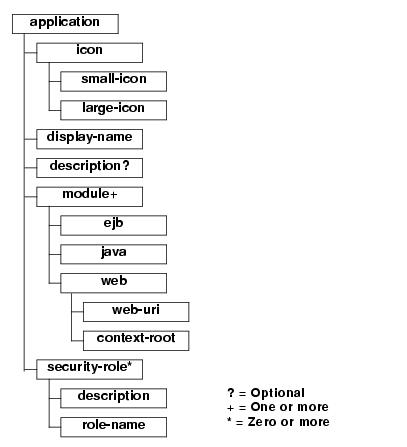
The following sections describe each of the elements that can appear in the file.
application
application is the root element of the application deployment descriptor. The elements within the application element are described in the following sections.
icon
The icon element specifies the locations of small and large images that represent the application in a GUI tool. This element is not currently used by WebLogic Server.
small-icon
Optional. Specifies the location for a small (16x16 pixel) .gif or .jpg image used to represent the application in a GUI tool. Currently, this is not used by WebLogic Server.
large-icon
Optional. Specifies the location for a large (32x32 pixel) .gif or .jpg image used to represent the application in a GUI tool. Currently, this element is not used by WebLogic Server.
display-name
Optional. The display-name element specifies the application display name, a short name that is intended to be displayed by GUI tools.
description
The optional description element provides descriptive text about the application.
module
The application.xml deployment descriptor contains one module element for each module in the Enterprise Archive file. Each module element contains an ejb, java, or web element that indicates the module type and location of the module within the application. An optional alt-dd element specifies an optional URI to the post-assembly version of the deployment descriptor.
ejb
Defines an EJB module in the application file. Contains the path to an EJB JAR file in the application.
Example:
<ejb>petStore_EJB.jar</ejb>
java
Defines a client application module in the application file.
Example:
<java>client_app.jar</java>
web
Defines a Web application module in the application file. The web element contains a web-uri element and a context-root element.
- web-uri
Defines the location of a Web module in the application file. This is the name of the .war file.
- context-root
Required. Specifies a context root for the Web application.
Example:
<web>

    <web-uri>petStore.war</web-uri>

    <context-root>estore</context-root>

</web>
security-role
The security-role element contains the definition of a security role which is global to the application. Each security-role element contains an optional description element, and a role-name element.
description
Optional. Text description of the security role.
role-name
Required. Defines the name of a security role or principal that is used for authorization within the application. Roles are mapped to WebLogic Server users or groups in the application.xml deployment descriptor.
Example:
<security-role>

    <description>the gold customer role</description>

    <role-name>gold_customer</role-name>

</security-role>

<security-role>

    <description>the customer role</description>

    <role-name>customer</role-name>

</security-role>
application.xml的更多相关文章
- Jsoup问题---获取http协议请求失败 org.jsoup.UnsupportedMimeTypeException: Unhandled content type. Must be text/*, application/xml, or application/xhtml+xml.
Jsoup问题---获取http协议请求失败 1.问题:用Jsoup在获取一些网站的数据时,起初获取很顺利,但是在访问某浪的数据是Jsoup报错,应该是请求头里面的请求类型(ContextType)不 ...
- Jsoup获取部分页面数据失败 org.jsoup.UnsupportedMimeTypeException: Unhandled content type. Must be text/*, application/xml, or application/xhtml+xml.
用Jsoup在获取一些网站的数据时,起初获取很顺利,但是在访问某浪的数据是Jsoup报错,应该是请求头里面的请求类型(ContextType)不符合要求. 请求代码如下: private static ...
- application/xml和text/xml的区别
XML有两个MIME类型,application/xml和text/xml,它们之间的区别是: text/xml忽略xml文件头中的关于编码的设定(<?xml version="1.0 ...
- 有关spring-servlet.xml 和 application.xml的配置信息讲解(这两个配置信息的区别在哪里)
在使用springmvc时需要配置得信息有两个,一个是spring-servlet.xml和applcation.xml: 首先两个文件的的存放位置就有一点的不同(见下图),application.x ...
- Springmvc配置文件application.xml 和 spring-servlet.xml
文章来源:http://blog.csdn.net/tengdazhang770960436/article/details/48395885 1.SpringMVC 的配置分为两部分 applica ...
- application/xml 和 text/xml的区别
application/xml and text/xml的区别 经常看到有关xml时提到"application/xml" 和 "text/xml"两种类型, ...
- ssh2的application.xml配置文件配置详解
ssh2的application.xml配置文件配置详解 1.导入其他的配置文件.在ssh项目中可以导入其他的配置文件,导入的格式为: <import resource="clas ...
- 在properties.xml中定义变量,在application.xml中取值问题
如果为application.xml中的变量赋默认值,同时又在properties.xml中变量赋值,而加载后是取不到properties.xml中的值的问题. 解决这个问题需要加上黑体部分配置: & ...
- Spring------约束导入和application.xml的引入方式
1.spring约束的导入 2.SSH常用约束 3.application.xml的引入方式 <1.通过ClassPathXmlApplicationContext引入配置文件applicati ...
- webservice接口问题:Payload: No message body writer has been found for class domain, ContentType: application/xml
当在使用cxf-rs的webservice的时候,有时候在传输数据,会发生这种错误 错误代码: Response-Code: 500 Content-Type: text/plain Headers: ...
随机推荐
- 【BZOJ】1229 [USACO2008 Nov]toy 玩具
[算法]三分+贪心 [题解] 数据范围小的版本:餐巾计划 这题不是使用最小费用流的下凸函数,因为这题是要满足最大流,那么这题到底在三分什么? 三分的这个函数,其实是总费用随卖出玩具量变化而变化的函数, ...
- js中三种定义变量 const, var, let 的区别
js中三种定义变量的方式const, var, let的区别 1.const定义的变量不可以修改,而且必须初始化. 1 const b = 2;//正确 2 // const b;//错误,必须初始化 ...
- C# 文件操作常用方法总结
需引用 System.IO Path为绝对路径 检测指定目录是否存在 Directory.Exists(Path) 创建目录 Directory.CreateDirectory(Path) 删除目录 ...
- linux非阻塞的socket EAGAIN的错误处理【转】
转自:http://blog.csdn.net/tianmohust/article/details/8691644 版权声明:本文为博主原创文章,未经博主允许不得转载. 在Linux中使用非阻塞的s ...
- python基础===python实现截图
python实现全屏截图: from PIL import ImageGrab im = ImageGrab.grab() im.save('F:\\12.png')
- 相册框架之AssetsLibrary
看到项目中用到AssetsLibrary这个框架, 所以研究了一下 其实很简单 - (void)getAlbumPhoto { NSString *tipTextWhenNoPhotosAuthori ...
- 通过file中的字段查询MySQL内容
# -*- coding: utf-8 -*- import MySQLdb with open(r"./user.txt", "r") as f: f.rea ...
- 安装sysstat出现软件包依赖问题
需要使用Linux性能分析工具iostat 和sar等, 这就需要安装软件包sysstat 在Ubuntu 12.04下运行sudo apt-get install sysstat,出现如下问题: 开 ...
- Tomcat手动指定jdk路径
Windows系统: 修改bin下的setclasspath.bat,在开头处添加: rem set specific jdkset JAVA_HOME=%CATALINA_HOME%\jdk1.8. ...
- Django-form組件補充
自定义验证规则 方法一: 1 2 3 4 5 6 7 8 9 10 from django.forms import Form from django.forms import widgets f ...