
微信小程序日历课表
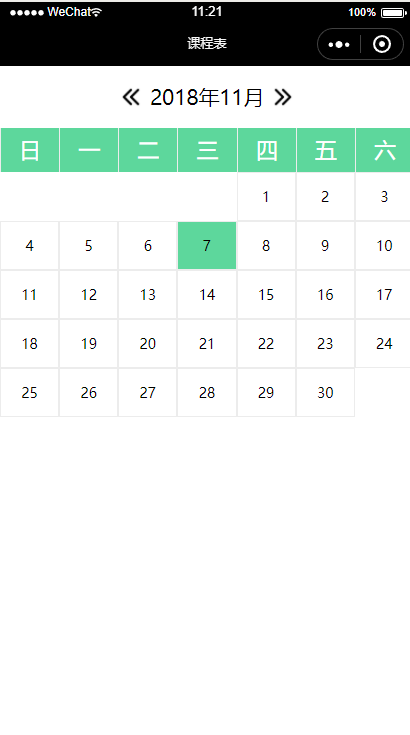
最近项目中使用到了日历,在网上找了一些参考,自己改改,先看效果图
wxml
<view class="date">

    <image class="direction" src="/images/icon/left.png" bindtap='minusMouth'/>

    <label>{{year}}年{{mouth}}月</label>

    <image class="direction" src="/images/icon/right.png" bindtap='plusMouth' />

</view>

<view class="header">

    <block wx:for="{{weeks}}" wx:key="index">

        <text class="weeks-item-text">{{item}}</text>

    </block>

</view>

<view class="body-days">

    <block wx:for="{{days}}" wx:key="index">

      <block wx:if="{{item !== nowDate }}">

        <view class="days-item" data-date='{{year}}-{{mouth}}-{{item}}' bindtap='selDate'>

            <view class="days-item-text" wx:if="{{item>0}}">{{item}}</view>

        </view>

      </block>

      <block wx:else>

        <view class="days-item days-item-selected" data-date='{{year}}-{{mouth}}-{{item}}' bindtap='selDate'>

            <view class="days-item-text" wx:if="{{item>0}}">{{item}}</view>

        </view>

      </block>

    </block>

</view>
wxss
.date {

    display: flex;

    flex-direction: row;

    justify-content: center;

    line-height: 3em;

    align-items: center;

}

.direction {

    width: 40rpx;

    margin: 15rpx;

    height: 40rpx;

}

.header {

    display: flex;

    flex-direction: row;

    background: #5DD79C;

    color: #fff

}

.weeks-item-text {

    width: 100%;

    line-height: 2em;

    font-size: 40rpx;

    text-align: center;

    border-left: 1px solid #ececec;

}

.body-days {

    display: flex;

    flex-direction: row;

    flex-wrap: wrap;

    text-align: center;

}

.days-item {

    width: 14.285%;

    display: flex;

    justify-content: center;

    align-content: center;

}

.days-item-text {

    width: 60rpx;

    padding: 26rpx;

    font-size: 26rpx;

    /* border-radius: 50%; */

    border: 1rpx solid #ececec;

    /* margin-top: 34rpx;

    margin-bottom: 34rpx; */

    color: #000;

}

/* 选中状态 */

.days-item-selected{

  background: #5DD79C

}
js
Page({

  /**

   * 页面的初始数据

   */

  data: {

    date: [],

    weeks: ['日', '一', '二', '三', '四', '五', '六'],

    days: [],

    year: 0,

    mouth: 0,

    nowDate:''

  },

  /**

   * 生命周期函数--监听页面加载

   */

  onLoad: function (options) {

    let that = this

    that.dateData();

    var myDate = new Date();//获取系统当前时间

    var nowDate = myDate.getDate();

    that.setData({

      nowDate:nowDate

    })

    console.log(nowDate)

  },

  // 点击日期事件

  selDate:function(e){

    let that = this

    // 日期 年月日

    var seldate = e.currentTarget.dataset.date

    // 天

    var selday = e.currentTarget.dataset.day

    console.log(seldate)

    that.setData({

      nowDate: selday

    })

  },

  //用户点击减少月份

  minusMouth: function () {

    var mouth;

    var year;

    mouth = this.data.mouth

    year = this.data.year

    mouth--

    if (mouth < 1) {

      mouth = 12

      year--

    }

    this.updateDays(year, mouth)

  },

  //用户点击增加月份

  plusMouth: function () {

    var mouth;

    var year;

    mouth = this.data.mouth

    year = this.data.year

    mouth++

    if (mouth > 12) {

      mouth = 1

      year++

    }

    this.updateDays(year, mouth)

  },

  dateData: function () {

    var date = new Date();

    var days = [];

    var year = date.getFullYear();

    var mouth = date.getMonth() + 1;

    this.updateDays(year, mouth)

  },

  updateDays: function (year, mouth) {

    var days = [];

    var dateDay, dateWeek;

    // 根据日期获取每个月有多少天

    var getDateDay = function (year, mouth) {

      return new Date(year, mouth, 0).getDate();

    }

    //根据日期获取这天是周几

    var getDateWeek = function (year, mouth) {

      return new Date(year, mouth - 1, 1).getDay();

    }

    dateDay = getDateDay(year, mouth)

    dateWeek = getDateWeek(year, mouth)

    // console.log(dateDay);

    // console.log(dateWeek);

    //向数组中添加天

    for (let index = 1; index <= dateDay; index++) {

      days.push(index)

    }

    //向数组中添加,一号之前应该空出的空格

    for (let index = 1; index <= dateWeek; index++) {

      days.unshift(0)

    }

    this.setData({

      days: days,

      year: year,

      mouth: mouth,

    })

  }

})
微信小程序日历课表的更多相关文章
- 微信小程序日历面板插件
创建日历面板组件,在components目录下创建calendar文件夹 1.calendar.js // components/calendar/calendar.js var util = req ...
- 微信小程序日历插件
1/ wxml代码 <view class="timePick"> <picker mode="date" fields="mo ...
- 微信小程序 --- 日历效果
wxml部分: <view class='box1' style='width: {{ sysW * 7 }}px'> <view class='dateBox'>{{ yea ...
- 微信小程序日历签到
近日做了一个项目需要用到日历插件,在网上找了一部分感觉跟项目不对口,所以就查考了其他的日历插件做了一个. 需求: 如图: 代码如下: index.wxml: <!--pages/pictrues ...
- [组件封装]微信小程序-日历
描述 切换月份, 当天文案为今天, 日期背景变色, 日期红点标识, 点击选中日期. 效果 源码 calendar.wxml <view class="component"&g ...
- 微信小程序--图片相关问题合辑
图片上传相关文章 微信小程序多张图片上传功能 微信小程序开发(二)图片上传 微信小程序上传一或多张图片 微信小程序实现选择图片九宫格带预览 ETL:微信小程序之图片上传 微信小程序wx.preview ...
- 微信小程序资源整理
微信小程序相关的文档.教程.开源项目等资源的整理,以便于开发学习使用. —— —— 收录仅作个人学习使用,涉及侵权行为及时联系: maple_6392@163.com 项目地址:GitHub | 码云 ...
- 微信小程序+OLAMI(欧拉蜜)自然语言API接口制作智能查询工具--快递、聊天、日历等
微信小程序最近比较热门,再加上自然语义理解也越来越被人关注,于是我想赶赶潮流,做一个小程序试试.想来想去快递查询应该是一种比较普遍的需求. 如果你也在通过自然语言接口做点什么,希望我的这篇博客能帮到你 ...
- 微信小程序横版日历,tab栏
代码地址如下:http://www.demodashi.com/demo/14243.html 一.前期准备工作 软件环境:微信开发者工具 官方下载地址:https://mp.weixin.qq.co ...
随机推荐
- SQL Server表分区(水平分区及垂直分区)
什么是表分区? 表分区分为水平表分区和垂直表分区,水平表分区就是将一个具有大量数据的表,进行拆分为具有相同表结构的若干个表:而垂直表分区就是把一个拥有多个字段的表,根据需要进行拆分列,然后根据某一个字 ...
- hadoop安装hive及java调用hive
1.安装hive 在安装hive前,请确保已经安装好了hadoop,如未安装,请参考centoos 安装hadoop集群进行安装: 1.1.下载,解压 下载hive2.1.1:http://mirr ...
- Java学习笔记45(多线程二:安全问题以及解决原理)
线程安全问题以及解决原理: 多个线程用一个共享数据时候出现安全问题 一个经典案例: 电影院卖票,共有100座位,最多卖100张票,买票方式有多种,网上购买.自主售票机.排队购买 三种方式操作同一个共享 ...
- Testing - 软件测试知识梳理 - 基础概念
测试是为了度量和提高被测试软件的质量,对测试软件进行工程设计.实施.维护的的整个生命周期过程. 仅仅发现Bug是测试的初步,而分析出根本原因推动问题的解决,却要有很深的功底. 不同的测试岗位从事不同的 ...
- 看看一个老程序员如何手写SpringMVC!
人见人爱的Spring已然不仅仅只是一个框架了.如今,Spring已然成为了一个生态.但深入了解Spring的却寥寥无几.这里,我带大家一起来看看,我是如何手写Spring的.我将结合对Spring十 ...
- 如何开始DDD
在开始DDD之前,你需要了解DDD的一些基础知识,聚合(AggregateRoot).实体(Entity).值对象(ValueObject),工厂(Factory),仓储(Repository)和领域 ...
- 【Promise】Promise实现请求超时处理(基本版)
首先是没有加入请求超时的情况: var http = require('http'); var url = require('url'); function get(addr) { return ne ...
- 选择排序——Selection Sort
基本思想: 在长度为N的无序数组中,第一次遍历n-1个数,找到最小的数值与第一个元素交换:第二次遍历n-2个数,找到最小的数值与第二个元素交换:...第n-1次遍历,找到最小的数值与第n-1个元素交换 ...
- 使用crypt配置Basic Auth登录认证
简介 Basic Auth用于服务端简单的登录认证,通常使用服务器Nginx.Apache本身即可完成.比如我们要限定某个域名或者页面必须输入用户名.密码才能登录,但又不想使用后端开发语言,此时Bas ...
- Deep learning with Python 学习笔记(10)
生成式深度学习 机器学习模型能够对图像.音乐和故事的统计潜在空间(latent space)进行学习,然后从这个空间中采样(sample),创造出与模型在训练数据中所见到的艺术作品具有相似特征的新作品 ...