
react 表格扩展与编辑
项目里有个需求是点击表格某行的工料机,显示对应定额下的工料机的表格数据,并能对两个表格进行增删改查,效果如下:
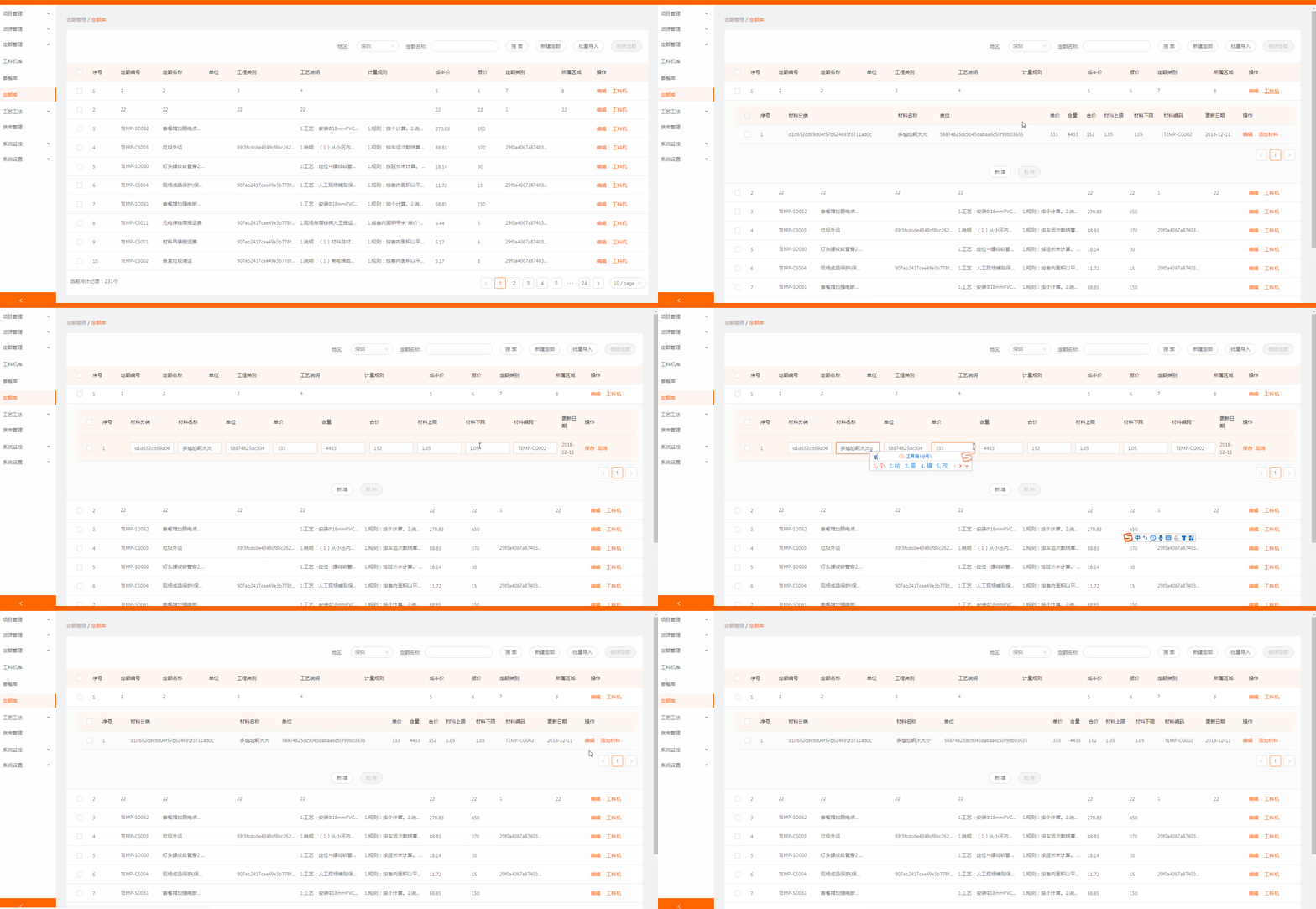
代码如下:
// 引入 Component 组件

import React, { Component } from 'react';

//定义子表显示

const EditableContext = React.createContext();

const EditableRow = ({ form, index, ...props }) => (

  <EditableContext.Provider value={form}>

    <tr {...props} />

  </EditableContext.Provider>

);

const EditableFormRow = Form.create()(EditableRow);

class EditableCell extends React.Component {

  getInput = () => {

    // 这里也可以通过其他值判断显示下拉框(比如dataIndex)

    if (this.props.inputType === 'number') {

      return <InputNumber />;

    }

    return <Input />;

  };

  render() {

    const {

      editing,

      dataIndex,

      title,

      inputType,

      record,

      index,

      ...restProps

    } = this.props;

    return (

      <EditableContext.Consumer>

        {(form) => {

          const { getFieldDecorator } = form;

          return (

            <td {...restProps}>

              {editing ? (

                <FormItem style={{ margin: 0 }}>

                  {getFieldDecorator(dataIndex, {

                    rules: [{

                      required: true,

                      message: `请填写${title}!`,

                    }],

                    initialValue: record[dataIndex],

                  })(this.getInput())}

                </FormItem>

              ) : restProps.children}

            </td>

          );

        }}

      </EditableContext.Consumer>

    );

  }

}

// 将上面的配置应用到子表中

const components = {

      body: {

        row: EditableFormRow,

        cell: EditableCell,

      },

    };

// 原始colums要把想要编辑的editable设置为true

const columns = OriginalColumns.map((col) => {

      if (!col.editable) {

        return col;

      }

      return {

        ...col,

        onCell: record => ({

          record,

          inputType: col.dataIndex === 'age' ? 'number' : 'text',

          dataIndex: col.dataIndex,

          title: col.title,

          editing: this.isEditing(record),   // 判断编辑哪一行

        }),

      };

    });

     // 判断编辑哪一行的函数

     isEditing = record => record.id === this.state.editingKey;

    <Table

      rowClassName="tableInput"

      dataSource={tableData}

      columns={columns}

      pagination={false}

      rowKey={record=>record.id}

      getTableData={this.getTableData}

      components={components}

      rowSelection={rowSelection}

      expandedRowRender={this.expandedRowRender}    // 字列表扩展函数

      expandIconColumnIndex={-1}                    // 隐藏默认展开样式

      expandIconAsCell={false}                      // 隐藏默认展开样式

      expandedRowKeys={expandedRowKeys}             // 展开的行的id

      defaultExpandedRowKeys={expandedRowKeys}

    />

  // 点击工料机,获取对应数据并展开,收起上一个展开的

  expandTable=(record,index)=>{

    this.setState({childTabData:[],parentTabId:record.id})

    // 如果已经展开则收回,否则展开

    let expandedRows = this.state.expandedRowKeys;

    if(expandedRows.includes(record.id)){

      this.setState({expandedRowKeys: []})

    }else{

      // 获取数据并展开当前行

      let arr = []

      arr.push(record.id)

      this.getStuffListById(record.id)

      this.setState({expandedRowKeys:arr})

    }

  }
react 表格扩展与编辑的更多相关文章
- js 实现表格的可编辑状态
实现表格的可编辑,点击修改以后可以编辑,代码如下: <!DOCTYPE HTML> <html> <head> <meta charset="utf ...
- Griddle, griddle-react 一个REACT 表格组件
Griddle, griddle-react 一个REACT 表格组件: http://griddlegriddle.github.io/Griddle/index.html
- AngularJS进阶(十一)AngularJS实现表格数据的编辑,更新和删除
AngularJS实现表格数据的编辑,更新和删除 效果 实现 首先,我们先建立一些数据,当然你可以从你任何地方读出你的数据 var app = angular.module('plunker', [' ...
- jquery-easyui 中表格的行编辑功能
具体实现代码如下: <table id="tt"></table> $('#tt').datagrid({ title:'Editable DataGrid ...
- 【react表格组件】material-table 基本用法 & 组件override
教程: https://mbrn.github.io/material-table/#/ https://material-ui.com/api/table/ github: https://gith ...
- ExtJs 日期相加,Grid表格列可编辑
1.日期相加: Ext.Date.add(new Date(), Ext.Date.DAY, 15) 2.Grid表格列可编辑: { header : "实际已交货量", ...
- vue-split-table【表格合并和编辑插件】
前言 vue-split-table应用的效果图 vue-split-table开源地址,欢迎star,现在已经开源和同步到npm上轻松搞定表格拆分或者合并,编辑,再也不怕被产品怼啦 1.核心源码分析 ...
- Bootstrap:Bootstrap_table第一篇:快速用bootstrap_table(支持参数)筛选并展示数据,固定表格前几列,实现表格单元格编辑
1.准备好css和js文件 <link rel="stylesheet" href="https://maxcdn.bootstrapcdn.com/bootstr ...
- 用react编写一个可以编辑的表格
这只一个雏形,但是可以用了.难点是如何点击每行后面的编辑按钮,让当前行的格子都变成input. import {Component} from 'react' const Action = props ...
随机推荐
- Java8 中的 default
之前的版本里 interface 中的方法必须是抽象方法,不能有方法体.现在可以添加 interface 内方法,只需要在方法的前面加一个 default 关键字,表示属于接口内部默认存在的方法. 如 ...
- Oracle 修改表 Alter Table...
--增加列ALTER TABLE Student add sex number(2);--删除列ALTER TABLE Student drop column sex;--更改列属性 ALTER TA ...
- image的srcset属性
介绍 响应式页面中经常用到根据屏幕密度设置不同的图片.这个时候肯定会用到image标签的srcset属性.srcset属性用于设置不同屏幕密度下,image自动加载不同的图片.用法如下: <im ...
- 补充:MySQL整理
1.连接Mysql 格式: mysql -h主机地址 -u用户名 -p用户密码 1.连接到本机上的MYSQL.首先打开DOS窗口,然后进入目录mysql\bin,再键入命令mysql -u root ...
- JavaScript——this
一.JavaScript 函数与方法 <body> <script type="text/javascript"> function show(){ con ...
- HTML经典模板总结(地址)
HTML经典模板总结 地址:http://download.csdn.net/tag/html%E6%A8%A1%E6%9D%BF?from=singlemessage
- linux学习:【第3篇】远程连接及软件安装
狂神声明 : 文章均为自己的学习笔记 , 转载一定注明出处 ; 编辑不易 , 防君子不防小人~共勉 ! linux学习:[第3篇]远程连接及软件安装 远程连接 xshell , xftp软件官网 : ...
- 记一次ADG备库归档目录满导致的延时处理
报错如下,原因是存放传过来的归档的目录+HWAREDODG满了,MRP进程无法应用归档,我在手动传了几个归档之后发现不是GAP,select * from V$ARCHIVE_GAP 显示没有GAP. ...
- 在centos7下安装python3的步骤
环境搭建 准备工具: centos7:http://mirror.bit.edu.cn/centos/7/isos/x86_64/CentOS-7-x86_64-DVD-1611.iso virtus ...
- git本地仓库 push到远程仓库出现错误
! [rejected] master -> master (fetch first) error: failed to push some refs to hint: Updates were ...