
react 表格扩展与编辑
项目里有个需求是点击表格某行的工料机,显示对应定额下的工料机的表格数据,并能对两个表格进行增删改查,效果如下:
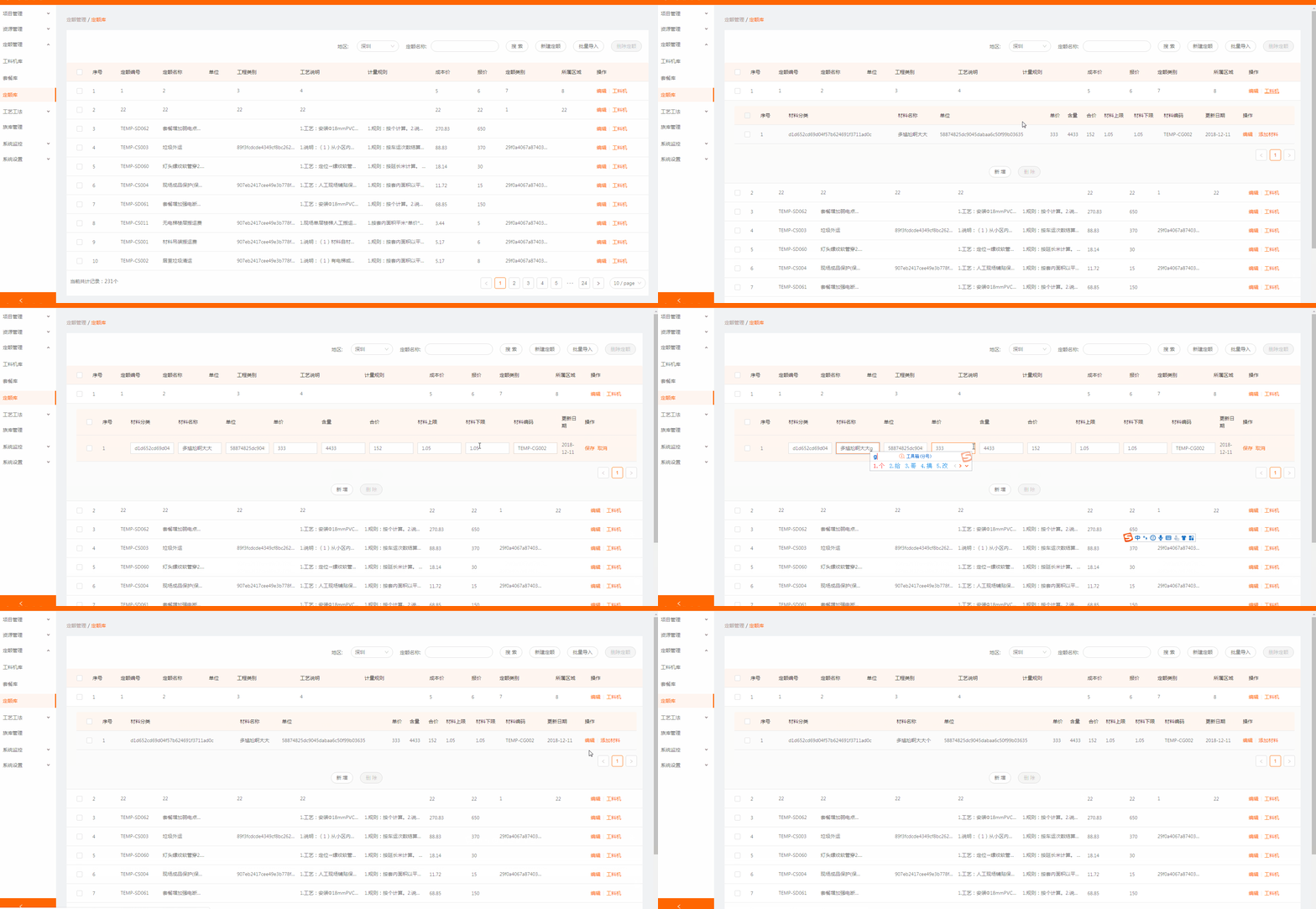
代码如下:
// 引入 Component 组件

import React, { Component } from 'react';

//定义子表显示

const EditableContext = React.createContext();

const EditableRow = ({ form, index, ...props }) => (

  <EditableContext.Provider value={form}>

    <tr {...props} />

  </EditableContext.Provider>

);

const EditableFormRow = Form.create()(EditableRow);

class EditableCell extends React.Component {

  getInput = () => {

    // 这里也可以通过其他值判断显示下拉框(比如dataIndex)

    if (this.props.inputType === 'number') {

      return <InputNumber />;

    }

    return <Input />;

  };

  render() {

    const {

      editing,

      dataIndex,

      title,

      inputType,

      record,

      index,

      ...restProps

    } = this.props;

    return (

      <EditableContext.Consumer>

        {(form) => {

          const { getFieldDecorator } = form;

          return (

            <td {...restProps}>

              {editing ? (

                <FormItem style={{ margin: 0 }}>

                  {getFieldDecorator(dataIndex, {

                    rules: [{

                      required: true,

                      message: `请填写${title}!`,

                    }],

                    initialValue: record[dataIndex],

                  })(this.getInput())}

                </FormItem>

              ) : restProps.children}

            </td>

          );

        }}

      </EditableContext.Consumer>

    );

  }

}

// 将上面的配置应用到子表中

const components = {

      body: {

        row: EditableFormRow,

        cell: EditableCell,

      },

    };

// 原始colums要把想要编辑的editable设置为true

const columns = OriginalColumns.map((col) => {

      if (!col.editable) {

        return col;

      }

      return {

        ...col,

        onCell: record => ({

          record,

          inputType: col.dataIndex === 'age' ? 'number' : 'text',

          dataIndex: col.dataIndex,

          title: col.title,

          editing: this.isEditing(record),   // 判断编辑哪一行

        }),

      };

    });

     // 判断编辑哪一行的函数

     isEditing = record => record.id === this.state.editingKey;

    <Table

      rowClassName="tableInput"

      dataSource={tableData}

      columns={columns}

      pagination={false}

      rowKey={record=>record.id}

      getTableData={this.getTableData}

      components={components}

      rowSelection={rowSelection}

      expandedRowRender={this.expandedRowRender}    // 字列表扩展函数

      expandIconColumnIndex={-1}                    // 隐藏默认展开样式

      expandIconAsCell={false}                      // 隐藏默认展开样式

      expandedRowKeys={expandedRowKeys}             // 展开的行的id

      defaultExpandedRowKeys={expandedRowKeys}

    />

  // 点击工料机,获取对应数据并展开,收起上一个展开的

  expandTable=(record,index)=>{

    this.setState({childTabData:[],parentTabId:record.id})

    // 如果已经展开则收回,否则展开

    let expandedRows = this.state.expandedRowKeys;

    if(expandedRows.includes(record.id)){

      this.setState({expandedRowKeys: []})

    }else{

      // 获取数据并展开当前行

      let arr = []

      arr.push(record.id)

      this.getStuffListById(record.id)

      this.setState({expandedRowKeys:arr})

    }

  }
react 表格扩展与编辑的更多相关文章
- js 实现表格的可编辑状态
实现表格的可编辑,点击修改以后可以编辑,代码如下: <!DOCTYPE HTML> <html> <head> <meta charset="utf ...
- Griddle, griddle-react 一个REACT 表格组件
Griddle, griddle-react 一个REACT 表格组件: http://griddlegriddle.github.io/Griddle/index.html
- AngularJS进阶(十一)AngularJS实现表格数据的编辑,更新和删除
AngularJS实现表格数据的编辑,更新和删除 效果 实现 首先,我们先建立一些数据,当然你可以从你任何地方读出你的数据 var app = angular.module('plunker', [' ...
- jquery-easyui 中表格的行编辑功能
具体实现代码如下: <table id="tt"></table> $('#tt').datagrid({ title:'Editable DataGrid ...
- 【react表格组件】material-table 基本用法 & 组件override
教程: https://mbrn.github.io/material-table/#/ https://material-ui.com/api/table/ github: https://gith ...
- ExtJs 日期相加,Grid表格列可编辑
1.日期相加: Ext.Date.add(new Date(), Ext.Date.DAY, 15) 2.Grid表格列可编辑: { header : "实际已交货量", ...
- vue-split-table【表格合并和编辑插件】
前言 vue-split-table应用的效果图 vue-split-table开源地址,欢迎star,现在已经开源和同步到npm上轻松搞定表格拆分或者合并,编辑,再也不怕被产品怼啦 1.核心源码分析 ...
- Bootstrap:Bootstrap_table第一篇:快速用bootstrap_table(支持参数)筛选并展示数据,固定表格前几列,实现表格单元格编辑
1.准备好css和js文件 <link rel="stylesheet" href="https://maxcdn.bootstrapcdn.com/bootstr ...
- 用react编写一个可以编辑的表格
这只一个雏形,但是可以用了.难点是如何点击每行后面的编辑按钮,让当前行的格子都变成input. import {Component} from 'react' const Action = props ...
随机推荐
- windows 下面必备软件
弹窗拦截软件 http://www.pc6.com/pc/tcguanggaolj/
- I - The lazy programmer 贪心+优先队列
来源poj2970 A new web-design studio, called SMART (Simply Masters of ART), employs two people. The fir ...
- QT下的贪吃蛇
QT写的贪吃蛇,学习于https://www.devbean.net/2012/12/qt-study-road-2-snake-1/ 建议就学习一下开发思想,开发游戏还是用专门的编译器. 多加了墙, ...
- Mysql 索引迁移策略
Mysql 索引迁移策略 近日在核查项目中的一些慢sql时发现一个很鸡仔儿的问题,本地开发库表中索引跟生产上差距很大,又因为生产库登录各种麻烦,需要各种验证码,那么多的慢sql分给好些个人,不可能让大 ...
- Python学习之旅(二十三)
Python基础知识(22):进程和线程(Ⅰ) 1.多进程 (1)fork Python的os模块封装了常见的系统调用,其中就包括fork,可以在Python程序中轻松创建子进程 fork可以在Mac ...
- java JVM虚拟机
JVM垃圾处理方法(标记清除.复制.标记整理) 1.标记清除 标记阶段:先通过根节点,标记所有从根节点开始的对象,未被标记的为垃圾对象. 清除阶段:清除所有未被标记的对象. 2.复制算法 将原有的空间 ...
- kafka的一些参数
参考文档: https://blog.csdn.net/fengzheku/article/details/50585972 http://kafka.apache.org/documentation ...
- RFID系统 免费开源代码 开发,分享[申明:来源于网络]
RFID系统 免费开源代码 开发,分享[申明:来源于网络] 地址:http://www.codeforge.cn/s/0/RFID%E7%B3%BB%E7%BB%9F
- 浅谈Vue 项目性能优化 经验
我优化公司的项目总结的几点: 1.先查看引入的图片大小,如果太大了,可以压缩,压缩路径:https://zhitu.isux.us/ 2.代码包优化, 待下项目开发完成.进行打包源码上线环节,需要对项 ...
- python 发送无附件邮件
import smtplibimport tracebackfrom email.mime.text import MIMETextfrom config.config import * ...