
续Gulp使用入门-综合运用>使用Gulp构建一个项目
这是我的文件目录结构图
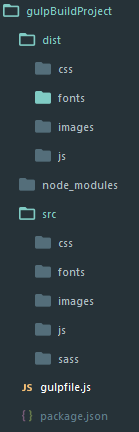 下面是我gulpfile.js的配置
'use strict'

var gulp=require('gulp');

var gutil=require('gulp-util');

var uglify=require('gulp-uglify');

var watchPath=require('gulp-watch-path');

var combiner=require('stream-combiner2');

var sourcemaps=require('gulp-sourcemaps');

var minifycss=require('gulp-minify-css');

var autoprefixer=require('gulp-autoprefixer');

var sass=require('gulp-sass');

var imagemin=require('gulp-imagemin');

var handleError=function(err){

    var colors=gutil.colors;

    console.log('\n')

    gutil.log(colors.red('Error!'))

    gutil.log('fileName: ' + colors.red(err.fileName))

    gutil.log('lineNumber: ' + colors.red(err.lineNumber))

    gutil.log('message: ' + err.message)

    gutil.log('plugin: ' + colors.yellow(err.plugin))

}

var combiner=require('stream-combiner2')

gulp.task('gutil',function(){

    gutil.log('message');

    gutil.log(gutil.colors.red('error'))

    gutil.log(gutil.colors.green('message:')+"some")

})

//压缩js

gulp.task('uglifyjs',function(){

    var combined=combiner.obj([

        gulp.src('src/js/**/*.js'),

        sourcemaps.init(),

        uglify(),

        sourcemaps.write('./'),

        gulp.dest('dist/js/')

    ])

    combined.on('error',handleError)

})

//压缩css

gulp.task('minifycss',function(){

    gulp.src('src/css/**/*.css')

        .pipe(sourcemaps.init())

        .pipe(autoprefixer({

                browsers: 'last 2 versions'

        }))

        .pipe(minifycss())

        .pipe(sourcemaps.write('./'))

        .pipe(gulp.dest('dist/css'));

})

//编译scss

gulp.task('sass',function(){

            gulp.src('src/sass/**/*.scss')

            .on('error',function(err){

                console.error('Error!',err.message)

            })

            .pipe(sourcemaps.init())

            .pipe(autoprefixer({

                browsers: 'last 2 versions'

            }))

            .pipe(sass({outputStyle: 'compact'}))

            .pipe(minifycss())

            .pipe(sourcemaps.write('./'))

            .pipe(gulp.dest('dist/css'))

})

//压缩图片

gulp.task('image', function () {

    gulp.src('src/images/**/*')

        .pipe(imagemin({

            progressive: true

        }))

        .pipe(gulp.dest('dist/images'))

})

// gulp.watch('src/js/**/*.js',function(event){

//     console.log(event);

//     当修改 src/js/log.js 文件时

//     event {

//         // 发生改变的类型,不管是添加,改变或是删除

//         type: 'changed',

//         // 触发事件的文件路径

//         path: 'D:/wamp/www/gulpBuildProject/src/js/log.js'

//     }

// })

//捕获错误信息

var handleError=function(err){

    var colors=gutil.colors;

    console.log('\n');

    gutil.log(colors.red('Error!'))

    gutil.log('filename: '+colors.red(err.filename))

    gutil.log('lineNumber: '+ colors.red(err.lineNumber))

    gutil.log('message: ' + err.message)

    gutil.log('plugin: ' + colors.yellow(err.plugin))

}

//监听js修改

gulp.task('watchjs',function(){

    gulp.watch('src/js/**/*.js',function(event){

        var paths=watchPath(event,'src/','dist/')

        paths={

            srcPath: 'src/js/log.js',

            srcdir:'src/js/',

            distPath:'dist/js/log.js',

            distDir:'dist/js',

            srcFilename:'log.js',

            distFilename:'log.js'

        }

        gutil.log(gutil.colors.green(event.type)+ ' ' + paths.srcPath)

        gutil.log('Dist '+ paths.distPath)

        var combined=combiner.obj([

            gulp.src(paths.srcPath),

            uglify(),

            gulp.dest(paths.distDir)

        ])

        // gulp.src(paths.srcPath)

        //     .pipe(uglify())

        //     .pipe(gulp.dest(paths.distDir))

        combined.on('error',handleError);

    })

})

//监听css修改

gulp.task('watchcss',function(){

    gulp.watch('src/css/**/*.css',function(event){

        var paths=watchPath(event,'src/','dist/');

        gutil.log(gutil.colors.green(event.type) + ' ' + paths.srcPath)

        gutil.log('Dist ' +paths.distPath)

        gulp.src(paths.srcPath)

            .pipe(sourcemaps.init())

            .pipe(autoprefixer({

                browsers: 'last 2 versions'

            }))

            .pipe(minifycss())

            .pipe(sourcemaps.write('./'))

            .pipe(gulp.dest(paths.distDir));

    })

})

//监听编译sass

gulp.task('watchsass',function(){

    gulp.watch('src/sass/**/*',function(event){

        var paths=watchPath(event,'src/sass/','dist/css/')

        gulp.log(gutil.colors.green(event.type)+ ' ' + paths.srcPath)

        gulp.log('Dist ' + paths.distPath)

        sass(paths.srcPath)

            .on('error',function(err){

                console.error('Error!', err.message);

            })

            .pipe(sourcemaps.init())

            .pipe(sass())

            .pipe(minifycss())

            .pipe(autoprefixer({

                browsers:'last 2 versions'

            }))

            .pipe(sourcemaps.write('./'))

            pipe(gulp.dest(paths.distDir))

    })

})

//监听压缩图片

gulp.task('watchimage', function () {

    gulp.watch('src/images/**/*', function (event) {

        var paths = watchPath(event,'src/','dist/')

        gutil.log(gutil.colors.green(event.type) + ' ' + paths.srcPath)

        gutil.log('Dist ' + paths.distPath)

        gulp.src(paths.srcPath)

            .pipe(imagemin({

                progressive: true

            }))

            .pipe(gulp.dest(paths.distDir))

    })

})

//配置文件复制任务

gulp.task('watchcopy',function(){

    gulp.watch('src/fonts/**/*',function(event){

        var paths=watchPath(event)

        gulp.log(gutil.colors.green(event.type)+ ' ' + paths.srcPath)

        gulp.log('Dist ' + paths.distPath)

        gulp.src(paths.srcPath)

            .pipe(gulp.dest(paths.distDir))

    })

})

gulp.task('copy',function(){

    gulp.src('src/fonts/**/*')

        .pipe(gulp.dest('dist/fonts/'))

})

gulp.task('default',['watchjs','watchcss','watchsass','watchimage','watchcopy'])
另外以下插件有需要也可以用得上
【gulp-plumber】例外處理
【gulp-livereload】自動重新載入頁面
【gulp-notify】gulp 處理通知
【browser-sync】瀏覽器同步檢視
续Gulp使用入门-综合运用>使用Gulp构建一个项目的更多相关文章
- 使用 gulp 构建一个项目
本章将介绍 gulp-watch-path stream-combiner2 gulp-sourcemaps gulp-autoprefixer 您还可以直接学习以下模块: 安装 Node 和 gul ...
- vue 快速入门 系列 —— 使用 vue-cli 3 搭建一个项目(上)
其他章节请看: vue 快速入门 系列 使用 vue-cli 3 搭建一个项目(上) 前面我们已经学习了一个成熟的脚手架(vue-cli),笔者希望通过这个脚手架快速搭建系统(或项目).而展开搭建最好 ...
- vue 快速入门 系列 —— 使用 vue-cli 3 搭建一个项目(下)
其他章节请看: vue 快速入门 系列 使用 vue-cli 3 搭建一个项目(下) 上篇 我们已经成功引入 element-ui.axios.mock.iconfont.nprogress,本篇继续 ...
- 2016-7-15(1)使用gulp构建一个项目
gulp是前端开发过程中自动构建项目的工具,相同作用的还有grunt.构建工具依 靠插件能够自动监测文件变化以及完成js/sass/less/html/image/css/coffee等文件的语法检查 ...
- 使用gulp构建一个项目
gulp是前端开发过程中自动构建项目的工具,相同作用的还有grunt.构建工具依靠插件能够自动监测文件变化以及完成js/sass/less/html/image/css/coffee等文件的语法检查. ...
- gulp详细入门教程
本文链接:http://www.ydcss.com/archives/18 gulp详细入门教程 简介: gulp是前端开发过程中对代码进行构建的工具,是自动化项目的构建利器:她不仅能对网站资源进行优 ...
- 续Gulp使用入门三步压缩CSS
gulp 压缩css 一.安装 gulp-minify-css 模块 提示:你需要使用命令行的 cd 切换到对应目录后进行安装操作. 在命令行输入 npm install gulp-minify-cs ...
- 【原】gulp快速入门
今天刚入职了一家新公司,结果明天就要开始项目了.上级说要用gulp来打包代码,所以今晚花了一晚来看这个gulp, 可以说已经入门了.所以做一个小小的总结 : 首先全局安装gulp npm instal ...
- gulp详细入门教程(转载)
本文转载自: gulp详细入门教程
随机推荐
- Mybatis 示例之 SelectKey
SelectKey在Mybatis中是为了解决Insert数据时不支持主键自动生成的问题,他可以很随意的设置生成主键的方式. 不管SelectKey有多好,尽量不要遇到这种情况吧,毕竟很麻烦. sel ...
- AutoMapper配置方法
在Mvc开发中,我们经常需要构建一个viewModel出来供页面使用,在PO和VO之间相互传值的时候,如果实体字段比较多的时候,那么传值将变得异常麻烦,也使得代码非常的臃肿.AutoMapper可以帮 ...
- 重构第6天:降低字段(Push Down Field)
理解:和提升字段正好相反,跟降低方法类似,就是把基类中,只有部分继承类需要用到的字段,降低到继承类自身去. 详解: 重构前代码: using System; using System.Collecti ...
- CSS浏览器兼容性写法小结
* , ie6,ie7可以识别: _和- , ie6可以识别: !important ,表示高优先级,ie7及以上,firefox都支持,ie6认识带!important的样式属性, ...
- c# tcp备忘及networkstream.length此流不支持查找解决
服务端 bool isRunning = true; MouseKeyBoard mk = new MouseKeyBoard(); void InitTcpServer(int port) { T ...
- 发布ASP.NET Core程序到Linux生产环境
原文翻译:Publish to a Linux Production Environment 作者:Sourabh Shirhatti 在这篇文章里我们将介绍如何在 Ubuntu 14.04 Serv ...
- 初识你---------Swift【下篇】
Swift中的结构体 Swift的结构体对比OC来说,可以添加初始化方法.可以遵守代理协议等,同时:Swift的Bool类型的变量也是一个结构体,所以只能选择true和false. Swift中声明结 ...
- [WP8] ListBox的Item宽度自动填满
[WP8] ListBox的Item宽度自动填满 范例下载 范例程序代码:点此下载 问题情景 开发WP8应用程序的时候,常常会需要使用ListBox作为容器来呈现各种数据集合.但是在ListBox呈现 ...
- js填写银行卡号,每隔4位数字加一个空格
1.原生js写法 !function () { document.getElementById('bankCard').onkeyup = function (event) { var v = thi ...
- Vue计算属性
github地址:https://github.com/lily1010/vue_learn/tree/master/lesson06 一 计算属性定位 当一些数据需要根据其它数据变化时,这时候就需要 ...