
transaction事务案例--银行转账
1)dao层
package cn.spring.transaction.dao;

public interface MoneyDao {

    //加钱的方法

    void addMoney(double money);

    //减钱的方法

    void subMoney(double money);

}
代码实现
(2)daoImpl层
package cn.spring.transaction.dao.impl;

import cn.spring.transaction.dao.MoneyDao;

import org.springframework.jdbc.core.JdbcTemplate;

import org.springframework.jdbc.core.support.JdbcDaoSupport;

public class MoneyDaoImpl extends JdbcDaoSupport implements MoneyDao {

    JdbcTemplate jdbcTemplate=this.getJdbcTemplate();

    @Override

    public void addMoney(double money) {

        String sql="update accounts set balance=balance+? where accountname='小明'";

        this.getJdbcTemplate().update(sql,money);

    }

    @Override

    public void subMoney(double money) {

        String sql="update accounts set balance=balance-? where accountname='小李'";

        this.getJdbcTemplate().update(sql,money);

    }

}
代码实现
(3)service层
package cn.spring.transaction.service;

public interface MoneyService {

    //转账的方法

    void transferMoney(double money);

}
代码实现
(4)serviceImpl层
package cn.spring.transaction.service.impl;

import cn.spring.transaction.dao.MoneyDao;

import cn.spring.transaction.service.MoneyService;

public class MoneyServiceImpl implements MoneyService {

    MoneyDao moneyDao;

    @Override

    public void transferMoney(double money) {

        //金额先减后加

        moneyDao.subMoney(money);

        moneyDao.addMoney(money);

    }

    public MoneyDao getMoneyDao() {

        return moneyDao;

    }

    public void setMoneyDao(MoneyDao moneyDao) {

        this.moneyDao = moneyDao;

    }

}
代码实现
(5)applicationContext.xml配置文件
<?xml version="1.0" encoding="UTF-8" ?>

<beans xmlns="http://www.springframework.org/schema/beans"

       xmlns:xsi="http://www.w3.org/2001/XMLSchema-instance"

       xmlns:aop="http://www.springframework.org/schema/aop"

       xmlns:p="http://www.springframework.org/schema/p"

       xmlns:context="http://www.springframework.org/schema/context"

       xsi:schemaLocation="http://www.springframework.org/schema/beans

       http://www.springframework.org/schema/beans/spring-beans.xsd

       http://www.springframework.org/schema/aop

       http://www.springframework.org/schema/aop/spring-aop.xsd http://www.springframework.org/schema/context http://www.springframework.org/schema/context/spring-context.xsd">

    <!--1.配置数据源   spring内置的数据源-->

    <bean id="dataSource" class="org.springframework.jdbc.datasource.DriverManagerDataSource">

        <property name="driverClassName" value="${jdbc.driver}"></property>

        <property name="url" value="${jdbc.url}"></property>

        <property name="username" value="${jdbc.username}"></property>

        <property name="password" value="${jdbc.password}"></property>

    </bean>

    <!--2.引入属性文件-->

    <context:property-placeholder location="jdbc.properties"></context:property-placeholder>

    <!--3.构建jdbcTemplate-->

    <bean id="jdbcTemplate" class="org.springframework.jdbc.core.JdbcTemplate">

        <property name="dataSource" ref="dataSource"></property>

    </bean>

    <!--4.dao-->

    <bean id="moneyDaoImpl" class="cn.spring.transaction.dao.impl.MoneyDaoImpl">

        <!--为jdbcTemplate配置数据源-->

        <property name="jdbcTemplate" ref="jdbcTemplate"></property>

    </bean>

    <!--5.service-->

    <bean id="moneyServiceImpl" class="cn.spring.transaction.service.impl.MoneyServiceImpl">

        <property name="moneyDao" ref="moneyDaoImpl"></property>

    </bean>

    <!--扫描注解:包扫描器-->

    <context:component-scan base-package="cn.spring"></context:component-scan>

    <!--开启AOP注解支持-->

    <aop:aspectj-autoproxy></aop:aspectj-autoproxy>

</beans>
代码实现
(6)测试类
package cn.spring;

import cn.spring.transaction.service.MoneyService;

import org.springframework.context.ApplicationContext;

import org.springframework.context.support.ClassPathXmlApplicationContext;

public class TransactionTest {

    public static void main(String[] args) {

        ApplicationContext context=new ClassPathXmlApplicationContext("app01.xml");

        MoneyService moneyService = context.getBean(MoneyService.class);

        //实现转账

        moneyService.transferMoney(1000);

    }

}
代码实现
(7)效果展示
转账前 转账后


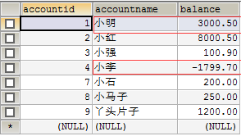
1、使用代理工厂实现事务
<!--1.配置数据源   spring内置的数据源-->

<bean id="dataSource" class="org.springframework.jdbc.datasource.DriverManagerDataSource">

        <property name="driverClassName" value="${jdbc.driver}"></property>

        <property name="url" value="${jdbc.url}"></property>

        <property name="username" value="${jdbc.username}"></property>

        <property name="password" value="${jdbc.password}"></property>

    </bean>

    <!--2.引入属性文件-->

    <context:property-placeholder location="jdbc.properties"></context:property-placeholder>

    <!--3.构建jdbcTemplate-->

    <bean id="jdbcTemplate" class="org.springframework.jdbc.core.JdbcTemplate">

        <property name="dataSource" ref="dataSource"></property>

    </bean>

    <!--配置Spring的事务管理器,默认在发生异常的情况下回滚,否则提交-->

    <bean id="transactionManager" class="org.springframework.jdbc.datasource.DataSourceTransactionManager">

        <property name="dataSource" ref="dataSource"></property>

    </bean>

    <!--第一种事务-->

    <!--配置Spring事务的代理工厂-->

    <bean id="transactionFactory" class="org.springframework.transaction.interceptor.TransactionProxyFactoryBean">

        <!--事务管理器-->

        <property name="transactionManager" ref="transactionManager"></property>

        <!--目标对象-->

        <property name="target" ref="moneyServiceImpl"></property>

        <!--设置方法-->

        <property name="transactionAttributes">

            <props>

                <!--方法对应的隔离级别和传播行为-->

                <prop key="transferMoney">ISOLATION_READ_COMMITTED</prop>

            </props>

        </property>

    </bean>

<!--扫描注解:包扫描器-->

    <context:component-scan base-package="cn.spring"></context:component-scan>

    <!--开启AOP注解支持-->

    <aop:aspectj-autoproxy></aop:aspectj-autoproxy>
2、使用AOP实现事务
<!--1.配置数据源   spring内置的数据源-->

<bean id="dataSource" class="org.springframework.jdbc.datasource.DriverManagerDataSource">

    <property name="driverClassName" value="${jdbc.driver}"></property>

    <property name="url" value="${jdbc.url}"></property>

    <property name="username" value="${jdbc.username}"></property>

    <property name="password" value="${jdbc.password}"></property>

</bean>

<!--2.引入属性文件-->

<context:property-placeholder location="jdbc.properties"></context:property-placeholder>

<!--3.构建jdbcTemplate-->

<bean id="jdbcTemplate" class="org.springframework.jdbc.core.JdbcTemplate">

    <property name="dataSource" ref="dataSource"></property>

</bean>

<!--配置Spring的事务管理器,默认在发生异常的情况下回滚,否则提交-->

<bean id="transactionManager" class="org.springframework.jdbc.datasource.DataSourceTransactionManager">

    <property name="dataSource" ref="dataSource"></property>

</bean>

<!--第二种事务AOP事务-->

<tx:advice id="transactionAdvice" transaction-manager="transactionManager" >

    <tx:attributes>

        <tx:method name="transferMoney" propagation="REQUIRED" isolation="READ_COMMITTED"></tx:method>

    </tx:attributes>

</tx:advice>

<aop:config>

    <aop:pointcut id="pointcut" expression="execution(* *..service.impl.*.*(..))"/>

    <aop:advisor advice-ref="transactionAdvice" pointcut-ref="pointcut"></aop:advisor>

</aop:config>

<!--扫描注解:包扫描器-->

<context:component-scan base-package="cn.spring"></context:component-scan>

<!--开启AOP注解支持-->

<aop:aspectj-autoproxy></aop:aspectj-autoproxy>
3、使用注解实现事务

<!--第三种事务注解事务-->

<tx:annotation-driven></tx:annotation-driven>
transaction事务案例--银行转账的更多相关文章
- 大数据学习day35----flume01-------1 agent(关于agent的一些问题),2 event,3 有关agent和event的一些问题,4 transaction(事务控制机制),5 flume安装 6.Flume入门案例
具体见文档,以下只是简单笔记(内容不全) 1.agent Flume中最核心的角色是agent,flume采集系统就是由一个个agent连接起来所形成的一个或简单或复杂的数据传输通道.对于每一个Age ...
- [原创]java WEB学习笔记77:Hibernate学习之路---Hibernate 版本 helloword 与 解析,.环境搭建,hibernate.cfg.xml文件及参数说明,持久化类,对象-关系映射文件.hbm.xml,Hibernate API (Configuration 类,SessionFactory 接口,Session 接口,Transaction(事务))
本博客的目的:①总结自己的学习过程,相当于学习笔记 ②将自己的经验分享给大家,相互学习,互相交流,不可商用 内容难免出现问题,欢迎指正,交流,探讨,可以留言,也可以通过以下方式联系. 本人互联网技术爱 ...
- SqlCommand对象-Transaction事务的使用
using (SqlConnection connection = new SqlConnection(connStr)) { SqlCommand sqlcmd = new SqlCommand() ...
- Spring事务经典案例-银行转账
1.entity实体类 2.dao层 3.dao实现类 4.service层 5.serviceimpl层 6.大配置.xml <?xml version="1.0" enc ...
- Transaction事务传播行为种类PROPAGATION_REQUIRED
事务传播行为种类 Spring在TransactionDefinition接口中规定了7种类型的事务传播行为,它们规定了事务方法和事务方法发生嵌套调用时事务如何进行传播: 表1事务传播行为类型 事务传 ...
- MSSQL Transaction[事务] and Procedure[存储过程]
--事务分三种 --1.显示事务 --我们手动begin transaction ...... commit transaction/rollback transaction --上面这种写法叫做“显 ...
- android 数据库中的事务_银行转账示例
主java package com.itheima.transtation; import com.itheima.transtation.db.BankOpenHelper; import andr ...
- Spring transaction事务之roll back回滚
转载自:http://blog.csdn.net/lovejavaydj/article/details/7635848 试验方法: 写一个单元测试,调用一个service层方法(发生对数据库进行写操 ...
- 浩哥解析MyBatis源码(三)——Transaction事务模块
原创作品,可以转载,但是请标注出处地址:http://www.cnblogs.com/V1haoge/p/6634151.html 1.回顾 之前介绍了Environment环境类,这其实是一个单例类 ...
随机推荐
- 12C-使用跨平台增量备份减少可移动表空间的停机时间 (Doc ID 2005729.1)
12C - Reduce Transportable Tablespace Downtime using Cross Platform Incremental Backup (Doc ID 20057 ...
- Linux系统学习 二十、SAMBA服务—介绍、安装、端口
1.简介 网络数据文件共享服务器 可以和Windows中的网上邻居通用 数据共享的方法: Windows中最常用的是“网上邻居”.网上邻居使用的文件系统是CIFS(通用互联网文件系统)协议进行数据共享 ...
- 【框架】利用Spring的BeanPostProcessor来修改bean属性
一.BeanPostProcessor是什么?什么时候触发?可以用来做什么? 1.它是什么? 首先它是一个接口,定义了两个方法: public interface BeanPostProcessor ...
- Java之属性集(Properties类)
Properties概述 java.util.Properties类 继承于 Hashtable ,来表示一个持久的属性集.它使用键值结构存储数据,每个键及其对应值都是一个字符串.该类也被许多Java ...
- Qt 信号和槽异常: QObject::connect: No Such slot baseClassName::subClassfunction() in ......
2019-08-14起笔 小熊的情况描述: 父类A继承自QWidget,所以父类A自动添加了Q_OBJECT. 子类B继承自父类A,子类B没有添加Q_OBJECT.在子类B中给动态创建的控件添加事件 ...
- 【安富莱】V6,V5开发板用户手册,重在BSP驱动包设计方法,HAL库的框架学习,授人以渔(2019-11-04)
说明: 1.本教程重在BSP驱动包设计方法和HAL库的框架学习,并将HAL库里面的各种弯弯绕捋顺,从而方便我们的程序设计. 2.本次工程延续以往的代码风格,从底层BSP驱动包到应用代码,变量命名,文件 ...
- Java学习 1.4——第一个Java程序:Hello World!
这一篇一起来写第一个Java程序,同时也了解一下IDEA的使用: 打开IDEA,新建项目: 选择Java,右边project SDK是选择Java版本,上一篇我们自己安装了JDK1.8,IDEA自带一 ...
- Vue.js+vue-element搭建属于自己的后台管理模板:更深入了解Vue.js(三)
前言 上一章我们介绍了关于Vue实例中一些基本用法,但是组件.自定义指令.Render函数这些放到了本章来介绍,原因是它们要比前面讲的要难一些,组件是Vue.js最核心的功能,学习使用组件也是必不可少 ...
- Oracle 备份数据库
[目录] ①备份数据库(https://www.cnblogs.com/xqz0618/p/oracle_backup.html) ②定时备份数据库(https://www.cnblogs.com/x ...
- dedecmsV5.7 arclist 如何调用副栏目的文章
问题:用arclist 调用某个栏目下的文章的时候,发现无法调用出副栏目是这个栏目的文章. 然后就上百度搜了一番,记录一下我搜到的解决方法: 1.打开/include/taglib/arclist.l ...