
Linux\CentOS Tomcat 配置
需要注意的是:安装 Tomcat 之前需要把 jdk 安装好。
一、下载安装包
- 安装可以在官网自行下载,下载 tar.gz 包便可。
二、解压缩:
tar -zxvf apache-tomcat-9.0.27.tar.gz
- 如果需要权限,执行以下命令
sudo chmod 777 apache-tomcat-9.0.27.tar.gz
三、配置环境变量
(1) 打开环境变量配置文件
sudo vim /etc/profile
(2) 在最下方添加如下命令:
export CATALINA_HOME=/usr/local/tomcat9/apache-tomcat-9.0.27
(3) 保存退出,通过vim的 ":wq"命令保存退出。如果还处于编辑状态,需要按下 Esc 键,在输入命令。
(4) 使命令生效:
source /etc/profile
(5) 配置 UTF-8 字符集(防止乱码问题)
A. 进入 tomcat 安装 conf 文件夹,编辑server.xml 文件
cd /usr/local/tomcat9/apache-tomcat-9.0.27/conf
B. 编辑 server.xml 文件
vim server.xml
C. 找到配置 8080 默认端口的位置,在 xml 节点末尾添加 URIEncoding="UTF-8",如下:
         Java AJP  Connector: /docs/config/ajp.html

         APR (HTTP/AJP) Connector: /docs/apr.html

         Define a non-SSL/TLS HTTP/1.1 Connector on port 8080

    -->

    <Connector port="8080" protocol="HTTP/1.1"

               connectionTimeout="20000"

               redirectPort="8443"

                URIEncodeing="UTF-8"/>

    <!-- A "Connector" using the shared thread pool-->

    <!--

    <Connector executor="tomcatThreadPool"

               port="8080" protocol="HTTP/1.1"

               connectionTimeout="20000"

               redirectPort="8443" />

    -->

    <!-- Define an SSL/TLS HTTP/1.1 Connector on port 8443

         This connector uses the NIO implementation. The default

         SSLImplementation will depend on the presence of the APR/native

         library and the useOpenSSL attribute of the

         AprLifecycleListener.

         Either JSSE or OpenSSL style configuration may be used regardless of

         the SSLImplementation selected. JSSE style configuration is used below.

    -->
D. 保存退出,通过vim的 ":wq"命令保存退出。如果还处于编辑状态,需要按下 Esc 键,在输入命令。
四、验证 Tomcat 服务器
(1) 进入tomcat 的目录,找到 \bin,执行里面的 ./startup.sh
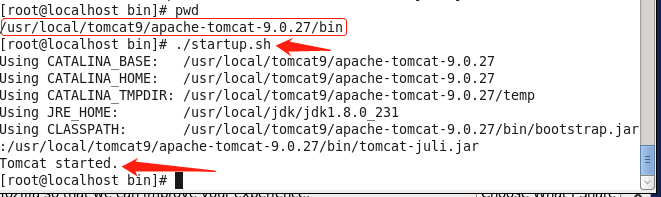
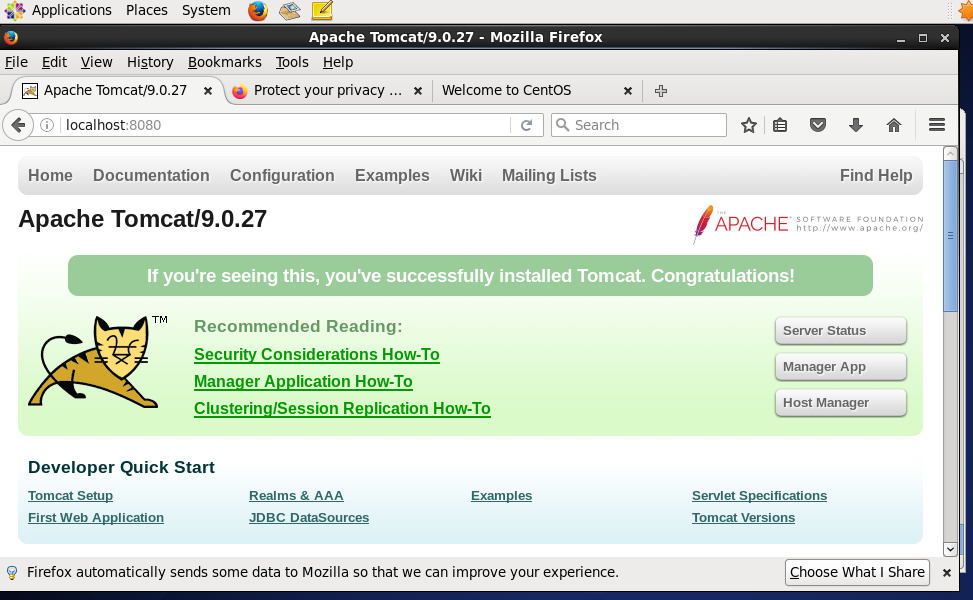
(2) 看到 Tomcat started,说明启动成功。打开浏览器输入 127.0.0.1:8080 or localhost:8080,看到下面界面,Tomcat 就已经安装成功了。
人若无名,专心练剑!
喜欢的朋友可以留下你的赞!
Linux\CentOS Tomcat 配置的更多相关文章
- 阿里云服务器Linux CentOS安装配置(四)yum安装tomcat
阿里云服务器Linux CentOS安装配置(四)yum安装tomcat 1.yum -y install tomcat 执行命令后,会帮你把jdk也安装好 2.tomcat安装目录:/var/li ...
- 阿里云服务器Linux CentOS安装配置(零)目录
阿里云服务器Linux CentOS安装配置(零)目录 阿里云服务器Linux CentOS安装配置(一)购买阿里云服务器 阿里云服务器Linux CentOS安装配置(二)yum安装svn 阿里云服 ...
- 阿里云服务器Linux CentOS安装配置(九)shell编译、打包、部署
阿里云服务器Linux CentOS安装配置(九)shell编译.打包.部署 1.查询当前目录以及子目录下所有的java文件,并显示查询结果 find . -name *.java -type f - ...
- 阿里云服务器Linux CentOS安装配置(八)nginx安装、配置、域名绑定
阿里云服务器Linux CentOS安装配置(八)nginx安装.配置.域名绑定 1.安装nginx yum -y install nginx 2.启动nginx service nginx star ...
- 阿里云服务器Linux CentOS安装配置(一)购买阿里云服务器
阿里云服务器Linux CentOS安装配置(一)购买阿里云服务器 我在阿里云购买的服务器配置 CPU:1核 内存:2G 系统盘:40G 公共镜像:CentOS 6.5 64位 公网带宽:1Mbps ...
- 阿里云服务器Linux CentOS安装配置(七)域名解析
阿里云服务器Linux CentOS安装配置(七)域名解析 1.购买域名 登录阿里云,左侧菜单点击[域名],然后[域名注册],完成域名购买.(一般首年45元) 2.添加域名解析 在域名列表里点击你的域 ...
- 阿里云服务器Linux CentOS安装配置(六)resin多端口配置、安装、部署
阿里云服务器Linux CentOS安装配置(六)resin多端口配置.安装.部署 1.下载resin包 http://125.39.66.162/files/2183000003E08525/cau ...
- 阿里云服务器Linux CentOS安装配置(五)jetty配置、部署
阿里云服务器Linux CentOS安装配置(五)jetty配置.部署 1.官网下载jetty:wget http://repo1.maven.org/maven2/org/eclipse/jetty ...
- 阿里云服务器Linux CentOS安装配置(三)yum安装mysql
阿里云服务器Linux CentOS安装配置(三)yum安装mysql 1.执行yum安装mysql命令:yum -y install mysql-server mysql-devel 2.启动mys ...
随机推荐
- 使用dynamic来简化反射实现,调用指定方法或构造函数
dynamic是Framework4.0的新特性,dynamic的出现让C#具有了弱语言类型的特性,编译器在编译的时候,不再对类型进行检查,不会报错,但是运行时如果执行的是不存在的属性或者方法,运行程 ...
- 2019滴滴php面试总结 (包含面试题解析)
2019滴滴java面试总结 (包含面试题) 本人6年开发经验.今年年初找工作,在互联网寒冬下成功拿到阿里巴巴.今日头条.滴滴等公司offer,岗位是既有php也有Java后端开发,最终选择去了滴滴 ...
- JZ2440 u-boot-2016.11、linux-4.17和busybox-1.28.4移植笔记
2018年5月份开始在JZ2440上陆续移植了u-boot-2016.11.u-boot-spl-2016.11.linux-4.17和busybox-1.28.4,其中linux-4.17和busy ...
- ElasticSearch安装SQL插件
ElasticSearch安装SQL插件下载地址(中国大佬开发的,膜拜ing):https://github.com/NLPchina/elasticsearch-sql 1.记得选择和自己Elast ...
- Java编程思想——第17章 容器深入研究 读书笔记(三)
七.队列 排队,先进先出. 除并发应用外Queue只有两个实现:LinkedList,PriorityQueue.他们的差异在于排序而非性能. 一些常用方法: 继承自Collection的方法: ad ...
- java高并发----个人学习理解汇总记录
1.首先,需要理解几个概念 1.同步(Synchronous):同步方法调用一旦开始,调用者必须等到前面的方法调用返回后,才能继续后续的行为,依次直到完成所有. 2.异步(Asynchronous): ...
- [POJ3107] Godfather - 暴力枚举(树的重心)
Godfather Time Limit: 2000MS Memory Limit: 65536K Total Submissions: 8728 Accepted: 3064 Descrip ...
- 1、Struts2基本入门
一.了解了这几个主要的优点,会促使你考虑使用Struts2 : 1.POJO表单及POJO操作 - Struts2 去除掉了Struts框架中的Action Forms部分.在Struts2框架下,你 ...
- Python开发【第五篇】字符串
字符串 作用:用来记录文字信息 例子: 空字符串 '' #单引号空字符串 "" #双引号空字符串 ''' ''' #三单引号空字符串 """ &quo ...
- java源码解析
String深入解析 String具有不变性的原因: String被final修饰,它不可能被继承,也就是任何对String的操作方法,都不会被继承覆写 String中保存数据的是一个char数组的v ...