
CCNA 之 十二 Frame Relay 帧中继
Fram Relay 帧中继
- 帧中继简介
- VC、LMI、DLCI的概念
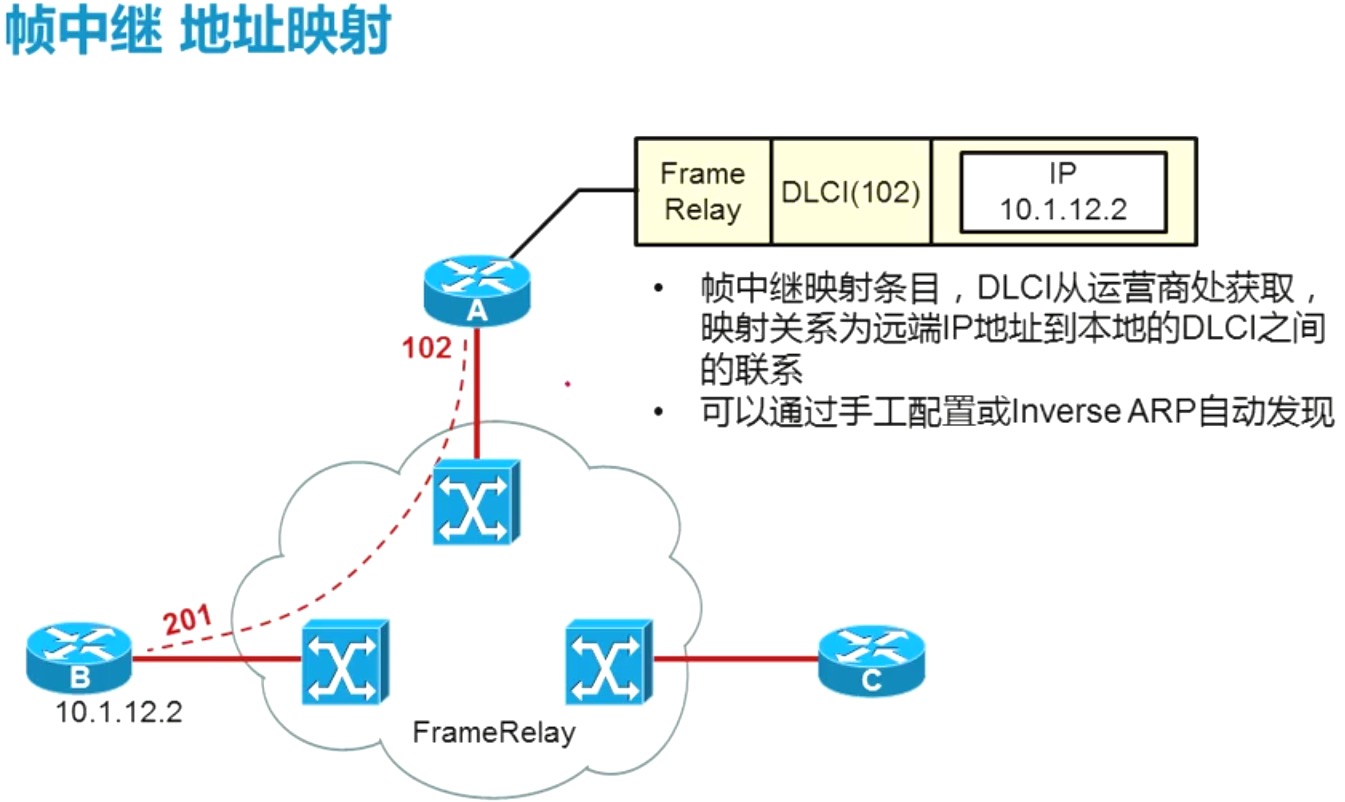
- 帧中继映射
- Inverse-ARP的操作
- 帧中继配置
帧中继简介
分组交换广域网接入方式的一个代表,分组交换是以分组的形式在广域网的环境中穿梭的,
- 使用虚电路进行连接;
- 提供面向对象的服务;
介绍:
- 应用非常广泛的WAN(广域网)协议
- FR交换设备在用户路由器间建立虚电路,提供基于分组减缓的二层通道;
- 面向连接的数据链路技术
- 速率:56K - 2M
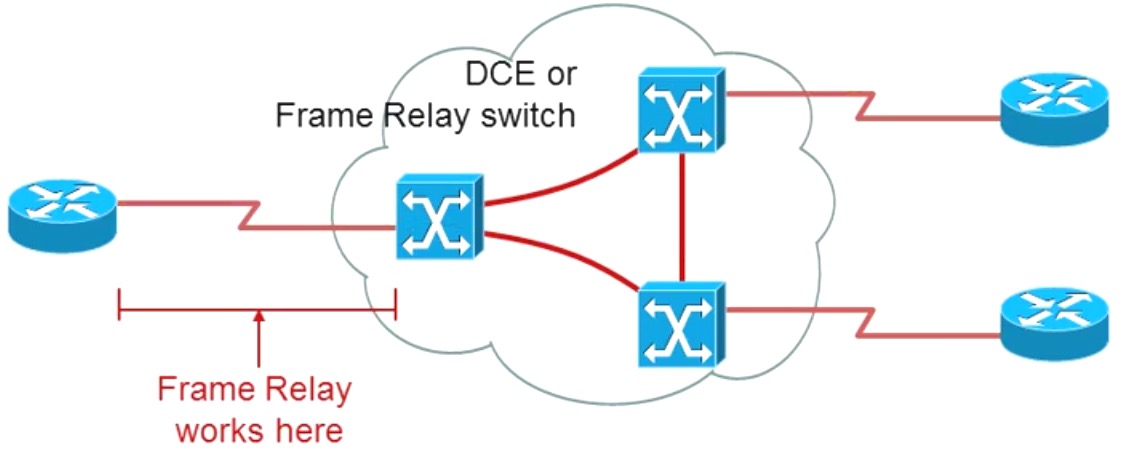
帧中继属于VC(虚电路):
- 通过帧中继网络实现的罗技连接叫做虚电路(VC);
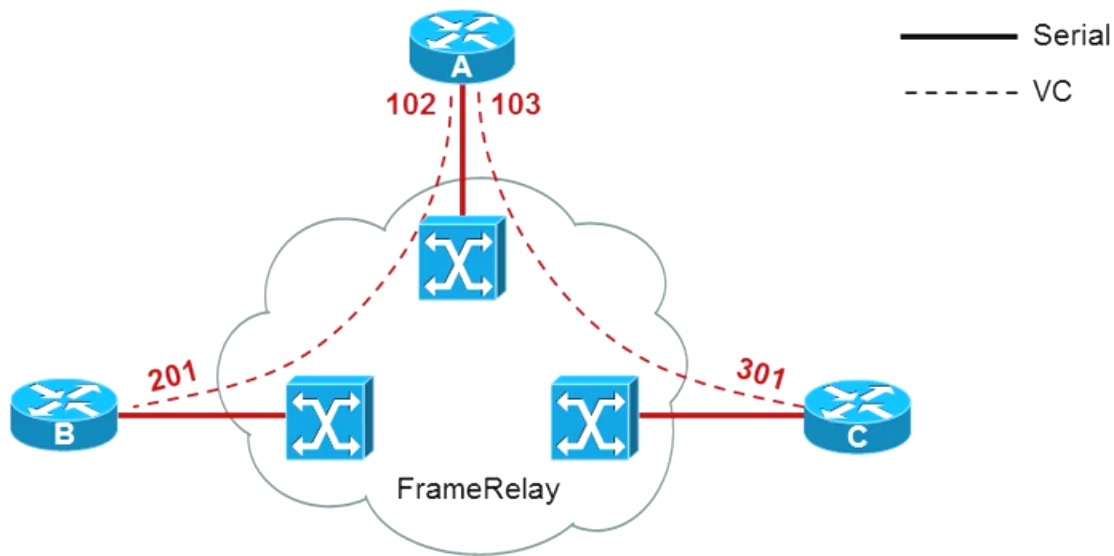
- 利用虚电路,帧中继允许多个用户共享带宽,而无需使用多条专用物理链路,虚电路是以DLCI标识的;
DLCI(Data Link Connection Identifier) 数据链路连接标识:
- 通常由帧中继服务提供商(例如电话分公司)分配
- 帧中继DLCI仅具有本地意义
- DLCI 0 到 15 和 1008 到1023 留作特殊用途。服务提供商分配DCLI范围通常为 16 到1007
**帧中继术语LMI
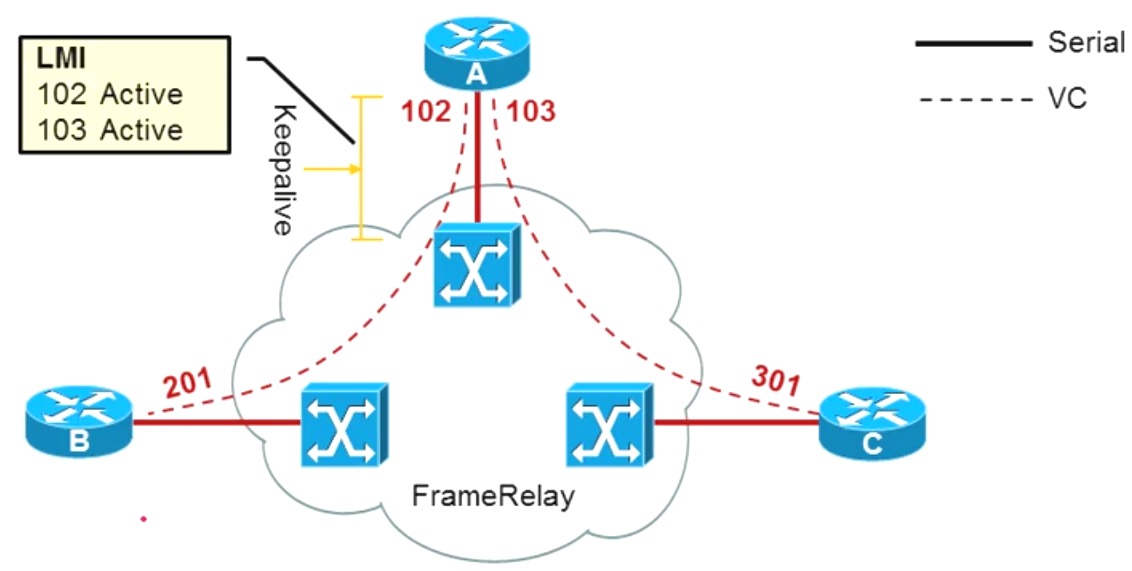
LMI(本地管理接口)**
- 是一种信令标准,用于管理链路连接及keepalive的机制。
- 终端路由器(DTE)和帧中继交换机(DCE)之间的帧中继设备每10秒(或大概如此)轮训一次网络
- Cisco 路由器支持一下三种LMI:Cisco,Ansi,q933a
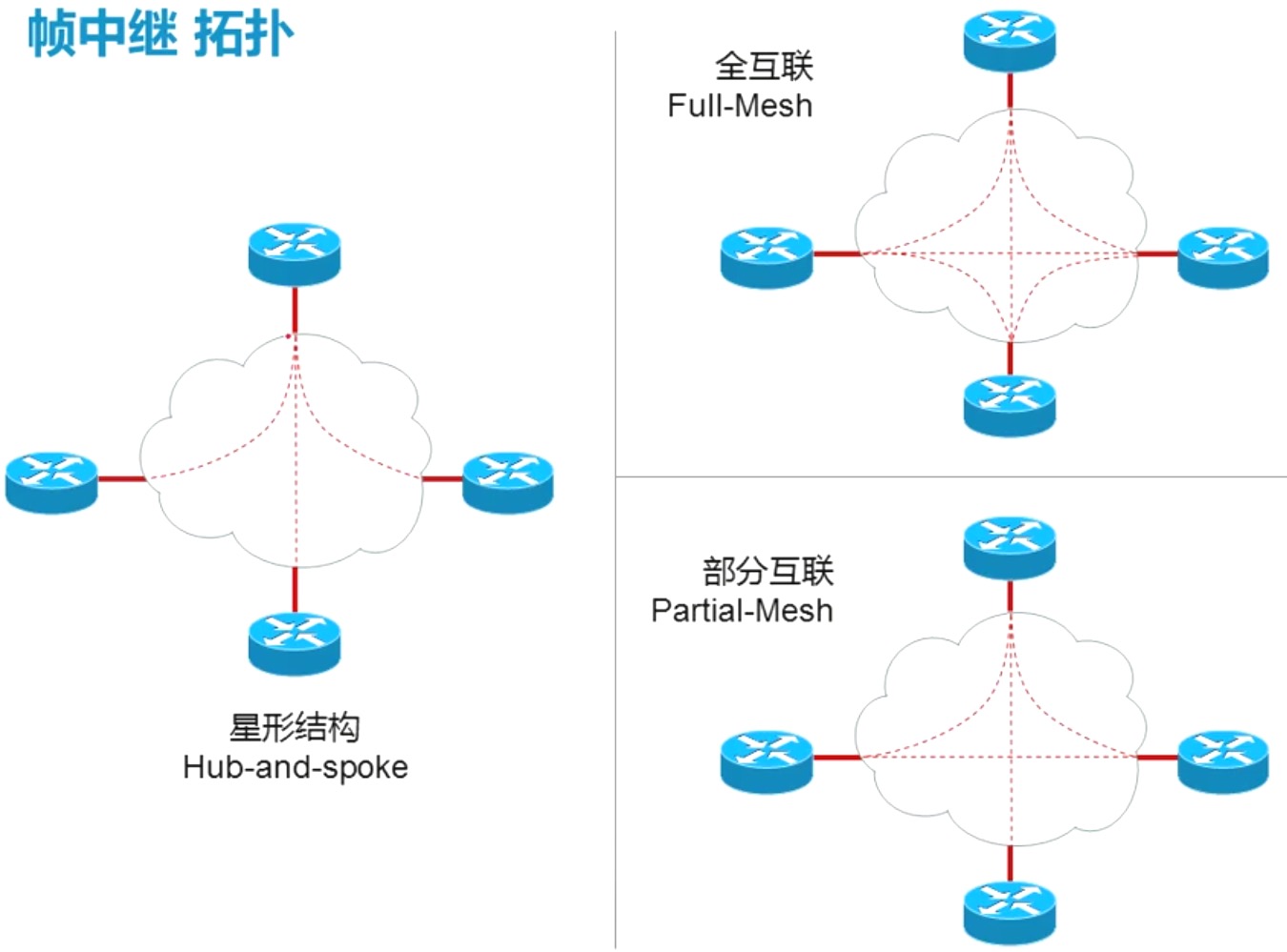


帧中继实验
根据下图拓扑,配置帧中继环境:
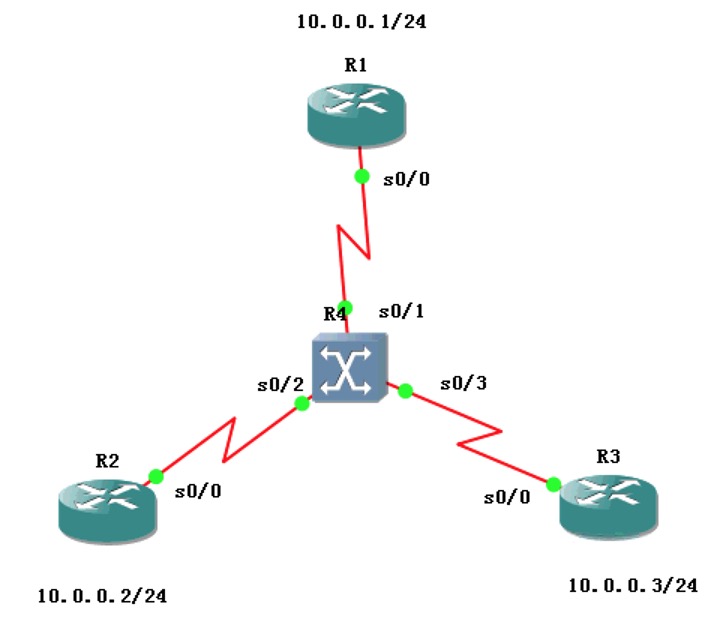
说明:
本次实验,使用路由器当做帧中继交换机,需要使用
frame-relay switching命令,启动帧中继交换机,然后在进行配置;
先配置动态帧中继,是R1、R2、R3之间能够访问
首先配置帧中继交换机 R4配置:
R4>en
R4#conf t
R4(config)#frame-relay switching
R4(config)#int s 0/1
R4(config-if)#encapsulation frame-relay
R4(config-if)#clock rate 64000
R4(config-if)#frame-relay intf-type dce
R4(config-if)#frame-relay route 102 interface s0/2 201
R4(config-if)#frame-relay route 103 interface s0/3 301
R4(config-if)#no sh
R4(config-if)#int s 0/2
R4(config-if)#encapsulation frame-relay
R4(config-if)#clock rate 64000
R4(config-if)#frame-relay intf-type dce
R4(config-if)#frame-relay route 201 interface s0/1 102
R4(config-if)#int s 0/3
R4(config-if)#encapsulation frame-relay
R4(config-if)#clock rate 64000
R4(config-if)#frame-relay intf-type dce
R4(config-if)#frame-relay route 301 interface s0/1 103
R4(config-if)#no sh
查看R4帧中继配置:
R4(config)#end
R4#show frame-relay route
Input Intf Input Dlci Output Intf Output Dlci Status
Serial0/1 102 Serial0/2 201 inactive
Serial0/1 103 Serial0/3 301 inactive
Serial0/2 201 Serial0/1 102 inactive
Serial0/3 301 Serial0/1 103 inactive
说明:
可以到,所有s0/1 s0/2 s0/3 的帧中继配置都是
inactive,毕竟其他的路由器都没有配置;
R1配置:
R1>en
R1#conf t
R1(config)#int s 0/0
R1(config-if)#encapsulation frame-relay
R1(config-if)#ip add 10.0.0.1 255.255.255.0
R1(config-if)#no sh
R2配置:
R2>en
R2#conf t
R2(config)#int s 0/0
R2(config-if)#encapsulation frame-relay
R2(config-if)#ip add 10.0.0.2 255.255.255.0
R2(config-if)#no sh
R3配置:
R3>en
R3#conf t
R3(config)#int s 0/0
R3(config-if)#encapsulation frame-relay
R3(config-if)#ip add 10.0.0.3 255.255.255.0
R3(config-if)#no sh
配置好后,再次查看R4帧中继交换机中的状态:
R4#show frame-relay route
Input Intf Input Dlci Output Intf Output Dlci Status
Serial0/1 102 Serial0/2 201 active
Serial0/1 103 Serial0/3 301 active
Serial0/2 201 Serial0/1 102 active
Serial0/3 301 Serial0/1 103 active
此时的状态都是active;
测试ping一下:
R1测试:
R1#ping 10.0.0.2
Type escape sequence to abort.
Sending 5, 100-byte ICMP Echos to 10.0.0.2, timeout is 2 seconds:
!!!!!
Success rate is 100 percent (5/5), round-trip min/avg/max = 8/22/48 ms
R1#ping 10.0.0.3
Type escape sequence to abort.
Sending 5, 100-byte ICMP Echos to 10.0.0.3, timeout is 2 seconds:
!!!!!
Success rate is 100 percent (5/5), round-trip min/avg/max = 8/24/80 ms
R2测试:
R2#ping 10.0.0.1
Type escape sequence to abort.
Sending 5, 100-byte ICMP Echos to 10.0.0.1, timeout is 2 seconds:
!!!!!
Success rate is 100 percent (5/5), round-trip min/avg/max = 8/20/44 ms
R2#ping 10.0.0.3
Type escape sequence to abort.
Sending 5, 100-byte ICMP Echos to 10.0.0.3, timeout is 2 seconds:
.....
Success rate is 0 percent (0/5)
R3测试:
R3#ping 10.0.0.1
Type escape sequence to abort.
Sending 5, 100-byte ICMP Echos to 10.0.0.1, timeout is 2 seconds:
!!!!!
Success rate is 100 percent (5/5), round-trip min/avg/max = 8/16/40 ms
R3#ping 10.0.0.2
Type escape sequence to abort.
Sending 5, 100-byte ICMP Echos to 10.0.0.2, timeout is 2 seconds:
.....
Success rate is 0 percent (0/5)
结论:
1、可以从R1通向R2和R3
2、R2和R3之间无法通信
R2和R3之间的通信问题稍后解决
再配置静态的帧中继:
需要分别修改R1、R2和R3的配置;如下
R1静态帧中继修改:
R1(config)#int s 0/0
R1(config-if)#no frame-relay inverse-arp
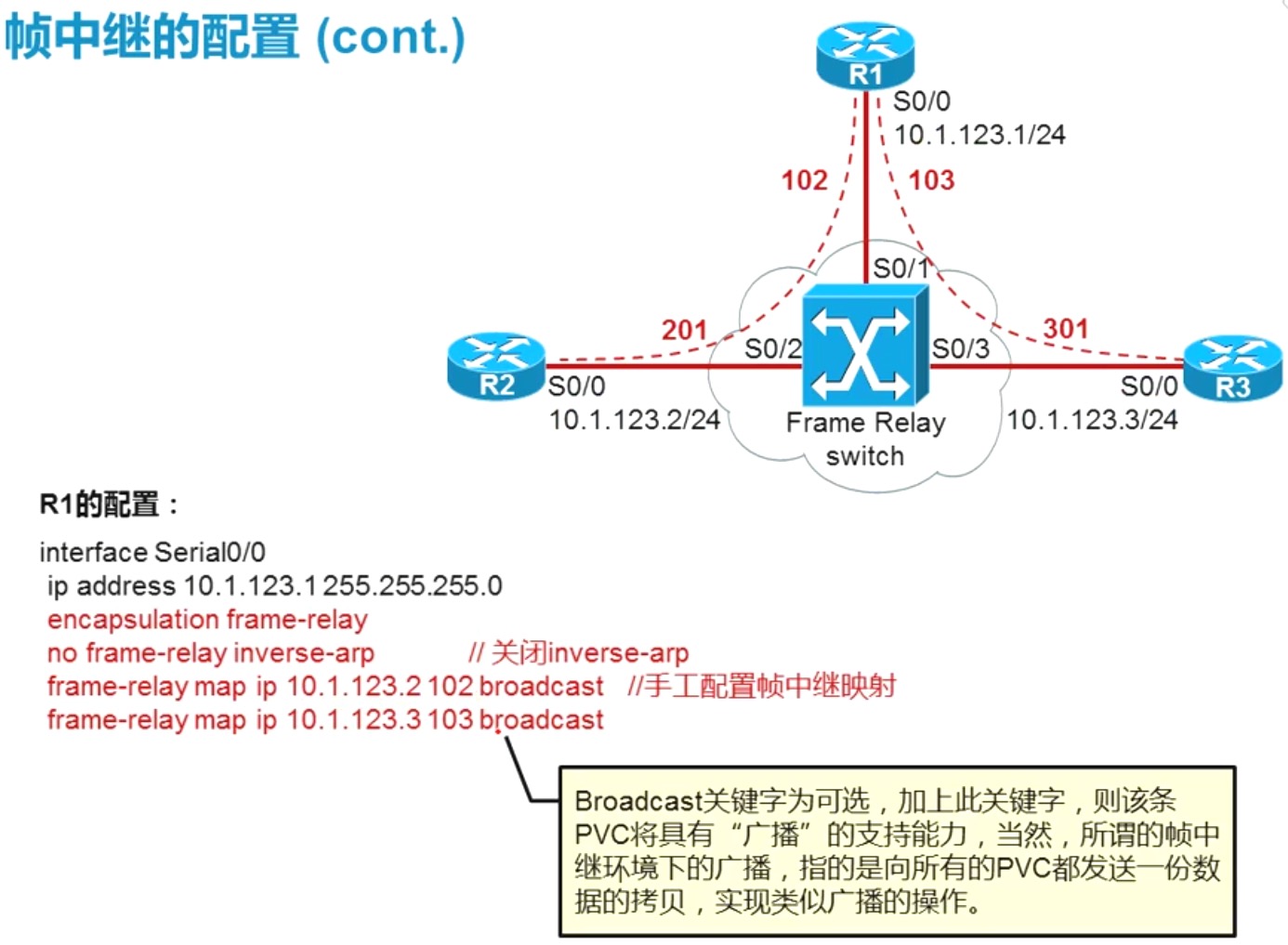
R1(config-if)#frame-relay map ip 10.0.0.2 102 broadcast
R1(config-if)#frame-relay map ip 10.0.0.3 103 broadcast
R1(config-if)#end
R1#show fram
*Mar 1 07:07:04.150: %SYS-5-CONFIG_I: Configured from console by console
R1#show fram
R1#show frame-relay map
Serial0/0 (up): ip 10.0.0.2 dlci 102(0x66,0x1860), static,
broadcast,
CISCO, status defined, active
Serial0/0 (up): ip 10.0.0.3 dlci 103(0x67,0x1870), static,
broadcast,
CISCO, status defined, active
R2静态帧中继修改:
R2(config)#int s 0/0
R2(config-if)#no frame-relay inverse-arp
R2(config-if)#frame-relay map ip 10.0.0.1 201 broadcast
R2(config-if)#end
R2#show frame-relay
*Mar 1 07:09:09.882: %SYS-5-CONFIG_I: Configured from console by console
R2#show frame-relay map
Serial0/0 (up): ip 10.0.0.1 dlci 201(0xC9,0x3090), static,
broadcast,
CISCO, status defined, active
R3静态帧中继修改:
R3(config)#int s 0/0
R3(config-if)#no frame-relay inverse-arp
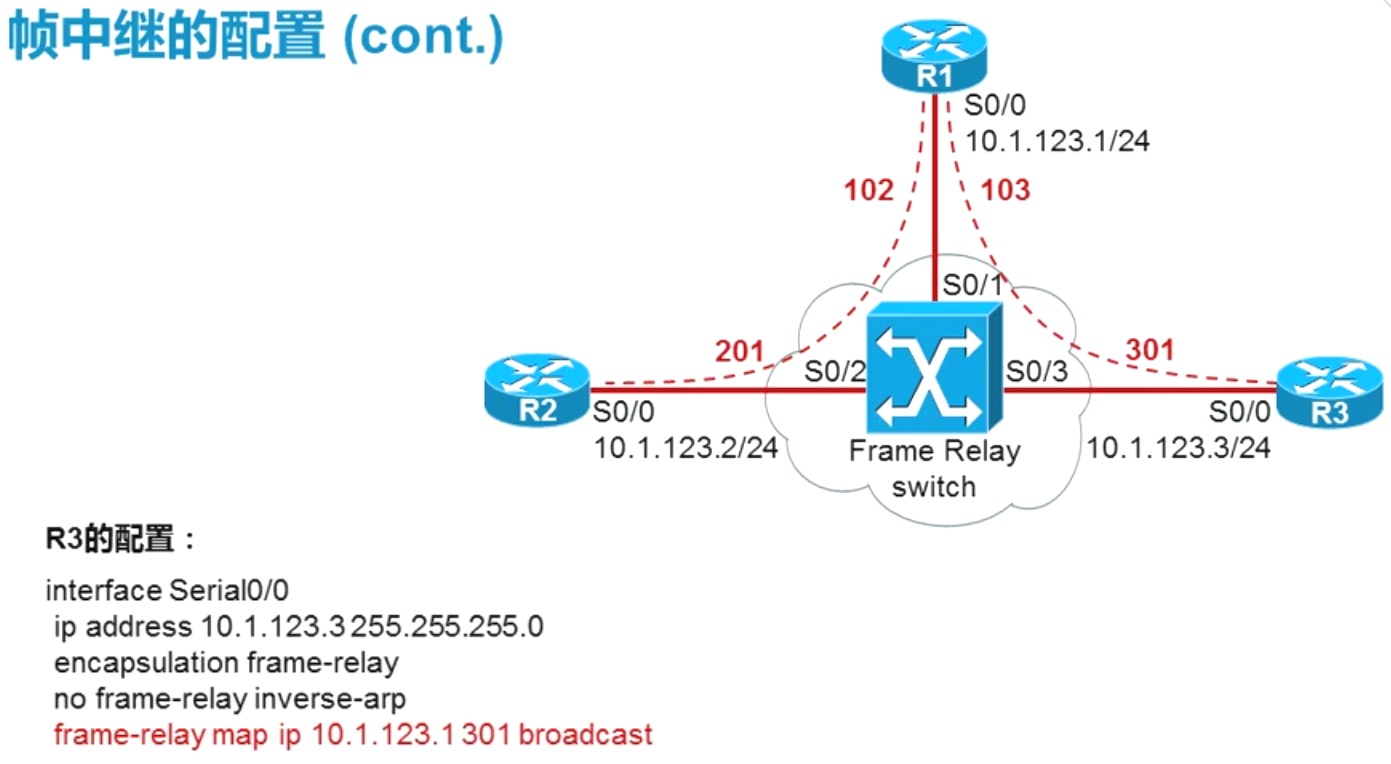
R3(config-if)#frame-relay map ip 10.0.0.1 301 broadcast
R3(config-if)#end
R3#show frame-relay
*Mar 1 07:09:54.534: %SYS-5-CONFIG_I: Configured from console by console
R3#show frame-relay map
Serial0/0 (up): ip 10.0.0.1 dlci 301(0x12D,0x48D0), static,
broadcast,
CISCO, status defined, active
此时就配置好了,下面进行测试:
R1测试:
R1#ping 10.0.0.2
Type escape sequence to abort.
Sending 5, 100-byte ICMP Echos to 10.0.0.2, timeout is 2 seconds:
!!!!!
Success rate is 100 percent (5/5), round-trip min/avg/max = 8/28/72 ms
R1#ping 10.0.0.3
Type escape sequence to abort.
Sending 5, 100-byte ICMP Echos to 10.0.0.3, timeout is 2 seconds:
!!!!!
Success rate is 100 percent (5/5), round-trip min/avg/max = 8/30/92 ms
R2测试:
R2#ping 10.0.0.1
Type escape sequence to abort.
Sending 5, 100-byte ICMP Echos to 10.0.0.1, timeout is 2 seconds:
!!!!!
Success rate is 100 percent (5/5), round-trip min/avg/max = 8/24/84 ms
R2#ping 10.0.0.3
Type escape sequence to abort.
Sending 5, 100-byte ICMP Echos to 10.0.0.3, timeout is 2 seconds:
.....
Success rate is 0 percent (0/5)
R3测试:
R3#ping 10.0.0.1
Type escape sequence to abort.
Sending 5, 100-byte ICMP Echos to 10.0.0.1, timeout is 2 seconds:
!!!!!
Success rate is 100 percent (5/5), round-trip min/avg/max = 8/24/52 ms
R3#ping 10.0.0.2
Type escape sequence to abort.
Sending 5, 100-byte ICMP Echos to 10.0.0.2, timeout is 2 seconds:
.....
Success rate is 0 percent (0/5)
测试结果和动态是一样的,那么下面解决两个问题:
1、R2和R3的通信
2、不能ping通自己
解决:
R2配置:
R2(config)#int s 0/0
R2(config-if)#frame-relay map ip 10.0.0.2 201 broadcast
R2(config-if)#frame-relay map ip 10.0.0.3 201 broadcast
R2(config-if)#end
R2#show frame-relay map
Serial0/0 (up): ip 10.0.0.1 dlci 201(0xC9,0x3090), static,
broadcast,
CISCO, status defined, active
Serial0/0 (up): ip 10.0.0.2 dlci 201(0xC9,0x3090), static,
broadcast,
CISCO, status defined, active
Serial0/0 (up): ip 10.0.0.3 dlci 201(0xC9,0x3090), static,
broadcast,
CISCO, status defined, active
R3配置:
R3(config)#int s 0/0
R3(config-if)#frame-relay map ip 10.0.0.3 301 broadcast
R3(config-if)#frame-relay map ip 10.0.0.2 301 broadcast
R3(config-if)#end
R3#show frame-relay map
Serial0/0 (up): ip 10.0.0.1 dlci 301(0x12D,0x48D0), static,
broadcast,
CISCO, status defined, active
Serial0/0 (up): ip 10.0.0.2 dlci 301(0x12D,0x48D0), static,
broadcast,
CISCO, status defined, active
Serial0/0 (up): ip 10.0.0.3 dlci 301(0x12D,0x48D0), static,
broadcast,
CISCO, status defined, active
此时就解决了R2和R3的通信和ping自己的问题了,下面进行测试:
R2测试:
R2#ping 10.0.0.02
Type escape sequence to abort.
Sending 5, 100-byte ICMP Echos to 10.0.0.2, timeout is 2 seconds:
!!!!!
Success rate is 100 percent (5/5), round-trip min/avg/max = 16/34/108 ms
R2#ping 10.0.0.2
Type escape sequence to abort.
Sending 5, 100-byte ICMP Echos to 10.0.0.2, timeout is 2 seconds:
!!!!!
Success rate is 100 percent (5/5), round-trip min/avg/max = 16/28/76 ms
R3测试:
R3#ping 10.0.0.3
Type escape sequence to abort.
Sending 5, 100-byte ICMP Echos to 10.0.0.3, timeout is 2 seconds:
!!!!!
Success rate is 100 percent (5/5), round-trip min/avg/max = 16/38/120 ms
R3#ping 10.0.0.2
Type escape sequence to abort.
Sending 5, 100-byte ICMP Echos to 10.0.0.2, timeout is 2 seconds:
!!!!!
Success rate is 100 percent (5/5), round-trip min/avg/max = 16/36/104 ms
解决
帧中继环境中的动态路由协议 问题1
- 问题1:帧中继是典型的NBMA网络,也就是非广播多路访问网络,并不支持广播,然而包括RIP、EIGRP、OSPF等在内的路由协议都需要组播或广播的支持,那么在帧中继环境下运行上述动态路由协议,会否有问题?
- 帧中继虽然不支持广播,但是可以”模拟“广播的操作,做法即是通过向所有PVC发送一份数据的靠背。
- 在建立PVC的时候,通过invers-arp自动建立的映射,默认就开启上述特性;如果是手工配置映射,则必须加上broadcast关键字;
CCNA 之 十二 Frame Relay 帧中继的更多相关文章
- CCNP路由实验之十二 MPLS
个.第3个数据包„„同样的操作.包含查询路由表.重写MAC地址,CRC校验等. 系列路由器.或者12000系列路由器. Netflow switching 通过一种标准的交换机制,处理了流的第一 ...
- 第三十二篇 -- CreateFile、ReadFile、WriteFile
一.CreateFile 这是一个多功能的函数,可打开或创建文件或者I/O设备,并返回可访问的句柄:控制台,通信资源,目录(只读打开),磁盘驱动器,文件,邮槽,管道. 函数原型: HANDLE WIN ...
- 无废话ExtJs 入门教程十二[下拉列表联动:Combobox_Two]
无废话ExtJs 入门教程十二[下拉列表联动:Combobox_Two] extjs技术交流,欢迎加群(201926085) 不管是几级下拉列表的联动实现本质上都是根据某个下拉列表的变化,去动态加载其 ...
- NeHe OpenGL教程 第三十二课:拾取游戏
转自[翻译]NeHe OpenGL 教程 前言 声明,此 NeHe OpenGL教程系列文章由51博客yarin翻译(2010-08-19),本博客为转载并稍加整理与修改.对NeHe的OpenGL管线 ...
- 疯狂JAVA讲义---第十二章:Swing编程(五)进度条和滑动条
http://blog.csdn.net/terryzero/article/details/3797782 疯狂JAVA讲义---第十二章:Swing编程(五)进度条和滑动条 标签: swing编程 ...
- 201771010126 王燕《面向对象程序设计(Java)》第十二周学习总结
实验十二 图形程序设计 实验时间 2018-11-14 1.实验目的与要求 (1) 掌握Java GUI中框架创建及属性设置中常用类的API: 创建空框架 . 在Java中,常采用框架(Frame) ...
- 马凯军201771010116《面向对象与程序设计Java》第十二周学习总结
一.理论与知识学习部分 Java的抽象窗口工具箱(Abstract Window Toolkit, AWT)包含在java.awt包中,它提供了许多用来设计GUI的组件类和容器类. 大部分AWT组件都 ...
- 刘志梅2017710101152.《面向对象程序设计(java)》第十二周学习总结
实验十二 图形程序设计 实验时间 2018-11-14 1.理论知识 (1) 基本AWT库采用将处理用户界面元素的任务委派给每个目标平台的本地GUI工具箱的方式,由本地GUI工具箱负责用户界面元素的 ...
- 201771010134杨其菊《面向对象程序设计java》第十二周学习总结
第十二周学习总结 第一部分:理论知识 内容概要: AWT与Swing简介:框架的创建:图形程序设计: 显示图像: 1.AWT组件: 2.Swing 组件层次关系 3 .AWT与Swing的关系:大部分 ...
随机推荐
- Openmp多线程编程练习
环境配置 一般使用Visual Studio2019来作为openmp的编程环境 调试-->属性-->C/C++-->所有选项-->Openmp支持改为 是(可以使用下拉菜单) ...
- 前端技术之:常用webpack插件
1.html-webpack-plugin Simplifies creation of HTML files to serve your webpack bundles. 主页地址: https ...
- Linux中vi命令的详细总结
vi命令的使用 首先可以新建一个文件夹 touch 1.txt 之后通过vi命令进入其中 vi 1.txt 进入其中开始编辑,按下a键可以进行输入. 随便输入一些东西(暂时不支持中文) 非输入模式 ...
- for循环使用笔记
1.for i in rang(1,101,2) #2为步长 print("loop",i) 2.flag 标志位3.for 循环CODE1 for与else一起用:当for循环正 ...
- Linux的组管理和权限管理
前言 前面的文章中提到:Linux在管理用户权限时,既是面向用户的,又是面向组的,通过管理用户的权限规定了其对所拥有的文件的权限(读.改.执行),通过管理组的权限而规定了该组中用户对于某一文件的权限. ...
- Scrapy简单上手 —— 安装与流程
一.安装scrapy 由于scrapy依赖较多,建议使用虚拟环境 windows下pip安装(不推荐) 1.安装virtualenv pip install virtualenv 2.在你开始项目的文 ...
- XML解析之Jsoup
操作xml文件 解析(读取):将文档中的数据解读到内存中 写入:将内存中的数据保存到XML文档中.持久化的存储 解析xml的方式 DOM:将标记语言文档一次性加载进内存,在内存中形成一颗dom树 优点 ...
- Java面向对象程序设计第15章5
5. 利用URLConnetction对象编写程序返回某网站的首页,并将首页的内容存放到文件当中. import java.net.*; import java.io.*; public class ...
- 使用ssh管理远程主机
首先,找两台虚拟机ping通,因为这个实验目的是通过客户端访问服务端. 咱们进入虚拟机后,打开终端,输入命令:rpm -qa | grep openssh 卸载 输入命令: yum remove ...
- 搭建Nginx正向代理服务
需求背景: 前段时间公司因为业务需求需要部署一个正向代理,需要内网服务通过正向代理访问到外网移动端厂商域名通道等效果,之前一直用nginx做四层或者七层的反向代理,正向代理还是第一次配置,配置的过程也 ...