
What is Java virtual machine?
Java Virtual Machine (JVM) is a specification that provides runtime environment in which java bytecode can be executed. As the name implies, the JVM acts as a “virtual” machine or processor. Java's platform independence consists mostly of its Java Virtual Machine (JVM) . JVM makes this possible because it is aware of the specific instruction lengths and other particularities of the platform. The JVM performs following operation:
- Loads code
- Verifies code
- Executes code
In most cases, other programming languages, the compiler produce code for a particular Operating System but the Java compiler produce Bytecode only for a Java Virtual Machine . When you run a Java program, it runs as a thread within the JVM process. It is the JVM's responsibility to load your class files, verify code, interpret them and execute them. When you issue a command like java , the JVM loads the class definition for that particular class and calls the main method of that class.
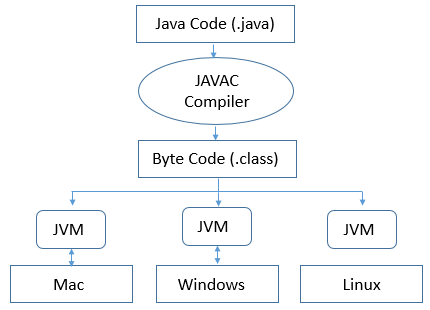
It is the JVMs responsibility that makes it possible for the same class file to run on any other Operating Systems . The JVM takes your compiled platform-neutral byte code and interprets it to run platform-specific machine code. It can also compile it into native code with a JIT (a just-in-time compiler that compiles and caches your code, usually one method at a time). Thus, it is in the JVM where your code results, if needed, in native Operating System calls. Therefore, in the JVM , your platform-neutral threading code gets turned into platform-specific threading code.
Java allocates threads as needed for your application. The JVM manages the memory of your Java program. So, when you create an Object, or an Audio Clip, or a plain old float, Java allocates memory for both objects and primitives. Java determines when these items are no longer referenced, and, therefore, can have their memories reclaimed. The JVM, without any prompting from the user, runs the Garbage Collector thread (when possible or required) to reclaim used, unreferenced memory. In addition to interpreting bytecodes, the JVM must supply interfaces to the various subsystems managed by the Operating System for display, mouse, keyboard, file system and I/O ports etc.
JVM Architecture
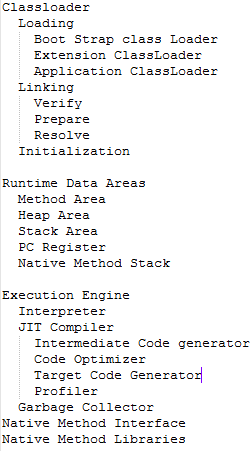
Each Java application runs inside a runtime instance of some concrete implementation of the abstract specification of the Java virtual machine . There are three notions of JVM: specification, implementation, and instance.
- Specification : A document that describes what is required of JVM Implementation.
- Implementation: Known as JRE(Java Run Time Environment.)
- Instance: Whenever you will run a java class file an instance of JVM is created.
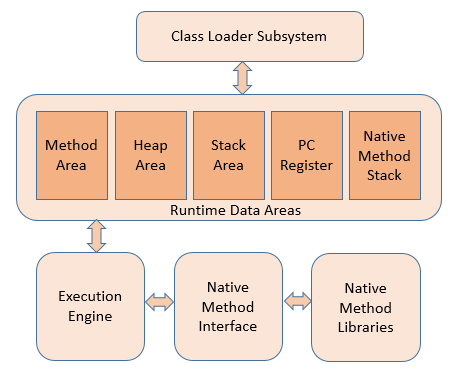
As shown in picture, JVM is divided into three main subsystems:
- Class Loader Subsystem
- Runtime Data Area
- Execution Engine
Class Loader Subsystem
The Java virtual machine has a flexible Class Loader architecture that allows a Java application to load classes in custom ways. In a JVM, each and every class is loaded by some instance of a java.lang.ClassLoader . A classloader is a special Java class file that is responsible for loading other classes onto a Java Virtual Machine. If a Java class is invoked and needs to be executed on a Java Virtual Machine, a special Java component, called a classloader , is used to find the Java class of interest, pull that Java class off of the file system, and execute the bytecode of that class file on the Java Virtual Machine.
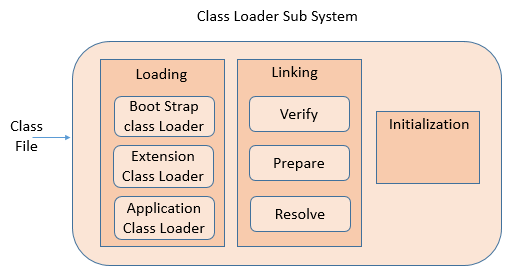
Java Class Loader Subsystem loads, links and initializes the class file when it refers to a class for the first time at runtime. It is responsible for loading class files from file system, network or any other source. There are three default class loader used in Java, Bootstrap , Extension and System or Application class loader.
Boot Strap class Loader
When a JVM starts up, a special chunk of machine code runs that loads the system classloader. This machine code is known as the Bootstrap / Primordial classloader. It is platform specific machine instructions that kick off the whole classloading process. The bootstrap classloader also takes care of loading all of the code needed to support the basic Java Runtime Environment (JRE), including classes in the java.util and the java.lang packages .
Extension ClassLoader
The Extension class loader loads the classes from the JRE’s extension directories, such lib/ext directories. Extension ClassLoader delegates class loading request to its parent, Bootstrap and if unsuccessful, loads class form jre/lib/ext directory or any other directory pointed by java.ext.dirs system property. Extension ClassLoader in JVM is implemented by sun.misc.Launcher$ExtClassLoader .
System/Application Class Loader
System/Application Class Loader is responsible for loading Application Level Classpath, path mentioned Environment Variable etc.
Classloader - Linking
Linking is the process of incorporating the loaded bytecodes into the Java Runtime System so that the loaded Type can be used by the JVM. It involves verifying and preparing that class or interface, its direct superclass, its direct superinterfaces , and its element type (if it is an array type), if necessary.
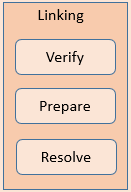
- Verify: Bytecode verifier will verify whether the generated bytecode is proper or not if verification fails we will get verification error
- Prepare: For all static variables memory will be allocated and assigned with default values.
- Resolve: All symbolic memory references are replaced with the original references from Method Area.
Initialization
This is the final phase of Class Loading, here all static variable will be assigned with the original values and static block will be executed.
Runtime Data Areas
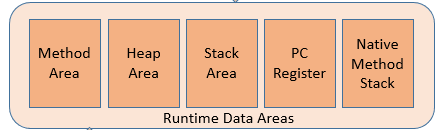
The Java Virtual Machine (JVM) defines various run-time data areas that are used during execution of a program. Some of these data areas are created on Java Virtual Machine start-up and are destroyed only when the Java Virtual Machine exits. Other data areas are per thread . Per-thread data areas are created when a thread is created and destroyed when the thread exits.
Method Area
It is memory which is shared among all Threads like Heap . It is created on Java Virtual Machine startup. It contains the code actually a compiled code, methods and its data and fields. Runtime constant pool is also a part of Method Area .
Heap Area
Heap is a memory place where the objects and its instance variable are stored. Each time an object is created in Java it goes into the area of memory known as heap.
Stack Area
Stack is a memory place where the methods and the local variables are stored. Variable references (either primitive or object references) are stored in the Stack
PC Register
PC Register basically is a address of current instruction is being executed. Since each thread some sets of method which is going to be executed depends upon PC Register. It has some value for each instruction and undefined for native methods . It is usually for keep tracking of instructions.
Native Method Stack
Native methods are those which are written in languages other than java. JVM implementations cannot load native methods and can't rely on conventional stacks . It is also associated with each thread. In short it same as stack but it is used for native methods .
Execution Engine
This is the core of the JVM. Execution engine can communicate with various memory areas of JVM. Each thread of a running Java application is a distinct instance of the virtual machine's execution engine. The byte code that is assigned to the runtime data areas in the JVM via class loader is executed by the execution engine.
- Interpreter
- JIT Compiler
- Garbage Collector
Interpreter
Reads, interprets and executes the bytecode instructions one by one. As it interprets and executes instructions one by one, it can quickly interpret one bytecode, but slowly executes the interpreted result. This is the disadvantage of the interpret language. The 'language' called Bytecode basically runs like an interpreter .
JIT Compiler
The JIT compiler converts the bytecode to an intermediate-level expression, IR (Intermediate Representation), to execute optimization , and then converts the expression to native code. The JIT compiler has been introduced to compensate for the disadvantages of the interpreter. The main purpose of JIT compiler is to improve the performance. Internally JIT compiler maintains a separate count for every method. Whenever JVM across any method call, first that method will be interpretednormally by the interpreter and JIT compiler increments the corresponding count variable.
Garbage Collector
Garbage collection (GC) is the process that aims to free up occupied memory that is no longer referenced by any reachable Java object, and is an essential part of the Java virtual machine's (JVM's) dynamic memory management system. All Java objects automatically grab the memory that they need when they are created, and when the object is no longer need, the Java Garbage Collection process reclaim the memory. That means, the Garbage Collector tracked live objects and everything else designated garbage. More about.... Java Garbage Collection Basics
Native Method Interface
Native methods allow you to use code from other languages such as C or C++ in your java code. You use them when java doesn't provide the functionality that you need.
Native Method Libraries
Native Method Libraries are Collection of the Native Libraries which is required for the Execution Engine .
http://net-informations.com/java/intro/jvm.htm
What is Java virtual machine?的更多相关文章
- fail to create java virtual machine..
今天打开zend stdio 的时候 出现的错误 fail to create java virtual machine... 然后找度娘了,,都说改xxxxx, 我打开360 ,把内存清理了一遍 ...
- Failed to create the Java Virtual Machine.问题的解决
运行Eclipse,出现了"Failed to create the Java Virtual Machine."错误: 解决的办法是在Eclipse的解压目录下找到eclipse ...
- eclipse failed to create the java virtual machine 问题图文解析
eclipse failed to create the java virtual machine 问题图文解析 分类: java常用软件异常2010-10-02 23:45 73200人阅读 评论( ...
- [转载]Eclipse提示No java virtual machine
第一次运行Eclipse,经常会提示下面的问题:... No java virtual machine was found after searching the follwing location ...
- SQL Developer 4.0 启动报错“unable to create an instance of the java virtual machine located at path”
安装了Oracle之后,第一件事情就是想想怎么去连接,进而操作.SQL Developer是官方提供的强大工具,个人看来也是第一选择. 目前官网提供的最新版是4.0.1.14.48,下载下来之后,就跃 ...
- Java Hour 58 Java Virtual Machine
每每谈到Java Virtual Machine, 你必须意识到这个有三种意思: 1 一个抽象的指南 2 一个具体的实现 3 一个运行时的实例 JVM 的生命周期 每个运行时JVM 实例都是为一个特定 ...
- 解决Eclipse启动报错Failed to create the Java Virtual Machine
电脑:2G内存,WIN7 32位. 启动adt-bundle-windows-x86-20140702\eclipse\eclipse.exe时,报错[Failed to create the Jav ...
- myeclipse启动报错 no java virtual machine。。。
如果环境变量里已经配置了JAVA_HOME,但是在启动的时候还会提示下面的信息: A Java Runtime Environment (JRE) or Java Development Kit ...
- Failed to create the java virtual machine完全解决办法
一直用EcliPSe开发java,突然有这么一天,无法启动了,splash窗口显示“Failed to create the Java Virtual Machine”,结果发现eclipse和mye ...
- Eclipse 4.6 Neon, could not create the java virtual machine
下了eclipse 4.6,打开报错:could not create the java virtual machine. a fatal exception has occurred. 命令行用 e ...
随机推荐
- 【2期】JVM必知必会
JVM之内存结构图文详解 Java8 JVM内存结构变了,永久代到元空间 Java GC垃圾回收机制 不要再问我“Java 垃圾收集器”了 Java虚拟机类加载机制 Java虚拟机类加载器及双亲委派机 ...
- 10. Go 语言反射
Go 语言反射 反射是指在程序运行期对程序本身进行访问和修改的能力.程序在编译时,变量被转换为内存地址,变量名不会被编译器写入到可执行部分.在运行程序时,程序无法获取自身的信息. 支持反射的语言可以在 ...
- Fiddler使用过程中容易忽略的小技巧
fiddler的基本使用,在之前的一篇博文中有详细介绍,可参见Fiddler抓包工具使用详解,今天来分享几个容易忽略的小技巧. 1.ios机装了证书,依然抓不到包 近期总被同事问及ios机装了证书,但 ...
- 【TencentOS tiny】深度源码分析(5)——信号量
信号量 信号量(sem)在操作系统中是一种实现系统中任务与任务.任务与中断间同步或者临界资源互斥保护的机制.在多任务系统中,各任务之间常需要同步或互斥,信号量就可以为用户提供这方面的支持. 抽象来说, ...
- C#中获取指定路径下特定开头和后缀的所有文件
场景 指定一个文件路径,获取当前路径下所有文件,并筛选出以指定内容开头和结尾的文件. 注: 博客主页: https://blog.csdn.net/badao_liumang_qizhi 关注公众号 ...
- 设计院老师良心汇总:值得牢记的15个CAD基础技巧,能帮大忙
哈喽!你们的CAD魔鬼(老师)来喽! 良心CAD技巧汇总,设计院师傅精心汇总,值得你牢记的15个CAD基础技巧,满满的都是干货,日常最常见的问题以及解决方法这里都汇总给你,给你高效的绘图体验,关键时刻 ...
- 【C#】学习笔记(3) 关于Events使用的小Demo
关于Events事件的简单Demo. 目录结构: Program.cs using System; namespace EventsDemo { class Program { static void ...
- [转载] Java 遍历 Map 的 5 种方式
目录 1 通过 keySet() 或 values() 方法遍历 2 通过 keySet 的 get(key) 获取值 3 通过 entrySet 遍历 4 通过迭代器 Iterator 遍历 5 通 ...
- AtCoder Regular Contest 103
传送门 C - /\/\/\/ 题意: 给出一个序列\(\{a_i\}\),先要求其满足以下条件: \(a_i=a_{i+2}\) 共有两个不同的数 你现在可以修改任意个数,现问最少修改个数为多少. ...
- JAVA实现二维码生成加背景图
pom.xml依赖 <!-- 二维码生成 --> <!-- https://mvnrepository.com/artifact/com.google.zxing/c ...