
Java中读文件操作
InputStream & Reader
InputStream(字节流),如下是InputStream的层次结构:
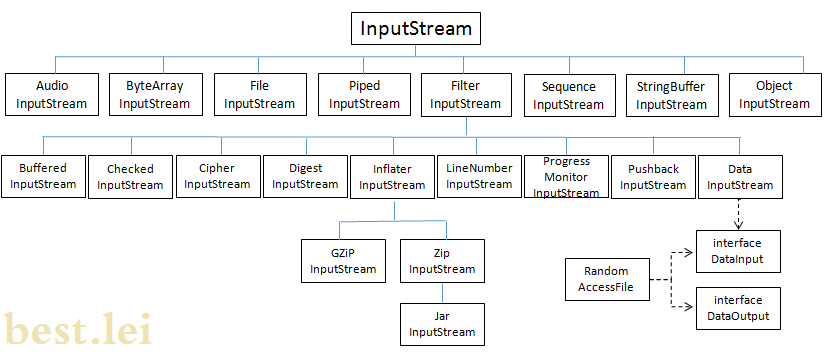
- AudioInputStream:音频输入流类,该方法可以:
- 从外部音频文件、流或 URL 获得音频输入流
- 从音频输入流写入外部文件
- 将音频输入流转换为不同的音频格式
AudioSystem类包括许多操作AudioInputStream对象的方法:- getAudioInputStream(AudioFormat.Encoding targetEncoding, AudioInputStream sourceStream)
- getAudioInputStream(AudioFormat targetFormat, AudioInputStream sourceStream)
getAudioInputStream(File file)- getAudioInputStream(InputStream stream)
- getAudioInputStream(URL url)
- 播放wav格式的文件代码如下:
public class audioInputStream {

    public static void playWAV(){

        try {

            AudioInputStream stream = AudioSystem.getAudioInputStream(new File("SourceFile/1.wav"));

            byte[] samples = getSamples(stream);   //将音频转化为字节数组

            InputStream in = new ByteArrayInputStream(samples);

            play(in,stream.getFormat());    //播放音频文件

        } catch (UnsupportedAudioFileException e) {

            // TODO Auto-generated catch block

            e.printStackTrace();

        } catch (IOException e) {

            // TODO Auto-generated catch block

            e.printStackTrace();

        }

    }

    private static byte[] getSamples(AudioInputStream stream){

        int length = (int) (stream.getFrameLength()*stream.getFormat().getFrameSize());

        byte[] samples = new byte[length];

        DataInputStream in = new DataInputStream(stream);

        try {

            in.readFully(samples);

            System.out.println(length);

        } catch (IOException e) {

            // TODO Auto-generated catch block

            e.printStackTrace();

        }

        return samples;

    }

    private static void play(InputStream stream, AudioFormat format){

        int bufferSize = format.getFrameSize()* Math.round(format.getSampleRate()/10);

        byte[] buffer = new byte[bufferSize];

        DataLine.Info info = new DataLine.Info(SourceDataLine.class, format);

        try {

            SourceDataLine line = (SourceDataLine) AudioSystem.getLine(info);

            line.open(format, bufferSize);

            line.start();

            int numBytesRead = 0;

            while(numBytesRead != -1){

                numBytesRead = stream.read(buffer, 0, buffer.length);

                if(numBytesRead != -1){

                    line.write(buffer, 0, numBytesRead);

                    //System.out.println(numBytesRead);

                }

            }

            line.drain();

            line.close();

        } catch (LineUnavailableException e) {

            // TODO Auto-generated catch block

            e.printStackTrace();

        } catch (IOException e) {

            // TODO Auto-generated catch block

            e.printStackTrace();

        }

    }
- ByteArrayInputStream:流的来源并不一定是文件,也可以是内存中的一块空间,例如一个字节数组。ByteArrayInputStream就是将字节数组当作流输入来源的类。
- new ByteArrayInputStream(byte[] buf, int offset, int length)
- new ByteArrayInputStream(byte[] buf)
- FileInputStream:从文件系统或者终端获取输入信息,构造函数如下:
- new FileInputStream(File file)
- new FileInputStream(FileDescriptor fdObj)
- new FileInputStream(String name)
try {

    FileInputStream fis = new FileInputStream("SourceFile/employee");

    try {

        byte[] bytes = new byte[fis.available()];

        fis.read(bytes);

        fis.close();

    } catch (IOException e) {

        // TODO Auto-generated catch block

        e.printStackTrace();

    }

} catch (FileNotFoundException e) {

    // TODO Auto-generated catch block

    e.printStackTrace();

}
Reader(字符输入流),其层次结构如下:
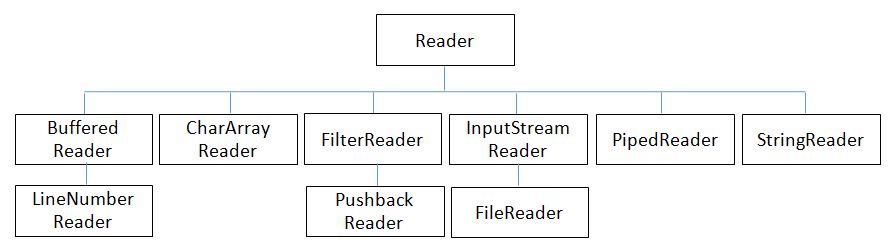
- BufferedReader:字符读入,默认拥有8192字符的缓冲区,当BufferedReader在读取文本文件时,会先尽量从文件中读入字符数据并置入缓冲区,而之后若使用read()方法,会先从缓冲区中进行读取。如果缓冲区数据不足,才会再从文件中读取。
- 构造方法有两个,size表示设置缓冲区大小,默认为8192:
- new BufferedReader(Reader in)
- new BufferedReader(Reader in, int size)
//System.in是一个位流,为了转换为字符流,可使用InputStreamReader为其进行字符转换,

//然后再使用BufferedReader为其增加缓冲功能。

BufferedReader br = new BufferedReader(new InputStreamReader(System.in));

String content = null;

try {

    while(!(content = br.readLine()).equals("quit")){

        System.out.println(content);

    }

    br.close();

} catch (IOException e) {

    // TODO Auto-generated catch block

    e.printStackTrace();

}
- 构造方法有两个,size表示设置缓冲区大小,默认为8192:
- CharArrayReader:从字符数组中读取信息
- 构造方法有两个:
- new CharArrayReader(char[] buf)
- new CharArrayReader(char[] buf, int offset, int length)
- 相关说明见CharArrayReader类链接。
- 构造方法有两个:
- InputStreamReader:将字节流转换为字符流。是字节流通向字符流的桥梁。如果不指定字符集编码,该解码过程将使用平台默认的字符编码。
- 构造方法:
- new InputStreamReader(InputStream in)
- new InputStreamReader(InputStream in, Charset cs)
- new InputStreamReader(InputStream in, CharsetDecoder dec)
- new InputStreamReader(InputStream in, String charsetName)
- 相关说明见InputStreamReader类链接。
- 构造方法:
- StringReader:读入String字符串。
- 构造方法
- new StringReader(String str)
- 相关代码
StringReader sr = new StringReader("dsfasdfasdfasd");

char[] chars = new char[5];   //每次读取5个字符

int length = 0;

try {

     while((length = sr.read(chars)) != -1){

     String strRead = new String(chars, 0, length).toUpperCase();

     System.out.println(strRead);

     }

} catch (IOException e) {

     // TODO Auto-generated catch block

     e.printStackTrace();

}
- 构造方法
Java中读文件操作的更多相关文章
- Java中的文件操作(一)RandomAccessFile
今天,学到的是java中的文件操作. Java.IO.File Java中操作文件用到RandomAccessFile类,既可以读取文件内容,也可以向文件输出数据,但不同与普通输入/输出流的是Rand ...
- Java中的文件操作
在使用计算机编程中,常常会用到对于文件的操作,以下是我对于Java中文件的相关内容学习之后的一个总结和在学习过程中遇到的一些问题. 一.什么是文件 对于文件进行操作,首先我们要知道什么是文件.在此之前 ...
- java的读文件操作
java读取文件内容,可以作如下理解: 首先获得一个文件句柄,File file = new File():file即为文件句柄.两人之间联通电话网络了,就可以开始打电话了. 通过这条线路读取甲方的信 ...
- 关于文件的INode与Java中的文件操作接口
本文由作者周梁伟授权网易云社区发布. 近日做的项目中涉及到多进程共同读写多个文件的问题,文件名和最后修改时间都是可能会被频繁修改的,因而识别文件的唯一性会产生相当的麻烦,于是专门再学习了一下文件系统对 ...
- Java中写文件操作
OutputStream 和 Writer OutputStream类(直接操作byte数组) 该类是字节输出流的抽象类,定义了输出流的各种操作方法.如下图是OutputStream的层次结构: By ...
- 3,Java中的文件IO流
1,File类 ··· 概念:File对象可以表示一个文件或目录.可以对其进行增删改查. ··· 常用方法: File f = new File("."); 判断是 ...
- Java中的IO操作和缓冲区
目录 Java中的IO操作和缓冲区 一.简述 二.IO流的介绍 什么是流 输入输出流的作用范围 三.Java中的字节流和字符流 字节流 字符流 二者的联系 1.InputStreamReader 2. ...
- 第32课 Qt中的文件操作
1. Qt的中IO操作 (1)Qt中IO操作的处理方式 ①Qt通过统一的接口简化了文件和外部设备的操作方式 ②Qt中的文件被看作一种特殊的外部设备 ③Qt中的文件操作与外部设备的操作相同 (2)IO操 ...
- 重新想象 Windows 8 Store Apps (24) - 文件系统: Application Data 中的文件操作, Package 中的文件操作, 可移动存储中的文件操作
原文:重新想象 Windows 8 Store Apps (24) - 文件系统: Application Data 中的文件操作, Package 中的文件操作, 可移动存储中的文件操作 [源码下载 ...
随机推荐
- android之Handler机制
简单例子开头: 网络http请求网站源码数据并显示 注意点:访问网络需要加Internet权限: android.permission.INTERNET 简单的步骤: 使用UrlConnection请 ...
- Linux下安装maven
1.首先到Maven官网下载安装文件,目前最新版本为3.0.3,下载文件为apache-maven-3.0.3-bin.tar.gz,下载可以使用wget命令: 2.进入下载文件夹,找到下载的文件,运 ...
- maven报错非法字符:\65279 错误
开发中一个项目很早就报这个错,maven报错非法字符:\65279 错误,今天终于忍无可忍要解决它 :编译java文件的时候,有些java文件报非法字符 \65279错误,在网上找和很多 方法,也试了 ...
- Linux VMware 克隆后无法启动eth0网卡
引: VMware 下LINUX出现:Device eth0 does not seem to be present, delaying initialization.解决办法 VMWare 克隆 复 ...
- 【转】WriteMessage的信息在AutoCAD中命令行中实时显示
之前程序中有段发送信息到命令行上显示的代码,如下: ed.WriteMessage("开始标注横断面高程,请稍候!"); 但是发现命令行中并不马上显示,代码也明明运 ...
- PHPCMS与UCenter整合要点
要点一: PHPCMS不能直接与UCenter整合,而是要经过 PHPSSO 适配,因此应用主URL应是 http://phpcms_url/phpsso_server 这种模式的. 要点二: 因为 ...
- sysbench 压力测试
200 ? "200px" : this.width)!important;} --> 介绍 sysbench是一个模块化.跨平台.多线程基准测试工具,主要用于测试不同系统参 ...
- Step by step Install a Local Report Server and Remote Report Server Database
原创地址:http://www.cnblogs.com/jfzhu/p/4012097.html 转载请注明出处 前面的文章<Step by step SQL Server 2012的安装 &g ...
- jieba.NET与Lucene.Net的集成
首先声明:我对Lucene.Net并不熟悉,但搜索确实是分词的一个重要应用,所以这里还是尝试将两者集成起来,也许对你有一参考. 看到了两个中文分词与Lucene.Net的集成项目:Lucene.Net ...
- Service基础使用
Service基础使用 之前的文章一直介绍Activity的使用,很多知识和用法单一的配合Activity使用,这次将总结Android四大组件之二--Service. 本文将要介绍以下内容: Ser ...