
【原创】display:flex布局大全
全都是自己写的 希望大家可以点个赞 谢谢!
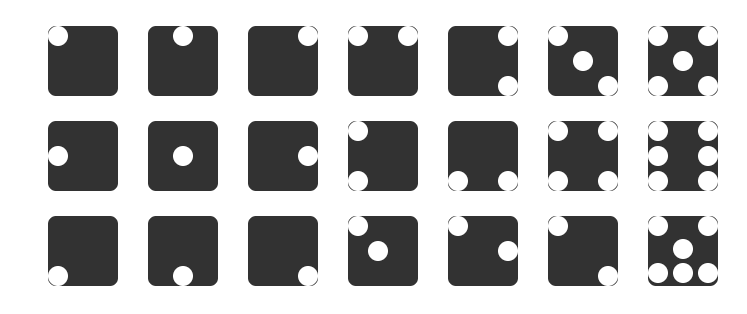
Html代码(没时间精简 请多包涵)
<!DOCTYPE html>
<html lang="en">
<head>
<meta charset="UTF-8">
<meta name="viewport" content="width=device-width, initial-scale=1.0">
<meta http-equiv="X-UA-Compatible" content="ie=edge">
<title>Flex布局大全</title>
<style>
body,html{
width: %;
height: %;
display: flex;
justify-content: space-between;
}
.fore{
width: 700px;
height: 277px;
margin: auto;
display: flex;
justify-content:space-around;
flex-wrap: wrap;
}
.row1,.row2,.row3{
width: 700px;
height: 95px;
display: flex;
justify-content: space-around;
}
.row1{
margin-top: 8px;
}
.father{
background-color: #;
height: 70px;
width: 70px;
border-radius: 8px ;
}
.son{
width: 20px;
height: 20px;
border-radius: 10px;
background-color: #fff;
}
.father2{
display: flex;
justify-content: center;
}
.father3{
display: flex;
justify-content: flex-end;
}
.father4{
display: flex;
justify-content: space-between;
}
.father5{
display: flex;
justify-content: flex-end;
}
.foreSom{
display: flex;
flex-direction: column;
justify-content: space-between;
}
.father6{
display: flex;
justify-content: space-between;
} .foreSon32{
display: flex;
flex-direction: column;
justify-content: center;
}
.foreSon33{
display: flex;
flex-direction: column;
justify-content: flex-end;
}
.father7{
display: flex;
justify-content: space-between;
}
.foreSon51{
display: flex;
flex-direction: column;
justify-content: space-between;
}
.foreSon52{
display: flex;
flex-direction: column;
justify-content: center;
}
.foreSon53{
display: flex;
flex-direction: column;
justify-content: space-between;
} /* 第二行 */
.father2-{
display: flex;
justify-content: flex-start;
align-items: center;
}
.father2-{
display: flex;
justify-content: center;
align-items: center;
}
.father2-{
display: flex;
justify-content: flex-end;
align-items: center;
}
.father2-{
display: flex;
flex-direction: column;
justify-content: space-between;
}
.father2-{
display: flex;
justify-content: space-between;
align-items: flex-end;
}
.father2-{
display: flex;
justify-content: space-between;
flex-wrap: wrap;
}
.foreSon2-{
display: flex;
flex-direction: column;
justify-content: space-between;
} .father2-{
display: flex;
justify-content: space-between;
flex-wrap: wrap;
}
.foreSon2-{
display: flex;
flex-direction: column;
justify-content: space-between;
}
.father3-{
display: flex;
align-items: flex-end;
}
.father3-{
display: flex;
align-items: flex-end;
justify-content: center;
}
.father3-{
display: flex;
align-items: flex-end;
justify-content: flex-end;
}
.father3-{
display: flex;
}
.foreSon3--{
display: flex;
}
.foreSon3--{
align-self: center;
}
.father3-{
display: flex;
justify-content: space-between;
}
.foreSon3--{
align-self: center;
}
.father3-{
display: flex;
justify-content: space-between;
}
.foreSon3--{
align-self: flex-end;
}
.father3-{
display: flex;
flex-wrap: wrap;
}
.foreSon3--{
display: flex;
flex-basis: %;
justify-content: space-between;
}
.foreSon3--{
display: flex;
flex-basis: 70px;
justify-content: center;
}
.foreSon3--{
display: flex;
justify-content: space-between;
flex-basis: %;
} </style>
</head>
<body>
<div class="fore">
<div class="row1">
<div class="father">
<div class="son1 son"></div>
</div>
<div class="father father2">
<div class="son1 son"></div>
</div>
<div class="father father3">
<div class="son1 son"></div>
</div>
<div class="father father4">
<div class="son1 son"></div>
<div class="son1 son"></div>
</div>
<div class="father father5">
<div class="foreSom">
<div class="son1 son"></div>
<div class="son1 son"></div>
</div>
</div>
<div class="father father6">
<div class="foreSon31">
<div class="son1 son"></div>
</div>
<div class="foreSon32">
<div class="son1 son"></div>
</div>
<div class="foreSon33">
<div class="son1 son"></div>
</div>
</div>
<div class="father father7">
<div class="foreSon51">
<div class="son1 son"></div>
<div class="son1 son"></div>
</div>
<div class="foreSon52">
<div class="son1 son"></div>
</div>
<div class="foreSon53">
<div class="son1 son"></div>
<div class="son1 son"></div>
</div>
</div> </div>
<div class="row2">
<div class="father father2-1">
<div class="son1 son"></div>
</div>
<div class="father father2-2">
<div class="son1 son"></div>
</div>
<div class="father father2-3">
<div class="son1 son"></div>
</div>
<div class="father father2-4">
<div class="son1 son"></div>
<div class="son1 son"></div>
</div>
<div class="father father2-5">
<div class="son1 son"></div>
<div class="son1 son"></div>
</div>
<div class="father father2-6">
<div class="foreSon2-6">
<div class="son1 son"></div>
<div class="son1 son"></div>
</div>
<div class="foreSon2-6">
<div class="son1 son"></div>
<div class="son1 son"></div>
</div>
</div>
<div class="father father2-7">
<div class="foreSon2-7">
<div class="son1 son"></div>
<div class="son1 son"></div>
<div class="son1 son"></div>
</div>
<div class="foreSon2-7">
<div class="son1 son"></div>
<div class="son1 son"></div>
<div class="son1 son"></div>
</div>
</div>
</div>
<div class="row3">
<div class="father father3-1">
<div class="son1 son"></div>
</div>
<div class="father father3-2">
<div class="son1 son"></div>
</div>
<div class="father father3-3">
<div class="son1 son"></div>
</div>
<div class="father father3-4">
<div class="foreSon3-4-1">
<div class="son1 son"></div>
</div>
<div class="foreSon3-4-2">
<div class="son1 son"></div>
</div>
</div>
<div class="father father3-5">
<div class="foreSon3-5-1">
<div class="son1 son"></div>
</div>
<div class="foreSon3-5-2">
<div class="son1 son"></div>
</div>
</div>
<div class="father father3-6">
<div class="foreSon3-6-1">
<div class="son1 son"></div>
</div>
<div class="foreSon3-6-2">
<div class="son1 son"></div>
</div>
</div>
<div class="father father3-7">
<div class="foreSon3-7-1">
<div class="son1 son"></div>
<div class="son1 son"></div>
</div>
<div class="foreSon3-7-2">
<div class="son1 son"></div>
</div>
<div class="foreSon3-7-3">
<div class="son1 son"></div>
<div class="son1 son"></div>
<div class="son1 son"></div>
</div>
</div>
</div>
</div> </body>
</html>
全都是自己写的 希望大家可以点个赞!!!(顺便凑下字数)
全都是自己写的 希望大家可以点个赞!!!(顺便凑下字数)
全都是自己写的 希望大家可以点个赞!!!(顺便凑下字数)
全都是自己写的 希望大家可以点个赞!!!(顺便凑下字数)
全都是自己写的 希望大家可以点个赞!!!(顺便凑下字数)
全都是自己写的 希望大家可以点个赞!!!(顺便凑下字数)
全都是自己写的 希望大家可以点个赞!!!(顺便凑下字数)
全都是自己写的 希望大家可以点个赞!!!(顺便凑下字数)
全都是自己写的 希望大家可以点个赞!!!(顺便凑下字数)
全都是自己写的 希望大家可以点个赞!!!(顺便凑下字数)
【原创】display:flex布局大全的更多相关文章
- 1.display:flex布局笔记
/*display:flex布局方式主要运用于垂直居中的效果*/ 一.Flex译为Flexible Box(弹性盒子),任何一个容器都可以指定为Flex布局 注:设置为Flex布局之后,子元素的flo ...
- display:flex 布局教程,弹性布局!
display:flex 布局教程 布局的传统解决方案,基于盒状模型,依赖 display属性 + position属性 + float属性.它对于那些特殊布局非常不方便,比如,垂直居中就不容易实现. ...
- display:flex布局
/*背景 居中 自适应 铺满容器*/ background: center / cover; flex布局是什么? flex是Flexibe Box 的缩写,意思为”弹性布局”, 用来为盒子模型提供最 ...
- HTML/CSS:display:flex 布局教程
网页布局(layout)是 CSS 的一个重点应用. 布局的传统解决方案,基于盒状模型,依赖 display 属性 + position属性 + float属性.它对于那些特殊布局非常不方便,比如,垂 ...
- display:flex 布局详解(2)
1. flex设置元素垂直居中对齐 在之前的一篇文章中记载过如何垂直居中对齐,方法有很多,但是在学习了flex布局之后,垂直居中更加容易实现 HTML代码: <div class=" ...
- display: flex; 布局
废话不多说,供上我学习Flex布局的启蒙文章,一切的答案,尽在这里,仔细阅读,多多回味!保证你有所收获! http://www.ruanyifeng.com/blog/2015/07/flex-gra ...
- display:flex 布局之 骰子
代码部分 html <body> <div class="box"> <div class="a a1"> <span ...
- flex布局大全 2019
有句话叫做:存在即是合理. 最近很喜欢flex布局模式,不过还在摸索中,这里正一边在项目中使用和总结,也在学习一些大牛们总结的东西和布局思考. 鉴于自己很苦恼,到处去ha资料,真的,就没有一个系统的, ...
- flex布局大全
有句话叫做:存在即是合理. 最近很喜欢flex布局模式,不过还在摸索中,这里正一边在项目中使用和总结,也在学习一些大牛们总结的东西和布局思考. 鉴于自己很苦恼,到处去ha资料,真的,就没有一个系统的, ...
随机推荐
- Latch设计模式
import java.util.concurrent.ThreadLocalRandom; import java.util.concurrent.TimeUnit; public class Te ...
- 【小家Spring】聊聊Spring中的数据绑定 --- DataBinder本尊(源码分析)
每篇一句 唯有热爱和坚持,才能让你在程序人生中屹立不倒,切忌跟风什么语言或就学什么去~ 相关阅读 [小家Spring]聊聊Spring中的数据绑定 --- 属性访问器PropertyAccessor和 ...
- 洛谷P2598 [ZJOI2009]狼和羊的故事 题解
题目链接: https://www.luogu.org/problemnew/show/P2598 分析: 我们知道此题的目的是将狼和羊分割开,很容易想到狼在S,羊在T中. 首先,我们可以在狼,羊,空 ...
- Git更改提交
提交记录我们的工作历史记录,提交自身是一成不变的.Git提供了几个工具和命令,抓门用来帮助修改完善版本库中的提交. 实际工作中存在很多情况需要我们去修改或返工某个提交或者整个提交序列: 1,可以在某个 ...
- 在springboot中使用swagger2
1.在springboot中使用swagger的话,首先在pom文件中引入依赖 <!-- https://mvnrepository.com/artifact/io.springfox/spri ...
- c++语言常用转义序列符号
\a 响铃 \n 换行符 \r 回车符 t 水平制表符(Tab键) \b 退格符(BackSpace键) \\ 反斜线 \' ...
- 实现简单的 IOC 和 AOP
1 简单的 IOC 1.1 简单的 IOC 容器实现的步骤 加载 xml 配置文件,遍历其中的标签 获取标签中的 id 和 class 属性,加载 class 属性对应的类,并创建 bean 遍历标签 ...
- 分析了京东内衣销售记录,告诉你妹子们的真Size!
>今天闲暇之余写了一个爬虫例子.通过爬虫去爬取京东的用户评价,通过分析爬取的数据能得到很多结果,比如,哪一种颜色的胸罩最受女性欢迎,以及中国女性的平均size(仅供参考哦~) 打开开发者工具-n ...
- lr参数化
为什么做参数化? 数据库校验:注册用户时会看数据库有没有这个账号 应用程序校验:pc端qq登陆,一个账号只能登陆一台电脑 1.数据库或应用程序提交值的唯一性校验 数据库查询过程: 1.语法检查.语义检 ...
- 前后端分离 之vue-cli 搭建项目mac 系统讲解
前端项目搭建必备技术 webpack nodejs 搭建 vue-cli 的安装 以上技术自行了解安装 一:创建前端项目 采用vue-cli 脚手架 1:终端执行如下命令 vue init webpa ...