
SpringBoot Web篇笔记(一)
摘要
文章是根据江南一点雨(松哥)的视频进行总结
全局异常处理
通常情况下,我们都需要对自己定义的异常进行相应的处理。捕获指定的异常方式如下:
@ControllerAdvice

public class ExceptionHandlers {

    // 捕获自定义异常类进行处理

    @ExceptionHandler(CustomException.class)

    public ModelAndView handler(CustomException e) {

        ModelAndView modelAndView = new ModelAndView("customException"); //自定义异常错误页面

        modelAndView.addObject("msg", e.getMessage());

        // ...

        return modelAndView;

    }

}
自定义错误页面
若服务器抛出404错误码(页面找不到)时,通常会返回如下页面:
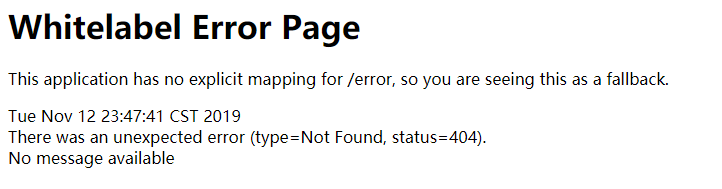
而我们需要指定在服务器抛出相应的错误码时,跳转到指定的动态或静态页面。
源码阅读
参考默认的视图解析器org.springframework.boot.autoconfigure.web.servlet.error.DefaultErrorViewResolver源码,取出部分代码片段如下:
public class DefaultErrorViewResolver implements ErrorViewResolver, Ordered {

   private static final Map<Series, String> SERIES_VIEWS; // 存放不同错误码对应的视图

   // 添加默认的视图

   static {

      Map<Series, String> views = new EnumMap<>(Series.class);

      views.put(Series.CLIENT_ERROR, "4xx");

      views.put(Series.SERVER_ERROR, "5xx");

      SERIES_VIEWS = Collections.unmodifiableMap(views);

   }

   ...

   // 开始解析错误视图

   @Override

   public ModelAndView resolveErrorView(HttpServletRequest request, HttpStatus status, Map<String, Object> model) {

      // status.value() 得到的是错误码

      // 寻找错误码指定的页面,如404就找名为404的页面

      ModelAndView modelAndView = resolve(String.valueOf(status.value()), model);

      // 若找不到错误码指定的页面,则400,401,403,404...都会去找4xx的页面

      if (modelAndView == null && SERIES_VIEWS.containsKey(status.series())) {

         modelAndView = resolve(SERIES_VIEWS.get(status.series()), model);

      }

      // 若modelAndView还是null,那么就返回上面的那个图片了

      return modelAndView;

   }

   private ModelAndView resolve(String viewName, Map<String, Object> model) {

      String errorViewName = "error/" + viewName;

      //首先去动态资源中查看是否存在对应的页面

      TemplateAvailabilityProvider provider = this.templateAvailabilityProviders.getProvider(errorViewName,

            this.applicationContext);

      if (provider != null) {

         return new ModelAndView(errorViewName, model);

      }

      //若动态资源中找不到则到静态资源中寻找对应的页面

      return resolveResource(errorViewName, model);

   }

   //获取静态页面资源

   private ModelAndView resolveResource(String viewName, Map<String, Object> model) {

      // 遍历静态资源,查找是否有对应的页面

      for (String location : this.resourceProperties.getStaticLocations()) {

         try {

            Resource resource = this.applicationContext.getResource(location);

            resource = resource.createRelative(viewName + ".html");

            if (resource.exists()) {

               return new ModelAndView(new HtmlResourceView(resource), model);

            }

         }

         catch (Exception ex) {

         }

      }

      return null;

   }

   ...

}
阅读源码总结
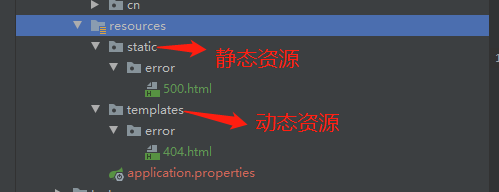
1.首先会去找指定错误码的页面,若指定页面找不到则找4xx、5xx页面,(400、401...都会找4xx)
2.先到动态资源下的error目录寻找,再到静态资源中的error目录寻找
实现
如果为动态资源的页面,返回的ModelAttribute可以查看org.springframework.boot.web.servlet.error.DefaultErrorAttributes, 返回的数据如下:
timestamp
status
error
message
...
thymeleaf下页面使用如下:
<table>

    <tr>

        <td th:text="${status}"></td>

    </tr>

    <tr>

        <td th:text="${message}"></td>

    </tr>

</table>
若需要扩展,则继承DefaultErrorAttributes,对扩展类加@Component注释:
@Component

public class CustomErrorAttribute extends DefaultErrorAttributes {

   // 扩展

}
CORS跨域
在前后端分离进行开发的情况下,一般都需要设置跨域访问,springBoot提供CORS跨域设置如下:
@Configuration

public class WebMvcConfig implements WebMvcConfigurer {

    @Override

    public void addCorsMappings(CorsRegistry registry) {

        registry.addMapping("/**") //所有前缀

                .allowedOrigins("http://localhost:8081") //跨域地址(前端地址)

                .allowedHeaders("*") //允许所有请求头

                .allowedMethods("*") //允许通过所有方法

                .maxAge(30 * 1000); //探测请求的有效期

    }

}
注册拦截器
拦截器可以拦截request请求,若自定义权限认证的功能,就可以使用拦截器去进行实现。
public class MyInterceptor implements HandlerInterceptor {

    @Override

    public boolean preHandle(HttpServletRequest request, HttpServletResponse response, Object handler) throws Exception {

        return false;

    }

    public void postHandle ...

    public void afterCompletion ...

}
preHandler执行方法前调用,postHandler在返回视图前调用,afterCompletion 在方法执行完后调用。
添加拦截器到配置中,重写addInterceptors方法
@Configuration

public class WebMvcConfig implements WebMvcConfigurer {

    @Override

    public void addInterceptors(InterceptorRegistry registry) {

        registry.addInterceptor(myInterceptor())

                .addPathPatterns("/**"); //拦截所有路径

    }

    @Bean

    MyInterceptor myInterceptor() {

        return new MyInterceptor();

    }

}
整合Servlet
首先自定义的Servelt继承javax.servlet.http.HttpServlet;使用@WebServlet进行url映射
@WebServlet(urlPatterns = "/myservlet")

public class MyServlet extends HttpServlet {

    @Override

    protected void doGet(HttpServletRequest req, HttpServletResponse resp) throws ServletException, IOException {

        System.out.println("doget");

    }

}
在启动类xxxApplication对自定义的Servlet的目录进行扫描
@ServletComponentScan(basePackages = "org.java.servlet")
这就可以成功访问到啦!localhost:8080/myservlet
扩展(怕忘记了,记一下):
request监听实现接口javax.servlet.ServletRequestListener, 然后对request监听类使用javax.servlet.annotation.WebListener注解;
request拦截器实现接口javax.servlet.Filter,然后对拦截器使用javax.servlet.annotation.WebFilter注解,如:
@WebListener

public class MyRequestListener implements ServletRequestListener {

    @Override

    public void requestDestroyed(ServletRequestEvent sre) {System.out.println("requestDestroyed");}

    @Override

    public void requestInitialized(ServletRequestEvent sre) {System.out.println("requestInitialized");}

}

@WebFilter(urlPatterns = "/*") //对所有目录进行拦截

public class MyFilter implements Filter {

    @Override

    public void doFilter(ServletRequest request, ServletResponse response, FilterChain chain) throws IOException, ServletException {

        System.out.println("doFilter");

        chain.doFilter(request,response);

    }

}
上述的监听器和拦截器一定要在@ServletComponentScan的扫描目录下或子目录。
若文章有错误或疑问,可在下方评论,Thanks♪(・ω・)ノ。
个人博客网址: https://colablog.cn/
如果我的文章帮助到您,可以关注我的微信公众号,第一时间分享文章给您

SpringBoot Web篇笔记(一)的更多相关文章
- SpringBoot Web篇(二)
摘要 继上一篇 SpringBoot Web篇(一) 文件上传 当我们服务器需要接收用户上传的文件时,就需要使用MultipartFile作为参数接收文件.如下: @PostMapping(" ...
- SpringBoot Web学习笔记
一.资源的访问: 情形一.所有的 /webjars/** 都会去 classpath:/META_INFO/resource/webjars/ 下找资源: webjars:以jar包的方式引入静态 ...
- [SpringBoot]Web综合开发-笔记
Web开发 Json接口开发 @RestController 给类添加 @RestController 即可,默认类中的方法都会以 json 的格式返回. 自定义filter filter作用: 用于 ...
- SpringBoot系列教程web篇之过滤器Filter使用指南扩展篇
前面一篇博文介绍了在 SpringBoot 中使用 Filter 的两种使用方式,这里介绍另外一种直接将 Filter 当做 Spring 的 Bean 来使用的方式,并且在这种使用方式下,Filte ...
- SpringBoot系列教程Web篇之开启GZIP数据压缩
本篇可以归纳在性能调优篇,虽然内容非常简单,但效果可能出乎预料的好: 分享一个真实案例,我们的服务部署在海外,国内访问时访问服务时,响应有点夸张:某些返回数据比较大的接口,耗时在 600ms+上,然而 ...
- SpringBoot系列教程web篇Listener四种注册姿势
java web三要素Filter, Servlet前面分别进行了介绍,接下来我们看一下Listener的相关知识点,本篇博文主要内容为SpringBoot环境下,如何自定义Listener并注册到s ...
- SpringBoot系列教程web篇Servlet 注册的四种姿势
原文: 191122-SpringBoot系列教程web篇Servlet 注册的四种姿势 前面介绍了 java web 三要素中 filter 的使用指南与常见的易错事项,接下来我们来看一下 Serv ...
- SpringBoot系列教程web篇之过滤器Filter使用指南
web三大组件之一Filter,可以说是很多小伙伴学习java web时最早接触的知识点了,然而学得早不代表就用得多.基本上,如果不是让你从0到1写一个web应用(或者说即便从0到1写一个web应用) ...
- SpringBoot系列教程web篇之自定义异常处理HandlerExceptionResolver
关于Web应用的全局异常处理,上一篇介绍了ControllerAdvice结合@ExceptionHandler的方式来实现web应用的全局异常管理: 本篇博文则带来另外一种并不常见的使用方式,通过实 ...
随机推荐
- 开发一个带UI的库(asp.net core 3.0)
在GitHub上有个项目,本来是作为自己研究学习.net core的Demo,没想到很多同学在看,还给了很多星,所以觉得应该升成3.0,整理一下,写成博分享给学习.net core的同学们. 项目名称 ...
- centos7版本以上root密码破解
centos7版本以上root密码破解 主讲内容: 1.centos7版本以上root密码破解 一.centos7版本以上root密码破解 重启服务器,按键盘的方向键(上 下) 按e 进入紧急救援 ...
- 基于STM32F429和HAL库的CAN收发例程
1.CAN协议介绍 CAN 是 Controller Area Network 的缩写(以下称为 CAN),是 ISO 国际标准化的串行通信协议.在当前的汽车产业中,出于对安全性.舒适性.方便性.低公 ...
- 高性能Web动画和渲染原理系列(2)——渲染管线和CPU渲染
目录 一. 高性能动画 二. 像素渲染管线 基本渲染流程 回流和重绘 三. 旧软件渲染 渲染对象(RenderObject) 渲染层(RenderLayer) 四. 从canvas体会分层优势 不分层 ...
- 6个Linux运维典型问题,看大牛的分析解决思路
问题1:文件系统破坏导致系统无法启动 Checking root filesystem /dev/sda6 contains a file system with errors, check forc ...
- winsock完成端口套接字重用注意事项
刚申请到博客,第一篇随笔(๑•̀ㅂ•́)و✧ 关于DisconnectEx的一个问题,目前主要发现在windows10中出现了这个问题,winserver2008 win7都没有这个问题. 被Disc ...
- 实验吧之【因缺思汀的绕过】(group by with rollup的注入利用)
打开页面,查看源代码,发现存在source.txt(http://ctf5.shiyanbar.com/web/pcat/source.txt),如下: <?php error_reportin ...
- Sublime Text3工具的安装、破解、VIM功能vintage插件教程(已经实践、绝对可用)
工欲善其事,必先利其器.Sublime Text是一款很好的开发工具,开发php项目很好用,尤其是Sublime Text的一些插件功能,可以享用VIM的快捷编辑和html.js等自动补全 ...
- [USACO10NOV]购买饲料Buying Feed 单调队列优化DP
题目描述 约翰开车来到镇上,他要带 KKK 吨饲料回家.运送饲料是需要花钱的,如果他的车上有 XXX 吨饲料,每公里就要花费 X2X^2X2 元,开车D公里就需要 D×X2D\times X^2D×X ...
- Uipath 获取当前浏览器页面URL
文章来源东京IT青年前线 http://www.rpatokyo.com Uipath 获取当前浏览器页面URL的方法 Inject Js Script 因为目前没有直接获取页面URL的Act ...