
vue之mixin理解与使用
使用场景
当有两个非常相似的组件,除了一些个别的异步请求外其余的配置都一样,甚至父组件传的值也是一样的,但他们之间又存在着足够的差异性,这时候就不得不拆分成两个组件,如果拆分成两个组件,你就不得不冒着一旦功能变动就要在两个文件中更新代码的风险。
这时候就可以使用mixin(混入)了,混入 (mixin) 提供了一种非常灵活的方式,来分发 Vue 组件中的可复用功能。一个混入对象可以包含任意组件选项。当组件使用混入对象时,所有混入对象的选项将被“混合”进入该组件本身的选项。可能听起来比较抽象,现在举个简单的例子吧。
实际案例
对比这两个组件有什么不同和相同之处
//组件一

<template>

  <a-table :columns="columns" :data-source="data" :pagination="pagination" :loading="loading" rowKey="classid">

    <a slot="classname" slot-scope="text">{{ text }}</a>

    <span slot="crtime" slot-scope="text, record">

      {{ parseTimeNew(record.crtime) }}

    </span>

  </a-table>

</template>

<script>

import { findClassHourByCurricid } from '@/api/system/class'

export default {

    name: 'AllClassHour',

    props: {

        recordDeatil: {

        type: Object,

        required: true

        },

        detailShow: {

            type: Boolean,

            require: true,

            default: false

        }

    },

    data () {

        return {

            data: [],

            columns: [

                        {

                            title: '序号',

                            dataIndex: 'index',

                            key: 'index',

                            align: 'center',

                            width: '10%',

                            customRender: (text, record, index) => `${index + 1}`

                        },

                        {

                            dataIndex: 'classname',

                            title: '课时名称',

                            key: 'classname',

                            width: '50%',

                            // align: 'center',

                            scopedSlots: { customRender: 'classname' }

                        },

                        {

                            title: '创建日期',

                            dataIndex: 'crtime',

                            key: 'crtime',

                            width: '50%',

                            // align: 'center',

                            scopedSlots: { customRender: 'crtime' }

                        }

                    ],

            pagination: false,

            loading: false,

            status: false

        }

    },

    mounted () {this.getClassHour()

        this.test()

    },

    methods: {

        test () {

            console.log('测试公共组件')

        },

        getClassHour () {

            this.data = []

            const params = {

                curricid: this.recordDeatil.curricid

            }

            this.loading = true

            findClassHourByCurricid(params).then(res => {

                const classHourDetail = res.data.data

                this.data = classHourDetail

                this.loading = false

                }

            )

        }

    }

}

</script>
//组件二

<template>

  <a-table :columns="columns" :data-source="data" :pagination="pagination" :loading="loading" rowKey="userid">

    <a slot="truename" slot-scope="text">{{ text }}</a>

    <span slot="crtime" slot-scope="text, record">

      {{ parseTimeNew(record.crtime) }}

    </span>

  </a-table>

</template>

<script>

import { findStudentByCurricid } from '@/api/system/class'

export default {

    name: 'AllStudent',

    props: {

        recordDeatil: {

        type: Object,

        required: true

        },

        detailShow: {

            type: Boolean,

            require: true,

            default: false

        }

    },

    data () {

        return {

            data: [],

            columns: [

                        {

                            title: '序号',

                            dataIndex: 'index',

                            key: 'index',

                            align: 'center',

                            width: '10%',

                            customRender: (text, record, index) => `${index + 1}`

                        },

                        {

                            dataIndex: 'truename',

                            title: '真实姓名',

                            key: 'truename',

                            width: '50%',

                            // align: 'center',

                            scopedSlots: { customRender: 'truename' }

                        },

                        {

                            title: '中文名',

                            dataIndex: 'chanema',

                            width: '50%',

                            // align: 'center',

                            key: 'chanema'

                        }

                    ],

            pagination: false,

            loading: false,

            status: false

        }

    },

    mounted () {this.getStudent()

        this.test()

    },

    methods: {

        test () {

            console.log('测试公共组件')

        },

        getStudent () {

            this.data = []

            const params = {

                curricid: this.recordDeatil.curricid

            }

            this.loading = true

            findStudentByCurricid(params).then(res => {

                const studentDetail = res.data.data

                this.data = studentDetail

                this.loading = false

                }

            )

        }

    }

}

</script>
可以发现,除了获取表格的数据所调用的异步请求外其余配置基本上相同 于是我们可以在这里提取逻辑并创建可以被重用的项:
export const publish = {

    props: {

        recordDeatil: {

        type: Object,

        required: true

        },

        detailShow: {

            type: Boolean,

            require: true,

            default: false

        }

    },

    data () {

        return {

            data: [],

            pagination: false,

            loading: false,

            status: false

        }

    },

    methods: {

        test () {

            console.log('测试公共方法')

        }

    }

}
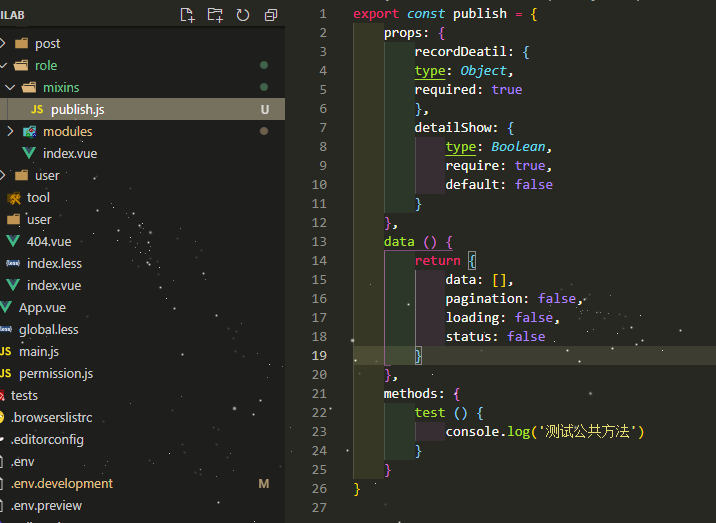
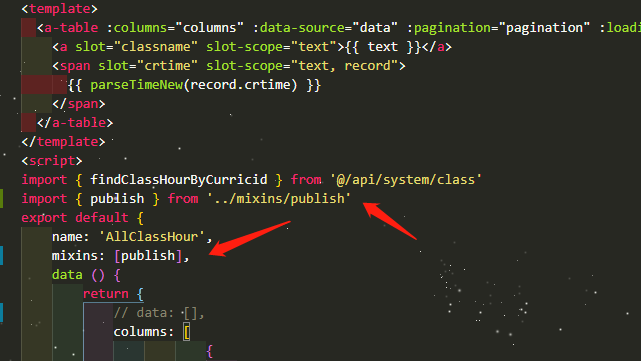
然后我们把组件中重复的配置和方法全部去掉,引用这个mixin
运行代码会发现 结果是一样的
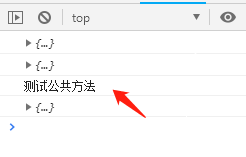
即便我们使用的是一个对象而不是一个组件,生命周期函数对我们来说仍然是可用的,理解这点很重要。我们也可以这里使用mounted()钩子函数,它将被应用于组件的生命周期上。这种工作方式真的很灵活也很强大。
总而言之
在一些我们需要做同样配置或者相似度极高的组件时,我们不妨可以试试Mixin混入你所需要的相同配置或者方法,这样会使我们的开发效率大大提高。
vue之mixin理解与使用的更多相关文章
- Vue中mixin的用法
在项目中我们经常会遇到多个组件调用同一个方法的问题,为了避免每次都在.vue文件中定义并调用,我们可采用vue的mixin的用法: 具体使用如下: 我们需要在main.js中引入mixins文件夹下的 ...
- 沉淀,再出发:VUE的简单理解
沉淀,再出发:VUE的简单理解 一.前言 Vue.js(读音 /vjuː/, 类似于 view) 是一套构建用户界面的渐进式框架.Vue 只关注视图层,采用自底向上增量开发的设计.Vue 的目标是通过 ...
- vue的mixin简化开发
vue的mixin可以将多个组件公用的声明周期方法和数据封装成一个对象,在不同的组件中自由插拔.实际做项目的时候,可以定义一些mixin,供多个组件使用.也非常有必要定义一个全局的mixin对象,对所 ...
- vue 混入 mixin,自定义指令,过滤器
vue 混入 mixin ,分发 vue 组件中重复的功能 局部的书写格式 // mixin.js var mymixin = { // 这是一个对象:对象里面的写法与组件里面的写法一模一样,组件该 ...
- vue中mixin的理解与用法
vue中提供了一种混合机制--mixins,用来更高效的实现组件内容的复用.最开始我一度认为这个和组件好像没啥区别..后来发现错了.下面我们来看看mixins和普通情况下引入组件有什么区别? 组件在引 ...
- vue中mixin的一点理解
vue中提供了一种混合机制--mixins,用来更高效的实现组件内容的复用.最开始我一度认为这个和组件好像没啥区别..后来发现错了.下面我们来看看mixins和普通情况下引入组件有什么区别? ...
- vue props的理解
vue用了这么久,今天发现父子组件还是傻傻的分不清,不过还好,今天终于搞懂了 vue中到底什么是父组件,什么是子组件 vue之props父子组件之间的谈话 简单的理解就是:使用的地方是父组件,定义的地 ...
- vue nextTick深入理解-vue性能优化、DOM更新时机、事件循环机制
一.定义[nextTick.事件循环] nextTick的由来: 由于VUE的数据驱动视图更新,是异步的,即修改数据的当下,视图不会立刻更新,而是等同一事件循环中的所有数据变化完成之后,再统一进行视图 ...
- 对vue nextTick深入理解-vue性能优化、DOM更新时机、事件循环机制
一.定义[nextTick.事件循环] nextTick的由来: 由于VUE的数据驱动视图更新,是异步的,即修改数据的当下,视图不会立刻更新,而是等同一事件循环中的所有数据变化完成之后,再统一进行视图 ...
随机推荐
- WebGL Programming Guide All In One
WebGL Programming Guide All In One WebGL WebGL Programming Guide All In One Publication date: July 2 ...
- React Hooks vs React Class vs React Function All In One
React Hooks vs React Class vs React Function All In One React Component Types React Hooks Component ...
- webfullstack website
webfullstack website refs https://www.lanqiao.cn/paths/ xgqfrms 2012-2020 www.cnblogs.com 发布文章使用:只允许 ...
- Beacon API All In One
Beacon API All In One Beacon API https://developer.mozilla.org/en-US/docs/Web/API/Beacon_API https:/ ...
- computer network layers architecture (TCP/IP)
computer network layers architecture (TCP/IP) 计算机网络分层架构 TCP/IP 协议簇 OSI 模型(7 层) TCP/IP (4 层) Applicat ...
- Apple & HTML5 app
Apple & HTML5 app https://developer.apple.com/cn/news/?id=09062019b https://developer.apple.com/ ...
- js 最简单的发布订阅模式
let _subscriber: any; function autorun(subscriber: Function) { _subscriber = subscriber; _subscriber ...
- 精密进近OAS面的绘制与评估
一.定义:精密进近OAS面(Obstacle Assessment Surface 障碍物评价面)是在精密进近程序中,用来对障碍物进行评估,找出影响运行标准的控制障碍物的一种计算方法. 二.构成 OA ...
- MySQL学习04(DQL查询)
DQL查询 DQL语言 DQL( Data Query Language 数据查询语言 ) 查询数据库数据 , 如SELECT语句 简单的单表查询或多表的复杂查询和嵌套查询 是数据库语言中最核心,最重 ...
- 为什么 Python 的 f-string 可以连接字符串与数字?
本文出自"Python为什么"系列,归档在 Github 上:https://github.com/chinesehuazhou/python-whydo 毫无疑问,Python ...