
swagger的导出
swagger-export是一个提供swagger文档导出功能的服务,不依赖于具体的API接口服务实现,你可以很方便地导出html和pdf两种格式的静态文档。源码来自swagger导出静态API文档工具,做了一些修改,以符合实际的项目需要。
一.在src下配置asciidoc
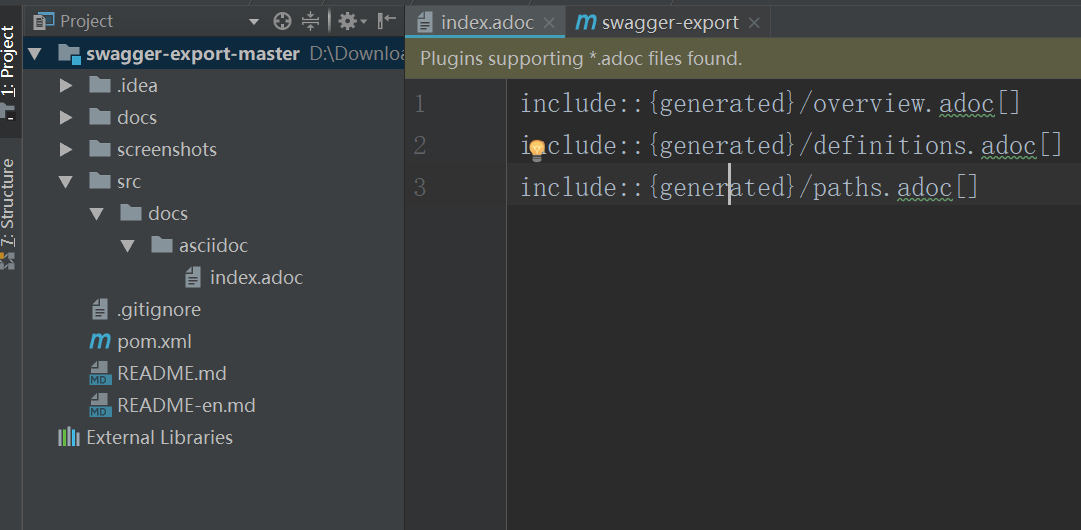
二.pom.xml
也就是maven插件
<?xml version="1.0" encoding="UTF-8"?>

<project xmlns="http://maven.apache.org/POM/4.0.0"

         xmlns:xsi="http://www.w3.org/2001/XMLSchema-instance"

         xsi:schemaLocation="http://maven.apache.org/POM/4.0.0 http://maven.apache.org/xsd/maven-4.0.0.xsd">

    <modelVersion>4.0.</modelVersion>

    <groupId>com.jeesun</groupId>

    <artifactId>swagger-export</artifactId>

    <version>1.0.</version>

    <properties>

        <swaggerInputPath>http://127.0.0.1:8080/api/v2/api-docs</swaggerInputPath>

    </properties>

    <build>

        <finalName>com-jeesun-${project.artifactId}-${project.version}</finalName>

        <plugins>

            <!--此插件生成ASCIIDOC-->

            <plugin>

                <groupId>io.github.swagger2markup</groupId>

                <artifactId>swagger2markup-maven-plugin</artifactId>

                <version>1.3.</version>

                <dependencies>

                    <dependency>

                        <groupId>io.github.swagger2markup</groupId>

                        <artifactId>swagger2markup</artifactId>

                        <version>1.3.</version>

                    </dependency>

                </dependencies>

                <configuration>

                    <!--此处端口一定要是当前项目启动所用的端口-->

                    <swaggerInput>${swaggerInputPath}</swaggerInput>

                    <outputDir>${project.build.directory}/docs/asciidoc/generated</outputDir>

                    <config>

                        <!-- 除了ASCIIDOC之外,还有MARKDOWN和CONFLUENCE_MARKUP可选 -->

                        <swagger2markup.markupLanguage>ASCIIDOC</swagger2markup.markupLanguage>

                        <swagger2markup.pathsGroupedBy>TAGS</swagger2markup.pathsGroupedBy>

                        <swagger2markup.outputLanguage>ZH</swagger2markup.outputLanguage>

                    </config>

                </configuration>

                <executions>

                    <execution>

                        <phase>generate-resources</phase>

                        <goals>

                            <goal>convertSwagger2markup</goal>

                        </goals>

                    </execution>

                </executions>

            </plugin>

            <!--此插件生成HTML和PDF-->

            <plugin>

                <groupId>org.asciidoctor</groupId>

                <artifactId>asciidoctor-maven-plugin</artifactId>

                <version>1.5.</version>

                <!-- Include Asciidoctor PDF for pdf generation -->

                <dependencies>

                    <dependency>

                        <groupId>org.asciidoctor</groupId>

                        <artifactId>asciidoctorj-pdf</artifactId>

                        <version>1.5.-alpha.</version>

                    </dependency>

                    <!--<dependency>-->

                    <!--<groupId>org.jruby</groupId>-->

                    <!--<artifactId>jruby-complete</artifactId>-->

                    <!--<version>1.7.</version>-->

                    <!--</dependency>-->

                    <!-- Comment this section to use the default jruby artifact provided by the plugin -->

                    <dependency>

                        <groupId>org.jruby</groupId>

                        <artifactId>jruby-complete</artifactId>

                        <version>9.1.8.0</version>

                    </dependency>

                    <!-- Comment this section to use the default AsciidoctorJ artifact provided by the plugin -->

                    <dependency>

                        <groupId>org.asciidoctor</groupId>

                        <artifactId>asciidoctorj</artifactId>

                        <version>1.5.</version>

                    </dependency>

                </dependencies>

                <!-- Configure generic document generation settings -->

                <configuration>

                    <sourceDirectory>src/docs/asciidoc</sourceDirectory>

                    <sourceDocumentName>index.adoc</sourceDocumentName>

                    <sourceHighlighter>coderay</sourceHighlighter>

                    <attributes>

                        <doctype>book</doctype>

                        <toc>left</toc>

                        <toclevels></toclevels>

                        <numbered></numbered>

                        <hardbreaks></hardbreaks>

                        <sectlinks></sectlinks>

                        <sectanchors></sectanchors>

                        <generated>${project.build.directory}/docs/asciidoc/generated</generated>

                    </attributes>

                </configuration>

                <!-- Since each execution can only handle one backend, run

                     separate executions for each desired output type -->

                <executions>

                    <execution>

                        <id>output-html</id>

                        <phase>generate-resources</phase>

                        <goals>

                            <goal>process-asciidoc</goal>

                        </goals>

                        <configuration>

                            <backend>html5</backend>

                            <outputDirectory>${project.build.directory}/docs/asciidoc/html</outputDirectory>

                        </configuration>

                    </execution>

                    <execution>

                        <id>output-pdf</id>

                        <phase>generate-resources</phase>

                        <goals>

                            <goal>process-asciidoc</goal>

                        </goals>

                        <configuration>

                            <backend>pdf</backend>

                            <outputDirectory>${project.build.directory}/docs/asciidoc/pdf</outputDirectory>

                        </configuration>

                    </execution>

                </executions>

            </plugin>

            <!-- end::plugin[] -->

        </plugins>

    </build>

    <!--<repositories>

        <repository>

            <id>jcenter-releases</id>

            <name>jcenter</name>

            <url>http://jcenter.bintray.com</url>

        </repository>

    </repositories>-->

    <pluginRepositories>

        <pluginRepository>

            <id>jcenter-releases</id>

            <name>jcenter</name>

            <url>http://jcenter.bintray.com</url>

        </pluginRepository>

    </pluginRepositories>

</project>
导出步骤
启动待导出的API接口服务;
修改pom文件中
properties配置的swaggerInputPath值为目标服务的IP端口信息;在当前目录执行
mvn clean compile命令;生成的文档有html和pdf两种格式,目录分别为
target\docs\asciidoc\html\index.html
target\docs\asciidoc\pdf\index.pdf
导出的pdf格式文件,中文存在显示问题。可用Word2016打开,然后另存为word格式文件。
注意:
导出时,如果有数据权限,得放出 /v2/api-docs 接口。
swagger的导出的更多相关文章
- 怎么将swagger API导出为HTML或者PDF
文章目录 将swagger API导出为HTML或者PDF 什么是Asciidoc swagger2markup-maven-plugin asciidoctor-maven-plugin 使用命令行 ...
- 通过Swagger接口导出模板文件时报错:URL.createObjectURL: Argument 1 is not valid for any of the 1-argument overloads.
问题描述:通过Swagger接口导出Excel模板文件时,报错:URL.createObjectURL: Argument 1 is not valid for any of the 1-argume ...
- 在.Net Core WebAPI下给Swagger增加导出离线文档功能
一丶前言 最近刚接触到Swagger,在github上下载了它的源码和demo学习了一遍,发现这个组件非常好用,不过不足的是它没有导出离线文档的功能,于是乎我就想给它加一个导出功能 Swagger G ...
- swagger json导出word,Typora软件推荐!!!
场景: 前几天项目验收,赶了一整天补API接口设计文档,给爷整吐了.周末的时候就想能不能直接把swagger的json文件导出成word? 顺便学习一下NPOI的使用. 实现思路: 1.先把swaag ...
- swagger环境搭建
下面所用工具下载 http://editor.swagger.io/#/ demo 一.安装 swagger editor 说明:安装swagger前需要安装node工具 工具安装 ...
- 浅谈API网关(API Gateway)如何承载API经济生态链
序言 API经济生态链已经在全球范围覆盖, 绝大多数企业都已经走在数字化转型的道路上,API成为企业连接业务的核心载体, 并产生巨大的盈利空间.快速增长的API规模以及调用量,使得企业IT在架构上.模 ...
- 阿里云高磊:API网关加速能力聚合与生态集成
导读:本文中,阿里云高级技术专家高磊(花名:埃兰)将聚焦API网关加速能力聚合与生态集成,讲述API如何实现系统间的衔接和API网关的产品升级进程,重点展示了一些新功能.新体验和新变化. 大家下午好, ...
- Swagger 导出API
Swagger 导出API 这算是在博客园的第一篇博客吧,之后发的应该也会同步到博客园上. 此前的博客地址: https://blog.mytyiluo.cn Swagger简介 Swagger是一个 ...
- C#中缓存的使用 ajax请求基于restFul的WebApi(post、get、delete、put) 让 .NET 更方便的导入导出 Excel .net core api +swagger(一个简单的入门demo 使用codefirst+mysql) C# 位运算详解 c# 交错数组 c# 数组协变 C# 添加Excel表单控件(Form Controls) C#串口通信程序
C#中缓存的使用 缓存的概念及优缺点在这里就不多做介绍,主要介绍一下使用的方法. 1.在ASP.NET中页面缓存的使用方法简单,只需要在aspx页的顶部加上一句声明即可: <%@ Outp ...
随机推荐
- C/C++编程笔记:C语言打造中国象棋游戏,项目源代码分享!
中国象棋是起源于中国的一种棋,属于二人对抗性游戏的一种,在中国有着悠久的历史.由于用具简单,趣味性强,成为流行极为广泛的棋艺活动. 它是中国棋文化,也是中华民族的文化瑰宝,它源远流长,趣味浓厚,基本规 ...
- AC自动机&后缀自动机
理解的不够深 故只能以此来加深理解 .我这个人就是蠢没办法 学长讲的题全程蒙蔽.可能我字符串就是菜吧,哦不我这个人就是菜吧. AC自动机的名字 AC 取自一个大牛 而自动机就比较有讲究了 不是寻常的东 ...
- 实战:docker搭建FastDFS文件系统并集成SpringBoot
实战:docker搭建FastDFS文件系统并集成SpringBoot 前言 15年的时候,那时候云存储还远远没有现在使用的这么广泛,归根结底就是成本和安全问题,记得那时候我待的公司是做建站开发的,前 ...
- 用tf.one_hot函数写任一坐标为1的二维张量
先给出tf.one_hot的用例:(例子转自https://www.jianshu.com/p/c5b4ec39713b) import tensorflow as tf var0 = tf.one_ ...
- python数据可视化编程实战PDF高清电子书
点击获取提取码:3l5m 内容简介 <Python数据可视化编程实战>是一本使用Python实现数据可视化编程的实战指南,介绍了如何使用Python最流行的库,通过60余种方法创建美观的数 ...
- 70道Spring面试题
1. 什么是spring? Spring 是个java企业级应用的开源开发框架.Spring主要用来开发Java应用,但是有些扩展是针对构建J2EE平台的web应用.Spring 框架目标是简化Jav ...
- git push到远程仓库
(此处我以码云为例) 常用命令: 添加远程仓库:git remote add origin 仓库地址 (origin只是一个名字,对远程仓库的一个名字,习惯上用origin) 从仓库拉取内容:git ...
- python种类
JPython IronPython CPython JavaScriptPython 等等. 这些python的区别是他们隶属于不同的厂商,而我们所说的python通常是指CPython, 因为不同 ...
- 《RabbitMQ》如何保证消息不被重复消费
一 重复消息 为什么会出现消息重复?消息重复的原因有两个:1.生产时消息重复,2.消费时消息重复. 1.1 生产时消息重复 由于生产者发送消息给MQ,在MQ确认的时候出现了网络波动,生产者没有收到确认 ...
- ES6语法学习(一)-let和const
1.let 和 const 变量提升: 在声明变量或者函数时,被声明的变量和函数会被提升到函数最顶部: 但是如果声明的变量或者函数被初始化了,则会失去变量提升: 示例代码: param2 = &quo ...