
Xray批量化自动扫描
关于Xray高级版破解:
不过好像新版本的Xray修复了破解的BUG,亲测Xray1.3.3高级版仍然可以破解
因为Xray没有批量化的选项,在网上查了一下,fofa2Xray是封装好了的EXE文件,其他的好像需要配置代理之类的,反正挺麻烦,我只是想从txt里面按行读取URL进行扫描,所以昨晚上花半个小时自己写了一个小脚本实现Xray自动化批量扫描。
首先是一个大LOGO
def logo():

    logo='''

 _ __  _ __  _ __

| '_ \| '_ \| '_ \

| |_) | |_) | |_) |

| .__/| .__/| .__/

| |   | |   | |

|_|   |_|   |_|

   __   __

   \ \ / /

    \ V / _ __ __ _ _   _

    /   \| '__/ _` | | | |

   / /^\ \ | | (_| | |_| |

   \/   \/_|  \__,_|\__, |

                     __/ |

                    |___/

                            v1.0

                            author:springbird

    '''

    return logo
将Xray高级版破解之后路径配置在环境变量里,这样我们这个代码就不需要固定位置放置
核心是
def xrayScan(targeturl,outputfilename="test"):

    scanCommand="xray.exe webscan --basic-crawler {} --html-output {}.html".format(targeturl,outputfilename)

    print(scanCommand)

    os.system(scanCommand)

    return
os.system执行命令进行扫描,这样就实现了单个URL的脚本扫描,接着是读取TXT实现批量
def pppGet():

    f = open("target.txt")

    lines = f.readlines()

    pattern = re.compile(r'^http://')

    for line in lines:

        try:

            if not pattern.match(line.strip()):

                targeturl="http://"+line.strip()

            else:

                targeturl=line.strip()

            print(targeturl.strip())

            outputfilename=hashlib.md5(targeturl.encode("utf-8"))

            xrayScan(targeturl.strip(), outputfilename.hexdigest())

            # print(type(line))

        except Exception as e:

            print(e)

            pass

    f.close()

    print("Xray Scan End~")

    return
这里的代码就是从文件里面读取URL,依次放在Xray里面进行扫描,放置待扫描URL的txt的名字为target.txt
最终完整代码为:
import os
import hashlib
import re
def logo():
logo='''
_ __ _ __ _ __
| '_ \| '_ \| '_ \
| |_) | |_) | |_) |
| .__/| .__/| .__/
| | | | | |
|_| |_| |_|
__ __
\ \ / /
\ V / _ __ __ _ _ _
/ \| '__/ _` | | | |
/ /^\ \ | | (_| | |_| |
\/ \/_| \__,_|\__, |
__/ |
|___/
v1.0
author:springbird
'''
return logo
def xrayScan(targeturl,outputfilename="test"):
scanCommand="xray.exe webscan --basic-crawler {} --html-output {}.html".format(targeturl,outputfilename)
print(scanCommand)
os.system(scanCommand)
return
# def test():
# pattern = re.compile(r'^http://')
# m = pattern.match('http://www.baidu.com')
# n = pattern.match('hta')
# print(m)
# print(n)
# return
def pppGet():
f = open("target.txt")
lines = f.readlines()
pattern = re.compile(r'^http://')
for line in lines:
try:
if not pattern.match(line.strip()):
targeturl="http://"+line.strip()
else:
targeturl=line.strip()
print(targeturl.strip())
outputfilename=hashlib.md5(targeturl.encode("utf-8"))
xrayScan(targeturl.strip(), outputfilename.hexdigest())
# print(type(line))
except Exception as e:
print(e)
pass
f.close()
print("Xray Scan End~")
return
def main():
print(logo())
pppGet()
return
if __name__ == '__main__':
main()
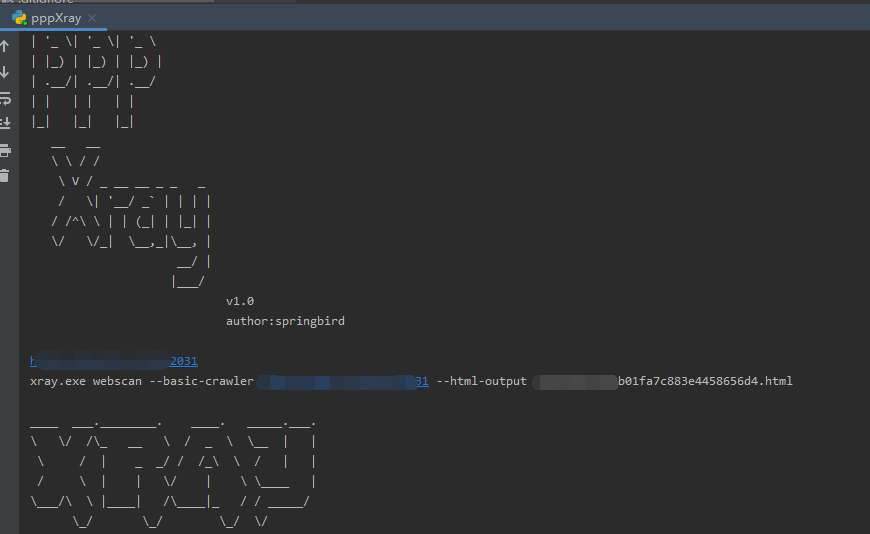
运行截图为:
其实这个批量的功能还是挺重要的,或许是Xray开发团队不想扫描器被滥用的原因才没有实现该功能,把代码放在了github上:
https://github.com/Cl0udG0d/pppXray
Xray批量化自动扫描的更多相关文章
- 你的应用安全吗? ——用Xray和Synk保驾护航
一.背景 在当下软件应用的开发过程当中,自研的内部代码所占的比例逐步地减少,开源的框架和共用库已经得到了广泛的引用.如下图所示,在一个Kubernetes部署的应用当中,我们自己开发代码所占的比例可能 ...
- ARL资产导出对接Xray扫描
使用ARL资产灯塔系统对目标进行资产整理的时候,能够对获取的结果进行导出: 导出之后为excel文件 想要将site中的URL导出为txt文件,再使用Xray高级版进行批量化扫描: https://w ...
- xray—学习笔记
长亭xray扫描器 简介 xray (https://github.com/chaitin/xray) 是从长亭洞鉴核心引擎中提取出的社区版漏洞扫描神器,支持主动.被动多种扫描方式,自备盲打平台.可以 ...
- Xray学习
Xray 目前支持的漏洞检测类型包括: XSS漏洞检测 (key: xss) SQL 注入检测 (key: sqldet) 命令/代码注入检测 (key: cmd-injection) 目录枚举 (k ...
- spring自动扫描、DispatcherServlet初始化流程、spring控制器Controller 过程剖析
spring自动扫描1.自动扫描解析器ComponentScanBeanDefinitionParser,从doScan开始扫描解析指定包路径下的类注解信息并注册到工厂容器中. 2.进入后findCa ...
- Spring常用注解,自动扫描装配Bean
1 引入context命名空间(在Spring的配置文件中),配置文件如下: xmlns:context="http://www.springframework.org/schema/con ...
- SpringMVC自动扫描@Controller注解的bean
若要对@Controller注解标注的bean进行自动扫描,必须将<context:component-scan base-package="包路径.controller"/ ...
- Spring的自动扫描与管理
通过在classpath自动扫描方式把组件纳入spring容器中管理 前面的例子我们都是使用XML的bean定义来配置组件.在一个稍大的项目中,通常会有上百个组件,如果这些这组件采用xml的bean定 ...
- 自动扫描FTP文件工具类 ScanFtp.java
package com.util; import java.io.BufferedInputStream; import java.io.BufferedOutputStream; import ja ...
随机推荐
- Core WebApi项目快速入门(二):Filter详解
Core的核心是DI,面向AOP的编程方式.在.NetCore中AOP的实现很大程度上依赖于Filter.下面就Core WebApi中的Filter进行举例. 其中鉴权中心我个人认为是比较重要的概念 ...
- Doctrine\ORM\QueryBuilder 源码解析之 where
背景 最近有需求实现类似于 QueryBuilder 的谓词语句,就去翻看了它的源码.先看两个例子 例子1 $qb = $em->createQueryBuilder(); $qb->se ...
- Table is marked as crashed and should be repaired 解决办法
遇到这个问题几个敲命令轻松搞定 1.首先进入mysql命令台: mysql -u root -p 回车 输入密码 2.查询所有的库 mysql> show databases; 3.进入数据库 ...
- python_摘要_加密
import hashlib def get_md5(username,password): md5 = hashlib.md5(username.encode('utf-8')) # 加盐 md5. ...
- hive 下载和导入数据 hive -e
1. 从97导出dim_channel_terminal_flag表数据到txt(数据下载) hive -e 'select * from dim.dim_city' >> dim_cit ...
- 手把手教你使用Vuex(二)
在上一篇文章Vuex(一)中我们已经把Vuex需要用到的属性的单独页面引入到了store/index.js里面,所以我们接下来直接在这些js文件中写自己需要的代码就好. 1.Getter 了解:Get ...
- nginx&http 第三章 惊群
惊群:概念就不解释了. 直接说正题:惊群问题一般出现在那些web服务器上,Linux系统有个经典的accept惊群问题,这个问题现在已经在内核曾经得以解决,具体来讲就是当有新的连接进入到accept队 ...
- 从 Webpack 到 Snowpack, 编译速度提升十倍以上——TRPG Engine迁移小记
动机 TRPG Engine经过长久以来的迭代,项目已经显得非常臃肿了.数分钟的全量编译, 每次按下保存都会触发一次10s到1m不等的增量编译让我苦不堪言, 庞大的依赖使其每一次编译都会涉及很多文件和 ...
- 记php多张图片 合并生成竖列 纵向长图(可用于商品详情图合并下载)
<?php namespace app\mapi\common\image; /** * 拼接多幅图片成为一张图片 * * 参数说明:原图片为文件路径数组,目的图片如果留空,则不保存结果 * * ...
- 怎么用思维导图软件iMindMap整理发文思路
如果你是一个普通的博客作者,那么你就应该明白在枯竭时寻找灵感就像是一场噩梦,即使你有一千个想法,但是你无法将它们关联起来也是无用的,所以,为什么不试试iMindMap思维导图呢,尝试创新,进行组建,你 ...