
Day01_企业权限管理(SSM整合)
学于黑马程序员和传智播客联合做的教学项目 感谢
黑马程序员官网
传智播客官网
个人根据教程的每天的工作进度的代码和资料 密码:cti5
b站在线视频
微信搜索"艺术行者",关注并回复关键词"企业权限管理"获取视频和教程资料!
功能介绍
- 商品查询
- 商品添加
- 订单查询
- 订单分页查询
- 订单详情查询
- 用户管理
- 角色管理
- 资源权限管理
- 权限关联与控制
- AOP日志处理
数据库介绍
- 产品表

- 订单表
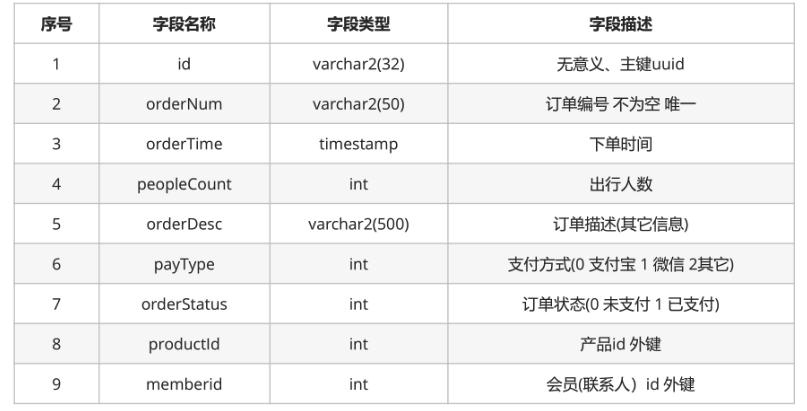
- 会员表
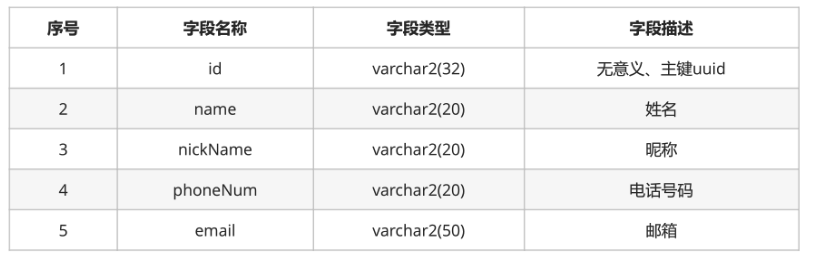
- 旅客表
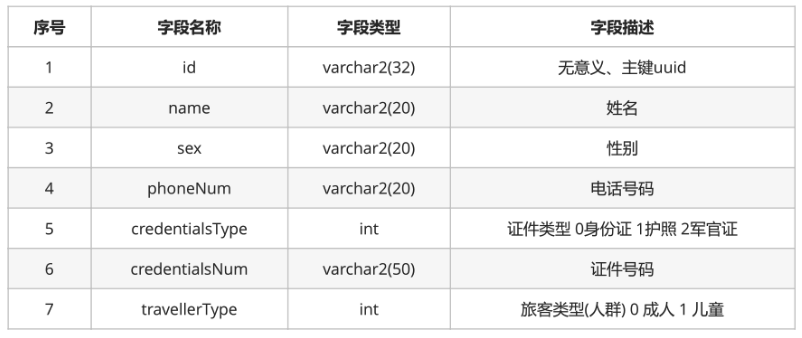
- 用户表
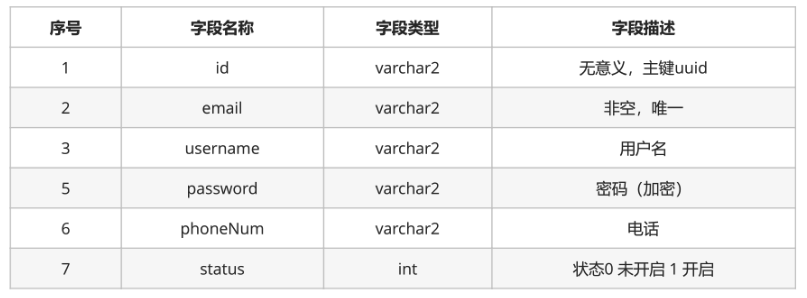
- 角色表
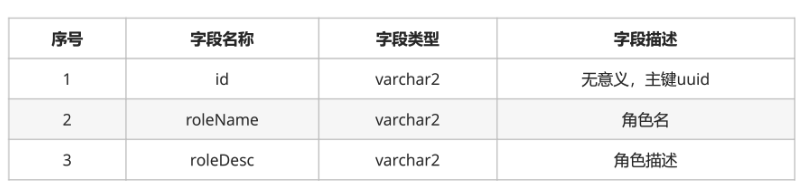
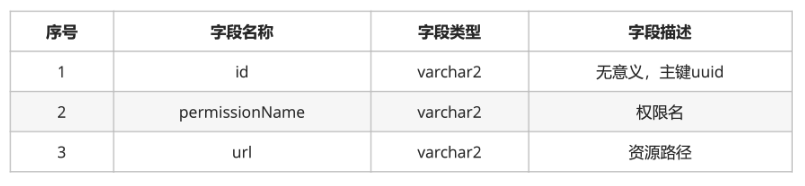
- 资源权限表
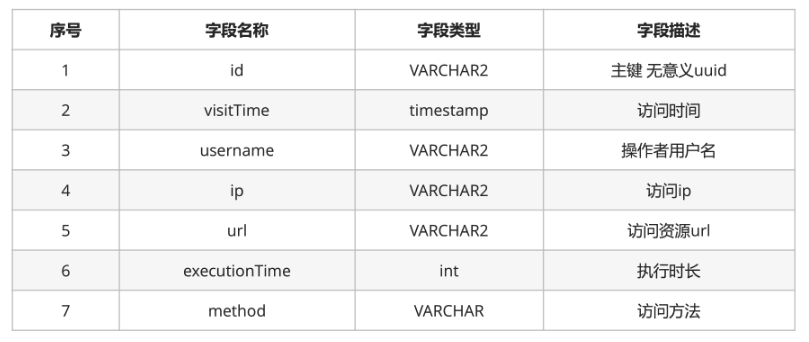
- 日志表
第一天
前端使用的技术:AdminLTE
- 简介:AdminLTE是一款建立在bootstrap和jquery之上的开源的模板主题工具,它提供了一系列响应的、可重复使用的组件,并内置了多个模板页面;同时自适应多种屏幕分辨率,兼容PC和移动端。通过AdminLTE,我们可以快速的创建一个响应式的Html5网站。AdminLTE框架在网页架构与设计上,有很大的辅助作用,尤其是前端架构设计师,用好AdminLTE 不但美观,而且可以免去写很大CSS与JS的工作量。
- 获取AdminLTE:
英文版:https://github.com/ColorlibHQ/AdminLTE
中文版:https://github.com/itheima2017/adminlte2-itheima
现成的都在资料里
准备工作
数据库:Oracle Database 10g Enterprise Edition Release 10.1.0.2.0 - Prod
Oracle 为每个项目创建单独user,每个用户有独立表空间,oracle数据存放在表空间下。
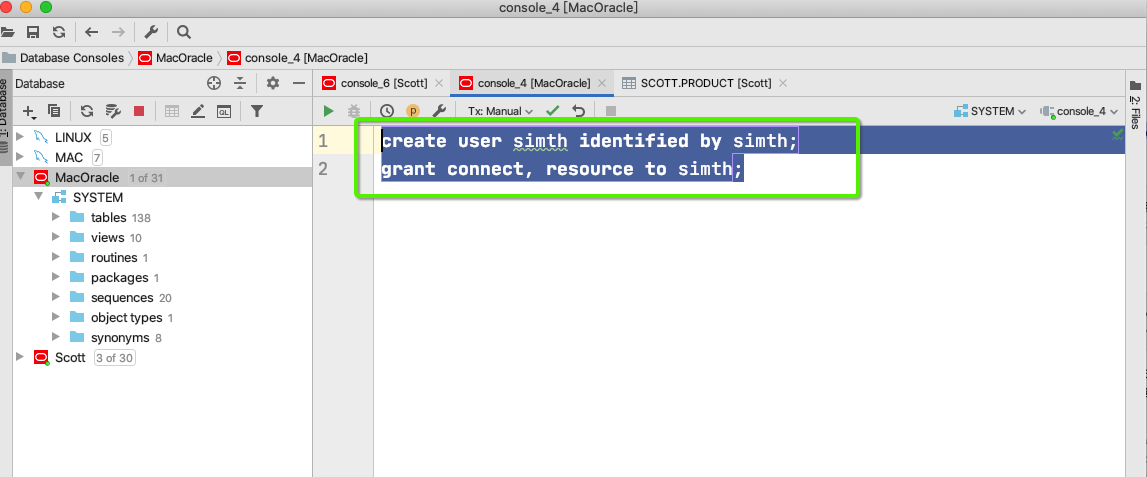
- 使用管理员连接到数据库,创建用户,并分配相应的权限
create user simth identified by simth;

grant connect, resource to simth;
- 使用simth用户连接数据库

- 创建产品表
CREATE TABLE product(id varchar2(32) default SYS_GUID() PRIMARY KEY,

                    productNum VARCHAR2(50) NOT NULL,

                    productName VARCHAR2(50),

                    cityName VARCHAR2(50),

                    DepartureTime timestamp,

                    productPrice Number,

                    productDesc VARCHAR2(500),

                    productStatus INT,

                    CONSTRAINT product UNIQUE (id, productNum));
- 插入数据
insert into PRODUCT (id, productnum, productname, cityname, departuretime, productprice,productdesc, productstatus)

values ('676C5BD1D35E429A8C2E114939C5685A', 'itcast-002', '北京三日游', '北京', to_timestamp('10-10-2018 10:10:00.000000', 'dd-mm-yyyy hh24:mi:ss.ff'), 1200, '不错的旅行', 1);

insert into PRODUCT (id, productnum, productname, cityname, departuretime, productprice,productdesc, productstatus)

values ('12B7ABF2A4C544568B0A7C69F36BF8B7', 'itcast-003', '上海五日游', '上海', to_timestamp('25-04-2018 14:30:00.000000', 'dd-mm-yyyy hh24:mi:ss.ff'), 1800, '魔都我来了', 0);

insert into PRODUCT (id, productnum, productname, cityname, departuretime, productprice,productdesc, productstatus)

values ('9F71F01CB448476DAFB309AA6DF9497F', 'itcast-001', '北京三日游', '北京', to_timestamp('10-10-2018 10:10:00.000000', 'dd-mm-yyyy hh24:mi:ss.ff'), 1200, '不错的旅行', 1);

- MAVEN工程搭建
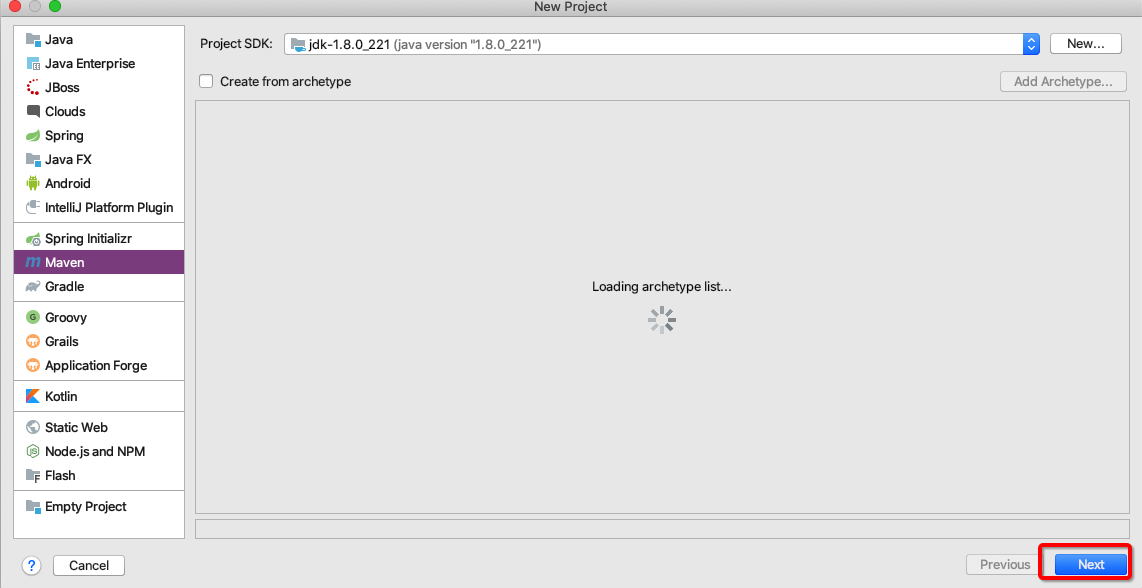
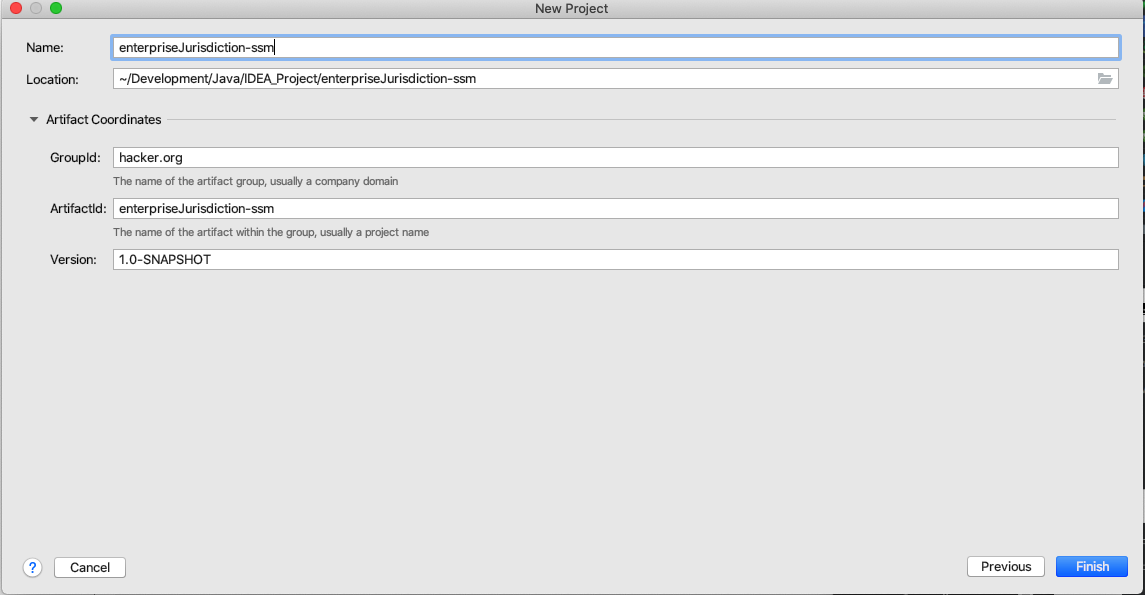
- 设置工程的pom.xml文件
<?xml version="1.0" encoding="UTF-8"?>

<project xmlns="http://maven.apache.org/POM/4.0.0"

         xmlns:xsi="http://www.w3.org/2001/XMLSchema-instance"

         xsi:schemaLocation="http://maven.apache.org/POM/4.0.0 http://maven.apache.org/xsd/maven-4.0.0.xsd">

    <modelVersion>4.0.0</modelVersion>

    <artifactId>enterpriseJurisdiction-ssm</artifactId>

    <modules>

        <module>hacker-ssm-web</module>

    </modules>

    <groupId>hacker.org</groupId>

    <packaging>pom</packaging>

    <version>1.0-SNAPSHOT</version>

    <properties>

        <spring.version>5.0.2.RELEASE</spring.version>

        <slf4j.version>1.6.6</slf4j.version>

        <log4j.version>1.2.12</log4j.version>

        <oracle.version>10.2.0.1.0</oracle.version>

        <mybatis.version>3.4.5</mybatis.version>

        <spring.security.version>5.0.1.RELEASE</spring.security.version>

            <project.build.sourceEncoding>UTF-8</project.build.sourceEncoding>

    </properties>

    <dependencies>

        <!-- spring -->

        <dependency>

            <groupId>org.aspectj</groupId>

            <artifactId>aspectjweaver</artifactId>

            <version>1.6.8</version>

        </dependency>

        <dependency>

            <groupId>org.springframework</groupId>

            <artifactId>spring-aop</artifactId>

            <version>${spring.version}</version>

        </dependency>

        <dependency>

            <groupId>org.springframework</groupId>

            <artifactId>spring-context</artifactId>

            <version>${spring.version}</version>

        </dependency>

        <dependency>

            <groupId>org.springframework</groupId>

            <artifactId>spring-context-support</artifactId>

            <version>${spring.version}</version>

        </dependency>

        <dependency>

            <groupId>org.springframework</groupId>

            <artifactId>spring-web</artifactId>

            <version>${spring.version}</version>

        </dependency>

        <dependency>

            <groupId>org.springframework</groupId>

            <artifactId>spring-orm</artifactId>

            <version>${spring.version}</version>

        </dependency>

        <dependency>

            <groupId>org.springframework</groupId>

            <artifactId>spring-beans</artifactId>

            <version>${spring.version}</version>

        </dependency>

        <dependency>

            <groupId>org.springframework</groupId>

            <artifactId>spring-core</artifactId>

            <version>${spring.version}</version>

        </dependency>

        <dependency>

            <groupId>org.springframework</groupId>

            <artifactId>spring-test</artifactId>

            <version>${spring.version}</version>

        </dependency>

        <dependency>

            <groupId>org.springframework</groupId>

            <artifactId>spring-webmvc</artifactId>

            <version>${spring.version}</version>

        </dependency>

        <dependency>

            <groupId>org.springframework</groupId>

            <artifactId>spring-tx</artifactId>

            <version>${spring.version}</version>

        </dependency>

        <dependency>

            <groupId>junit</groupId>

            <artifactId>junit</artifactId>

            <version>4.12</version>

            <scope>test</scope>

        </dependency>

        <dependency>

            <groupId>javax.servlet</groupId>

            <artifactId>javax.servlet-api</artifactId>

            <version>3.1.0</version>

            <scope>provided</scope>

        </dependency>

        <dependency>

            <groupId>javax.servlet.jsp</groupId>

            <artifactId>jsp-api</artifactId>

            <version>2.0</version>

            <scope>provided</scope>

        </dependency>

        <dependency>

            <groupId>jstl</groupId>

            <artifactId>jstl</artifactId>

            <version>1.2</version>

        </dependency>        <!-- log start -->

        <dependency>

            <groupId>log4j</groupId>

            <artifactId>log4j</artifactId>

            <version>${log4j.version}</version>

        </dependency>

        <dependency>

            <groupId>org.slf4j</groupId>

            <artifactId>slf4j-api</artifactId>

            <version>${slf4j.version}</version>

        </dependency>

        <dependency>

            <groupId>org.slf4j</groupId>

            <artifactId>slf4j-log4j12</artifactId>

            <version>${slf4j.version}</version>

        </dependency>        <!-- log end -->

        <dependency>

            <groupId>org.mybatis</groupId>

            <artifactId>mybatis</artifactId>

            <version>${mybatis.version}</version>

        </dependency>

        <dependency>

            <groupId>org.mybatis</groupId>

            <artifactId>mybatis-spring</artifactId>

            <version>1.3.0</version>

        </dependency>

        <dependency>

            <groupId>c3p0</groupId>

            <artifactId>c3p0</artifactId>

            <version>0.9.1.2</version>

            <type>jar</type>

            <scope>compile</scope>

        </dependency>

        <dependency>

            <groupId>com.github.pagehelper</groupId>

            <artifactId>pagehelper</artifactId>

            <version>5.1.2</version>

        </dependency>

        <dependency>

            <groupId>org.springframework.security</groupId>

            <artifactId>spring-security-web</artifactId>

            <version>${spring.security.version}</version>

        </dependency>

        <dependency>

            <groupId>org.springframework.security</groupId>

            <artifactId>spring-security-config</artifactId>

            <version>${spring.security.version}</version>

        </dependency>

        <dependency>

            <groupId>org.springframework.security</groupId>

            <artifactId>spring-security-core</artifactId>

            <version>${spring.security.version}</version>

        </dependency>

        <dependency>

            <groupId>org.springframework.security</groupId>

            <artifactId>spring-security-taglibs</artifactId>

            <version>${spring.security.version}</version>

        </dependency>

        <dependency>

            <groupId>com.oracle</groupId>

            <artifactId>ojdbc14</artifactId>

            <version>${oracle.version}</version>

        </dependency>

        <dependency>

            <groupId>javax.annotation</groupId>

            <artifactId>jsr250-api</artifactId>

            <version>1.0</version>

        </dependency>

    </dependencies>

    <build>

        <pluginManagement>

            <plugins>

                <plugin>

                    <groupId>org.apache.maven.plugins</groupId>

                    <artifactId>maven-compiler-plugin</artifactId>

                    <version>3.2</version>

                    <configuration>

                        <source>1.8</source>

                        <target>1.8</target>

                        <encoding>UTF-8</encoding>

                        <showWarnings>true</showWarnings>

                    </configuration>

                </plugin>

            </plugins>

        </pluginManagement>

    </build>

</project>
- 创建子模块
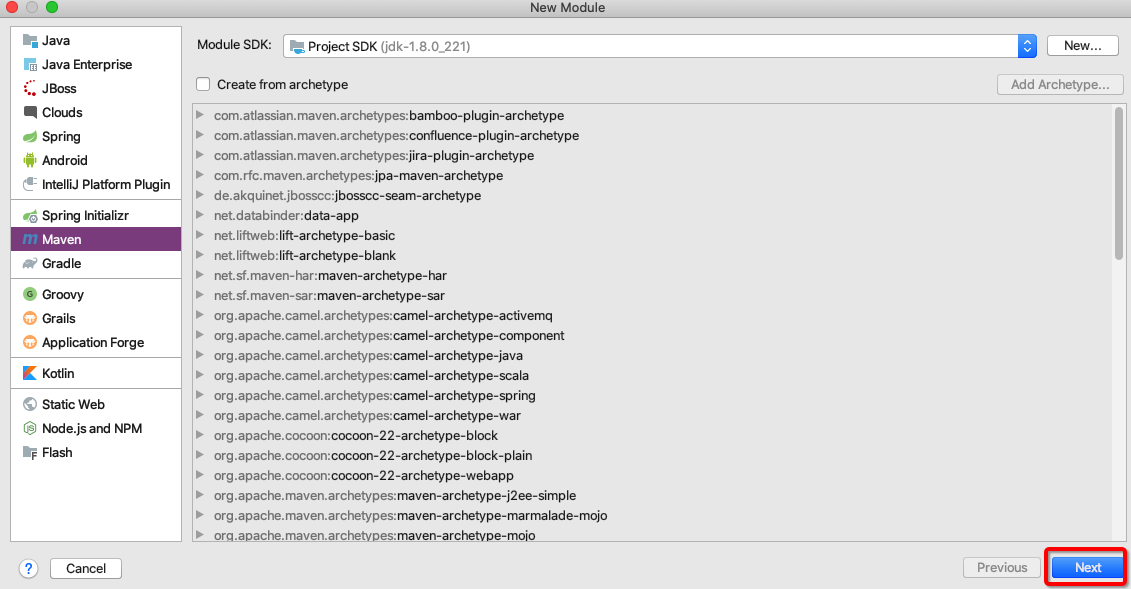
- hacker-ssm-web(使用maven的web骨架)
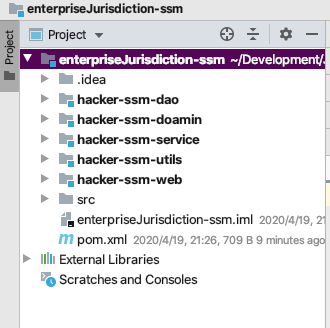
- hacker-ssm-domain
- hacker-ssm-service
- hacker-ssm-dao
- hacker-ssm-utils
- hacker-ssm-web
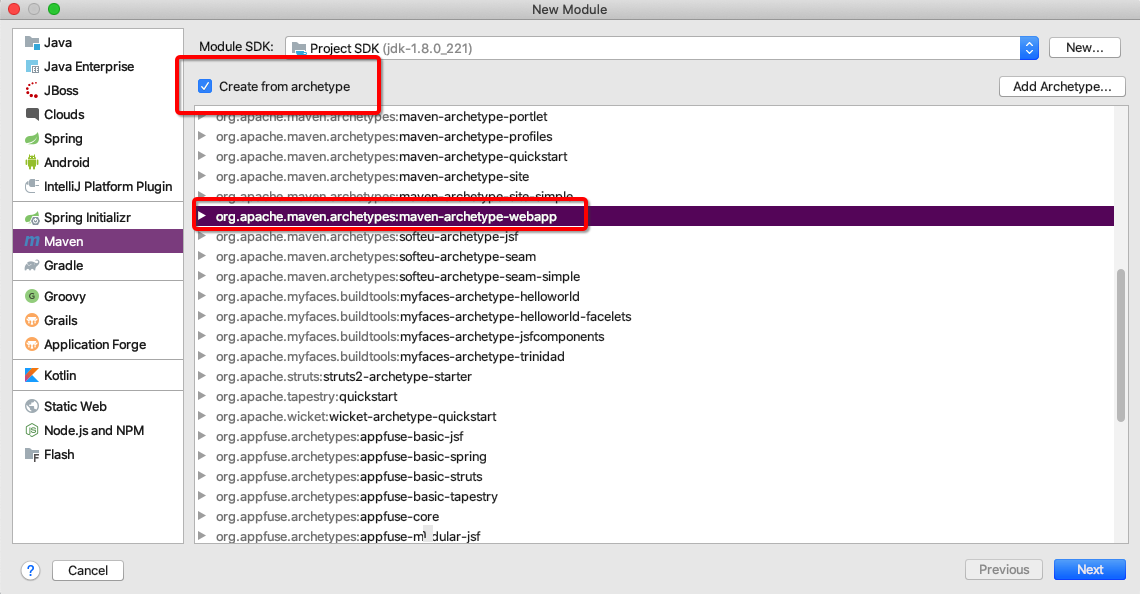
- 设置hacker-ssm-web模块的pom.xml文件
<?xml version="1.0" encoding="UTF-8"?>

<project xmlns="http://maven.apache.org/POM/4.0.0" xmlns:xsi="http://www.w3.org/2001/XMLSchema-instance"

         xsi:schemaLocation="http://maven.apache.org/POM/4.0.0 http://maven.apache.org/xsd/maven-4.0.0.xsd">

    <modelVersion>4.0.0</modelVersion>

    <groupId>hacker.org</groupId>

    <artifactId>hacker-ssm-web</artifactId>

    <version>1.0-SNAPSHOT</version>

    <packaging>war</packaging>

    <name>hacker-ssm-web Maven Webapp</name>

    <!-- FIXME change it to the project's website -->

    <url>http://www.example.com</url>

    <properties>

        <project.build.sourceEncoding>UTF-8</project.build.sourceEncoding>

        <maven.compiler.source>1.8</maven.compiler.source>

        <maven.compiler.target>1.8</maven.compiler.target>

    </properties>

    <dependencies>

        <dependency>

            <groupId>junit</groupId>

            <artifactId>junit</artifactId>

            <version>4.11</version>

            <scope>test</scope>

        </dependency>

        <dependency>

            <groupId>com.itheima.heima_ssm</groupId>

            <artifactId>heima_ssm_service</artifactId>

            <version>1.0-SNAPSHOT</version>

            <scope>compile</scope>

        </dependency>

        <dependency>

            <groupId>com.itheima.heima_ssm</groupId>

            <artifactId>heima_ssm_domain</artifactId>

            <version>1.0-SNAPSHOT</version>

            <scope>compile</scope>

        </dependency>

    </dependencies>

    <build>

        <finalName>heima_ssm_web</finalName>

        <pluginManagement><!-- lock down plugins versions to avoid using Maven defaults (may be moved to parent pom) -->

            <plugins>

                <plugin>

                    <artifactId>maven-clean-plugin</artifactId>

                    <version>3.0.0</version>

                </plugin>

                <!-- see http://maven.apache.org/ref/current/maven-core/default-bindings.html#Plugin_bindings_for_war_packaging -->

                <plugin>

                    <artifactId>maven-resources-plugin</artifactId>

                    <version>3.0.2</version>

                </plugin>

                <plugin>

                    <artifactId>maven-compiler-plugin</artifactId>

                    <version>3.7.0</version>

                </plugin>

                <plugin>

                    <artifactId>maven-surefire-plugin</artifactId>

                    <version>2.20.1</version>

                </plugin>

                <plugin>

                    <artifactId>maven-war-plugin</artifactId>

                    <version>3.2.0</version>

                </plugin>

                <plugin>

                    <artifactId>maven-install-plugin</artifactId>

                    <version>2.5.2</version>

                </plugin>

                <plugin>

                    <artifactId>maven-deploy-plugin</artifactId>

                    <version>2.8.2</version>

                </plugin>

            </plugins>

        </pluginManagement>

        <plugins>

            <plugin>

                <groupId>org.apache.tomcat.maven</groupId>

                <artifactId>tomcat7-maven-plugin</artifactId>

                <configuration>

                    <port>8888</port>

                </configuration>

                <version>2.2</version>

            </plugin>

        </plugins>

    </build>

</project>
- 创建java和resources目录并标记
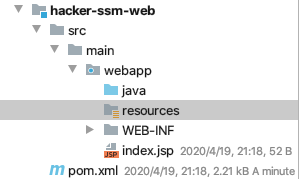
- hacker-ssm-dao(剩下的几个模块和dao模块的创建基本一样)

- 各模块创建完成后
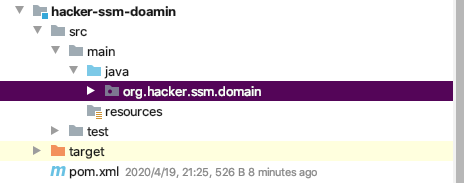
- 编写产品实体类
package com.hacker.ssm.domain;

import java.util.Date;

public class Product {

    private String id; // 主键

    private String productNum; // 编号唯一

    private String productName; // 名称

    private String cityName; // 出发城市

    private Date departureTime; // 出发时间

    private String departureTimeStr;

    private double productPrice; // 产品价格

    private String productDesc; // 产品描述

    private Integer productStatus; // 状态 0 关闭 1 开启

    private String productStatusStr;

    public String getId() {

        return id;

    }

    public void setId(String id) {

        this.id = id;

    }

    public String getProductNum() {

        return productNum;

    }

    public void setProductNum(String productNum) {

        this.productNum = productNum;

    }

    public String getProductName() {

        return productName;

    }

    public void setProductName(String productName) {

        this.productName = productName;

    }

    public String getCityName() {

        return cityName;

    }

    public void setCityName(String cityName) {

        this.cityName = cityName;

    }

    public Date getDepartureTime() {

        return departureTime;

    }

    public void setDepartureTime(Date departureTime) {

        this.departureTime = departureTime;

    }

    public String getDepartureTimeStr() {

        return departureTimeStr;

    }

    public void setDepartureTimeStr(String departureTimeStr) {

        this.departureTimeStr = departureTimeStr;

    }

    public double getProductPrice() {

        return productPrice;

    }

    public void setProductPrice(double productPrice) {

        this.productPrice = productPrice;

    }

    public String getProductDesc() {

        return productDesc;

    }

    public void setProductDesc(String productDesc) {

        this.productDesc = productDesc;

    }

    public Integer getProductStatus() {

        return productStatus;

    }

    public void setProductStatus(Integer productStatus) {

        this.productStatus = productStatus;

    }

    public String getProductStatusStr() {

        return productStatusStr;

    }

    public void setProductStatusStr(String productStatusStr) {

        this.productStatusStr = productStatusStr;

    }

}
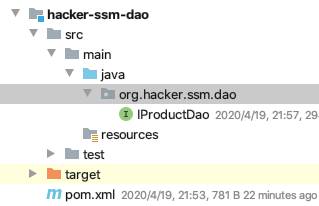
- 编写持久层接口
package org.hacker.ssm.dao;

import org.apache.ibatis.annotations.Select;

import org.hacker.ssm.domain.Product;

import java.util.List;

/**

 * @author HackerStar

 * @create 2020-04-20 11:51

 */

public interface IProductDao {

    //查询所有的产品信息

    @Select("select * from product")

    public List<Product> findAll() throws Exception;

}
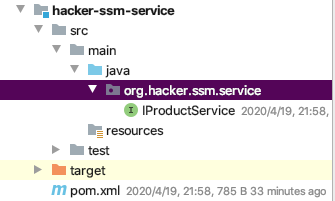
- 编写业务层接口
package org.hacker.ssm.service;

import org.hacker.ssm.domain.Product;

import java.util.List;

/**

 * @author HackerStar

 * @create 2020-04-20 10:46

 */

public interface IProductService {

    List<Product> findAll() throws Exception;

}
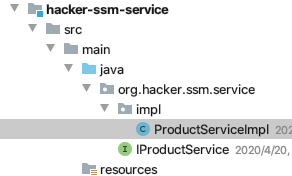
- 编写service实现类
package org.hacker.ssm.service.impl;

import org.hacker.ssm.dao.IProductDao;

import org.hacker.ssm.domain.Product;

import org.hacker.ssm.service.IProductService;

import org.springframework.beans.factory.annotation.Autowired;

import org.springframework.stereotype.Service;

import org.springframework.transaction.annotation.Transactional;

import java.util.List;

/**

 * @author HackerStar

 * @create 2020-04-20 10:47

 */

@Service

@Transactional

public class ProductServiceImpl implements IProductService {

    @Autowired

    private IProductDao productDao;

    @Override

    public List<Product> findAll() throws Exception {

        return productDao.findAll();

    }

}
SSM整合
Spring环境搭建
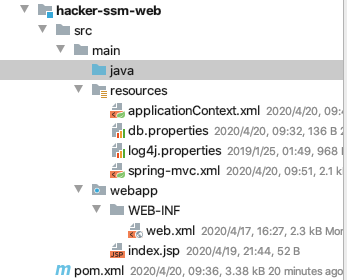
- 编写数据库配置文件db.properties
jdbc.driver=oracle.jdbc.driver.OracleDriver

jdbc.url=jdbc:oracle:thin:@10.211.55.23:1521:orcl

jdbc.username=smith

jdbc.password=simth
- 编写Spring配置文件applicationContext.xml
<?xml version="1.0" encoding="UTF-8"?>

<beans xmlns="http://www.springframework.org/schema/beans"

       xmlns:xsi="http://www.w3.org/2001/XMLSchema-instance"

       xmlns:context="http://www.springframework.org/schema/context"

       xmlns:aop="http://www.springframework.org/schema/aop"

       xmlns:tx="http://www.springframework.org/schema/tx"

       xsi:schemaLocation="http://www.springframework.org/schema/beans

   http://www.springframework.org/schema/beans/spring-beans.xsd

   http://www.springframework.org/schema/context

   http://www.springframework.org/schema/context/spring-context.xsd

   http://www.springframework.org/schema/aop

   http://www.springframework.org/schema/aop/spring-aop.xsd

   http://www.springframework.org/schema/tx

   http://www.springframework.org/schema/tx/spring-tx.xsd">

    <!-- 开启注解扫描,管理service和dao -->

    <context:component-scan base-package="org.hacker.ssm.dao"/>

    <context:component-scan base-package="org.hacker.ssm.service"/>

    <context:property-placeholder location="classpath:db.properties"/>

    <!-- 配置连接池 -->

    <bean id="dataSource" class="com.mchange.v2.c3p0.ComboPooledDataSource">

        <property name="driverClass" value="${jdbc.driver}"/>

        <property name="jdbcUrl" value="${jdbc.url}"/>

        <property name="user" value="${jdbc.username}"/>

        <property name="password" value="${jdbc.password}"/>

    </bean>

    <!-- 交给IOC管理 SqlSessionFactory -->

    <bean id="sqlSessionFactory" class="org.mybatis.spring.SqlSessionFactoryBean">

        <property name="dataSource" ref="dataSource"/>

    </bean>

    <!-- 扫描dao接口 -->

    <bean id="mapperScanner" class="org.mybatis.spring.mapper.MapperScannerConfigurer">

        <property name="basePackage" value="org.hacker.ssm.dao"/>

    </bean>

    <!-- 配置Spring的声明式事务管理 -->

    <!-- 配置事务管理器 -->

    <bean id="transactionManager" class="org.springframework.jdbc.datasource.DataSourceTransactionManager">

        <property name="dataSource" ref="dataSource"/>

    </bean>

    <tx:annotation-driven transaction-manager="transactionManager"/>

</beans>
SpringMVC环境搭建
配置springmvc.xml
<?xml version="1.0" encoding="UTF-8"?>

<beans xmlns="http://www.springframework.org/schema/beans"

       xmlns:mvc="http://www.springframework.org/schema/mvc"

       xmlns:context="http://www.springframework.org/schema/context"

       xmlns:xsi="http://www.w3.org/2001/XMLSchema-instance"

       xmlns:aop="http://www.springframework.org/schema/aop"

       xsi:schemaLocation="

           http://www.springframework.org/schema/beans

           http://www.springframework.org/schema/beans/spring-beans.xsd

           http://www.springframework.org/schema/mvc

           http://www.springframework.org/schema/mvc/spring-mvc.xsd

           http://www.springframework.org/schema/context

           http://www.springframework.org/schema/context/spring-context.xsd

           http://www.springframework.org/schema/aop

      http://www.springframework.org/schema/aop/spring-aop.xsd

           ">

    <!-- 扫描controller的注解,别的不扫描 -->

    <context:component-scan base-package="org.hacker.ssm.controller"/>

    <!-- 配置视图解析器 -->

    <bean id="viewResolver" class="org.springframework.web.servlet.view.InternalResourceViewResolver">

        <!-- JSP文件所在的目录 -->

        <property name="prefix" value="/pages/"/>

        <!-- 文件的后缀名 -->

        <property name="suffix" value=".jsp"/>

    </bean>

    <!-- 设置静态资源不过滤 -->

    <mvc:resources location="/css/" mapping="/css/**"/>

    <mvc:resources location="/img/" mapping="/img/**"/>

    <mvc:resources location="/plugins/" mapping="/plugins/**"/>

    <!-- 开启对SpringMVC注解的支持 -->

    <mvc:annotation-driven/>

    <!--

        支持AOP的注解支持,AOP底层使用代理技术

        JDK动态代理,要求必须有接口

        cglib代理,生成子类对象,proxy-target-class="true" 默认使用cglib的方式

    -->

    <aop:aspectj-autoproxy proxy-target-class="true"/>

</beans>
- 配置web.xml
<?xml version="1.0" encoding="UTF-8"?>

<web-app xmlns:xsi="http://www.w3.org/2001/XMLSchema-instance"

         xmlns="http://xmlns.jcp.org/xml/ns/javaee"

         xsi:schemaLocation="http://xmlns.jcp.org/xml/ns/javaee http://xmlns.jcp.org/xml/ns/javaee/web-app_3_1.xsd"

         version="3.1">

    <!-- 配置加载类路径的配置文件 -->

    <context-param>

        <param-name>contextConfigLocation</param-name>

        <param-value>classpath*:applicationContext.xml</param-value>

    </context-param>

    <!-- 配置监听器 -->

    <listener>

        <listener-class>org.springframework.web.context.ContextLoaderListener</listener-class>

    </listener>

    <!-- 前端控制器(加载classpath:springmvc.xml 服务器启动创建servlet) -->

    <servlet>

        <servlet-name>dispatcherServlet</servlet-name>

        <servlet-class>org.springframework.web.servlet.DispatcherServlet</servlet-class>

        <!-- 配置初始化参数,创建完DispatcherServlet对象,加载springmvc.xml配置文件 -->

        <init-param>

        <param-name>contextConfigLocation</param-name>

        <param-value>classpath:spring-mvc.xml</param-value>

    </init-param>

        <!-- 服务器启动的时候,让DispatcherServlet对象创建 -->

        <load-on-startup>1</load-on-startup>

    </servlet>

    <servlet-mapping>

        <servlet-name>dispatcherServlet</servlet-name>

        <url-pattern>*.do</url-pattern>

    </servlet-mapping>

    <!-- 解决中文乱码过滤器 -->

    <filter>

        <filter-name>characterEncodingFilter</filter-name>

        <filter-class>org.springframework.web.filter.CharacterEncodingFilter</filter-class>

        <init-param>

            <param-name>encoding</param-name>

            <param-value>UTF-8</param-value>

        </init-param>

    </filter>

    <filter-mapping>

        <filter-name>characterEncodingFilter</filter-name>

        <url-pattern>/*</url-pattern>

    </filter-mapping>

    <welcome-file-list>

        <welcome-file>index.html</welcome-file>

        <welcome-file>index.htm</welcome-file>

        <welcome-file>index.jsp</welcome-file>

        <welcome-file>default.html</welcome-file>

        <welcome-file>default.htm</welcome-file>

        <welcome-file>default.jsp</welcome-file>

    </welcome-file-list>

</web-app>
- 导入log4j日志文件
# Set root category priority to INFO and its only appender to CONSOLE.

#log4j.rootCategory=INFO, CONSOLE            debug   info   warn error fatal

log4j.rootCategory=debug, CONSOLE, LOGFILE

# Set the enterprise logger category to FATAL and its only appender to CONSOLE.

log4j.logger.org.apache.axis.enterprise=FATAL, CONSOLE

# CONSOLE is set to be a ConsoleAppender using a PatternLayout.

log4j.appender.CONSOLE=org.apache.log4j.ConsoleAppender

log4j.appender.CONSOLE.layout=org.apache.log4j.PatternLayout

log4j.appender.CONSOLE.layout.ConversionPattern=%d{ISO8601} %-6r [%15.15t] %-5p %30.30c %x - %m\n

# LOGFILE is set to be a File appender using a PatternLayout.

# log4j.appender.LOGFILE=org.apache.log4j.FileAppender

# log4j.appender.LOGFILE.File=d:\axis.log

# log4j.appender.LOGFILE.Append=true

# log4j.appender.LOGFILE.layout=org.apache.log4j.PatternLayout

# log4j.appender.LOGFILE.layout.ConversionPattern=%d{ISO8601} %-6r [%15.15t] %-5p %30.30c %x - %m\n
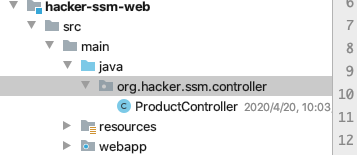
- 编写controller
package org.hacker.ssm.controller;

import org.hacker.ssm.service.IProductService;

import org.hacker.ssm.domain.Product;

import org.springframework.beans.factory.annotation.Autowired;

import org.springframework.stereotype.Controller;

import org.springframework.web.bind.annotation.RequestMapping;

import org.springframework.web.servlet.ModelAndView;

import java.util.List;

/**

 * @author HackerStar

 * @create 2020-04-20 10:00

 */

@Controller

@RequestMapping("/product")

public class ProductController {

    @Autowired

    private IProductService productService;

    @RequestMapping("/findAll.do")

    public ModelAndView findAll() throws Exception {

        ModelAndView mv = new ModelAndView();

        List<Product> ps = productService.findAll();

        mv.addObject("productList", ps);

        mv.setViewName("product-list1");

        return mv;

    }

}
- 运行查看情况
clean->install 父工程 然后 clean->install web工程 如果出现异常就按照依赖关系clean->install
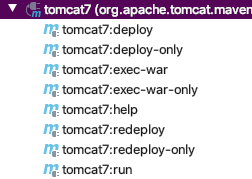
使用mvn tomcant7:run,可以使用maven插件,也可以配置好点击

- 运行后,浏览器结果

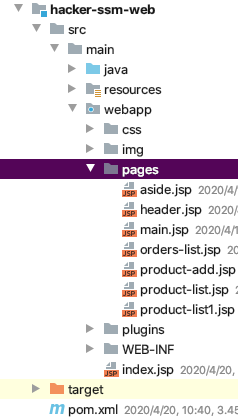
- 导入插件,将pages里的静态文件换为jsp文件,导入到web工程中
- 修改index.jsp代码
<%@ page language="java" contentType="text/html; charset=UTF-8"

         pageEncoding="UTF-8"%>

<html>

<body>

<jsp:forward page="/pages/main.jsp"></jsp:forward>

</body>

</html>
- 运行项目,查看效果

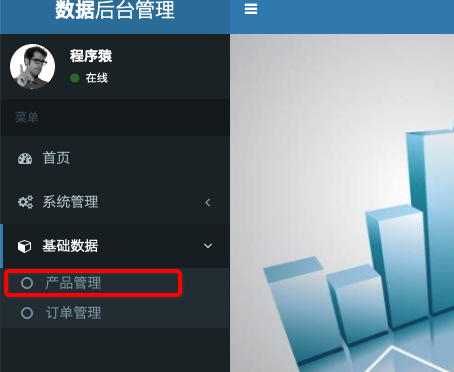
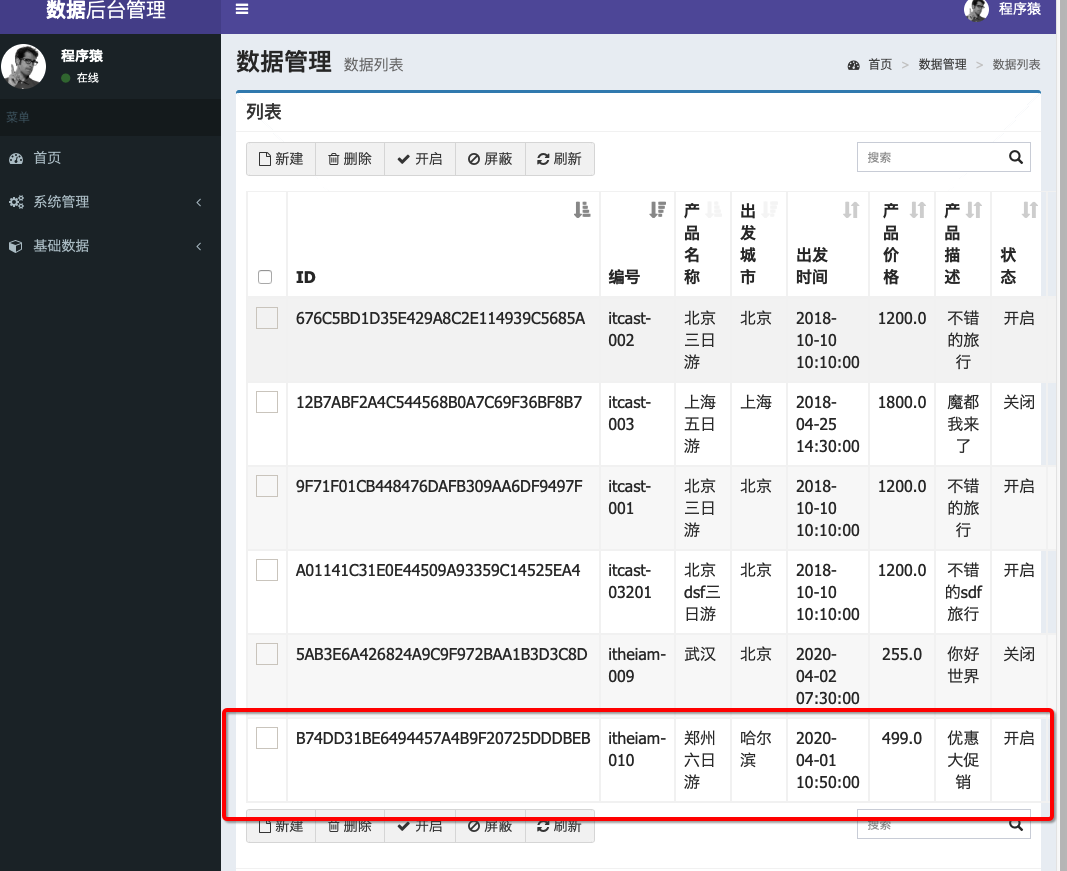
- 产品管理现在可以查询数据库的产品

增加产品添加功能
- 往controller类里添加增加代码
package org.hacker.ssm.controller;

import org.hacker.ssm.service.IProductService;

import org.hacker.ssm.domain.Product;

import org.springframework.beans.factory.annotation.Autowired;

import org.springframework.stereotype.Controller;

import org.springframework.web.bind.annotation.RequestMapping;

import org.springframework.web.servlet.ModelAndView;

import java.util.List;

/**

 * @author HackerStar

 * @create 2020-04-20 10:00

 */

@Controller

@RequestMapping("/product")

public class ProductController {

    @Autowired

    private IProductService productService;

    @RequestMapping("/save.do")

    public String save(Product product) {

        productService.save(product);

        return "redirect:finaAll.do";//重新回到list界面

    }

    @RequestMapping("/findAll.do")

    public ModelAndView findAll() throws Exception {

        ModelAndView mv = new ModelAndView();

        List<Product> ps = productService.findAll();

        mv.addObject("productList", ps);

        mv.setViewName("product-list1");

        return mv;

    }

}
- 修改IProductService代码
package org.hacker.ssm.service;

import org.hacker.ssm.domain.Product;

import java.util.List;

/**

 * @author HackerStar

 * @create 2020-04-20 10:46

 */

public interface IProductService {

    //从数据库查询所有商品

    List<Product> findAll() throws Exception;

    //添加商品

    void save(Product product);

}
- 修改ProductServiceImpl代码
package org.hacker.ssm.service.impl;

import org.hacker.ssm.dao.IProductDao;

import org.hacker.ssm.domain.Product;

import org.hacker.ssm.service.IProductService;

import org.springframework.beans.factory.annotation.Autowired;

import org.springframework.stereotype.Service;

import org.springframework.transaction.annotation.Transactional;

import java.util.List;

/**

 * @author HackerStar

 * @create 2020-04-20 10:47

 */

@Service

@Transactional

public class ProductServiceImpl implements IProductService {

    @Autowired

    private IProductDao productDao;

    @Override

    public List<Product> findAll() throws Exception {

        return productDao.findAll();

    }

    @Override

    public void save(Product product) {

        productDao.save();

    }

}
- 修改IProductDao代码
package org.hacker.ssm.dao;

        import org.apache.ibatis.annotations.Insert;

        import org.apache.ibatis.annotations.Select;

        import org.hacker.ssm.domain.Product;

        import java.util.List;

/**

 * @author HackerStar

 * @create 2020-04-20 11:51

 */

public interface IProductDao {

    //查询所有的产品信息

    @Select("select * from product")

    public List<Product> findAll() throws Exception;

    //保存商品

    @Insert("insert into product(productNum,productName,cityName,departureTime,productPrice,productDesc,productStatus)" +

            "values(#{productNum},#{productName},#{cityName},#{departureTime},#{productPrice},#{productDesc},#{productStatus})")

    void save(Product product);

}
- 此时,运行项目,浏览器会出现400错误
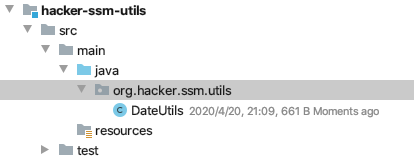
出现的异常:Field error in object 'product' on field 'departureTime': rejected value [2020-04-04 07:00]; typeMismatch.product.departureTime - 添加工具类转换时间
package org.hacker.ssm.utils;

import java.text.ParseException;

import java.text.SimpleDateFormat;

import java.util.Date;

public class DateUtils {

    //日期转换成字符串

    public static String date2String(Date date, String patt) {

        SimpleDateFormat sdf = new SimpleDateFormat(patt);

        String format = sdf.format(date);

        return format;

    }

    //字符串转换成日期

    public static Date string2Date(String str, String patt) throws ParseException {

        SimpleDateFormat sdf = new SimpleDateFormat(patt);

        Date parse = sdf.parse(str);

        return parse;

    }

}
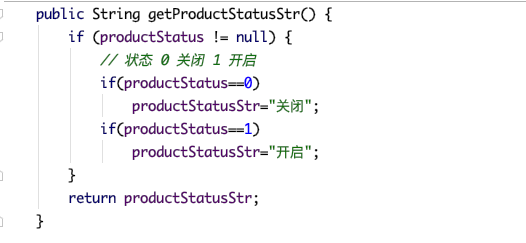
- 修改domina代码,因为前端页面获取到的数据类型是String和数据库表中的时间类型是Date,所以需要转换
这里是用Spring为我们提供的注解
@DateTimeFormat将字符串转换为Date类型
@JsonFormat将日期转换为string类型
因为product-add.jsp获取出发时间时,使用input标签获取的是一个字符串,这里需要转换为Date类型,所以使用Spring提供的@DateTimeFormat注解

- 这里用到了utils包,根据不同的情况,给出不同的描述

- 结果

第一天的工作完毕
Day01_企业权限管理(SSM整合)的更多相关文章
- 五天一体_企业权限管理(SSM整合)
学于黑马程序员和传智播客联合做的教学项目 感谢 黑马程序员官网 传智播客官网 个人根据教程的每天的工作进度的代码和资料 密码:cti5 b站在线视频 微信搜索"艺术行者",关注并回 ...
- Day05_企业权限管理(SSM整合)
学于黑马程序员和传智播客联合做的教学项目 感谢 黑马程序员官网 传智播客官网 个人根据教程的每天的工作进度的代码和资料 密码:cti5 b站在线视频 微信搜索"艺术行者",关注并回 ...
- Day04_企业权限管理(SSM整合)
学于黑马程序员和传智播客联合做的教学项目 感谢 黑马程序员官网 传智播客官网 个人根据教程的每天的工作进度的代码和资料 密码:cti5 b站在线视频 微信搜索"艺术行者",关注并回 ...
- Day03_企业权限管理(SSM整合)
学于黑马程序员和传智播客联合做的教学项目 感谢 黑马程序员官网 传智播客官网 个人根据教程的每天的工作进度的代码和资料 密码:cti5 b站在线视频 微信搜索"艺术行者",关注并回 ...
- Day02_企业权限管理(SSM整合)
学于黑马程序员和传智播客联合做的教学项目 感谢 黑马程序员官网 传智播客官网 个人根据教程的每天的工作进度的代码和资料 密码:cti5 b站在线视频 微信搜索"艺术行者",关注并回 ...
- 企业权限管理(SSM整合)(总结)
学于黑马程序员和传智播客联合做的教学项目 感谢 黑马程序员官网 传智播客官网 个人根据教程的每天的工作进度的代码和资料 密码:cti5 b站在线视频 微信搜索"艺术行者",关注并回 ...
- Apache Shiro(五)-登录认证和权限管理ssm
创建一个web动态项目 jar包 web.xml web.xml做了如下几件事情1. 指定spring的配置文件有两个 applicationContext.xml: 用于链接数据库的 applica ...
- SpringBoot中关于Shiro权限管理的整合使用
转载:https://blog.csdn.net/fuweilian1/article/details/80309192 在整合Shiro的时候,我们先要确定一下我们的步骤: 1.加入Shiro的依 ...
- 08 SSM整合案例(企业权限管理系统):07.订单操作
04.AdminLTE的基本介绍 05.SSM整合案例的基本介绍 06.产品操作 07.订单操作 08.用户操作 09.权限控制 10.权限关联与控制 11.AOP日志 07.订单操作 SSM订单操作 ...
随机推荐
- Centos 6.4 安装/卸载 Adobe Reader 9(.bin .tar.bz2 rpm 包)
一.To install Adobe Reader 9.1 using a tarball installer 1. Open a terminal window. 2. Change directo ...
- Python3笔记009 - 2.6 输入和输出
第2章 python语言基础 python语法特点 保留字与标识符 变量 数据类型 运算符 输入和输出 2.6 输入和输出 1.input()函数 name = input("请输入姓名:& ...
- matlab添加toolbox失败的解决办法
matlab添加toolbox有三种方法: 1.在网上下载对应的文件,再复制到matlab安装路径中的toolbox文件夹里. 结果:失败.仍然显示不能用该模块. 2.由于笔者的学校有买正版,所以可以 ...
- 洛谷 P2220 [HAOI2012]容易题 数论
洛谷 P2220 [HAOI2012]容易题 题目描述 为了使得大家高兴,小Q特意出个自认为的简单题(easy)来满足大家,这道简单题是描述如下: 有一个数列A已知对于所有的A[i]都是1~n的自然数 ...
- 调整数组顺序使奇数位于偶数前面(剑指offer-13)
方法1:新建两个数组,一个数组用来放奇数,一个数组用来放偶数,最后再把它们合并起来. 1 import java.util.*; 2 public class Solution { 3 public ...
- TKCTF-学校内部的校赛
*Reverse easy_C easy_re1.exe 在网络百度到解决逆向需要用到软件IDA 然后用IDA打开一条条的找我找到了一条很怪的ZmxhZ3s1ZWU1ZjYyOC1mMzVhLTQxN ...
- 利用docker部署oxidized网络设备备份系统
随着网络设备的增多,通过人手备份网络设备倍感压力,而且效率低.有编程基础的人可能会通过Python的parimiko 或者netmiko 连接到设备操作 把文件通过ftp 上传到FTP服务器, 在通过 ...
- 蜂鸟E203系列——Linux下运行hello world例程
欲观原文,请君移步 创建程序 在 -/hbird-e-sdk-master/software 路径下创建一个"helloworld"中文件夹 在 -/hbird-e-sdk-mas ...
- MYSQL 之 JDBC(八):增删改查(六)ReflectionUtils
这里在网上找了一份ReflectionUtils package com.litian.jdbc; /** * @author: Li Tian * @contact: litian_cup@163. ...
- java IO流 (七) 对象流的使用
1.对象流: ObjectInputStream 和 ObjectOutputStream2.作用:ObjectOutputStream:内存中的对象--->存储中的文件.通过网络传输出去:序列 ...