
如何给 GitHub 添加 SSH key, 如何生成 SSH key 详细图文教程!
如何给 GitHub 添加 SSH key, 如何生成 SSH key 详细图文教程!
一、 生成 SSH key
创建一个空项目:(或使用真实 Linux 主机) PS: windows 类似(? CMD) ReadMore
https://ide.c9.io/xgqfrms/demo
打开 shell(bash), 输入:
$ npm install -g git-it
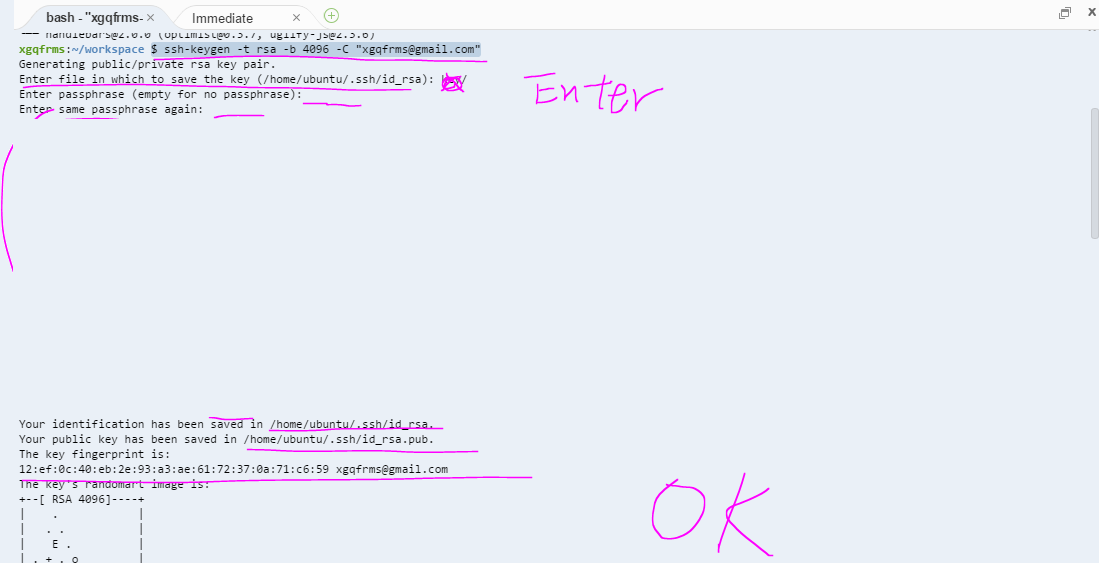
生成 SSH-Key
$ ssh-keygen -t rsa -b 4096 -C "username@email.com"
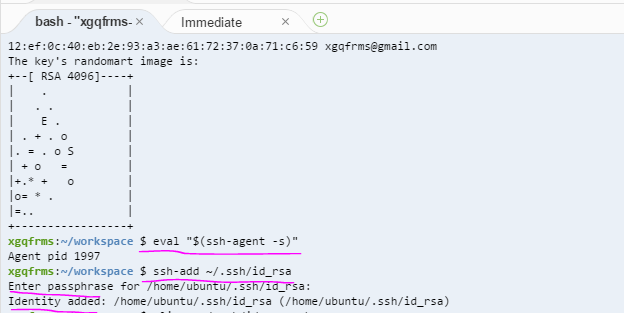
检查,添加 ssh-key 到,linux client:
$ eval "$(ssh-agent -s)"

$ ssh-add ~/.ssh/id_rsa
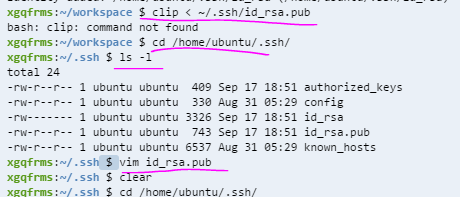
复制 ssh-key public 到 剪切板:
$ clip < ~/.ssh/id_rsa.pub如果不好使, 使用vim 打开,复制即可!
$ cd /home/ubuntu/.ssh/

$ ls -l

$ vim id_rsa.pub
PS: 退出 vim 方法:
1. 点击 esc 键,进入vim命令模式 输入 :q
:q2. 点击 Enter 即可退出!
NEW: after add ssh key ,you should close the terminal & restart a new terminal!
二、 给 GitHub 添加 SSH key
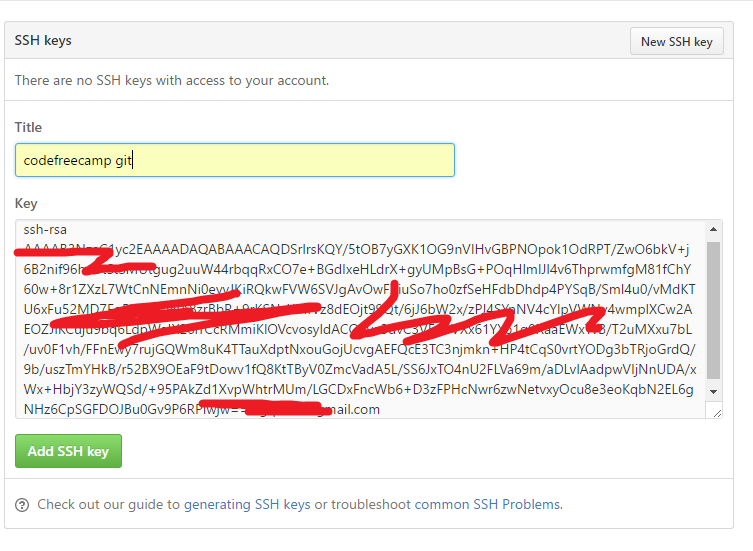
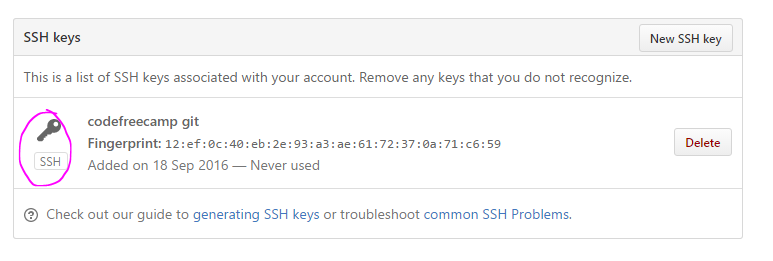
1. 打开 设置>SSH and GPG Keys> New SSH key ,
2. 将复制的 id_rsa.pub 的 key 值,粘贴到 key 文本框,点击 Add SSH key 即可!
ok!
NEW: after add ssh key ,you should close the terminal & restart a new terminal!

1
Checking for existing SSH keys
https://help.github.com/articles/checking-for-existing-ssh-keys/#platform-linux
Adding a new SSH key to your GitHub account
https://help.github.com/articles/adding-a-new-ssh-key-to-your-github-account/
1
Multi Account for GitHub!
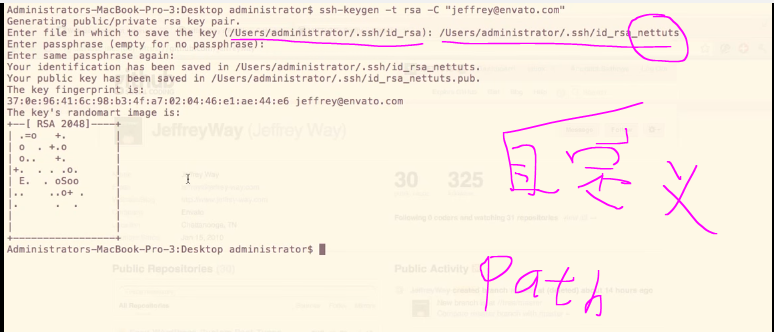
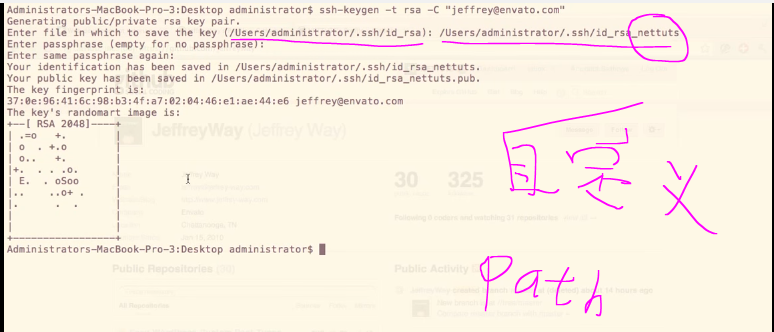
new path
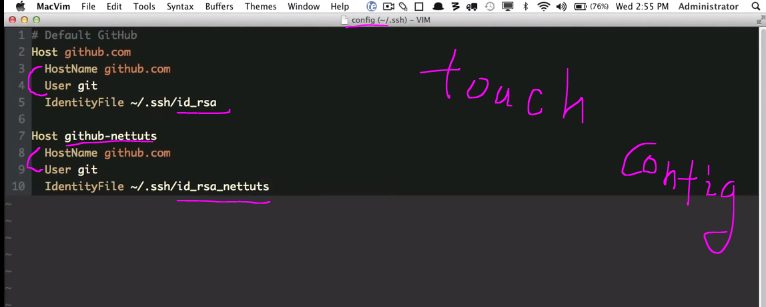
创建 config,配置 multi account for GitHub!
touch config
编辑 config
vim config
NEW: after add ssh key ,you should close the terminal & restart a new terminal!
1
1
Generating a new SSH key and adding it to the ssh-agent
After you've checked for existing SSH keys, you can generate a new SSH key to use for authentication, then add it to the ssh-agent.
Generating a new SSH key
Open Terminal.
Paste the text below, substituting in your GitHub email address.
ssh-keygen -t rsa -b 4096 -C "your_email@example.com"

# Creates a new ssh key, using the provided email as a label

Generating public/private rsa key pair.
When you're prompted to "Enter a file in which to save the key," press Enter. This accepts the default file location.
Enter a file in which to save the key (/Users/you/.ssh/id_rsa): [Press enter]using new path in case of override your other SSH-keys
Enter a file in which to save the key (/Users/you/.ssh/id_rsa): [Press enter]
$ Enter a file in which to save the key (/Users/you/.ssh/id_rsa): /Users/you/.ssh/id_rsa_github [Type a passphrase]At the prompt, type a secure passphrase. For more information, see "Working with SSH key passphrases".
Enter passphrase (empty for no passphrase): [Type a passphrase]

Enter same passphrase again: [Type passphrase again]
Adding your SSH key to the ssh-agent
Before adding a new SSH key to the ssh-agent, you should have checked for existing SSH keys andgenerated a new SSH key.
Ensure ssh-agent is enabled:
# start the ssh-agent in the background

$ eval "$(ssh-agent -s)"

Agent pid 59566
Add your SSH key to the ssh-agent. If you used an existing SSH key rather than generating a new SSH key, you'll need to replace id_rsa in the command with the name of your existing private key file.
$ ssh-add ~/.ssh/id_rsa
1
如何给 GitHub 添加 SSH key, 如何生成 SSH key 详细图文教程!的更多相关文章
- 代码文档生成工具-Doxygen生成CHM和RTF图文教程
Doxygen是一种开源跨平台的,以类似JavaDoc风格描述的文档系统,可以从一套归档源文件开始,生成chm格式的文档.本文主要讲解如何在winddows下安装doxygen. 1.下载do ...
- 转 SSH框架搭建详细图文教程
原址:http://blog.sina.com.cn/s/blog_a6a6b3cd01017c57.html 什么是SSH? SSH对应 struts spring hibernatestruts ...
- SSH框架搭建 详细图文教程
转载请标明原文地址 一.什么是SSH? SSH是JavaEE中三种框架(Struts+Spring+Hibernate)的集成框架,是目前比较流行的一种Java Web开源框架. SSH主要用于Jav ...
- SSH框架搭建详细图文教程(转)
这篇文章看的我醍醐灌顶的感觉,比之前本科时候学习的SSH架构 要清晰数倍 非常感觉这篇博主的文章 文章链接为:http://blog.sina.com.cn/s/blog_a6a6b3cd01017 ...
- SSH框架搭建详细图文教程
转载请标明原文地址:http://www.cnblogs.com/zhangyukof/p/6762554.html 一.什么是SSH? SSH是JavaEE中三种框架(Struts+Spring+H ...
- github版本库使用详细图文教程(命令行及图形界面版)
投稿:mdxy-dxy 字体:[增加 减小] 类型:转载 时间:2015-08-06我要评论 今天我们就来学习github的使用,我们将用它来管理我们的代码,你会发现它的好处的,当然是要在本系列教程全 ...
- .NET文档生成工具ADB使用图文教程
.NETv3.0 可再发行组件包 类型:编程辅助大小:2.7M语言:中文 评分:1.8 标签: 立即下载 ADB2.3使用指南 ADB2.3使用方法如下图所示: (1)主界面: (2)批量选择: 4. ...
- powerdesigner连接Mysql进行反向工程并生成word文档图文教程
1 软件版本 windows7 64位 powerdesigner 15.1 Mysql 5.1.56 mysql-connector-odbc-3.51.30-winx64 对于mysql-conn ...
- [转载]SSH框架搭建详细图文教程
http://www.cnblogs.com/hoobey/p/5512924.html
随机推荐
- 从零开始学spring源码之xml解析(二):默认标签和自定义标签解析
默认标签: 上一篇说到spring的默认标签和自定义标签,发现这里面东西还蛮多的.决定还是拆开来写.今天就来好好聊聊这两块是怎么玩的,首先我们先看看默认标签: private void parseDe ...
- 自修改代码 on the fly 动态编译 即时编译 字节码
https://zh.wikipedia.org/wiki/自修改代码 自修改代码(Self-modifying code)是指程序在运行期间(Run time)修改自身指令.可能的用途有:病毒利用此 ...
- python 11 模块
模块 在计算机程序的开发过程中,随着程序代码越写越多,在一个文件里代码就会越来越长,越来越不容易维护. 为了编写可维护的代码,我们把很多函数分组,分别放到不同的文件里,这样,每个文件包含的代码就相对较 ...
- Apache Http Server 一些资料
配置虚拟主机的例子: http://httpd.apache.org/docs/current/vhosts/examples.html
- Canvas实现弧线时钟
最近试着用canvas元素的2d绘图函数做了一个弧线形的时钟. 我也没啥好说的,直接上代码: <div id="myclock"></div> <sc ...
- Android第一代壳demo编写
Android第一代壳Demo编写 前言 这篇文章是对姜维大佬的这篇文章[Android中的Apk的加固(加壳)原理解析和实现]的补充.建议先看一编姜维大佬的这篇文章再看. 姜维大佬写那篇文章的时间距 ...
- DEDECMS:解决BMP、jpeg图片或MP4视频无法上传和在后台无法显示
一.BMP图片无法上传解决方法: 1.修改配置文件: 在include-->dialog的文件夹下, select_images_post.php--> 把 $sparr = Array( ...
- php之PDO连接mysql数据库,增删改查等等操作实例
我们使用传统的 mysql_connect .mysql_query方法来连接查询数据库时,如果过滤不严就有SQL注入风险,导致网站被攻击. 虽然可以用mysql_real_escape_string ...
- nginx教程<二>(高可用)
1.nginx集群 对于访问量较大的网站来说,随着流量的增加单台服务器已经无法处理所有的请求,这时候需要多台服务器对大量的请求进行分流处理,即负载均衡. 而如果实现负载均衡,必须在网站的入口部署服务器 ...
- DolphinScheduler1.3.2源码分析(一)看源码前先把疑问列出来
1.谈谈如何看源码 个人觉得拿到一个开源的项目,首先要先使用一下. 如果是有页面的那种,可以先把测试平台部署起来,然后到处随意点点,然后用一下最基础的功能,走一遍基础的使用流程.不用担心会把系统弄 ...