
SpringBoot从入门到精通教程(六)

之前学了,这么多东西
thyemeaf、MyBatis还有 配置文件等等,今天我们就来做一个小案例
CRUD,程序员的必备
项目结构
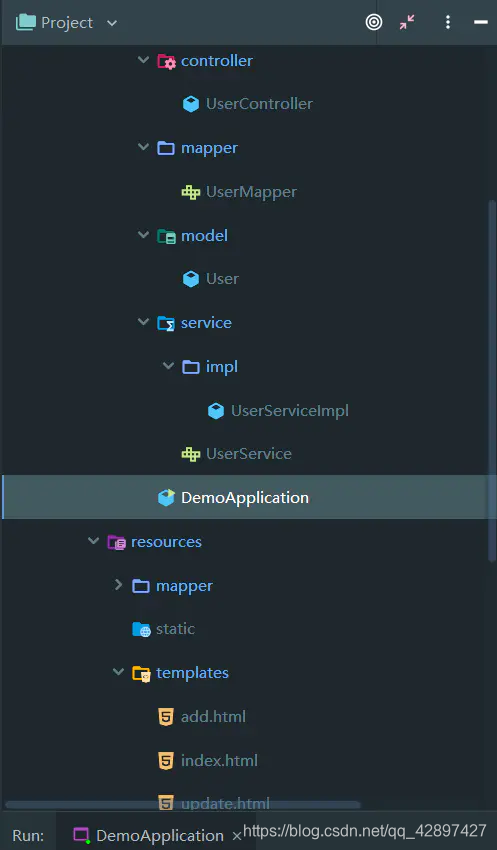
pom.xml
        <!-- mybatis 相关依赖 -->

        <dependency>

            <groupId>mysql</groupId>

            <artifactId>mysql-connector-java</artifactId>

        </dependency>

        <dependency>

            <groupId>org.mybatis.spring.boot</groupId>

            <artifactId>mybatis-spring-boot-starter</artifactId>

            <version>1.1.1</version>

        </dependency>

        <!-- thymeleaf 相关依赖 -->

        <dependency>

            <groupId>org.springframework.boot</groupId>

            <artifactId>spring-boot-starter-thymeleaf</artifactId>

        </dependency>
3. application.properties
logging.level.org.springframework=DEBUG

#springboot   mybatis

mybatis.mapper-locations = classpath:mapper/*Mapper.xml

mybatis.config-location = classpath:mapper/config/sqlMapConfig.xml

mybatis.type-aliases-package = com.spiritmark.demo.model

#数据库

spring.datasource.driver-class-name= com.mysql.jdbc.Driver

spring.datasource.url = jdbc:mysql://localhost:3306/springboot_test?serverTimezone=GMT

spring.datasource.username = root

spring.datasource.password = 123qwe
- UserController.java
package com.spiritmark.demo.controller;

import java.util.List;

import com.spiritmark.demo.model.User;

import com.spiritmark.demo.service.UserService;

import org.springframework.beans.factory.annotation.Autowired;

import org.springframework.stereotype.Controller;

import org.springframework.ui.Model;

import org.springframework.web.bind.annotation.RequestMapping;

@Controller

public class UserController {

    @Autowired

    private UserService userService;

    @RequestMapping("/index")

    public String showUser(Model model){

        List<User> list = userService.findAll();

        model.addAttribute("list",list);

        return "index";

    }

    // 进入添加界面

    @RequestMapping("/intoAdd")

    public String intoAdd(){

        return "add";

    }

    // 添加用户

    @RequestMapping("/add")

    public String add(User user){

        userService.add(user);

        return "redirect:/index";

    }

    // 删除用户

    @RequestMapping("/delete")

    public String delete(int id){

        userService.delete(id);

        return "redirect:/";

    }

    // 进入修改用户

    @RequestMapping("/intoUpdate")

    public String intoUpdate(Model model,int id){

        User user = userService.findById(id);

        model.addAttribute("user",user);

        return "update";

    }

    // 修改用户

    @RequestMapping("/update")

    public String update(User user){

        userService.update(user);

        return "redirect:/index";

    }

}
- UserMapper.java
package com.spiritmark.demo.mapper;

import com.spiritmark.demo.model.User;

import org.apache.ibatis.annotations.Mapper;

import java.util.List;

@Mapper

public interface UserMapper {

    // 获取所有

    List<User> findAll();

    // 新增

    void add(User user);

    // 删除

    void delete(int id);

    // 编辑

    void update(User user);

    // 查询

    User findById(int id);

}
- UserServiceImpl.java
package com.spiritmark.demo.service.impl;

import java.util.List;

import java.util.Map;

import com.spiritmark.demo.mapper.UserMapper;

import com.spiritmark.demo.model.User;

import com.spiritmark.demo.service.UserService;

import org.springframework.beans.factory.annotation.Autowired;

import org.springframework.stereotype.Service;

@Service

public class UserServiceImpl implements UserService {

    @Autowired

    private UserMapper userMapper;

    // 获取所有

    @Override

    public List<User> findAll() {

        return userMapper.findAll();

    }

    // 新增

    @Override

    public void add(User user) {

        userMapper.add(user);

    }

    // 删除

    @Override

    public void delete(int id) {

        userMapper.delete(id);

    }

    // 修改

    @Override

    public void update(User user) {

        userMapper.update(user);

    }

    // 查询

    @Override

    public User findById(int id) {

        return userMapper.findById(id);

    }

}
- UserService.java
package com.spiritmark.demo.service;

import com.spiritmark.demo.model.User;

import java.util.List;

public interface UserService {

    // 获取所有

    List<User> findAll();

    // 新增

    void add(User user);

    // 删除

    void delete(int id);

    // 编辑

    void update(User user);

    // 查询

    User findById(int id);

}
- UserMapper.xml
<?xml version="1.0" encoding="UTF-8" ?>

<!DOCTYPE mapper PUBLIC "-//mybatis.org//DTD Mapper 3.0//EN" "http://mybatis.org/dtd/mybatis-3-mapper.dtd" >

<mapper namespace="com.spiritmark.demo.mapper.UserMapper">

    <select id="findAll" resultType="com.spiritmark.demo.model.User">

        select * from user

    </select>

    <insert id="add" parameterType="com.spiritmark.demo.model.User">

        insert into user (username, password)

        values (#{username,jdbcType=VARCHAR}, #{password,jdbcType=VARCHAR})

    </insert>

    <delete id="delete" parameterType="java.lang.Integer">

        delete from user where id= #{id,jdbcType=INTEGER}

    </delete>

    <select id="findById" resultType="com.spiritmark.demo.model.User">

        select * from user where id= #{id,jdbcType=INTEGER}

    </select>

    <update id="update" parameterType="com.spiritmark.demo.model.User">

        update user set

        username= #{username,jdbcType=VARCHAR},

        password = #{password,jdbcType=VARCHAR}

        where id= #{id,jdbcType=INTEGER}

    </update>

</mapper>
index.html
<!DOCTYPE html>

<html xmlns="http://www.w3.org/1999/xhtml"

      xmlns:th="http://www.thymeleaf.org"

      xmlns:sec="http://www.thymeleaf.org/thymeleaf-extras-springsecurity3">

<head>

    <title></title>

</head>

<body>

<a th:href="@{/intoAdd}">添加</a>

<table>

    <thead>

    <tr>

        <th>id</th>

        <th>username</th>

        <th>password</th>

        <th>op</th>

    </tr>

    </thead>

    <tbody>

    <tr th:each="user : ${list}">

        <td th:text="${user.id}"></td>

        <td th:text="${user.username}"></td>

        <td th:text="${user.password}"></td>

        <td><a th:href="@{/delete(id=${user.id})}">删除</a><a th:href="@{/intoUpdate(id=${user.id})}">修改</a></td>

    </tr>

    </tbody>

</table>

</body>

</html>
add.html
<!DOCTYPE html>

<html xmlns="http://www.w3.org/1999/xhtml"

      xmlns:th="http://www.thymeleaf.org"

      xmlns:sec="http://www.thymeleaf.org/thymeleaf-extras-springsecurity3">

<head>

    <title></title>

</head>

<body>

    <form th:action="@{/add}" method="post">

        <input type="text" id="username" name="username">

        <input type="text" id="password" name="password">

        <input type="submit">

    </form>

</body>

</html>
update.html
<!DOCTYPE html>

<html xmlns="http://www.w3.org/1999/xhtml"

      xmlns:th="http://www.thymeleaf.org"

      xmlns:sec="http://www.thymeleaf.org/thymeleaf-extras-springsecurity3">

<head>

    <title></title>

</head>

<body>

<form th:action="@{/update}" th:object="${user}" method="post">

    <input type="hidden" name="id" th:value="*{id}">

    <input type="text" name="username" id="username" th:value="*{username}">

    <input type="text" name="password" id="password" th:value="*{password}">

    <input type="submit">

</form>

</body>

</html>
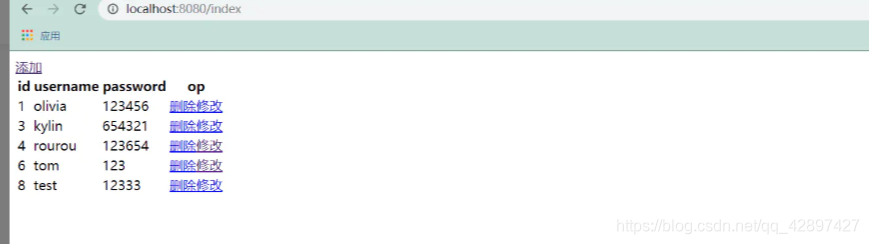
大功告成
SpringBoot从入门到精通教程(六)的更多相关文章
- SpringBoot从入门到精通教程(二)
SpringBoot 是为了简化 Spring 应用的创建.运行.调试.部署等一系列问题而诞生的产物,自动装配的特性让我们可以更好的关注业务本身而不是外部的XML配置,我们只需遵循规范,引入相关的依赖 ...
- SpringBoot从入门到精通教程(七)
今天,我们继续讲SpringBoot整合Redis ,也就缓存,它将与我们的Springboot整合 Redis 简介 Redis 是当前比较热门的NOSQL系统之一,它是一个开源的使用ANSI c语 ...
- SpringBoot从入门到精通教程(三)
在上一篇中,我们已经讲了,SpringBoot 如何构建项目,和SpringBoot的HelloWorld, 那这一节我们继续讲 Thymeleaf Thymeleaf 官网: Thymeleaf T ...
- SpringBoot从入门到精通教程(一)
写在前面的话: 在很早之前,记笔记时候,我就一直在思考一个问题,我记笔记是为了什么,我一直想不明白 ,后面发现技术跟新迭代的速度实在太快了,笔记刚纪完,技术又跟新了,于是我想了想干脆边写博客,边记笔记 ...
- SpringBoot从入门到精通教程(八)
本主要介绍ElasticSearch 和 SpringBoot 的整合 ,对您有帮助的话,点个关注哦 ElastSearch 介绍 ElasticSearch是一个基于Lucene的搜索服务器.它提供 ...
- SpringBoot从入门到精通教程(五)
上节,我们讲了 SpringBoot 如何使用MyBatis 今天我们讲讲 Springboot Logo自定义的问题, 我们在启动 SpringBoot 时,控制台会打印 SpringBoot Lo ...
- SpringBoot从入门到精通教程(四)
前端时间整合SSM ,发现了一个现象,在整合的时候 配置文件过于复杂. 1.建工程,建目录,导入jar包. 2.配置 数据源 映射信息 等等 ... 3. 还有 各种 拦截器,控制器 ,头都大了... ...
- 深入浅出!springboot从入门到精通,实战开发全套教程!
前言 之前一直有粉丝想让我出一套springboot实战开发的教程,我这边总结了很久资料和经验,在最近总算把这套教程的大纲和内容初步总结完毕了,这份教程从springboot的入门到精通全部涵盖在内, ...
- Spring Boot从入门到精通(六)集成Redis实现缓存机制
Redis(Remote Dictionary Server ),即远程字典服务,是一个开源的使用ANSI C语言编写.支持网络.可基于内存亦可持久化的日志型.Key-Value数据库,并提供多种语言 ...
随机推荐
- 在CorelDRAW2019创建对称绘图模式
对称绘图模式是CorelDRAW 2018推出的全新功能,在2019的版本中又得到了极大的完善,通过对称绘图模式可以创建平衡.和谐.独一无二的效果,对称在大自然中随处可见,因此设计元素很可能将依靠于它 ...
- 系统兼容软件CrossOver和虚拟机软件,哪个好用?
想要在Mac上运行Windows软件的方法有很多种,比较常见的有安装双系统以及虚拟机.但是安装双系统会导致一个很大的问题,就是占用了过多的硬盘空间,这样一来会导致可使用的空间减少. 目前来说,大家都不 ...
- 1. git简介
1.1 版本控制理解 版本控制 工程设计领域中使用版本控制管理工程蓝图的设计过程,在 IT 开发过程中也可以使用版本控制思想管理代码的版本迭代 集中式版本控制工具 CVS.SVN.VSS等 分布式版本 ...
- NTML
NTLM: 1.客户端向服务器发送一个请求,请求中包含明文的登陆用户名.在服务器中已经存储了登陆用户名和对应的密码hash 2.服务器接收到请求后,NTLMv2协议下 ...
- AndroidStudio新导入项目,无法编译,rebuild、clean都无效
此按钮,可以用gradle重新编译
- 排序--ShellSort 希尔排序
希尔排序 no 实现 希尔排序其实就是插入排序.只不过希尔排序在比较的元素的间隔不是1. 我们知道插入排序 都是 一个一个和之前的元素比较.发现比之前元素小就交换位置.但是希尔排序可能是和前第n个元素 ...
- 树莓派搭建seafile服务器备忘
用户:pi 密码:raspberry 启用root用户https://blog.csdn.net/chenxd1101/article/details/53437925(防止特殊原因pi用户不能登录时 ...
- PyQt(Python+Qt)学习随笔:使用QFontDialog.getFont交互设置应用或部件的字体
专栏:Python基础教程目录 专栏:使用PyQt开发图形界面Python应用 专栏:PyQt入门学习 老猿Python博文目录 PyQt中的部件只要是QWidget的派生类都可以在Designer或 ...
- 第12.2节 Python sys模块导览
sys模块包括一些用于系统处理的功能,常用的成员包括: sys.argv:当前执行进程的命令参数列表,不含执行程序本身的名字: sys.stdin .sys.stdout 和 stderr :分别对应 ...
- buu学习记录(下)(做题是不可能做题的)
目录: easy_calc 禁止套娃 EasyWeb Babysqli Easyweb easy_serialize_php 我有一个数据库 SSRFme 枯燥的抽奖 EasyPHP 题目解析: ea ...