
android 使用svg 和 webp
1.参考
https://chris.banes.dev/2016/02/25/appcompat-vector/#enabling-the-flag
2.使用svg
2.1 在中打开svg选项
 android {

     compileSdkVersion 29

     buildToolsVersion "29.0.2"

     defaultConfig {

         applicationId "com.example.vn"

         minSdkVersion 15

         targetSdkVersion 29

         versionCode 1

         versionName "1.0"

         testInstrumentationRunner "androidx.test.runner.AndroidJUnitRunner"

         vectorDrawables.useSupportLibrary = true

     }

     buildTypes {

         release {

             minifyEnabled false

             proguardFiles getDefaultProguardFile('proguard-android-optimize.txt'), 'proguard-rules.pro'

         }

     }

 }
2.2 把svg生成drawable

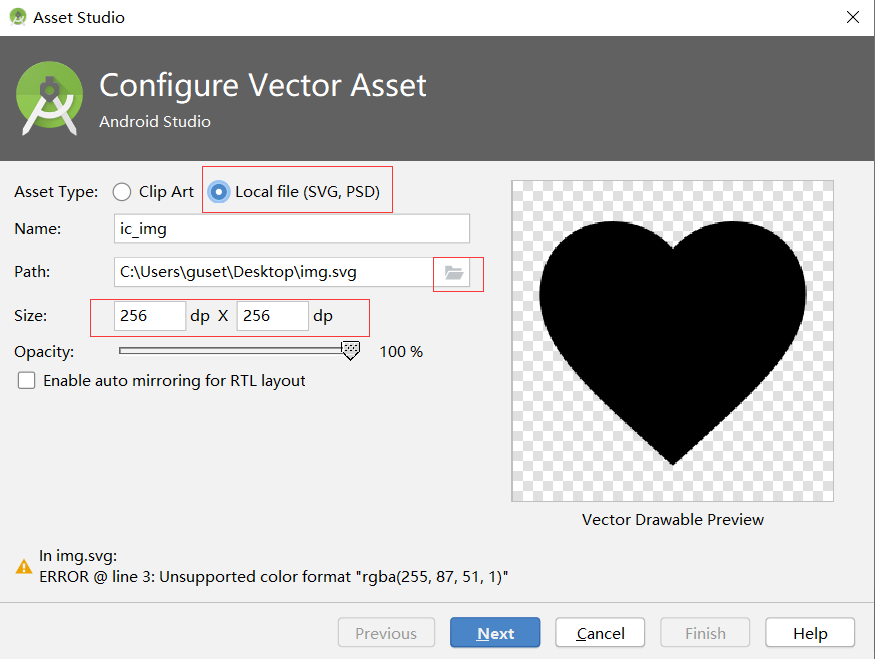
2.3 设置矢量图的颜色
打开生成的drawable,找到颜色属性,修改它。
 <vector xmlns:android="http://schemas.android.com/apk/res/android"

     android:width="256dp"

     android:height="256dp"

     android:viewportWidth="48"

     android:viewportHeight="48">

   <path

       android:pathData="M18,23.5c-1.38,0 -2.5,1.12 -2.5,2.5s1.12,2.5 2.5,2.5 2.5,-1.12 2.5,-2.5 -1.12,-2.5 -2.5,-2.5zM30,23.5c-1.38,0 -2.5,1.12 -2.5,2.5s1.12,2.5 2.5,2.5 2.5,-1.12 2.5,-2.5 -1.12,-2.5 -2.5,-2.5zM24,4C12.95,4 4,12.95 4,24s8.95,20 20,20 20,-8.95 20,-20S35.05,4 24,4zM24,40c-8.82,0 -16,-7.18 -16,-16 0,-0.58 0.04,-1.15 0.1,-1.71 4.71,-2.09 8.47,-5.95 10.42,-10.74 3.62,5.1 9.57,8.45 16.31,8.45 1.55,0 3.06,-0.19 4.5,-0.53 0.43,1.44 0.67,2.96 0.67,4.53 0,8.82 -7.18,16 -16,16z"

       android:fillColor="#ff5733"/>

 </vector>
3. 使用webp
- 把wep图片放到mipmap中
- 在布局文件中直接使用
 <?xml version="1.0" encoding="utf-8"?>

 <androidx.constraintlayout.widget.ConstraintLayout xmlns:android="http://schemas.android.com/apk/res/android"

     xmlns:app="http://schemas.android.com/apk/res-auto"

     xmlns:tools="http://schemas.android.com/tools"

     android:layout_width="match_parent"

     android:layout_height="match_parent"

     android:background="@mipmap/earth"

     tools:context=".MainActivity">

     <TextView

         android:id="@+id/textView"

         android:layout_width="wrap_content"

         android:layout_height="wrap_content"

         android:text="Hello webp!"

         android:layout_marginTop="8dp"

         android:background="@mipmap/earth"

         app:layout_constraintLeft_toLeftOf="parent"

         app:layout_constraintRight_toRightOf="parent"

         app:layout_constraintTop_toTopOf="parent" />

     <ImageView

         android:id="@+id/imageView"

         android:layout_width="0dp"

         android:layout_height="0dp"

         app:layout_constraintBottom_toBottomOf="parent"

         app:layout_constraintEnd_toEndOf="parent"

         app:layout_constraintStart_toStartOf="parent"

         app:layout_constraintTop_toTopOf="parent"

         app:srcCompat="@mipmap/earth" />

 </androidx.constraintlayout.widget.ConstraintLayout>
android 使用svg 和 webp的更多相关文章
- Android 使用 SVG 矢量图
android svg矢量图 可能包含的操作有: SVG图还包括改变颜色,透明度,大小,矩阵操作(平移.旋转.缩放),selector, (图标,背景,按钮),动画,等 setTint(int Col ...
- Android使用SVG小结
SVG的全称是Scalable Vector Graphics,叫可缩放矢量图形.它和位图(Bitmap)相对,SVG不会像位图一样因为缩放而让图片质量下降.它的优点在于节约空间,使用方便. andr ...
- Android使用SVG矢量创建很酷的动态效率!
尊重原创,欢迎转载.转载请注明: FROM GA_studio http://blog.csdn.net/tianjian4592 一个真正酷炫的动效往往让人虎躯一震,话不多说.咱们先瞅瞅效果: ...
- Android使用SVG矢量动画(二)
上篇我们学习了怎么显示SVG矢量图像,当然还有一个更强大的功能,就是让SVG图像动起来,先上一张效果图吧: 要实现上述动画效果,就得用AnimatedVectorDrawable这个类了,它就是负责V ...
- react native Android支持gif和WebP动图
在项目android/app/build.gradle的文件中找到dependencies 支持gif动图加入: implementation 'com.facebook.fresco:animate ...
- android之SVG制作与应用
文章解析及例子:http://www.jcodecraeer.com/a/anzhuokaifa/androidkaifa/2015/0825/3362.html 工具:Photoshop CC+sv ...
- Android SVG矢量资源的使用方法
VectorDrawable 与 SVG Android 5.0(Lollipop, API 21)后,新增了<vector>标签,以VectorDrawable的形式支持SVG类型矢量图 ...
- Android中使用SVG矢量图(一)
SVG矢量图介绍 首先要解释下什么是矢量图像,什么是位图图像? 1.矢量图像:SVG (Scalable Vector Graphics, 可伸缩矢量图形) 是W3C 推出的一种开放标准的文本式矢量图 ...
- webp图片详解
WebP(发音 weppy),是一种支持有损压缩和无损压缩的图片文件格式,派生自图像编码格式 VP8.根据 Google 的测试,无损压缩后的 WebP 比 PNG 文件少了 45% 的文件大小,即使 ...
随机推荐
- Rest接口加Https单向认证
背景: 接到一个需求,客户要求某个模块的rest接口都得通过https访问,客户提供证书. 步骤: Server端证书生成 刚开始还没拿到客户的证书,所以通过jdk自带的keytools自己先生成了一 ...
- K近邻算法(一)
K 近邻算法思想: 寻找该点周围最近的K个点.根据这K 个点的类别来判断该点的类别: 核心: 数据归一化.(在必要的时候必须进行数据归一化处理,防止某一特征在计算数据时占比较重) 计算欧拉距离 . 使 ...
- ios_UITextField-修改占位文字和光标的颜色,大小
一.设置占位文字的颜色 方法一:利用富文本 /** 手机号输入框 */ @property (weak, nonatomic) IBOutlet UITextField *phoneTextField ...
- 异步文件通道Java NIO你需要了解多少,来看看这篇文章
在Java 7,AsynchronousFileChannel 被添加到了Java NIO中.使用AsynchronousFileChannel可以实现异步地读取和写入文件数据. 创建一个Asynch ...
- 漫画 | 到底是什么让IT人如此苦逼???
写在最后 漫画是有点夸张,不过多少还是有点现实开发过程的影子! 老板很乐观,核心就是三个月上线,至于怎么办那是底下人的事. 产品很无奈,心里盘算着,万万不可在他这一环节耽误了进度,时间这么赶,先出个壳 ...
- 极简 Node.js 入门 - 2.1 Path
极简 Node.js 入门系列教程:https://www.yuque.com/sunluyong/node 本文更佳阅读体验:https://www.yuque.com/sunluyong/node ...
- C#LeetCode刷题之#849-到最近的人的最大距离(Maximize Distance to Closest Person)
问题 该文章的最新版本已迁移至个人博客[比特飞],单击链接 https://www.byteflying.com/archives/3754 访问. 在一排座位( seats)中,1 代表有人坐在座位 ...
- python使用zipfile递归压缩和解压缩文件
import shutil,zipfile,os class ToolModel(object): def dfs_get_zip_file(self,input_path, result, igno ...
- angular中阿里矢量图标使用
<!DOCTYPE html> <html lang="en" ng-app="app"> <head> <meta ...
- iOS Abort问题系统性解决方案
一.背景 崩溃(Crash),即闪退,多指移动设备(如iOS.Android设备)在打开/使用应用程序的过程中,突然出现意外退出/中断的情况.如果App线上版本频繁发生崩溃,会极大地影响用户体验,甚至 ...