
android 使用svg 和 webp
1.参考
https://chris.banes.dev/2016/02/25/appcompat-vector/#enabling-the-flag
2.使用svg
2.1 在中打开svg选项
 android {

     compileSdkVersion 29

     buildToolsVersion "29.0.2"

     defaultConfig {

         applicationId "com.example.vn"

         minSdkVersion 15

         targetSdkVersion 29

         versionCode 1

         versionName "1.0"

         testInstrumentationRunner "androidx.test.runner.AndroidJUnitRunner"

         vectorDrawables.useSupportLibrary = true

     }

     buildTypes {

         release {

             minifyEnabled false

             proguardFiles getDefaultProguardFile('proguard-android-optimize.txt'), 'proguard-rules.pro'

         }

     }

 }
2.2 把svg生成drawable

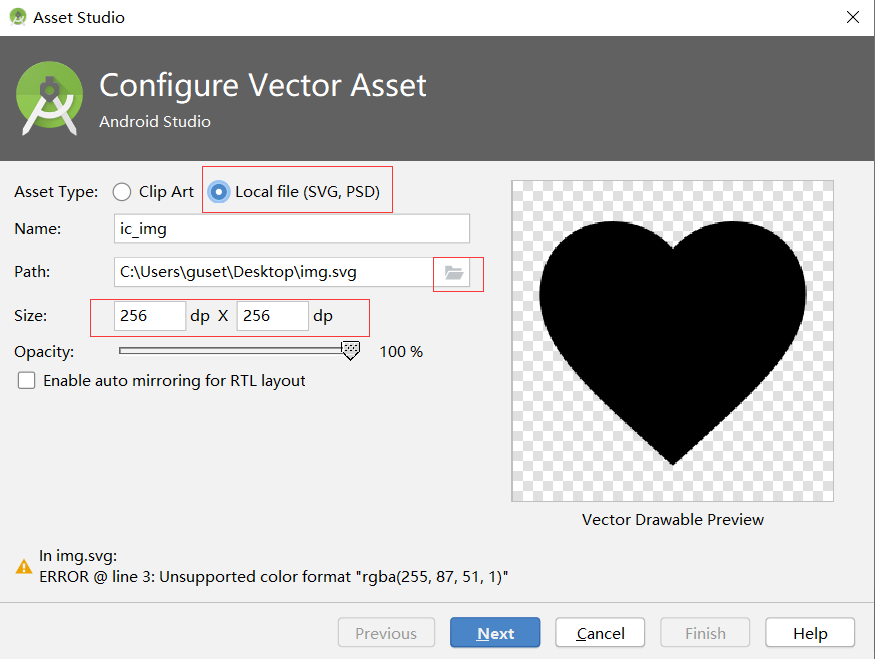
2.3 设置矢量图的颜色
打开生成的drawable,找到颜色属性,修改它。
 <vector xmlns:android="http://schemas.android.com/apk/res/android"

     android:width="256dp"

     android:height="256dp"

     android:viewportWidth="48"

     android:viewportHeight="48">

   <path

       android:pathData="M18,23.5c-1.38,0 -2.5,1.12 -2.5,2.5s1.12,2.5 2.5,2.5 2.5,-1.12 2.5,-2.5 -1.12,-2.5 -2.5,-2.5zM30,23.5c-1.38,0 -2.5,1.12 -2.5,2.5s1.12,2.5 2.5,2.5 2.5,-1.12 2.5,-2.5 -1.12,-2.5 -2.5,-2.5zM24,4C12.95,4 4,12.95 4,24s8.95,20 20,20 20,-8.95 20,-20S35.05,4 24,4zM24,40c-8.82,0 -16,-7.18 -16,-16 0,-0.58 0.04,-1.15 0.1,-1.71 4.71,-2.09 8.47,-5.95 10.42,-10.74 3.62,5.1 9.57,8.45 16.31,8.45 1.55,0 3.06,-0.19 4.5,-0.53 0.43,1.44 0.67,2.96 0.67,4.53 0,8.82 -7.18,16 -16,16z"

       android:fillColor="#ff5733"/>

 </vector>
3. 使用webp
- 把wep图片放到mipmap中
- 在布局文件中直接使用
 <?xml version="1.0" encoding="utf-8"?>

 <androidx.constraintlayout.widget.ConstraintLayout xmlns:android="http://schemas.android.com/apk/res/android"

     xmlns:app="http://schemas.android.com/apk/res-auto"

     xmlns:tools="http://schemas.android.com/tools"

     android:layout_width="match_parent"

     android:layout_height="match_parent"

     android:background="@mipmap/earth"

     tools:context=".MainActivity">

     <TextView

         android:id="@+id/textView"

         android:layout_width="wrap_content"

         android:layout_height="wrap_content"

         android:text="Hello webp!"

         android:layout_marginTop="8dp"

         android:background="@mipmap/earth"

         app:layout_constraintLeft_toLeftOf="parent"

         app:layout_constraintRight_toRightOf="parent"

         app:layout_constraintTop_toTopOf="parent" />

     <ImageView

         android:id="@+id/imageView"

         android:layout_width="0dp"

         android:layout_height="0dp"

         app:layout_constraintBottom_toBottomOf="parent"

         app:layout_constraintEnd_toEndOf="parent"

         app:layout_constraintStart_toStartOf="parent"

         app:layout_constraintTop_toTopOf="parent"

         app:srcCompat="@mipmap/earth" />

 </androidx.constraintlayout.widget.ConstraintLayout>
android 使用svg 和 webp的更多相关文章
- Android 使用 SVG 矢量图
android svg矢量图 可能包含的操作有: SVG图还包括改变颜色,透明度,大小,矩阵操作(平移.旋转.缩放),selector, (图标,背景,按钮),动画,等 setTint(int Col ...
- Android使用SVG小结
SVG的全称是Scalable Vector Graphics,叫可缩放矢量图形.它和位图(Bitmap)相对,SVG不会像位图一样因为缩放而让图片质量下降.它的优点在于节约空间,使用方便. andr ...
- Android使用SVG矢量创建很酷的动态效率!
尊重原创,欢迎转载.转载请注明: FROM GA_studio http://blog.csdn.net/tianjian4592 一个真正酷炫的动效往往让人虎躯一震,话不多说.咱们先瞅瞅效果: ...
- Android使用SVG矢量动画(二)
上篇我们学习了怎么显示SVG矢量图像,当然还有一个更强大的功能,就是让SVG图像动起来,先上一张效果图吧: 要实现上述动画效果,就得用AnimatedVectorDrawable这个类了,它就是负责V ...
- react native Android支持gif和WebP动图
在项目android/app/build.gradle的文件中找到dependencies 支持gif动图加入: implementation 'com.facebook.fresco:animate ...
- android之SVG制作与应用
文章解析及例子:http://www.jcodecraeer.com/a/anzhuokaifa/androidkaifa/2015/0825/3362.html 工具:Photoshop CC+sv ...
- Android SVG矢量资源的使用方法
VectorDrawable 与 SVG Android 5.0(Lollipop, API 21)后,新增了<vector>标签,以VectorDrawable的形式支持SVG类型矢量图 ...
- Android中使用SVG矢量图(一)
SVG矢量图介绍 首先要解释下什么是矢量图像,什么是位图图像? 1.矢量图像:SVG (Scalable Vector Graphics, 可伸缩矢量图形) 是W3C 推出的一种开放标准的文本式矢量图 ...
- webp图片详解
WebP(发音 weppy),是一种支持有损压缩和无损压缩的图片文件格式,派生自图像编码格式 VP8.根据 Google 的测试,无损压缩后的 WebP 比 PNG 文件少了 45% 的文件大小,即使 ...
随机推荐
- Win10系统安装MySQL Workbench 8
系统:Window10 专业版 MySQL Workbench 8.0.19 下载地址:https://dev.mysql.com/downloads/workbench/8.0.html 点击Dow ...
- 【NOIP2016】组合数问题 题解(组合数学+递推)
题目链接 题目大意:给定$n,m,k$,求满足$k|C_i^j$的$C_i^j$的个数.$(0\leq i\leq n,1\leq j\leq \min(i,m))$. --------------- ...
- 用Spark进行实时流计算
Spark Streaming VS Structured Streaming Spark Streaming是Spark最初的流处理框架,使用了微批的形式来进行流处理. 提供了基于RDDs的Dstr ...
- 配置Django-TinyMCE组件支持上传图片功能
Django自带的Admin后台,好用,TinyMCE作为富文本编辑器,也蛮好用的,这两者结合起来在做博客的时候很方便(当然博客可能更适合用Markdown来写),但是Django-TinyMCE这个 ...
- Python 错误 异常
8 错误,调试和测试 8.1错误处理 所有的异常来自 BaseException 记录错误 : # err_logging.py import logging def foo(s): return 1 ...
- java web 下载文件 response.setHeader()的用法 (转载)
response.setHeader()的用法 response.setHeader()下载中文文件名乱码问题 收藏 1. HTTP消息头 (1)通用信息头 即能用于请求消息中,也能用于响应信息中,但 ...
- CSS 学习第一天
css的三种引入方式: 1.内嵌:直接在标签中添加style属性 格式:<标签名 style="样式1:样式值1:样式2:样式值2"> 2.内联:在head标签中添加& ...
- vue跳转页面问题记录
跳转到别的页面带参数 const space = this.pageHelperspace['search'] = this.searchconst query_params = Object.ass ...
- Caused by: java.lang.NullPointerException: Attempt to invoke virtual method 'java.util.List com.catherine.forrealm.about_utils.RealmHelper.findAllStudent()' on a null object reference
报错: 解决方法: private RealmHelper realm_search = new RealmHelper(); 进而发现在写RecyclerView时,遗漏如下代码: recy_sea ...
- Windows server 2008R2 中sql server的搭建
一.安装sql server Step1:下载sql server 2008 r2 standard,解压到Windows的C:\下. Step2:打开安装程序,进行sql server的安装 Ste ...