
vue+ springboot 分页(两种方式:sql分页 & PageHelper 分页)
<el-pagination

  @size-change="handleSizeChange"

  @current-change="handleCurrentChange"

  :current-page="currentPage"

  :page-sizes="[10,20,30,40]"

  :page-size="pageSize"

   layout="total, sizes, prev, pager, next, jumper"

   :total="totalSize">

</el-pagination>
//总数据条数

totalSize: 0,

//当前页码

currentPage: 1,

//每页条数

pageSize: 10,

//起始行数

offset: 0
//改变每页显示的数据条数

handleSizeChange(val) {

  //设置每页显示的条数

  this.pageSize = val;

  if(!this.currentType) {

    this.$message({

    showClose: true,

    message: '查询失败!',

    type: 'error'

    });

    return;

  }

  this.acquireInfo(this.currentType);

},

//改变页码

handleCurrentChange(val) {

  //offset为分页后的起始页码

  this.offset = (val - 1) * this.pageSize;

  this.currentPage = val;

  if(!this.currentType) {

    this.$message({

    showClose: true,

    message: '查询失败!',

    type: 'error'

    });

    return;

  }

  this.acquireInfo(this.currentType);

},

//往后台传offset,和每页多少行,返回的是当前页的pageSize行数据

let params = {

"offset": this.offset,

"pageSize": this.pageSize,

"file_type": type  //业务所需,ignore

};

resourcesApi.queryFileList(params).then(res =>{

  if(res.status === 200 && res.data) {

    this.fileInfoList = res.data;

    .....xxx.....

  }

}).catch(error => {

..............

});

});

},
queryFileList(param) {

  return httpSender({

    url: '/resources/documentList/getFileListByFileType',

    method: 'get',

    params:param

  });

}
/**

* 根据文件类型查询文件

* @param offset

* @param pageSize

* @param file_type

* @return

*/

@ApiOperation(value="/getFileListByFileType",notes = "根据文件类型获取文件列表")

@GetMapping(value = "/getFileListByFileType")

public List<Map> queryFileListByFileType(@RequestParam("offset") @ApiParam(value = "当前页显示的起始数据") int offset,

                                                                 @RequestParam("pageSize") @ApiParam(value = "每页显示的条数") int pageSize,

                                                                 @RequestParam("file_type")  @ApiParam(value = "文件类型") String file_type) {

  try{

    int startRow = offset;

    return documentService.queryFileListByFileType(startRow,pageSize, file_type);

  }catch(Exception e) {

    throw e;

}

}
/**

* 根据文件类型获取分页后的文件

* @param offest

* @param pageSize

* @param file_type

* @return

*/

List<Map> queryFileListByFileType(int startRow, int pageSize, String file_type);
/**

* 根据文件类型查询文件

*

* @param startRow

* @param pageSize

* @param file_type

* @return

*/

@Override

public List<Map> queryFileListByFileType(int startRow, int pageSize, String file_type) {

    if (file_type == "" || file_type == null) {

    return null;

}

List<Map> list = resourceStorageMapper.queryFileListByFileType(startRow,pageSize, file_type);

//获取该文件类型的总条数

int num = resourceStorageMapper.getCountByFileType(file_type);

for (Map i : list) {

    i.put("num", num);

}

 return list;

}
/**

* 根据文件类型、分页条件查询文件列表

* @param startRow

* @param endRow

* @param file_type

* @return

*/

@Select("SELECT a.file_name,DATE_FORMAT(a.update_datetime,'%Y-%m-%d %T') " +

"as update_datetime,a.file_size,a.file_path FROM (SELECT * FROM " +

"tab_resources_storage WHERE file_type = #{file_type}) a " +

"Left JOIN tab_resources_filetype b ON a.file_type = b.code " +

"ORDER BY a.update_datetime DESC LIMIT #{startRow}, #{pageSize};")

List<Map> queryFileListByFileType(@Param("startRow") int startRow,@Param("pageSize") intpageSize,@Param("file_type") String file_type);

/**

* 获取该文件类型的总条数

* @param file_type

* @return

*/

@Select("SELECT COUNT(*) FROM tab_resources_storage WHERE file_type = #{file_type}")

int getCountByFileType(@Param("file_type") String file_type);
<el-pagination

@size-change="handleSizeChange"

@current-change="handleCurrentChange"

:current-page="currentPage"

:page-sizes="[10,20,30,40]"

:page-size="pageSize"

layout="total, sizes, prev, pager, next, jumper"

:total="totalSize">

</el-pagination>
//总数据条数

totalSize: 0,

//当前页码

currentPage: 1,

//每页条数

pageSize: 10,
let params = {

"currentPage": this.currentPage,

"pageSize": this.pageSize,

"queryCondition": this.dictfilterstr

};

//发起请求

dictApi.getDict(params).then(res =>{

  let data = res.data;

  if(data.total) {

    this.totalSize = data.total;

  }

    this.tableData = tData;

  }

}).catch(error =>{})
getDict(param) {

  return httpSender({

    url: '/dict/list',

    method: 'get',

    params: param

  });

},
@ApiOperation(value = "获取项信息", notes = "获取项信息")

@GetMapping(value = "/list")

@ResponseBody

public PageInfo dictList(@RequestParam("currentPage") @ApiParam(value = "当前页码") int currentPage,

                         @RequestParam("pageSize") @ApiParam(value = "每页显示的条数") int pageSize,

                         @RequestParam(value = "queryCondition", required = false) @ApiParam(value = "查询条件") String queryCondition){

if(StringUtils.isBlank(queryCondition)) {

  queryCondition = "";

}

PageInfo page = null;

try{

  page = dictService.list(currentPage, pageSize, queryCondition);

}catch (Exception e) {

  logger.error(e.getMessage(), e);

  throw new DictException(GET_DATA_INFO_FAILED);

}

  return page;

}
**

* 获取项信息并分页

* @param currentPage

* @param

* @param queryCondition

* @return

*/

PageInfo list(int currentPage, int pageSize, String queryCondition);
/**

* 查询所有字典项信息

* @return

*/

@Override

public PageInfo list(int currentPage, int pageSize, String queryCondition) {

PageInfo page = PageHelper.startPage(currentPage, pageSize).doSelectPageInfo(()-> dictMapper.selectDict(queryCondition));

return page;

}
/**

* 根据查询条件查询列表

*

* @param queryCondition

* @return

*/

@Select("<script>" +

"SELECT * FROM vsai_dict <if test='queryCondition != null and queryCondition != \"\"'> " +

"WHERE dict_code LIKE concat(concat(\'%\',#{queryCondition}),\'%\')</if><if test='queryCondition == null or queryCondition == \"\"'>" +

"WHERE pid = '0'</if> ORDER BY update_time DESC " +

"</script>")

List<DictEntity> selectDict(@Param("queryCondition") String queryCondition);
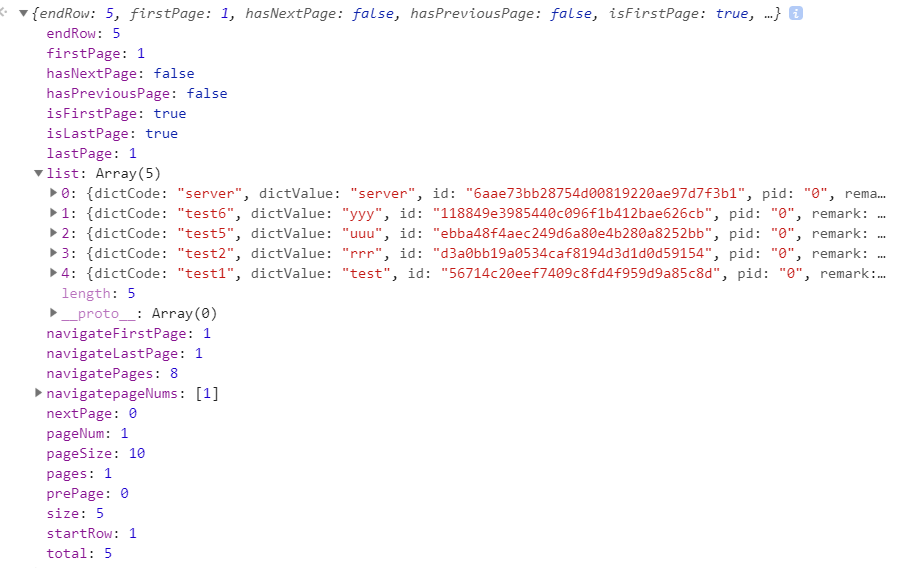
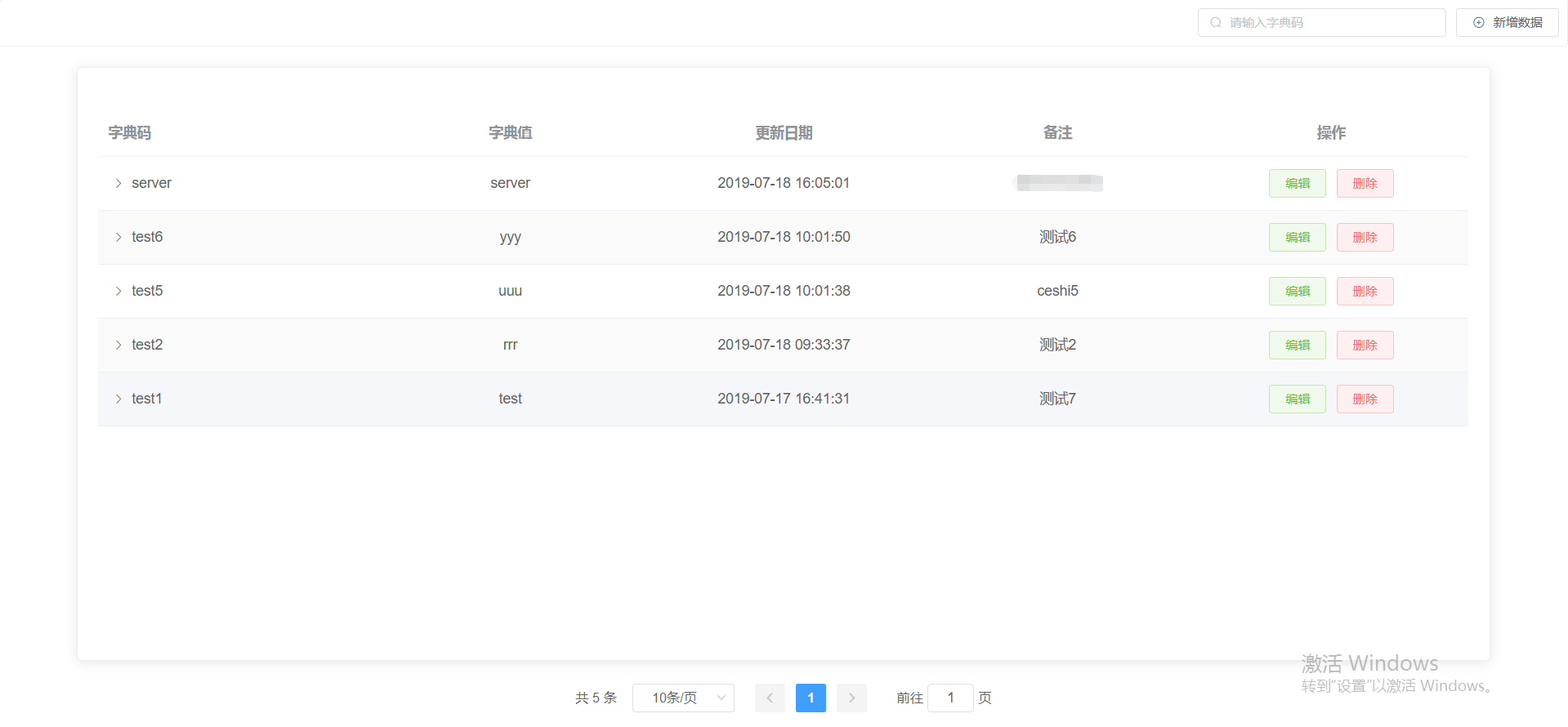
效果图:
vue+ springboot 分页(两种方式:sql分页 & PageHelper 分页)的更多相关文章
- flask 操作mysql的两种方式-sql操作
flask 操作mysql的两种方式-sql操作 一.用常规的sql语句操作 # coding=utf-8 # model.py import MySQLdb def get_conn(): conn ...
- 引入springboot的两种方式以及springboot容器的引入
一.在项目中引入springboot有两种方式: 1.引入spring-boot-starter-parent 要覆盖parent自带的jar的版本号有两种方式: (1)在pom中重新引入这个jar, ...
- SqlServer2008 数据库同步的两种方式(Sql JOB)
尊重原著作:本文转载自http://www.cnblogs.com/tyb1222/archive/2011/05/27/2060075.html 数据库同步是一种比较常用的功能.下面介绍的就是数据库 ...
- 手把手教你Dubbo与SpringBoot常用两种方式整合
一.Dubbo整合SpringBoot的方式(1) 1)直奔主题,方式一: pom.xml中引入dubbo-starter依赖,在application.properties配置属性,使用@Servi ...
- element select失效问题 , vue刷新的两种方式
changeSelect: function () { this.$forceUpdate(); }, 编辑一条记录,给select 赋值后就不动了, 原因是复制后组件需要刷新一下, 不然不能触发事件 ...
- bootstrap table分页(前后端两种方式实现)
bootstrap table分页的两种方式: 前端分页:一次性从数据库查询所有的数据,在前端进行分页(数据量小的时候或者逻辑处理不复杂的话可以使用前端分页) 服务器分页:每次只查询当前页面加载所需要 ...
- 在springboot中使用Mybatis Generator的两种方式
介绍 Mybatis Generator(MBG)是Mybatis的一个代码生成工具.MBG解决了对数据库操作有最大影响的一些CRUD操作,很大程度上提升开发效率.如果需要联合查询仍然需要手写sql. ...
- Sql Server 聚集索引扫描 Scan Direction的两种方式------FORWARD 和 BACKWARD
最近发现一个分页查询存储过程中的的一个SQL语句,当聚集索引列的排序方式不同的时候,效率差别达到数十倍,让我感到非常吃惊 由此引发出来分页查询的情况下对大表做Clustered Scan的时候, 不同 ...
- SpringBoot从入门到精通二(SpringBoot整合myBatis的两种方式)
前言 通过上一章的学习,我们已经对SpringBoot有简单的入门,接下来我们深入学习一下SpringBoot,我们知道任何一个网站的数据大多数都是动态的,也就是说数据是从数据库提取出来的,而非静态数 ...
- SpringBoot集成Mybatis实现多表查询的两种方式(基于xml)
下面将在用户和账户进行一对一查询的基础上进行介绍SpringBoot集成Mybatis实现多表查询的基于xml的两种方式. 首先我们先创建两个数据库表,分别是user用户表和account账户表 ...
随机推荐
- Redis在springboot项目的使用
一.在pom.xml配置redis依赖 <!-- redis客户端代码 --> <dependency> <groupId>org.springframework. ...
- 删除osd的正确方式
在ceph的集群当中关于节点的替换的问题,一直按照以前的方式进行的处理,处理的步骤如下: 停止osd进程 /etc/init.d/ceph stop osd.0 这一步是停止osd的进程,让其他的os ...
- 2018.1.22 js
1.JavaScrip运算符 [案例]a+=b 等价于 a=a+ba-=b 等价于 a=a-ba*=b 等价于 a=a*ba/=b 等价于 a=a/ba%=b 等价于 a%=b2.逻辑控制语句语法1: ...
- python分类
python是一种动态解释性的强类型语言. python下分几个类别,分别是cpython,jypython,ironpython,pypy等等,这些属于不同的解释器,但编写规范只有一个就是pytho ...
- CSS 常用列表样式
CSS 常用列表样式 CSS没学扎实,复习记录一下.下面是一些常用的属性 list-style-image 指定一个图片作为列表项的标记 默认值none,可设置为图片的url list-style-i ...
- Nacos服务发现源码解析
1.Spring服务发现的统一规范 Spring将这套规范定义在Spring Cloud Common中 discovery包下面定义了服务发现的规范 核心接口:DiscoveryClient 用于服 ...
- Mac OS终端利器 iTem2 配置大全
转载链接:https://www.cnblogs.com/diyxiaoshitou/p/9017413.html 之前一直使用 Mac OS 自带的终端,用起来虽然有些不太方便,但总体来说还是可以接 ...
- Apache Shiro 1.2.4反序列化漏洞(CVE-2016-4437)复现
Apache Shiro 1.2.4反序列化漏洞(CVE-2016-4437)复现 环境搭建 docker pull medicean/vulapps:s_shiro_1 docker run -d ...
- Seay源代码审计系统使用
Seay源代码审计系统简介 Seay源代码审计系统使用 如何使用"Seay源代码审计系统"扫描源代码漏洞 Seay源代码审计系统下载安装 github-Seay源代码审计系统
- 堆的数据结构java
public class MaxHeap { private int[] data; private int count; private int capacity; public MaxHeap(i ...