
记开发个人图书收藏清单小程序开发(六)Web开发
Web页面开发暂时是没有问题了,现在开始接上Ptager.BL的DB部分。
首先需要初始化用户和书房信息。因为还没有给其他多余的设计,所以暂时只有个人昵称和书房名称。
添加 Init Razor Pages(/Pages/Shelves/Init) 。
/Pages/Shelves/Init.cshtml
 @page

 @model InitModel

 @{

     ViewData["Title"] = "Shelf Init";

 }

 <nav aria-label="breadcrumb">

     <ol class="breadcrumb">

         <li class="breadcrumb-item"><a asp-page="/Index">Home</a></li>

         <li class="breadcrumb-item"><a asp-page="/My Books/Index">My Books</a></li>

         <li class="breadcrumb-item active" aria-current="page">Bookcase Init</li>

     </ol>

 </nav>

 <form method="post">

     <div class="form-group form-group-lg">

         <label asp-for="Input.NickName"></label>

         <input class="form-control form-control-lg" asp-for="Input.NickName" autocomplete="off">

     </div>

     <div class="form-group form-group-lg">

         <label asp-for="Input.ShelfName"></label>

         <input class="form-control form-control-lg" asp-for="Input.ShelfName" autocomplete="off">

     </div>

     <div class="form-group text-right">

         <button class="btn btn-warning btn-lg" type="submit">Save</button>

     </div>

 </form>
现在去实现底层Repo的部分。
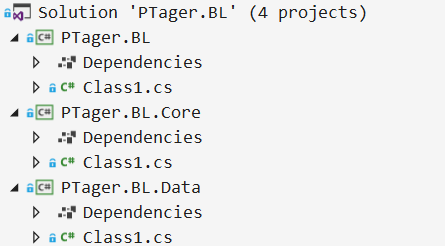
需要在BL层添加基本的底层代码:
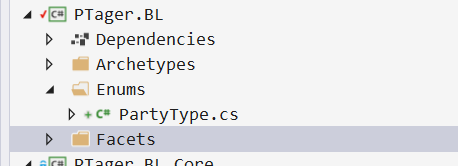
在PTager.BL.Core层增加DataContract、Models和Repos Interface。
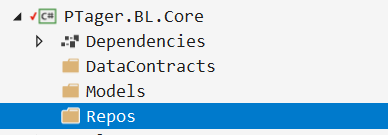
暂时还没有用到查询,所以只需要增加Init Model和Repo Interface就好。
新增Shelf.InitSpec Model文件:
Shelf.InitSpec.cs
 namespace PTager.BL

 {

     public partial class Shelf

     {

         public class InitSpec

         {

             public string NickName { get; set; }

             public string ShelfName { get; set; }

         }

     }

 }
Install Package Newtonsoft.Json
新增_module扩展文件:
_module.cs
 namespace PTager.BL

 {

     [System.Diagnostics.DebuggerNonUserCode]

     public static partial class extOC

     {

         public static string ToJson<T>(this T me) where T : class

             => JsonConvert.SerializeObject(me);

     }

 }
并且引用Projects:Ptager.BL
新增IShelfRepo:
IShelfRepo.cs
 using System.Threading.Tasks;

 namespace PTager.BL

 {

     using M = Shelf;

     public interface IShelfRepo

     {

         Task Init(M.InitSpec spec);

     }

 }
在PTager.BL.Data层增加Store和Repos的实现。
引用Projects:Ptager.BL和PTager.BL.Core,并且添加Nuget Package:System.Data.SqlClient、Microsoft.EntityFrameworkCore.Relational
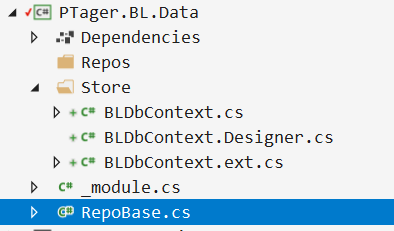
其中Store的内容是模仿Linq to SQL的分层做的,但没那么高的性能,勉强够用而已。
RepoBase.cs
 namespace PTager.BL.Data

 {

     public class RepoBase

     {

         protected readonly BLDbContext _context;

         public RepoBase(BLDbContext context)

         {

             _context = context;

         }

     }

 }
_module.cs
 namespace PTager.BL.Data

 {

     [System.Diagnostics.DebuggerNonUserCode]

     public static partial class extBL { }

 }
BLDbContext.cs
 using System.Threading.Tasks;

 namespace PTager.BL.Data.Store

 {

     public class BLDbContext : DbContext

     {

         public BLDbContext(DbContextOptions<BLDbContext> options)

         : base(options)

         {

             this.ChangeTracker.AutoDetectChangesEnabled = false;

         }

         #region { Functions }

         #endregion

         #region { Actions }

         public async Task Shelf_Init(string json)

             => await this.ExecuteMethodCallAsync(nameof(Shelf_Init), args: json);

         #endregion

     }

 }
BLDbContext.ext.cs(这是目前代码中最脏的部分了,找时间需要优化这个部分)
 using Microsoft.EntityFrameworkCore;

 using System;

 using System.Data;

 using System.Data.SqlClient;

 using System.Linq;

 using System.Reflection;

 using System.Threading.Tasks;

 namespace PTager.BL.Data.Store

 {

     public static partial class extUSDContext

     {

         public static IQueryable<T> CreateMethodCallQuery<T>(this DbContext me, MethodBase method, string schema = "svc")

             where T : class

             => me.CreateMethodCallQuery<T>(method, schema, null);

         public static IQueryable<T> CreateMethodCallQuery<T>(this DbContext me, MethodBase method, string schema = "svc", params object[] args)

             where T : class

         {

             var hasArgs = args != null && args.Length > ;

             //var fields = typeof(T).GetType().ToSelectFields();

             var sql = $"select * from {schema}.{method.Name.Replace("_", "$")}(";

             if (hasArgs) sql += string.Join(", ", args.Select(x => $"@p{args.ToList().IndexOf(x)}"));

             sql += ")";

             me.Database.SetCommandTimeout(TimeSpan.FromMinutes());

             return hasArgs ? me.Set<T>().FromSql(sql, args) : me.Set<T>().FromSql(sql);

         }

         public static async Task<string> ExecuteMethodCallAsync(this DbContext me, string methodName)

             => await me.ExecuteMethodCallAsync(methodName, null);

         public static async Task<string> ExecuteMethodCallAsync(this DbContext me, string methodName, params object[] args)

             => await me.ExecuteMethodCallAsync(methodName, false, args);

         public static async Task<string> ExecuteMethodCallAsync(this DbContext me, string methodName, bool lastOutput, params object[] args)

         {

             var hasArgs = args != null && args.Length > ;

             var sql = $"svc.{methodName.Replace("_", "$")} ";

             if (!hasArgs)

             {

                 if (lastOutput == false)

                 {

                     await me.Database.ExecuteSqlCommandAsync(sql);

                     return string.Empty;

                 }

             }

             else

             {

                 sql += string.Join(", ", args.Select(x => $"@p{args.ToList().IndexOf(x)}"));

                 if (lastOutput == false)

                 {

                     await me.Database.ExecuteSqlCommandAsync(sql, args);

                     return string.Empty;

                 }

                 sql += ", ";

             }

             sql += " @result output";

             var parameters = args.Select(x => new SqlParameter($"@p{args.ToList().IndexOf(x)}", x)).ToList();

             var outParam = new SqlParameter("@result", SqlDbType.VarChar, int.MaxValue)

             {

                 Value = string.Empty,

                 Direction = ParameterDirection.Output

             };

             parameters.Add(outParam);

             me.Database.SetCommandTimeout(TimeSpan.FromMinutes());

             await me.Database.ExecuteSqlCommandAsync(sql, parameters.ToArray());

             return outParam.Value.ToString();

         }

     }

 }
好了,基础已建好,新增ShelfRepo的实现。
ShelfRepo.cs
 namespace PTager.BL.Data.Repos

 {

     using System.Threading.Tasks;

     using PTager.BL.Data.Store;

     using M = Shelf;

     public class ShelfRepo : RepoBase, IShelfRepo

     {

         public ShelfRepo(BLDbContext context) : base(context)

         {

         }

         public async Task Init(M.InitSpec spec)

             => await _context.Shelf_Init(spec.ToJson());

     }

 }
在WebUI的Project中,引用新增的三个底层项目,并在Statup.cs的ConfigureServices中注册IShelfRepo的依赖和BL DB的连接注册:
     services.AddDbContext<BLDbContext>(options =>

         options.UseSqlServer(

             Configuration.GetConnectionString("BLConnection")));

     services.AddScoped<IShelfRepo, ShelfRepo>();
当然,这个时会报错的,因为我们并没有在appsetting中添加这个DB Connection。
修改后的appsettings.json
 {

     "ConnectionStrings": {

         "DefaultConnection": "Server=.\\SQL2017;Database=PTager;Trusted_Connection=True;MultipleActiveResultSets=true",

         "BLConnection": "Server=.\\SQL2017;Database=PTagerBL;Trusted_Connection=True;MultipleActiveResultSets=true"

     },

   "Logging": {

     "LogLevel": {

       "Default": "Warning"

     }

   },

   "AllowedHosts": "*"

 }
接下来需要去新建DB的Script实现这个Shelf_Init功能了。
记开发个人图书收藏清单小程序开发(六)Web开发的更多相关文章
- 记开发个人图书收藏清单小程序开发(十)DB开发——新增图书信息
昨晚完成了Web端新增图书信息的功能,现在就差DB的具体实现了. 因为我把Book相关的信息拆分的比较多,所以更新有点小麻烦. 首先,我需要创建一个Book Type的Matter: 然后,将图片路径 ...
- 记开发个人图书收藏清单小程序开发(三)DB设计
主要是参考豆瓣的图书查询接口: https://api.douban.com/v2/book/isbn/:9780132350884 返回内容如下: { "rating": { & ...
- 记开发个人图书收藏清单小程序开发(五)Web开发
决定先开发Web端试试. 新增Web应用: 选择ASP.NET Core Web Application,填写好Name和Location,然后点击OK. 注意红框标出来的,基于.NET Core 2 ...
- 记开发个人图书收藏清单小程序开发(九)Web开发——新增图书信息
书房信息初始化已完成,现在开始处理图书信息新增功能. 主要是实现之前New Razor Pages的后台部分. 新增需要保存的Model:Book.InitSpec.cs /Models/Book.I ...
- 记开发个人图书收藏清单小程序开发(四)DB设计
早上起来,又改动了一下: 主要是,将非常用信息全部拆分出来,让Table尽量的小,小到不能继续拆分了,这样区分DB逻辑.增加了FileBank存储Book的封面图片,统一管理图片资源. 新添加的Typ ...
- 记开发个人图书收藏清单小程序开发(七)DB设计
前面的书房初始化的前端信息已经完善,所以现在开始实现DB的Script部分. 新增Action:Shelf_Init.sql svc.sql CREATE SCHEMA [svc] AUTHORIZA ...
- 微信小程序开发系列一:微信小程序的申请和开发环境的搭建
我最近也刚刚开始微信小程序的开发,想把我自学的一些心得写出来分享给大家. 这是第一篇,从零开始学习微信小程序开发.主要是小程序的注册和开发环境的搭建. 首先我们要在下列网址申请一个属于自己的微信小程序 ...
- 微信小程序开发系列五:微信小程序中如何响应用户输入事件
微信小程序开发系列教程 微信小程序开发系列一:微信小程序的申请和开发环境的搭建 微信小程序开发系列二:微信小程序的视图设计 微信小程序开发系列三:微信小程序的调试方法 微信小程序开发系列四:微信小程序 ...
- 微信小程序开发系列七:微信小程序的页面跳转
微信小程序开发系列教程 微信小程序开发系列一:微信小程序的申请和开发环境的搭建 微信小程序开发系列二:微信小程序的视图设计 微信小程序开发系列三:微信小程序的调试方法 微信小程序开发系列四:微信小程序 ...
随机推荐
- j2ee常用jar包
[b]activation.jar:[/b]与javaMail有关的jar包,使用javaMail时应与mail.jar一起加入到lib中去,具体负责mail的数据源和类型等 [b]ajaxtags- ...
- libcurl 调用curl_easy_getinfo( ) 返回错误码对照
//执行设置好的操作 res = curl_easy_perform(easy_handle); //获取HTTP错误码 ; curl_easy_getinfo(easy_handle, CURLIN ...
- ArrayList原理(一)
需要使用到动态数组的时候用的最多的就是ArrayList了,底层其实是Object数组,以下demo基于JDK1.8: List<Integer> list = new ArrayLis ...
- jQuery load() 判断 iframe 是否加载完毕
判断 iframe 是否加载完毕 方法.jQuery load() var frm = document.getElementById('myiframe'); $(frm).load(functi ...
- Lua加密
两种方式:一种用luac,一种用luajit luac加密: 1.lua本身可以使用luac将脚本编译为字节码(bytecode)从而实现加密,去官网下载Lua源代码包(http://www.lua. ...
- leetcode 20 Valid Parentheses 有效的括号
描述: 给定一些列括号,判断其有效性,即左括号有对应的有括号,括号种类只为小,中,大括号. 解决: 用栈. bool isValid(string s) { stack<char> st; ...
- 转)bash快捷键
粗体表示推荐,也许对每个人不同. Ctrl-A 相当于HOME键,用于将光标定位到本行最前面 Ctrl-E 相当于End键,即将光标移动到本行末尾 Ctrl-B 相当于左箭头键,用于将光标向左移动一格 ...
- 解题报告-683. K Empty Slots
There is a garden with N slots. In each slot, there is a flower. The N flowers will bloom one by one ...
- error:while loading shared libraries: libevent-2.1.so.6: cannot open shared object file: No such file or directory
执行 memcached 启动命令时,报错,提示:error while loading shared libraries: libevent-2.1.so.6: cannot open shared ...
- 解决 Laravel try catch 不工作的问题
最近再用laravel框架发现,try catch用了没有效果,不能捕获异常, 然后在think框架里也试了一下,发现竟然也不可以! [php] view plain copy try{ $i = ...