
阿里RocketMq(TCP模式)
针对公司业务逻辑,向阿里云MQ发送指定数据,消费端根据数据来做具体的业务,分两个项目,一个生产端(Producer)、一个消费端(Consumer)
生产端通过定时任务执行sql向阿里云MQ发送数据,消费端消费指定Topic上的数据
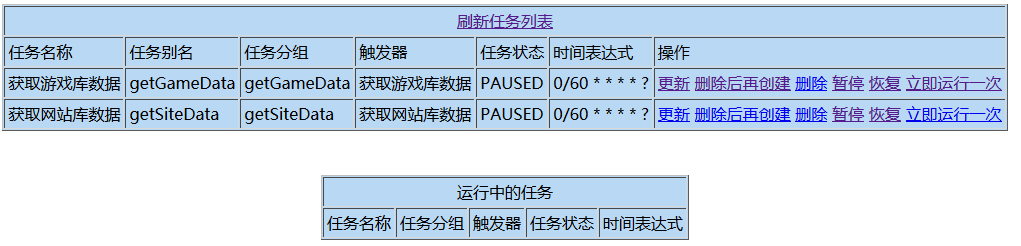
1:定时任务列表:
2:生产端表结构:
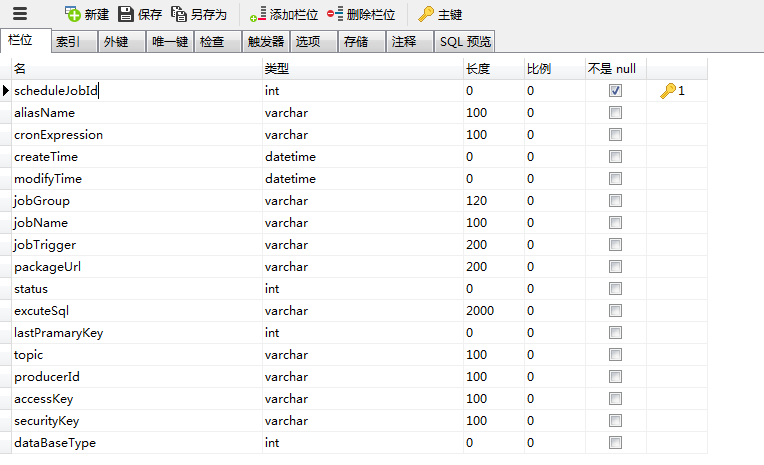
aliasName:定时任务别名;
cronExpression:定时任务轮询规则;
jobGroup:定时任务分组;
jobName:定时任务名称;
jobTrigger:定时任务触发器;
packageUrl:定时任务扫描具体封装类;
excuteSql:扫描类中执行的获取数据的脚本;
lastPramaryKey:最后一次获取数据时最大的主键;
topic:阿里云MQ的topic;
producerId:生产端的Id;
accessKey、securityKey:账号跟秘钥
dataBaseType:操作数据库类型(公司数据库类型比较多,执行脚本时,需要根据类型来指定具体的Service)

3:Java端核心代码,定时任务扫描如下配置的任务类来向阿里云MQ发送数据
public class SendPrimaryKeyListToMqTask implements Job{

    private final Logger logger = LoggerFactory.getLogger(SendPrimaryKeyListToMqTask.class);

    public void execute(JobExecutionContext context) throws JobExecutionException{

        JobDataMap data = context.getJobDetail().getJobDataMap();

        ScheduleJob scheduleJob = (ScheduleJob)data.get("jobParam");

        //最后一次获取数据时最大的主键

        int lastPramaryKey = scheduleJob.getLastPramaryKey();

        //执行sql

        String excuteSql = scheduleJob.getExcuteSql();

        excuteSql = excuteSql.replace("lastPramaryKey", String.valueOf(lastPramaryKey));

        //操作数据库类型(数据库配置)

        int dataBaseType = scheduleJob.getDataBaseType();

        //从游戏库获取数据

        LinkedList<ExcuteResultData> resultData = new LinkedList<ExcuteResultData>();

        if( dataBaseType == 1 ){

            GameService gameService = (GameService)SpringBeanFactory.getBean(GameService.class);

            resultData = gameService.getExcuteResultData(excuteSql);

        //从网站库获取数据

        }else if( dataBaseType == 2 ){

             SiteService siteService = (SiteService)SpringBeanFactory.getBean(SiteService.class);

             resultData = siteService.getExcuteResultData(excuteSql);

        }

        if ( resultData.size() > 0 ){

            scheduleJob.setPrimaryKeyList(resultData);

            QuartzService quartzService = (QuartzService)SpringBeanFactory.getBean(QuartzService.class);

            //将数据集中最大的主键更新

            scheduleJob.setLastPramaryKey(resultData.getLast().getPrimaryKey());

            quartzService.updateLastPramaryKey(scheduleJob);

            String topic = scheduleJob.getTopic();

            String producerId = scheduleJob.getProducerId();

            String ak = scheduleJob.getAccessKey();

            String sk = scheduleJob.getSecurityKey();

            //添加日志

            ScheduleJobLog scjLog = new ScheduleJobLog();

            scjLog.setDataSize(resultData.size());

            scjLog.setJobName(scheduleJob.getJobName());

            scjLog.setTopic(topic);

            int scjLogId = quartzService.addMqScheduleJobLog(scjLog);

            //消费端根据此日志主键更新日志状态

            scheduleJob.setScjLogId(scjLogId);

            Properties properties = new Properties();

            properties.put("ProducerId", producerId);

            properties.put("AccessKey", ak);

            properties.put("SecretKey", sk);

            Producer producer = ONSFactory.createProducer(properties);

            producer.start();

            Message msg = new Message(topic, "PRIMARY_KEY_" + String.valueOf(scjLogId), ObjectsTranscoder.serialize(scheduleJob));

            msg.setKey("PRIMARY_KEY_" + String.valueOf(scjLogId));

            SendResult sendResult = producer.send(msg);

            if ( ( sendResult != null ) && ( sendResult.getMessageId() != null ) ){

                scjLog.setMessageId(sendResult.getMessageId());

                scjLog.setStatus(2);

                quartzService.updateMqScheduleJobLog(scjLog);

            }

            producer.shutdown();

            logger.debug("=====>任务名称:" + scheduleJob.getJobName());

            logger.debug("=====>发送条数:" + resultData.size());

            logger.debug("=====>发送主键内容:" + resultData.toString());

        }

    }

}
4:消费端表结构:

5:消费端Java核心代码(通过监听器来做):
import java.util.List;

import java.util.Properties;

import javax.servlet.ServletContextEvent;

import javax.servlet.ServletContextListener;

import org.springframework.web.context.WebApplicationContext;

import org.springframework.web.context.support.WebApplicationContextUtils;

import com.aliyun.openservices.ons.api.Action;

import com.aliyun.openservices.ons.api.ConsumeContext;

import com.aliyun.openservices.ons.api.Consumer;

import com.aliyun.openservices.ons.api.Message;

import com.aliyun.openservices.ons.api.MessageListener;

import com.aliyun.openservices.ons.api.ONSFactory;

import com.aliyun.openservices.ons.api.PropertyKeyConst;

import com.odao.common.utils.ObjectsTranscoder;

import com.odao.entity.ScheduleJob;

import com.odao.entity.ScheduleJobLog;

import com.odao.service.consumer.ConsumerService;

import com.odao.service.message.MessageService;

/**

 * 阿里云游戏、网站 主键数据集消费监听器

 */

public class ConsumePrimaryKeyFromMqListener implements ServletContextListener {

    @Override

    public void contextInitialized(ServletContextEvent sce) {

        WebApplicationContext appctx = WebApplicationContextUtils.getWebApplicationContext(sce.getServletContext());

        MessageService messageService = (MessageService) appctx.getBean(MessageService.class);

        List<ScheduleJob> consumeList = messageService.getScheduleJobList();

        for(final ScheduleJob sjc : consumeList){

            String topic = sjc.getTopic();

            String consumerId= sjc.getConsumerId();

            String ak = sjc.getAccessKey();

            String sk = sjc.getSecurityKey();

            Properties properties = new Properties();

            properties.put(PropertyKeyConst.ConsumerId,consumerId);

            properties.put(PropertyKeyConst.AccessKey,ak);

            properties.put(PropertyKeyConst.SecretKey,sk);

            //properties.put(PropertyKeyConst.ONSAddr,"http://onsaddr-internal.aliyun.com:8080/rocketmq/nsaddr4client-internal");

            Consumer consumer = ONSFactory.createConsumer(properties);

            consumer.subscribe(topic, "*", new MessageListener() {

                @Override

                public Action consume(Message message, ConsumeContext context) {

                    ScheduleJob scheduleJob = (ScheduleJob) ObjectsTranscoder.deserialize(message.getBody());

                    if( scheduleJob !=null ){

                        //更新消息状态为3:消费消息成功

                        ScheduleJobLog scjLog = new ScheduleJobLog();

                        scjLog.setStatus(3);

                        scjLog.setMqScheduleJobLogId(scheduleJob.getScjLogId());

                        messageService.updateMqScheduleJobLog(scjLog);

                        try {

                            ConsumerService consumerService = (ConsumerService) Class.forName(sjc.getImplementClass()).newInstance();

                            boolean isSuccess = consumerService.consume(scheduleJob.getPrimaryKeyList());

                            if(isSuccess){

                                //更新消息状态为4:业务逻辑处理成功

                                scjLog.setStatus(4);

                                messageService.updateMqScheduleJobLog(scjLog);

                            }

                        } catch (InstantiationException e) {

                            e.printStackTrace();

                        } catch (IllegalAccessException e) {

                            e.printStackTrace();

                        } catch (ClassNotFoundException e) {

                            e.printStackTrace();

                        }

                    }

                    return Action.CommitMessage;

                }

            });

            consumer.start();

        }

    }

    @Override

    public void contextDestroyed(ServletContextEvent sce) {

    }

}
阿里RocketMq(TCP模式)的更多相关文章
- 【运维技术】CentOS7上从零开始安装阿里RocketMQ版本:release-4.0.1【亲测哈哈】
CentOS7上从零开始安装阿里RocketMQ版本:release-4.0.1[亲测哈哈] 安装git # 更新包 $ yum update # 安装git $ yum install git # ...
- (转)阿里 RocketMQ 安装与简介
原文:阿里 RocketMQ 安装与简介 一.简介 官方简介: l RocketMQ是一款分布式.队列模型的消息中间件,具有以下特点: l 能够保证严格的消息顺序 l 提供丰富的消息拉取模式 l ...
- 阿里RocketMq试用记录+简单的Spring集成
CSDN学院招募微信小程序讲师啦 程序猿全指南,让[移动开发]更简单! [观点]移动原生App开发 PK HTML 5开发 云端应用征文大赛,秀绝招,赢无人机! 阿里RocketMq试用记录+简单的S ...
- keepalived绑定单播地址、非抢占模式及LVS的TCP模式的高可用
背景:keepalived默认是组播地址进行播放,且默认地址是224.0.0.18,如果配置多个keepalived主机,会导致虚拟IP地址存在冲突问题,这种问题怎么解决呢? 解决办法:就是将keep ...
- RabbitMQ,Apache的ActiveMQ,阿里RocketMQ,Kafka,ZeroMQ,MetaMQ,Redis也可实现消息队列,RabbitMQ的应用场景以及基本原理介绍,RabbitMQ基础知识详解,RabbitMQ布曙
消息队列及常见消息队列介绍 2017-10-10 09:35操作系统/客户端/人脸识别 一.消息队列(MQ)概述 消息队列(Message Queue),是分布式系统中重要的组件,其通用的使用场景可以 ...
- Alibaba(阿里) RocketMQ入门实例
摘自:码友18年(www.mayou18.com) what is rocketMQ? RocketMQ作为一款分布式的消息中间件(阿里的说法是不遵循任何规范的,所以不能完全用JMS的那一套东西来看它 ...
- 阿里 RocketMQ 安装与简介
一.简介 官方简介: l RocketMQ是一款分布式.队列模型的消息中间件,具有以下特点: l 能够保证严格的消息顺序 l 提供丰富的消息拉取模式 l 高效的订阅者水平扩展能力 l 实时的 ...
- UDP模式与TCP模式的区别
1.TCP有连接状态,而UDP没有. 2.TCP应用层使用无需考虑包的大小及发送情况,而UDP需要. 3.TCP中IP包大小的决定者是Socket,而UDP为应用层.
- (转)阿里RocketMQ Quick Start
转:http://blog.csdn.net/a19881029/article/details/34446629 RocketMQ单机支持1万以上的持久化队列,前提是足够的内存.硬盘空间,过期数据数 ...
随机推荐
- LOJ2251 [ZJOI2017] 树状数组【线段树】【树套树】
题目分析: 对于一个$add$操作,它的特点是与树状数组的查询相同,会给$1$到它自己产生影响,而$query$操作则会途径所有包含它的树状数组点.现在$add$操作具有前向性(不会影响之后的点).所 ...
- [PA2012] Tax
传送门:>Here< 题意:给出一个N个点M条边的无向图,经过一个点的代价是进入和离开这个点的两条边的边权的较大值,求从起点1到点N的最小代价.起点的代价是离开起点的边的边权,终点的代价是 ...
- Matplotlib学习---用matplotlib画折线图(line chart)
这里利用Jake Vanderplas所著的<Python数据科学手册>一书中的数据,学习画图. 数据地址:https://raw.githubusercontent.com/jakevd ...
- Install KVM Hypervisor on arrch64 Linux Server
Install KVM Hypervisor on arrch64 Linux Server 参考链接: https://wiki.ubuntu.com/ARM64/QEMU https://wiki ...
- 微信小程序原生开发简介
简介: 总结: 1. 逻辑层使用js引擎,视图层使用webview渲染 2. 微信小程序已经支持了绝大部分的 ES6 API 3. 可以自动补全css的兼容语法 文档:https://develope ...
- python学习日记(迭代器、生成器)-乱七八糟
迭代器 迭代是Python最强大的功能之一,是访问集合元素的一种方式. 迭代器是一个可以记住遍历的位置的对象. 迭代器对象从集合的第一个元素开始访问,直到所有的元素被访问完结束.迭代器只能往前不会后退 ...
- windows 设置ipsec防火墙
windows server 推荐使用ipsec修改防火墙设置,默认防火墙需要手动导入导出.wfw文件,需要手动添加单条规则,维护麻烦,推荐关闭,使用ipsec管理 以下是线上防火墙配置,可参照业务环 ...
- C++类相关
本文打算通过一些小例子来说明几个关键的知识点. 一:成员函数相关 #include <iostream> using namespace std; class D { public: vo ...
- 【php】php实现数组反转
php里面有个函数可以反转数组,工作中也经常用到,非常方便.今天来自己实现这样的功能. $arr = [2,5,6,1,8,16,12]; function reverse($arr){ $left ...
- CANdbc编辑器的下载和入门介绍
candb 是汽车CAN总线dbc文件的常用编辑软件之一,下面介绍如何下载和安装,本人电脑使用的是win7 64bit. https://download.csdn.net/download/wuku ...