
git reset的用法
git reset三个选项
--mix,--hard,--soft
数据
针对每个选项都是操作这个文件。
[root@centos demo]# git init

Initialized empty Git repository in /root/demo/.git/

[root@centos demo]# echo one >> a.txt

[root@centos demo]# git add a.txt

[root@centos demo]# git commit -m "first commit"

[master (root-commit) b7ee3a2] first commit

 1 file changed, 1 insertion(+)

 create mode 100644 a.txt

[root@centos demo]# echo two >> a.txt

[root@centos demo]# git commit -am "second commit"

[master 92ae9c4] second commit

 1 file changed, 1 insertion(+)

[root@centos demo]# echo three >> a.txt

[root@centos demo]# git commit -am "third commit"

[master 0985eec] third commit

 1 file changed, 1 insertion(+)

[root@centos demo]# echo four >> a.txt

[root@centos demo]# git commit -am "four commit"

[master 5bd480c] four commit

 1 file changed, 1 insertion(+)

[root@centos demo]# git show-branch --more=4    #查看四次提交记录

[master] four commit

[master^] third commit

[master~2] second commit

[master~3] first commit
git reset --mix
在省略reset选项的时候,默认的就是使用--mix
[root@centos demo]# git reset HEAD~2

Unstaged changes after reset:

M       a.txt

[root@centos demo]# git status

On branch master

Changes not staged for commit:

  (use "git add <file>..." to update what will be committed)

  (use "git checkout -- <file>..." to discard changes in working directory)

        modified:   a.txt

no changes added to commit (use "git add" and/or "git commit -a")

[root@centos demo]# cat a.txt

one

two

three

four

[root@centos demo]#  git diff

diff --git a/a.txt b/a.txt

index 69f75fc..a4c0ca1 100644

--- a/a.txt

+++ b/a.txt

@@ -1,2 +1,4 @@

 one

 two

+three

+four
从运行结果可以看出来,--mix有以下特点:
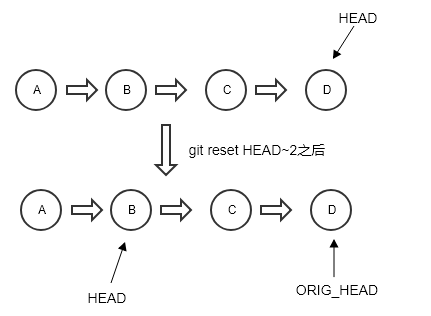
假设使用reset命令从版本D回到版本B,那么HEAD就会指向B。同时,版本D的代码内容并不会删除,会保留版本D相对于B的diff。
可以使用git reset ORIG_HEAD回到之前的版本。
git reset --hard
对原始数据进行下面操作:
[root@centos demo]# git show-branch --more=4

[master] four commit

[master^] third commit

[master~2] second commit

[master~3] first commit

[root@centos demo]# git reset --hard HEAD~2

HEAD is now at e57a55f second commit

[root@centos demo]# git show-branch --more=4

[master] second commit

[master^] first commit

[root@centos demo]# git status

On branch master

nothing to commit, working tree clean

[root@centos demo]# cat a.txt

one

two
从运行结果可以发现,--hard选项有以下特点:
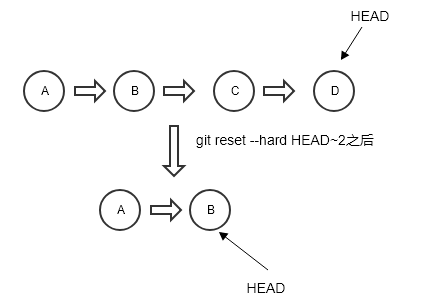
使用--hard选项回到版本B的啥时候,HEAD会回到版本B,同时,代码内容也会回到版本B,也就是说,版本B之后的内容都被删除了。
但是还是可以使用git reset ORIG_HEAD回到版本D。然后版本D的内容就会恢复,但是需要再次git add && git commit。
git reset --soft
[root@centos demo]# git show-branch --more=5

[master] four commit

[master^] third commit

[master~2] second commit

[master~3] first commit

[root@centos demo]# git reset --soft HEAD~2

[root@centos demo]#  git status

On branch master

Changes to be committed:

  (use "git reset HEAD <file>..." to unstage)

        modified:   a.txt

[root@centos demo]# git diff

#注意上面一个命令提示修改了a.txt,但是却没有diff

[root@centos demo]# cat a.txt  #a文件的内容仍旧没变

one

two

three

four

[root@centos demo]# git reset ORIG_HEAD

[root@centos demo]# git show-branch --more=5

[master] four commit

[master^] third commit

[master~2] second commit

[master~3] first commit
--soft选项很特别,和--mix很相似,区别是:
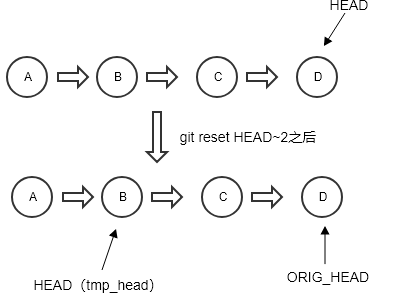
1、如果从D版本回到B版本,进行git diff时,不会显示版本D相对于版本B的diff,因为在B处执行git diff时,是和D进行diff,而不是和B进行diff(但是执行git status时,还是会提示有变化,但是可以忽略)
2、在从B版本回到D版本后,不用在进行git add && git commit。可以认为HEAD一直都指向D,执行B的只是一个tmp_head。
git reset的用法的更多相关文章
- Git reset 常见用法
Git reset 1. 文件从暂存区回退到工作区 2. 版本回退 1.1 git reset HEAD filename :回退文件,将文件从暂存区回退到工作区 //也可以使用 git reset ...
- 【Git 学习三】深入理解git reset 命令
重置命令(git reset)是Git 最常用的命令之一,也是最危险最容易误用的命令.来看看git reset命令用法. --------------------------------------- ...
- git reset 与 git revert的区别?
一,git reset的功能: 该命令修改HEAD的位置,即将HEAD指向的位置改变为之前存在的某个版本, 说明: 修改后,push到远程仓库时需要使用"git push -f"提 ...
- git revert用法以及与git reset的区别
git revert用法 git revert 撤销 某次操作,此次操作之前和之后的commit和history都会保留,并且把这次撤销 作为一次最新的提交 * git revert HEAD ...
- Git复习(十三)之git revert用法及与git reset区别
git revert用法以及与git reset的区别 git revert用法 git revert 撤销 某次操作,此次操作之前和之后的commit和history都会保留,并且把这次撤销 作为一 ...
- git reset 版本回退的三种用法总结
git reset (–mixed) HEAD~1 回退一个版本,且会将暂存区的内容和本地已提交的内容全部恢复到未暂存的状态,不影响原来本地文件(未提交的也不受影响) git reset –soft ...
- git reset用法
git 删除 错误 提交的 commit 方法: 根据–soft –mixed –hard,会对working tree和index和HEAD进行重置: git reset -- ...
- 代码回滚:git reset、git checkout和git revert区别和联系
git reset.git checkout和git revert是你的Git工具箱中最有用的一些命令.它们都用来撤销代码仓库中的某些更改,而前两个命令不仅可以作用于提交,还可以作用于特定文件. 因为 ...
- [译]git reset
git reset 如果说git revert是一个安全的撤销方式, 那么git reset就是一个非常危险的方法了. 当你使用git reset撤销的时候, 你没有可能在回到最初了-他是一个永久的不 ...
随机推荐
- 一、JSP标签介绍,自定义标签
一.JSP标签介绍 1. 标签库有什么作用 自定义标签库是一种优秀的表现层技术,之前介绍的MVC模式,我们使用jsp作为表现层,但是jsp语法嵌套在html页面,美工还是很难直接参与开发,并且jsp脚 ...
- MySQL注入与防御
1.简介 1.1.含义 在一个应用中,数据的安全无疑是最重要的.数据的最终归宿都是数据库,因此如何保证数据库不被恶意攻击者入侵是一项重要且严肃的问题! SQL注入作为一种很流行的攻击手段,一直以来都受 ...
- C# -- 使用反射(Reflect)获取dll文件中的类型并调用方法
使用反射(Reflect)获取dll文件中的类型并调用方法 需引用:System.Reflection; 1. 使用反射(Reflect)获取dll文件中的类型并调用方法(入门案例) static v ...
- LeetCode算法题-Power of Four(Java实现-六种解法)
这是悦乐书的第205次更新,第216篇原创 01 看题和准备 今天介绍的是LeetCode算法题中Easy级别的第72题(顺位题号是342).给定一个整数(带符号的32位),写一个函数来检查它是否为4 ...
- 团队作业—预则立&&他山之石
团队作业-预则立&&他山之石 Deadline: 2017.10.24 22:00pm 作业要求 一.确立团队选题,建立和初步熟悉团队git的协作方式.项目后续的代码.文档都要通过gi ...
- JavaScript数据类型之文本类型
引言 字符串(string)是一组由16位值组成的不可变的有序序列,每个字符通常来自于Unicode字符集.JavaScript通过字符串类型来表示文本.字符串的长度(length)是其所含16位值的 ...
- Teradata超长数据会截断
1.数据库版本 Teradata 15.10 2.测试案例: create multiset table test_stg ( col1 ) CHARACTER SET LATIN not null ...
- 新建SpringBoot项目运行页面报错Whitelabel Error Page This application has no explicit mapping for /error, so yo
新建SpringBoot项目运行页面报错Whitelabel Error Page This application has no explicit mapping for /error, so yo ...
- ajax @requestBody
前端: $.ajax({ type: "POST", contentType: "application/json;charset=UTF-8", url: R ...
- forall 与 for loop 案例
create table a_tab(ver number,id number);create table b_tab(ver number,id number);set timing on DECL ...