
使用Spring Cache缓存出现的小失误
前文:今天在使用Spring Boot项目使用Cache中出现的小失误,那先将自己创建项目的过程摆出来
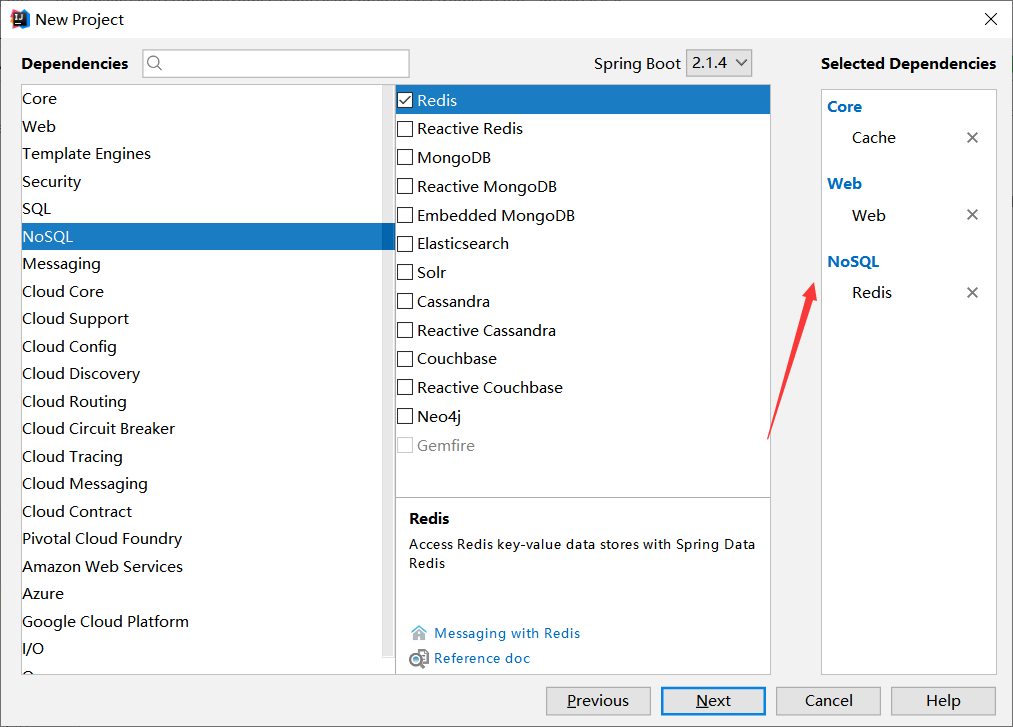
1.首先创建一个Spring Boot的项目(我这里使用的开发工具是Intellij IDEA),并且导入相关依赖
2.创建Bean对象
public class User implements Serializable {

    private Long id;    //id

    private String username;    //账号

    private String password;    //密码

    public Long getId() {

        return id;

    }

    public void setId(Long id) {

        this.id = id;

    }

    public String getUsername() {

        return username;

    }

    public void setUsername(String username) {

        this.username = username;

    }

    public String getPassword() {

        return password;

    }

    public void setPassword(String password) {

        this.password = password;

    }

    @Override

    public String toString() {

        return "User{" +

                "id=" + id +

                ", username='" + username + '\'' +

                ", password='" + password + '\'' +

                '}';

    }

}
3.Service
@Service

@CacheConfig(cacheNames = "c1")

public class UserService {

    @Cacheable

    public User getUserById(Long id){

        System.out.println(id);

        User user = new User();

        user.setId(id);

        return user;

    }

}
4.测试类
@RunWith(SpringRunner.class)

@SpringBootTest

public class RediscacheApplicationTests {

    @Autowired

    UserService userService;

    @Test

    public void contextLoads() {

        User userById = userService.getUserById(99L);

        System.out.println("userById >>> " + userById);

        User userById2 = userService.getUserById(99L);

        System.out.println("userById2 >>> " + userById2);

    }

}
5.配置文件中注册redis相关信息
#这里是我这里本地装有redis的linux地址

spring.redis.host=192.168.209.131

spring.redis.port=6379

spring.redis.database=0

spring.cache.cache-names=c1
6.开启redis

然后启动!
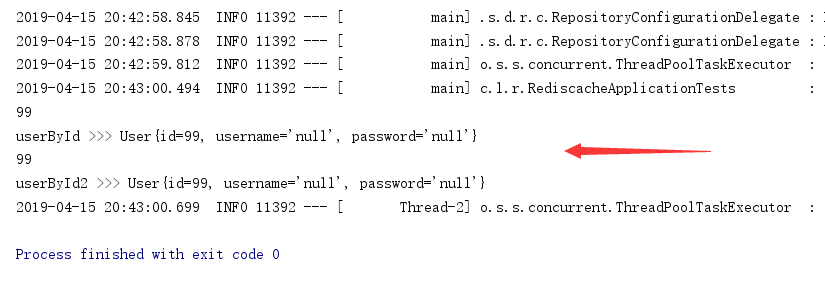
从控制台这里可以看到方法执行了,并且调用了service中的方法,出现了99
为了检测redis中是否拥有了缓存,再次执行!
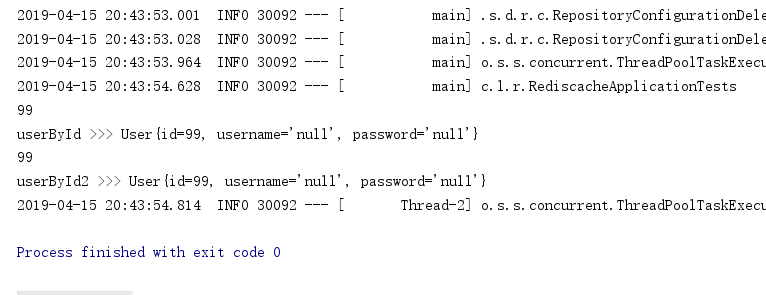
。。。?
按照道理来说,这次执行会直接调用缓存里的数据,这里不应该执行service方法里面的内容(也就是不应该出现99的)
那我们看看redis里面的参数
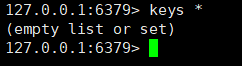
从这里我们可以看出redis并没有任何缓存,我推断这里是没有启动缓存所引起的,跑回主方法看看
@SpringBootApplication

public class RediscacheApplication {

    public static void main(String[] args) {

        SpringApplication.run(RediscacheApplication.class, args);

    }

}
好的,问题出在这里,少了一个@EnableCaching注解来启动缓存,加上注解:
@EnableCaching  //这里画个重点

@SpringBootApplication

public class RediscacheApplication {

    public static void main(String[] args) {

        SpringApplication.run(RediscacheApplication.class, args);

    }

}
那么,启动!!!
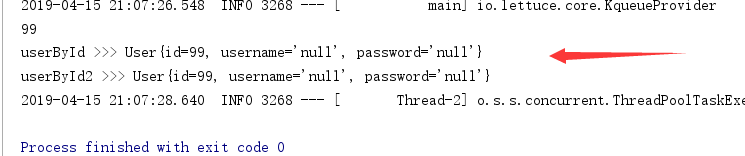
好的,这次99只出现一次,说明调用了一次service里的方法,并将数据保存到了缓存中。在第二次调用id=99的user对象时,直接从缓存中获取。测试成功!
那这次的问题就解决了,积累点点滴滴,一步一脚印,加油
使用Spring Cache缓存出现的小失误的更多相关文章
- Spring Cache缓存注解
目录 Spring Cache缓存注解 @Cacheable 键生成器 @CachePut @CacheEvict @Caching @CacheConfig Spring Cache缓存注解 本篇文 ...
- 注释驱动的 Spring cache 缓存介绍
概述 Spring 3.1 引入了激动人心的基于注释(annotation)的缓存(cache)技术,它本质上不是一个具体的缓存实现方案(例如 EHCache 或者 OSCache),而是一个对缓存使 ...
- [转]注释驱动的 Spring cache 缓存介绍
原文:http://www.ibm.com/developerworks/cn/opensource/os-cn-spring-cache/ 概述 Spring 3.1 引入了激动人心的基于注释(an ...
- 注释驱动的 Spring cache 缓存介绍--转载
概述 Spring 3.1 引入了激动人心的基于注释(annotation)的缓存(cache)技术,它本质上不是一个具体的缓存实现方案(例如 EHCache 或者 OSCache),而是一个对缓存使 ...
- Spring cache 缓存
概述 Spring 3.1 引入了激动人心的基于注释(annotation)的缓存(cache)技术,它本质上不是一个具体的缓存实现方案(例如 EHCache 或者 OSCache),而是一个对缓存使 ...
- 【快学SpringBoot】快速上手好用方便的Spring Cache缓存框架
前言 缓存,在开发中是非常常用的.在高并发系统中,如果没有缓存,纯靠数据库来扛,那么数据库压力会非常大,搞不好还会出现宕机的情况.本篇文章,将会带大家学习Spring Cache缓存框架. 原创声明 ...
- Spring Cache缓存技术,Cacheable、CachePut、CacheEvict、Caching、CacheConfig注解的使用
前置知识: 在Spring Cache缓存中有两大组件CacheManager和Cache.在整个缓存中可以有多个CacheManager,他们负责管理他们里边的Cache.一个CacheManage ...
- Spring Cache缓存框架
一.序言 Spring Cache是Spring体系下标准化缓存框架.Spring Cache有如下优势: 缓存品种多 支持缓存品种多,常见缓存Redis.EhCache.Caffeine均支持.它们 ...
- 基于Redis的Spring cache 缓存介绍
目录 Cache API及默认提供的实现 demo 依赖包安装 定义实体类.服务类和相关配置文件 Cache注解 启用Cache注解 @CachePut @CacheEvict @Cacheable ...
随机推荐
- 深度学习(二)--深度信念网络(DBN)
深度学习(二)--深度信念网络(Deep Belief Network,DBN) 一.受限玻尔兹曼机(Restricted Boltzmann Machine,RBM) 在介绍深度信念网络之前需要先了 ...
- Access denied when I try to install profiler
I had the same issue and used the diagtool to find more information. The traces showed this error me ...
- .yaml参数文件的编写和使用
一.在ROS底下使用.yaml文件配置参数 在ROS底下用起来还是非常方便的,首先,写一个读参数的函数getParam(),由于参数类型不止一种,所以要使用模板. 具体语句如下: template&l ...
- Android 开发 View的API 转载
转载地址:https://blog.csdn.net/lemonrabbit1987/article/details/47704679 View类代表用户界面组件的基本构建块.一个View占据屏幕上的 ...
- java实现HTTP Basic认证
这两天一直在调试EMQ的API,通过HTTP的GET请求,可以查询到订阅列表信息,在浏览器中测试时,需要输入用户名和密码,然后才能显示出结果,输错或者不输入会返回401错误. 通过浏览器输入用户名和密 ...
- Tomcat(免安装版)的安装与配置【转】
1.下载 到Apache的官方网站,我们可以很容易找到Tomcat的下载地址,如: http://tomcat.apache.org/download-60.cgi 在这里我们可以下载到Tomcat的 ...
- springIoC的理解01
IOC将模块(对象)之间的依赖关系交由IOC容器管理,让应用开发对接口编程,而不是对类编程.依赖反转:每个对象都需要与其合作的对象(也就是依赖的对象)的引用.未使用依赖反转的特性之前,是需要先创建一个 ...
- 使用 webpack 搭建多入口项目
闲来无事,学习一下怎么用 webpack 自定义多入口项目的打包 项目github地址:https://github.com/xiaoliwang2016/webpack-demo 先来看一下目录结构 ...
- List 去重
private static List removeDuplicate(List list) { HashSet h = new HashSet(list); list.clear(); list.a ...
- 《Java开发学习大纲文档》V6.0(已经不公布了,请查看第七版)
<Java开发大纲学习文档第六版>简介: 有需要的私聊作者QQ:253173641.