
全国人口 信息(NCIIC)接口开发纪要
阶段一:根据wsdl2java命令解析https://ws.nciic.org.cn/nciic_ws/services/NciicServices?wsdl以生成接口调用的对象类:
wsdl2java用法:

wsdl2java -p com -d src -all  wsdl

实例1.:wsdl2java -p com -client -d d:/src https://ws.nciic.org.cn/nciic_ws/services/NciicServices?wsdl

实例2.:wsdl2java -p com -all -d E:\jiekou E:\jiekou\NciicServices.wsdl

生成java代码后可以直接复制到客户端中再客户端中使用(具体cxf及wsdl2java使用方式,可参看我另外一篇博客:http://www.cnblogs.com/hedongfei/p/7487149.html)
阶段二:将生成的代码复制到项目中后,在客户端调用测试的过程中,因公安部拒绝提供证书,仅提供了inlisene文件,无法进行正常调试。故开始寻找cxf客户端调用规避证书或者无条件信任证书的方式(下附的信任证书方式是我寻找到的其中一种方式,经我多次验证,我所寻找的方法均无用,下附的也无用。似乎CXF在生成的客户端中不存在规避的途径):
1、当不需要使用任何证书访问https网页时,只需配置信任任何证书

HttpClient http = new HttpClient();

String url = "https://payment.cib.com.cn/payment/api/rest";

Protocol myhttps = new Protocol("https", new MySSLProtocolSocketFactory(), 443);

Protocol.registerProtocol("https", myhttps);

PostMethod post = new PostMethod(url);

2、其中信任任何证书的类

import java.io.IOException;

import java.net.InetAddress;

import java.net.InetSocketAddress;

import java.net.Socket;

import java.net.SocketAddress;

import java.net.UnknownHostException;

import java.security.KeyManagementException;

import java.security.NoSuchAlgorithmException;

import java.security.cert.CertificateException;

import java.security.cert.X509Certificate;

import javax.net.SocketFactory;

import javax.net.ssl.SSLContext;

import javax.net.ssl.TrustManager;

import javax.net.ssl.X509TrustManager;

import org.apache.commons.httpclient.ConnectTimeoutException;

import org.apache.commons.httpclient.params.HttpConnectionParams;

import org.apache.commons.httpclient.protocol.ProtocolSocketFactory;

/**

 * author by lpp

 *

 * created at 2010-7-26 上午09:29:33

 */

public class MySSLProtocolSocketFactory implements ProtocolSocketFactory {

  private SSLContext sslcontext = null;

  private SSLContext createSSLContext() {

      SSLContext sslcontext=null;

      try {

          sslcontext = SSLContext.getInstance("SSL");

          sslcontext.init(null, new TrustManager[]{new TrustAnyTrustManager()}, new java.security.SecureRandom());

      } catch (NoSuchAlgorithmException e) {

          e.printStackTrace();

      } catch (KeyManagementException e) {

          e.printStackTrace();

      }

      return sslcontext;

  }

  private SSLContext getSSLContext() {

      if (this.sslcontext == null) {

          this.sslcontext = createSSLContext();

      }

      return this.sslcontext;

  }

  public Socket createSocket(Socket socket, String host, int port, boolean autoClose)

          throws IOException, UnknownHostException {

      return getSSLContext().getSocketFactory().createSocket(

              socket,

              host,

              port,

              autoClose

          );

  }

  public Socket createSocket(String host, int port) throws IOException,

          UnknownHostException {

      return getSSLContext().getSocketFactory().createSocket(

              host,

              port

          );

  }

  public Socket createSocket(String host, int port, InetAddress clientHost, int clientPort)

          throws IOException, UnknownHostException {

      return getSSLContext().getSocketFactory().createSocket(host, port, clientHost, clientPort);

  }

  public Socket createSocket(String host, int port, InetAddress localAddress,

          int localPort, HttpConnectionParams params) throws IOException,

          UnknownHostException, ConnectTimeoutException {

      if (params == null) {

          throw new IllegalArgumentException("Parameters may not be null");

      }

      int timeout = params.getConnectionTimeout();

      SocketFactory socketfactory = getSSLContext().getSocketFactory();

      if (timeout == 0) {

          return socketfactory.createSocket(host, port, localAddress, localPort);

      } else {

          Socket socket = socketfactory.createSocket();

          SocketAddress localaddr = new InetSocketAddress(localAddress, localPort);

          SocketAddress remoteaddr = new InetSocketAddress(host, port);

          socket.bind(localaddr);

          socket.connect(remoteaddr, timeout);

          return socket;

      }

  }

  //自定义私有类

  private static class TrustAnyTrustManager implements X509TrustManager {

      public void checkClientTrusted(X509Certificate[] chain, String authType) throws CertificateException {

      }

      public void checkServerTrusted(X509Certificate[] chain, String authType) throws CertificateException {

      }

      public X509Certificate[] getAcceptedIssuers() {

          return new X509Certificate[]{};

      }

  }

}
阶段三:在寻求cxf规避证书无果后,我决定换成Xfire的方式实现接口。我在网上搜索是否存在xfire相关解析wsdl命令,以生成对象类,在寻找的过程中确有发现,但在eclipse安装xfire插件时,发现根本下载不了,方案亦pass··寻找到的xfire解析方案如下:
这篇笔记,只是针对于基于wsdl文件生成客户端代码后,来编写访问webservice的客户端。作为开发过程中遇到的问题的记录。

开发环境:jdk1.5、xfire-1.2.6

由于服务端并非本公司开发,所以只能拿到服务端的wsdl文件,首先想到的是,基于wsdl文件生成客户端代码,然后在此基础上按照业务来编写请求类。

XFire 官方网站 http://xfire.codehaus.org

可以从该网站下载xfire-distribution-1.2.6.zip文件,里面包含了xFire的文档、类包及相关文档说明。

jar包都在lib下,另外不要忘记了xfire-all-1.2.6.jar包。

一、new一个project:MyWebservice
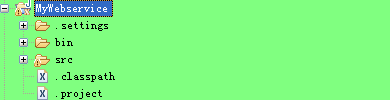
然后右键再new一下,选择other:

next,出现下图:
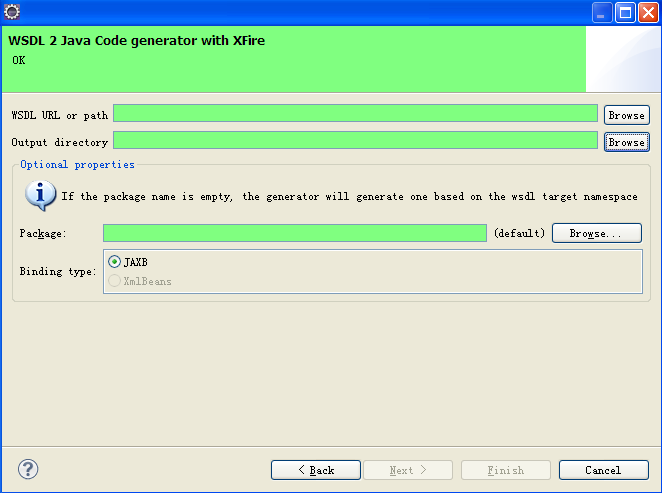
上图中的WSDL URL or path栏可以选择url地址:http://<ip>:<port>/path/XXX?wsdl,也可以将wsdl文件下载到本地,选择本地wsdl文件。由于本项目用到的url本地无法访问,因此必须在服务器上下载服务端的wsdl文件到本地,利用本地的wsdl文件生成客户端。

Output directory一栏,是选择你生成的代码放入的目录。由于之前新建了一个MyWebservice的工程,所以这里选择该工程的src目录,当然也可以新建你指定的目录列表(下面的package一栏可以选择指定的目录,这里暂时选择default)。如下图:
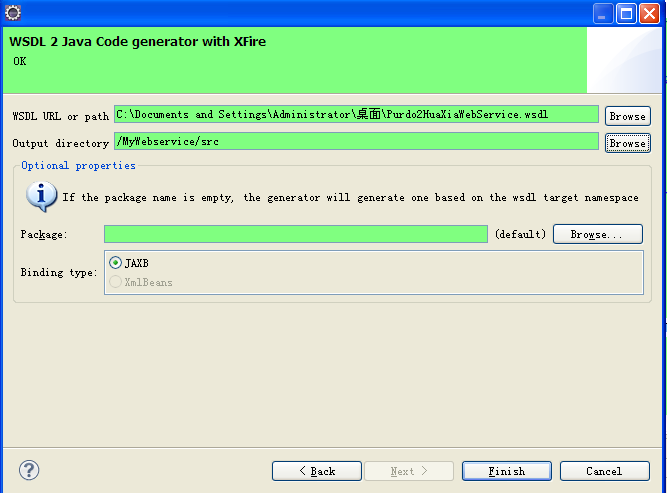
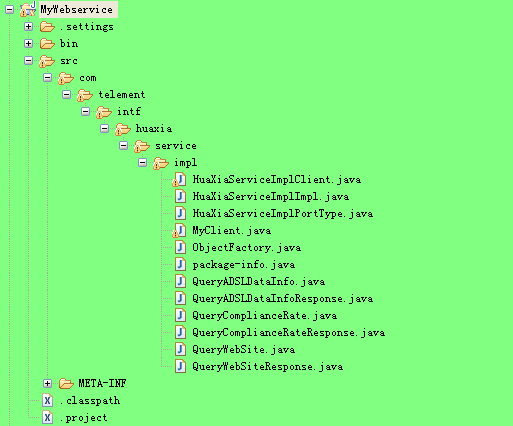
点击finish完成,生成如下图目录结构的客户端代码(MyClient类是后面自己编写的访问请求类)。
二、编写客户端调用类:MyClient

Java代码  收藏代码

package com.telement.intf.huaxia.service.impl;

import java.net.MalformedURLException;

import java.net.URL;

import javax.xml.bind.JAXBElement;

import javax.xml.namespace.QName;

import org.codehaus.xfire.XFireFactory;

import org.codehaus.xfire.client.Client;

import org.codehaus.xfire.client.XFireProxyFactory;

import org.codehaus.xfire.service.Service;

import org.codehaus.xfire.service.binding.ObjectServiceFactory;

public class MyClient {

    public static void main(String[] args) {

        MyClient mc = new MyClient();

        mc.queryWebSiteByXfireThree();

    }

    public void queryWebSiteByXfireOne() {

        Service srvcModel = new ObjectServiceFactory()

                .create(HuaXiaServiceImplPortType.class);

        XFireProxyFactory factory = new XFireProxyFactory(XFireFactory

                .newInstance().getXFire());

        String helloWorldURL = "http://<ip>:<port>/path/serviceName";

        String requestXmlStr = "yours_request_str";

        try {

            HuaXiaServiceImplPortType srvc = (HuaXiaServiceImplPortType) factory

                    .create(srvcModel, helloWorldURL);

            JAXBElement<String> requestParm = new JAXBElement<String>(

                    new QName("http://impl.service.huaxia.intf.telement.com/",

                            "HuaXiaServiceImplPort"), String.class,

                    requestXmlStr);

            JAXBElement<String> resultStr = srvc.queryWebSite(requestParm);

            System.out.println(resultStr.getValue());

        } catch (MalformedURLException e) {

            e.printStackTrace();

        }

    }

    public void queryWebSiteByXfireTwo() {

        String requestXmlStr = "yours_request_str";

        URL url = null;

        Client client = null;

        try {

            url = new URL("http://<ip>:<port>/path/serviceName?wsdl");

            client = new Client(url);

            System.out.println(requestXmlStr);

            String result = (String) client.invoke("queryWebSite",

                    new Object[] { requestXmlStr })[0];

            System.out.println(result);

        } catch (MalformedURLException e) {

            e.printStackTrace();

        } catch (Exception e) {

            e.printStackTrace();

        }

    }

    public void queryWebSiteByXfireThree() {

        String requestXmlStr = "yours_request_str";

        HuaXiaServiceImplClient hxc = new HuaXiaServiceImplClient();

        HuaXiaServiceImplPortType service = hxc.getHuaXiaServiceImplPort();

        JAXBElement<String> requestParm = new JAXBElement<String>(new QName(

                "http://impl.service.huaxia.intf.telement.com/",

                "HuaXiaServiceImplPort"), String.class, requestXmlStr);

        JAXBElement<String> resultStr = service.queryWebSite(requestParm);

        System.out.println(resultStr.getValue());

    }

}

 调用上述类中方法一和方法三测试后发现如下异常:(方法二正常,因为方法二与生成的客户端存根代码无关)

Java代码  收藏代码

Exception in thread "main" org.codehaus.xfire.XFireRuntimeException: Could not invoke service.. Nested exception is org.codehaus.xfire.fault.XFireFault: Couldn't get property {http://lang.java}classes from bean class java.lang.String. Nested exception is java.lang.reflect.InvocationTargetException: null

org.codehaus.xfire.fault.XFireFault: Couldn't get property {http://lang.java}classes from bean class java.lang.String. Nested exception is java.lang.reflect.InvocationTargetException: null

    at org.codehaus.xfire.fault.XFireFault.createFault(XFireFault.java:89)

    at org.codehaus.xfire.client.Invocation.invoke(Invocation.java:83)

    at org.codehaus.xfire.client.Invocation.invoke(Invocation.java:114)

    at org.codehaus.xfire.client.Client.invoke(Client.java:336)

    at org.codehaus.xfire.client.XFireProxy.handleRequest(XFireProxy.java:77)

    at org.codehaus.xfire.client.XFireProxy.invoke(XFireProxy.java:57)

    at $Proxy6.queryWebSite(Unknown Source)

    at com.telement.intf.huaxia.service.impl.MyClient.queryWebSiteByXfireOne(MyClient.java:77)

    at com.telement.intf.huaxia.service.impl.MyClient.main(MyClient.java:27)

Caused by: org.codehaus.xfire.XFireRuntimeException: Couldn't get property {http://lang.java}classes from bean class java.lang.String. Nested exception is java.lang.reflect.InvocationTargetException: null

    at org.codehaus.xfire.aegis.type.basic.BeanType.readProperty(BeanType.java:446)

    at org.codehaus.xfire.aegis.type.basic.BeanType.writeObject(BeanType.java:377)

    at org.codehaus.xfire.aegis.type.basic.BeanType.writeObject(BeanType.java:392)

    at org.codehaus.xfire.aegis.type.basic.ArrayType.writeValue(ArrayType.java:298)

    at org.codehaus.xfire.aegis.type.basic.ArrayType.writeObject(ArrayType.java:210)

    at org.codehaus.xfire.aegis.type.basic.BeanType.writeObject(BeanType.java:392)

    at org.codehaus.xfire.aegis.type.basic.BeanType.writeObject(BeanType.java:392)

    at org.codehaus.xfire.aegis.type.basic.ArrayType.writeValue(ArrayType.java:298)

    at org.codehaus.xfire.aegis.type.basic.ArrayType.writeObject(ArrayType.java:210)

    at org.codehaus.xfire.aegis.type.basic.BeanType.writeObject(BeanType.java:392)

    at org.codehaus.xfire.aegis.type.basic.BeanType.writeObject(BeanType.java:392)

    at org.codehaus.xfire.aegis.type.basic.ArrayType.writeValue(ArrayType.java:298)

    at org.codehaus.xfire.aegis.type.basic.ArrayType.writeObject(ArrayType.java:210)

    at org.codehaus.xfire.aegis.type.basic.BeanType.writeObject(BeanType.java:392)

    at org.codehaus.xfire.aegis.type.basic.BeanType.writeObject(BeanType.java:392)

    at org.codehaus.xfire.aegis.type.basic.ArrayType.writeValue(ArrayType.java:298)

思路一直停留在org.codehaus.xfire.XFireRuntimeException: Could not invoke service上面,但后面发现修改

wsdl文件中的一个属性nillable,可以解决下面的这个Exception:

Java代码  收藏代码

Couldn't get property {http://lang.java}classes from bean class java.lang.String. Nested exception is java.lang.reflect.InvocationTargetException: null

从服务端下载到的wsdl文件中,<xsd:element>元素存在这么几个元素:

<xsd:element minOccurs="0" name="requestXml" nillable="true" type="xsd:string"></xsd:element>

造成在生成客户端代码的时候将本来是String类型的请求参数和返回值都封装成了JAXBElement<String>这个类,因此在编写MyClient这个类的时候,自然就想到要将请求参数封装为JAXBElement<String>。

经过调试发现改为:

<xsd:element minOccurs="0" name="requestXml" nillable="false" type="xsd:string"></xsd:element>

或者

<xsd:element maxOccurs="1" minOccurs="1" name="requestXml" nillable="true" type="xsd:string"></xsd:element>

再根据wsdl文件来生成客户端,便是本真的String类型作为参数和返回的数据类型。

三、修改编写好的客户端调用类:MyClient

Java代码  收藏代码

package com.telement.intf.huaxia.service.impl;

import java.net.MalformedURLException;

import java.net.URL;

import org.codehaus.xfire.XFireFactory;

import org.codehaus.xfire.client.Client;

import org.codehaus.xfire.client.XFireProxyFactory;

import org.codehaus.xfire.service.Service;

import org.codehaus.xfire.service.binding.ObjectServiceFactory;

public class MyClient {

    public static void main(String[] args) {

        MyClient mc = new MyClient();

        mc.queryWebSiteByXfireOne();

    }

    public void queryWebSiteByXfireOne() {

        Service srvcModel = new ObjectServiceFactory()

                .create(HuaXiaServiceImplPortType.class);

        XFireProxyFactory factory = new XFireProxyFactory(XFireFactory

                .newInstance().getXFire());

        String helloWorldURL = "http://<ip>:<port>/path/serviceName";

        String requestXmlStr = "yours_request_str";

        try {

            HuaXiaServiceImplPortType srvc = (HuaXiaServiceImplPortType) factory

                    .create(srvcModel, helloWorldURL);

            String resultStr = srvc.queryWebSite(requestXmlStr);

            System.out.println(resultStr);

        } catch (MalformedURLException e) {

            e.printStackTrace();

        }

    }

    public void queryWebSiteByXfireTwo() {

        String requestXmlStr = "yours_request_str";

        URL url = null;

        Client client = null;

        try {

            url = new URL("http://<ip>:<port>/path/serviceName?wsdl");

            client = new Client(url);

            System.out.println(requestXmlStr);

            String result = (String) client.invoke("queryWebSite",

                    new Object[] { requestXmlStr })[0];

            System.out.println(result);

        } catch (MalformedURLException e) {

            e.printStackTrace();

        } catch (Exception e) {

            e.printStackTrace();

        }

    }

    public void queryWebSiteByXfireThree() {

        String requestXmlStr = "yours_request_str";

        HuaXiaServiceImplClient hxc = new HuaXiaServiceImplClient();

        HuaXiaServiceImplPortType service = hxc.getHuaXiaServiceImplPort();

        String resultStr = service.queryWebSite(requestXmlStr);

        System.out.println(resultStr);

    }

}

方法一的方式调用依然存在Exception:

Java代码  收藏代码

Exception in thread "main" org.codehaus.xfire.XFireRuntimeException: Could not invoke service.. Nested exception is org.codehaus.xfire.fault.XFireFault: Fault occurred while proce

ssing.

org.codehaus.xfire.fault.XFireFault: Fault occurred while processing.

        at org.codehaus.xfire.fault.Soap11FaultSerializer.readMessage(Soap11FaultSerializer.java:31)

        at org.codehaus.xfire.fault.SoapFaultSerializer.readMessage(SoapFaultSerializer.java:28)

        at org.codehaus.xfire.soap.handler.ReadHeadersHandler.checkForFault(ReadHeadersHandler.java:111)

        at org.codehaus.xfire.soap.handler.ReadHeadersHandler.invoke(ReadHeadersHandler.java:67)

        at org.codehaus.xfire.handler.HandlerPipeline.invoke(HandlerPipeline.java:131)

        at org.codehaus.xfire.client.Client.onReceive(Client.java:406)

        at org.codehaus.xfire.transport.http.HttpChannel.sendViaClient(HttpChannel.java:139)

        at org.codehaus.xfire.transport.http.HttpChannel.send(HttpChannel.java:48)

        at org.codehaus.xfire.handler.OutMessageSender.invoke(OutMessageSender.java:26)

        at org.codehaus.xfire.handler.HandlerPipeline.invoke(HandlerPipeline.java:131)

        at org.codehaus.xfire.client.Invocation.invoke(Invocation.java:79)

        at org.codehaus.xfire.client.Invocation.invoke(Invocation.java:114)

        at org.codehaus.xfire.client.Client.invoke(Client.java:336)

        at org.codehaus.xfire.client.XFireProxy.handleRequest(XFireProxy.java:77)

        at org.codehaus.xfire.client.XFireProxy.invoke(XFireProxy.java:57)

        at $Proxy6.queryWebSite(Unknown Source)

        at com.telement.intf.huaxia.service.impl.MyClient.queryWebSiteByXfireOne(MyClient.java:31)

        at com.telement.intf.huaxia.service.impl.MyClient.main(MyClient.java:16)

但方法二和方法三调用可正常返回结果。

 由于在网上搜索到很多文章都是提到xfire客户端调用方式是上述MyClient类中的方法一,所以笔者写了一个简单的服务端,然后另外起一个project来生成客户端并测试,发现确实是行得通的。所以暂时将该问题记录下来,如果有知道原因的童鞋,也请指点下。

来自博客:http://xm-koma.iteye.com/blog/1585413
阶段四:在无法用xfire解析对象类后,我决定直接用XFIRE的实现方式调用以cxf的wsdl2java命令生成的对象类,最后木想到,成功了,哈哈哈:附我的client如下(不需要动cxf以生成的各对象类,在我的client里需要重新设置SERVICE_URL,这个是重点!):
package com.aebiz.app.web.modules.controllers.open.api.nciccClient.client;

import java.io.BufferedReader;

import java.io.FileNotFoundException;

import java.io.FileReader;

import java.io.IOException;

import java.lang.reflect.Proxy;

import java.net.MalformedURLException;

import com.aebiz.app.web.modules.controllers.open.api.nciic.NciicService;

import com.aebiz.app.web.modules.controllers.open.api.nciic.impl.NciicServiceImpl;

import com.aebiz.app.web.modules.controllers.open.api.nciic.ncicc_client_server.NciicServicesPortType;

import org.apache.commons.httpclient.protocol.Protocol;

import org.apache.commons.httpclient.protocol.ProtocolSocketFactory;

import org.codehaus.xfire.client.Client;

import org.codehaus.xfire.client.XFireProxy;

import org.codehaus.xfire.client.XFireProxyFactory;

import org.codehaus.xfire.service.Service;

import org.codehaus.xfire.service.binding.ObjectServiceFactory;

import org.codehaus.xfire.transport.http.CommonsHttpMessageSender;

import org.codehaus.xfire.transport.http.EasySSLProtocolSocketFactory;

import org.codehaus.xfire.util.dom.DOMOutHandler;

import javax.servlet.http.HttpServletRequest;

/**

 * Created by aebiz on 2017/9/24.

 */

public class NciicClient {

    public static final String SERVICE_URL = "https://ws.nciic.org.cn/nciic_ws/services/";

    public static final String NCIICCHENK_INLICENSE = "***";//此处填密文

    public NciicClient() {

    }

    /**

     * XFire调用方法

     * @param serviceName

     * @param condition

     * @return

     * @throws MalformedURLException

     */

    public String executeClient(String serviceName,

                                String condition)

            throws MalformedURLException {

        ProtocolSocketFactory easy = new

                EasySSLProtocolSocketFactory();

        Protocol protocol = new Protocol("https", easy, 443);

        Protocol.registerProtocol("https", protocol);

        Service serviceModel = new ObjectServiceFactory().create(

                NciicServicesPortType.class, "NciicServices", null, null);

        NciicServicesPortType service = (NciicServicesPortType) new

                XFireProxyFactory().create(

                serviceModel, SERVICE_URL + serviceName);

        Client client = ((XFireProxy)

                Proxy.getInvocationHandler(service))

                .getClient();

        client.addOutHandler(new DOMOutHandler());

        //压缩传输

        client.setProperty(CommonsHttpMessageSender.GZIP_ENABLED,

                Boolean.TRUE);

        //忽略超时

        client.setProperty(CommonsHttpMessageSender.DISABLE_EXPECT_CONTINUE, "1");

        client.setProperty(CommonsHttpMessageSender.HTTP_TIMEOUT,

                "0");

        BufferedReader in;

        //调用核查方法

        String result = service.nciicCheck(NCIICCHENK_INLICENSE, condition);

        System.out.println("结果:" + result);

        return result;

    }

    /**

     * @param args

     * @throws MalformedURLException

     */

    public static void main(String[] args) throws

            MalformedURLException {

        /**

         *  授权文件名称,如果该文件不在客户端工程根目录下,请

         *  将文件路径添加。如 C:\\1.txt

         */

        String license = "授权文件";

        String con = "<?xml version=\"1.0\" encoding=\"UTF-8\" ?>\n" +

                "<ROWS><INFO><SBM>$$SBM$$</SBM></INFO><ROW><GMSFHM> 公民身份号码\n" +

                "</GMSFHM><XM> 姓名</XM></ROW><ROW FSD=\" $$FSD$$ \" YWLX=\" $$YWLX$$  \" >\n" +

                "<GMSFHM>$$idno$$</GMSFHM><XM>$$username$$</XM></ROW></ROWS>";

        con= con.replace("$$idno$$","***").replace("$$username$$","**");

new NciicClient().executeClient("NciicServices",

                con);

    }

}
总结:此接口的调节过程可谓蛋疼至极,因接口文档他大爷的简陋到爆,实现方式可以说全部靠我几年来的经验和技术推敲,没有任何demo,只有简单的接口介绍,中间走了很多弯路,请教了不少次公司的架构师及分公司cto等前辈,他们亦对cxf进行https访问时如何规避证书或者信任证书的办法不甚了解,在多次寻找其他解决方案的时候,最终成功用wsdl2java解析对象类,然后用XFire的方式调用的方案解决,故分享之。
p.s.此前不曾想起试用的最终解决方案,实是因为我一直认为wsdl2java是cxf带的解析命令,我以为生成的对象类不会和axis或者XFire兼容,故没想过尝试,在此尤为感谢公司架构师的提醒,也提醒了我作为开发工程师要多学多想!另外,提醒一点!如果cxf的webservicer接口调用https的链接,其实只需要将证书放入jre,而cxf的调用方式会完全可行的!此条博客的方案,仅仅是因为公安部不提供证书,而我又需要链接·····哇哇哇········
全国人口 信息(NCIIC)接口开发纪要的更多相关文章
- FastAPI(六十八)实战开发《在线课程学习系统》接口开发--用户 个人信息接口开发
在之前的文章:FastAPI(六十七)实战开发<在线课程学习系统>接口开发--用户登陆接口开发,今天实战:用户 个人信息接口开发. 在开发个人信息接口的时候,我们要注意了,因为我们不一样的 ...
- 全国天气预报信息数据 API 功能简介与代码调用实战视频
此文章对开放数据接口 API 之「全国天气预报信息数据 API」进行了功能介绍.使用场景介绍以及调用方法的说明,供用户在使用数据接口时参考之用,并对实战开发进行了视频演示. 1. 产品功能 接口开放了 ...
- 《连载 | 物联网框架ServerSuperIO教程》- 13.自定义视图显示接口开发,满足不同的显示需求
1.C#跨平台物联网通讯框架ServerSuperIO(SSIO)介绍 <连载 | 物联网框架ServerSuperIO教程>1.4种通讯模式机制. <连载 | 物联网框架Serve ...
- 浅谈 PHP 与手机 APP 开发(API 接口开发) -- 转载
转载自:http://www.thinkphp.cn/topic/5023.html 这个帖子写给不太了解PHP与API开发的人 一.先简单回答两个问题: 1.PHP 可以开发客户端? 答:不可以,因 ...
- 支付宝WAP支付接口开发(Node/Coffee语言)
此博客不更新很久了, 更新的文档在这, 有兴趣到这里围观: http://neutra.github.io/2013/%E6%94%AF%E4%BB%98%E5%AE%9DWAP%E6%94%AF%E ...
- C#微信公众号接口开发,灵活利用网页授权、带参数二维码、模板消息,提升用户体验之完成用户绑定个人微信及验证码获取
一.前言 当下微信公众号几乎已经是每个公司必备的,但是大部分微信公众账号用户体验都欠佳,特别是涉及到用户绑定等,需要用户进行复杂的操作才可以和网站绑定,或者很多公司直接不绑定,而是每次都让用户填写账号 ...
- APP数据接口开发的一些经验
刚接到这样的任务时,没有感觉到任何压力,不就是给移动端应用提供数据吗?那边发来参数,这边处理数据,返回JSON.做网站开发时经常使用ajax请求后台数据,不就是这么回事吗.于是,在确认完需求后就开始干 ...
- 浅谈 PHP 与手机 APP 开发(API 接口开发)
本文内容转载自:http://www.thinkphp.cn/topic/5023.html 这个帖子写给不太了解PHP与API开发的人一.先简单回答两个问题:1.PHP 可以开发客户端?答:不可以, ...
- php支付宝在线支付接口开发教程【转】
php支付宝在线支付接口开发教程 这篇文章主要为大家详细介绍了php支付宝在线支付接口开发教程,具有一定的参考价值,感兴趣的小伙伴们可以参考一下 1.什么是第三方支付 所谓第三方支付,就是一些和各 ...
随机推荐
- Codeforces Round #529 (Div. 3) C. Powers Of Two(数学????)
传送门 题意: 给出一个整数 n ,问能否将 n 分解成 k 个数之和,且这 k 个数必须是2的幂. 如果可以,输出"YES",并打印出任意一组解,反之输出"NO&quo ...
- (线段判交的一些注意。。。)nyoj 1016-德莱联盟
1016-德莱联盟 内存限制:64MB 时间限制:1000ms 特判: No通过数:9 提交数:9 难度:1 题目描述: 欢迎来到德莱联盟.... 德莱文... 德莱文在逃跑,卡兹克在追.... 我们 ...
- RJ45连接器
http://www.huilyn.com/path315.html HBJ-6308ANLF http://www.hanrun.com/en/ HR971169C h ...
- 把菜单栏变成万能工具箱,让你的 Mac 更酷炫
文章来源:知乎 文章收录于:风云社区 www.scoee.com,提供上千款各类mac软件下载 为了彰显存在感,各路 Mac 应用都喜欢在菜单栏上安置一个图标:其中有的只是用来召唤主界面,也有一些应用 ...
- MySQL的复制机制
MySQL的复制机制 作者:尹正杰 版权声明:原创作品,谢绝转载!否则将追究法律责任. 一.MySQL复制介绍 1>.MySQL复制允许将主实例(master)上的数据同步到一个或多个从实例( ...
- hadoop 分布式开发环境搭建
一,安装java环境 添加java环境变量 vi /etc/profile # add by tank export JAVA_HOME=/data/soft/jdk/jdk1.7.0_71 ex ...
- NameNode 与 SecondaryNameNode 的工作机制
一.NameNode.Fsimage .Edits 和 SecondaryNameNode 概述 NameNode:在内存中储存 HDFS 文件的元数据信息(目录) 如果节点故障或断电,存在内存中的数 ...
- git的那些事
前言:记得在想学习git的时候,一直停留在思想的层面,总没有弄清楚它的运行机制,经常与github混淆,还好找到了一个好的教程,带我领略了git的风采 (一)git的优点 git的优点:版本控制在本地 ...
- xml实体注入学习
好久没学习技术了 很多东西都忘了 复习一下 测试代码 <?php $xml = file_get_contents("php://input"); $data = sim ...
- js中html拼接
https://i.cnblogs.com/EditPosts.aspx?postid=10620765&update=1