
Android——MaterialDesign之三NavigationView
NavigationView的使用
这里我们来讲讲在Android5.0之后推出的NavigationView的具体使用方式。和普通的侧拉菜单制作方式一样,首先所有的东西还是都放在一个DrawerLayout中。如果对DrawerLayout的用法还不是很了解的。
可以参考我上一篇文章:Android——MaterialDesign之二DrawerLayout
CircleImageView是实现图片圆形化的功能,我是感觉非常的nice,很好用。具体看下面例子操作。
首先添加库:

Nav_menu.xml
<?xml version="1.0" encoding="utf-8"?>
<menu xmlns:android="http://schemas.android.com/apk/res/android">
<item
android:id="@+id/nav_call"
android:icon="@mipmap/call_1"
android:title="Call">
</item>
<item
android:id="@+id/nav_friend"
android:icon="@mipmap/friend_1"
android:title="Friend">
</item>
<item
android:id="@+id/nav_location"
android:icon="@mipmap/location_1"
android:title="Location">
</item>
<item
android:id="@+id/nav_mail"
android:icon="@mipmap/mail_1"
android:title="Mail">
</item>
<item
android:id="@+id/nav_task"
android:icon="@mipmap/task_1"
android:title="Task">
</item>
</menu>
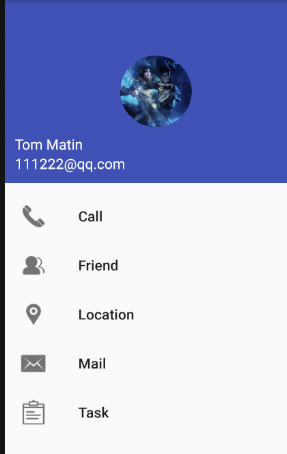
这里是侧滑的menu包括电话、朋友、位置、邮件、日程。
Nav_header.xml
<?xml version="1.0" encoding="utf-8"?>
<RelativeLayout xmlns:android="http://schemas.android.com/apk/res/android"
android:layout_width="match_parent"
android:layout_height="180dp"
android:padding="10dp"
android:background="?attr/colorPrimary">
<de.hdodenhof.circleimageview.CircleImageView
android:layout_width="70dp"
android:layout_height="70dp"
android:src="@mipmap/p4"
android:layout_centerInParent="true"/>
<TextView
android:layout_width="wrap_content"
android:layout_height="wrap_content"
android:id="@+id/mail"
android:layout_alignParentBottom="true"
android:textSize="14sp"
android:textColor="#fff"
android:text="111222@qq.com"/>
<TextView
android:layout_width="wrap_content"
android:layout_height="wrap_content"
android:id="@+id/username"
android:text="Tom Matin"
android:textSize="14sp"
android:textColor="#fff"
android:layout_above="@+id/mail"/>
</RelativeLayout>
详解:这里用到了CircleImageView,src加入图片,自动的会处理图片圆形化
Activity_main.xml:
<?xml version="1.0" encoding="utf-8"?>
<android.support.v4.widget.DrawerLayout xmlns:android="http://schemas.android.com/apk/res/android"
xmlns:app="http://schemas.android.com/apk/res-auto"
xmlns:tools="http://schemas.android.com/tools"
android:layout_width="match_parent"
android:layout_height="match_parent"
android:id="@+id/drawer_layout"
tools:context="com.example.materialtest_demo2.MainActivity">
<android.support.design.widget.NavigationView
android:layout_width="match_parent"
android:layout_height="match_parent"
android:layout_gravity="start"
app:menu="@menu/nav_menu"
app:headerLayout="@layout/nav_header"
android:id="@+id/nav_view">
</android.support.design.widget.NavigationView>
</android.support.v4.widget.DrawerLayout>
详解:这里侧滑还是用到了上次讲解的DrawerLayout 进行侧滑,而NavigationView代替了上次的TextView,通过 app:menu、app:headerLayout设置属性。
mainActivity.class:
...
//侧滑菜单
drawerLayout = (DrawerLayout) findViewById(R.id.drawer_layout);
NavigationView navigationView = (NavigationView) findViewById(R.id.nav_view);
navigationView.setCheckedItem(R.id.nav_call);
navigationView.setNavigationItemSelectedListener(new NavigationView.OnNavigationItemSelectedListener() {
@Override
public boolean onNavigationItemSelected(@NonNull MenuItem item) {
return true;
}
});
...
详解:这里获取到navigationView的实例后调用setCheckedItem()方法设置默认Call选项为选中,接着调用设置监听器,进行我们想要的操作,这里就简单的关闭菜单。
实验效果如下:
Android——MaterialDesign之三NavigationView的更多相关文章
- Android单元测试之三:使用模拟框架模拟依赖
Android单元测试之三:使用模拟框架模拟依赖 基本描述 如果是一些工具类方法的测试,如计算两数之和的方法,本地 JVM 虚拟机就能提供足够的运行环境,但如果要测试的单元依赖了 Android 框架 ...
- Android——MaterialDesign之二DrawerLayout
滑动菜单--DrawerLayout 滑动菜单就是把一些菜单选项隐藏起来,而不是放置主屏幕中,然后可以通过滑动的方式将菜单显示出来,具有非常的画面效果,就是类似侧边滑动. 例子:需要上一次的Toolb ...
- Android Material Design:NavigationView抽屉导航菜单
需要添加的包: 测试代码: package com.zzw.navigationview; import android.app.Activity; import android.os.Bundle; ...
- Android Material Design NavigationView 及 Palette 颜色提取器
DrawerLayout + NavigationView DrawerLayout布局,通常在里面添加两个子控件,程序主界面添加到NavitagionView前面. <android.supp ...
- Android 自己实现 NavigationView [Design Support Library(1)]
转载请标明出处: http://blog.csdn.net/lmj623565791/article/details/46405409: 本文出自:[张鸿洋的博客] 一.概述 Google I/O 2 ...
- Android开发之NavigationView的使用
NavigationView主要是和DrawerLayout框架结合使用,来完成抽屉导航实现侧边栏 引用一段官方文档的示例代码 <android.support.v4.widget.Drawer ...
- Android——MaterialDesign之一Toolbar
Toolbar 由于ActionBar设计原因只能存在活动的顶部,从而不能实现MaterialDesign的效果,现在推荐使用Toolbar,继承Actionbar,但是比起它更加的灵活. 设置主题: ...
- .Net程序员玩转Android系列之三~快速上手(转)
转自http://www.cnblogs.com/HouZhiHouJueBlogs/p/3962122.html 快速环境搭建和Hello World 第一步:JAVA SDK(JDK)的安装: 官 ...
- Android开发之三种动画
转载:http://www.cnblogs.com/angeldevil/archive/2011/12/02/2271096.html http://www.lightskystreet.com/2 ...
随机推荐
- UVA208-Firetruck(并查集+dfs)
Problem UVA208-Firetruck Accept:1733 Submit:14538 Time Limit: 3000 mSec Problem Description The Ce ...
- Python之requests库
Request库 r = requests.get(url) 这个包括两个语句:Response.Request,我们重点来看一下Response Response包含了页面返回的所有信息,下面是它的 ...
- linux 压缩文件或文件夹
zip demo.mp4.zip demo.mp4 zip -r videos.zip videos # 压缩文件夹需要加-r
- Pycharm远程调试服务器代码(使用Pipenv管理虚拟环境)
准备工作 1.随便准备一个项目工程,在本地用Pipenv创建一个虚拟环境并生成Pipfile和pipfile.lock文件,如下: 2.准备一台服务器,我这里使用阿里云的ECS SSH连接上 $ ss ...
- Storm知识点
1. 离线计算是什么? 离线计算:批量获取数据.批量传输数据.周期性批量计算数据.数据展示 代表技术:Sqoop批量导入数据.HDFS批量存储数据.MapReduce批量计算数据.Hive批量计算数据 ...
- mysql存储引擎之MyISAM 和 InnoDB的比较
一.什么是存储引擎 存储引擎说白了就是如何存储数据.如何为存储的数据建立索引和如何更新.查询数据等技术的实现方法.因为在关系数据库中数据的存储是以表的形式存储的,所以存储引擎也可以称为表类型(即存储和 ...
- ORACLE存储过程中%TYPE和%ROWTYPE的区别
ORACLE存储过程中%TYPE和%ROWTYPE的区别 在存储过程中%TYPE和%ROWTYPE常用来在PL/SQL中定义变量 因为 t_emp emp%rowtype ;这个语句的意思是 定义一个 ...
- Git-命令行-使用 Tag 标记你的代码
前言 正文开始之前,我想我们需要弄明白几个问题: 1.tag 是什么? 2.使用tag 的好处? 3.tag 和 branch 的区别以及使用场景? tag 是什么? tag , 翻译过来是标签的意思 ...
- 深入理解Java虚拟机(类文件结构+类加载机制+字节码执行引擎)
目录 1.类文件结构 1.1 Class类文件结构 1.2 魔数与Class文件的版本 1.3 常量池 1.4 访问标志 1.5 类索引.父索引与接口索引集合 1.6 字段表集合 1.7 方法集合 1 ...
- 【出错记录】Tomcat非root用户启动无法拥有权限读写文件
简单记录下,如有必要,将深入补充: 一.非root用户运行Tomcat及原因 由于项目中,为了安全需要,Tomcat将禁止以root形式启动,原因很简单,举个例子,一旦有人恶意将jsp文件透过某个别的 ...