
bootstrap4简单使用和入门02-bootstrap的js组件简单使用
自带默认的css和js弹框控制
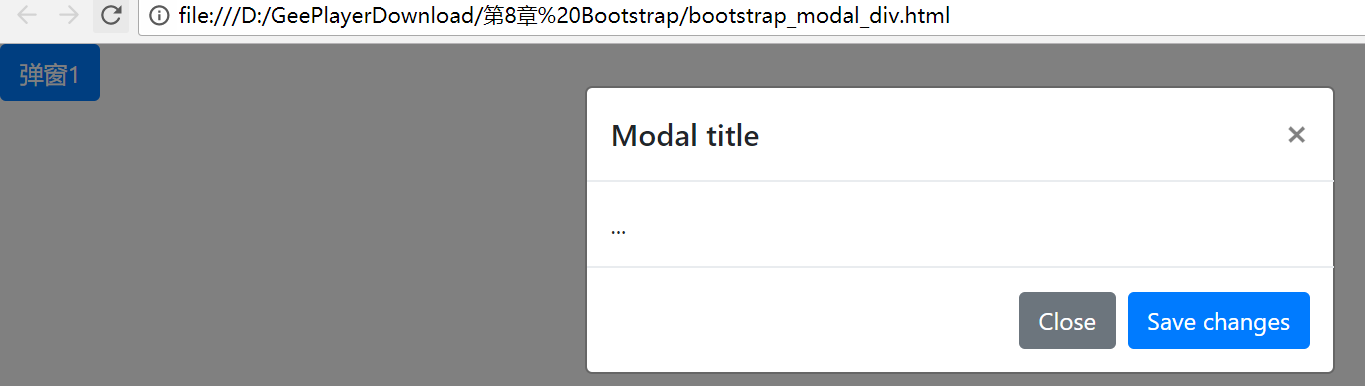
<!DOCTYPE html>
<html lang="en">
<head>
<meta charset="UTF-8">
<title>modal</title>
<script type="text/javascript" src="jquery-3.3.1.min.js"></script>
<script type="text/javascript" src="bootstrap-4.0.0-dist/js/bootstrap.bundle.min.js"></script>
<link rel="stylesheet" type="text/css" href="bootstrap-4.0.0-dist/css/bootstrap.min.css">
</head>
<body> <!-- css自带弹窗处理 -->
<button type="button" class="btn btn-primary" data-toggle="modal" data-target="#exampleModal">
弹窗1
</button> <!-- Modal -->
<div class="modal fade" id="exampleModal" tabindex="-1" role="dialog" aria-labelledby="exampleModalLabel" aria-hidden="true">
<div class="modal-dialog" role="document">
<div class="modal-content">
<div class="modal-header">
<h5 class="modal-title" id="exampleModalLabel">Modal title</h5>
<button type="button" class="close" data-dismiss="modal" aria-label="Close">
<span aria-hidden="true">×</span>
</button>
</div>
<div class="modal-body">
...
</div>
<div class="modal-footer">
<button type="button" class="btn btn-secondary" data-dismiss="modal">Close</button>
<button type="button" class="btn btn-primary">Save changes</button>
</div>
</div>
</div>
</div> </body>
</html>
自己使用jquery控制弹窗

<!DOCTYPE html>
<html lang="en">
<head>
<meta charset="UTF-8">
<title>modal</title>
<script type="text/javascript" src="jquery-3.3.1.min.js"></script>
<script type="text/javascript" src="bootstrap-4.0.0-dist/js/bootstrap.bundle.min.js"></script>
<link rel="stylesheet" type="text/css" href="bootstrap-4.0.0-dist/css/bootstrap.min.css">
</head>
<body> <!-- css自带弹窗处理 -->
<!-- <button type="button" class="btn btn-primary" data-toggle="modal" data-target="#exampleModal">
弹窗1
</button> -->
<!-- js控制弹窗 -->
<button id="myModal" class="btn btn-info">弹窗2</button> <!-- Modal -->
<div class="modal fade" id="exampleModal" tabindex="-1" role="dialog" aria-labelledby="exampleModalLabel" aria-hidden="true">
<div class="modal-dialog" role="document">
<div class="modal-content">
<div class="modal-header">
<h5 class="modal-title" id="exampleModalLabel">Modal title</h5>
<button type="button" class="close" data-dismiss="modal" aria-label="Close">
<span aria-hidden="true">×</span>
</button>
</div>
<div class="modal-body">
...
</div>
<div class="modal-footer">
<button type="button" class="btn btn-secondary" data-dismiss="modal">Close</button>
<button type="button" class="btn btn-primary">Save changes</button>
</div>
</div>
</div>
</div> <script type="text/javascript">
$('#myModal').on('click', function () {
$('#exampleModal').modal('show');
})
</script> </body>
</html>
bootstrap4简单使用和入门02-bootstrap的js组件简单使用的更多相关文章
- 【Bootstrap基础学习】02 Bootstrap的布局组件应用示例
字体图标的应用示例 <button type="button" class="btn btn-default"> <span class=&q ...
- JS组件系列——表格组件神器:bootstrap table
前言:之前一直在忙着各种什么效果,殊不知最基础的Bootstrap Table用法都没有涉及,罪过,罪过.今天补起来吧.上午博主由零开始自己从头到尾使用了一遍Bootstrap Table ,遇到不少 ...
- JS组件系列——表格组件神器:bootstrap table(二:父子表和行列调序)
前言:上篇 JS组件系列——表格组件神器:bootstrap table 简单介绍了下Bootstrap Table的基础用法,没想到讨论还挺热烈的.有园友在评论中提到了父子表的用法,今天就结合Boo ...
- JS组件系列——表格组件神器:bootstrap table(三:终结篇,最后的干货福利)
前言:前面介绍了两篇关于bootstrap table的基础用法,这章我们继续来看看它比较常用的一些功能,来个终结篇吧,毛爷爷告诉我们做事要有始有终~~bootstrap table这东西要想所有功能 ...
- [转]JS组件系列——表格组件神器:bootstrap table
原文地址:https://www.cnblogs.com/landeanfen/p/4976838.html 前言:之前一直在忙着各种什么效果,殊不知最基础的Bootstrap Table用法都没有涉 ...
- JS组件系列——表格组件神器:bootstrap table 包含了js对象的定义和对象成员函数的定义
前言:之前一直在忙着各种什么效果,殊不知最基础的Bootstrap Table用法都没有涉及,罪过,罪过.今天补起来吧.上午博主由零开始自己从头到尾使用了一遍Bootstrap Table ,遇到不少 ...
- CSS3基础入门02
CSS3 基础入门02 边框相关属性 border-radius 通过这个属性我们可以设置边框圆角,即可以将四个角设置为统一的圆角,也可以单独的设置具体的某一个角的圆角. grammer: borde ...
- Bootstrap入门(二十一)组件15:警告框
Bootstrap入门(二十一)组件15:警告框 通过这些简单.灵活的进度条,为当前工作流程或动作提供实时反馈. 进度条组件使用了 CSS3 的 transition 和 animation 属性来完 ...
- Bootstrap入门(二十)组件14:警告框
Bootstrap入门(二十)组件14:警告框 警告框组件通过提供一些灵活的预定义消息,为常见的用户动作提供反馈消息,提示.通知或者警示,可以迅速吸引注意力. 1.情景警告框 2.可关闭的警告框 3. ...
随机推荐
- 【leetcode-75】 颜色分类
(1过,解法不好,看參考荷兰国旗问题解法) 给定一个包含红色.白色和蓝色,一共 n 个元素的数组,原地对它们进行排序,使得相同颜色的元素相邻,并按照红色.白色.蓝色顺序排列. 此题中,我们使用整数 0 ...
- HDU 1024(新最大子序列和 DP)
题意是要在一段数列中求 m 段互不重合的子数列的最大和. 动态规划,用数组 num[ ] 存储所给数列,建二维数组 dp[ ][ ] , dp[ i ][ j ] 表示当选择了第 j 个数字( num ...
- MySQL学习笔记(三)数据优化
第1章 数据库优化简介1-1 MySQL优化简介 第2章 SQL语句优化2-1 数据准备 2-2 MySQL慢查日志的开启方式 2-3 MySQL慢查日志分析工具之 mysqldumpslow www ...
- string赋值和操作
string赋值 string s1; //默认构造函数,s1为空串 string s1(s2); //将s2初始化为s1的一个副本 string s3("value"); //将 ...
- T-SQL常见基础疑点问答总结
--建立测试环境 IF object_id('tb') IS NOT NULL DROP TABLE tb GO ,),v )) GO INSERT tb SELECT 'a' UNION ...
- sqlserver 循环取时间
declare @str date; set @str='2015-01-08'; while DATEDIFF([day], @str , '2015-02-01')>0 begin sele ...
- Docker 创建 mongo 容器
获取 docker 认证 mongo 镜像: docker pull mongo 创建运行 mongo 容器: docker run -d -it -p : --name mongo3 -m 512M ...
- 自己对Java的一点看法
作为一个理论性比较强的学生,谈一下这段时间对java以及对程序设计的理解 java相对于其它语言有几个特点,一个是面向对象,一个是强类型 首先谈谈面向对象,关于类和对象,这个一定要 ...
- linux时间戳和时间格式的转化
1.将时间戳转化为yyyy-MM-dd HH:mm:ss时间格式 date -d @时间戳(秒) 2.设置服务器时间---特别注意使用 date -s 时间
- Java基础_0205: 程序逻辑结构
使用if语句进行判断 public class TestDemo { public static void main(String args[]) { double score = 90.0; // ...