
$Django 表设计,登陆图片验证
pip3 install pillow #PIL
登陆图片验证(未实现局部刷新)
详细:https://www.cnblogs.com/qiangyuge/p/8025168.html
def get_color():
    import random
    return (random.randint(0,255),random.randint(0,255),random.randint(0,255))
def get_text(request):
    import random
    a=str(random.randint(0,9))
    b=chr(random.randint(65,90))
    c=chr(random.randint(97,122))
    d=''
    for i in range(5):
        d+=random.choice([a,b,c])
    request.session['code']=d
    return d
def img_code(request):
    if request.method=='GET':
        from PIL import ImageDraw, Image,ImageFont
        from io import BytesIO
        img=Image.new('RGB',(320,30),color=get_color())
        #画字
        img_draw=ImageDraw.Draw(img)
        font=ImageFont.truetype('static/aa.TTF',size=25)
        img_draw.text((120,-5),get_text(request),get_color(),font=font,)
        f = BytesIO ()
        img.save (f, 'png')
        data = f.getvalue ()
        return HttpResponse(data)

**********************************************************************************
# 第一种方式
# with open('static/img/lhf.jpg','rb') as f:
# # 图片二进制
# data=f.read()
# return HttpResponse(data)
# 第二种方式:随机生成一张图片
# pip3 install Pillow
# pillow 是一个图形处理的模块,功能很强强大
# 生成一张图片,第一个参数是模式:RGB,第二个参数是图片大小,第三个参数是图片颜色
# img = Image.new('RGB', (320, 35), color=get_random_color())
# # 保存到本地
# with open('valid_code.png', 'wb') as f:
# # 直接用img的save方法,第一个参数是空文件,第二个参数图片格式
# img.save(f, 'png')
# # 打开文件,再返回
# with open('valid_code.png', 'rb') as f:
# data = f.read()
# return HttpResponse(data)
# 第三种方式
# 在内存中生成一个空文件(把它想象成 open('valid_code.png', 'wb') as f:)
# 一个是在硬盘上,一个是在内存中
# img = Image.new('RGB', (320, 35), color=get_random_color())
# f = BytesIO()
# # 把图片保存到f中
# # 放到内存中,存取比较快,而且有自动清理
# img.save(f, 'png')
#
# data = f.getvalue()
# return HttpResponse(data)
# 第四种方式,在图片上写文字
img = Image.new('RGB', (320, 35), color=get_random_color())
# 拿到画笔,把图片传入画笔
img_draw=ImageDraw.Draw(img)
# 生成一个字体对象,第一个参数是字体文件的路径,第二个参数是字体大小
font=ImageFont.truetype('static/font/ss.TTF',size=25)
# 不同的字体是不同的ttf文件
img_draw.text((0,0),'python',get_random_color(),font=font)
# 把图片保存到f中
# 放到内存中,存取比较快,而且有自动清理
img.save(f, 'png')
return HttpResponse(data)
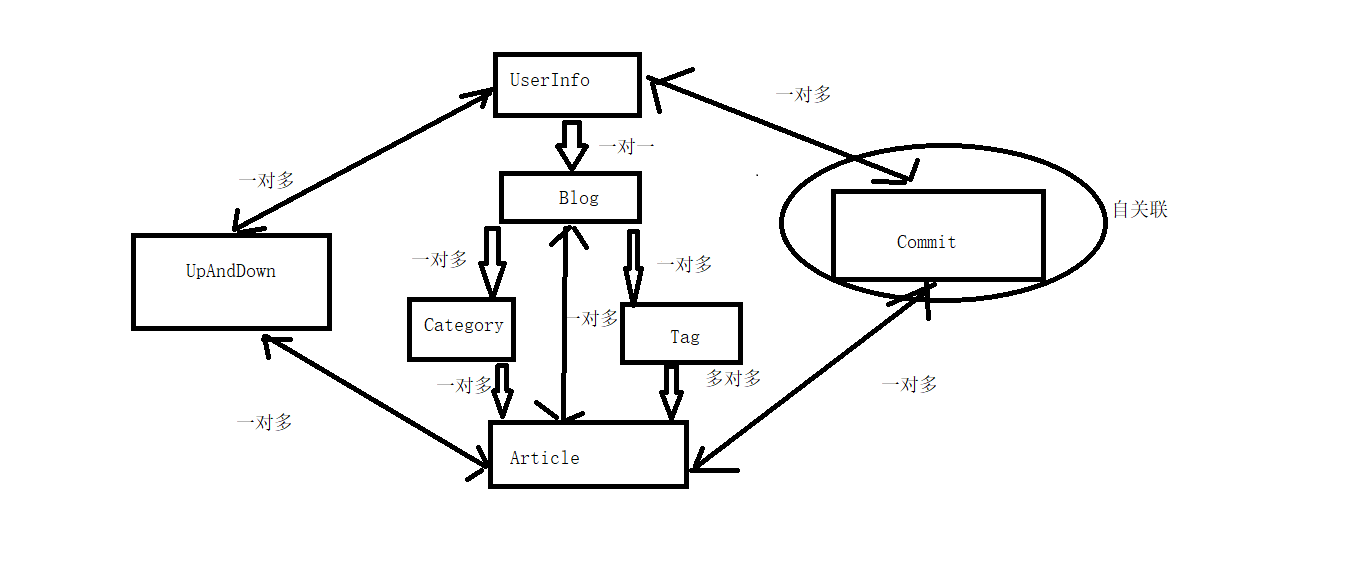
表设计
User 用户表
-nid
-name
-password
-phone
-avatar 用户头像
-create_date 用户注册时间
-blog
Blog 个人站点表
-nid
-title 标题
-site_name 站点url名
-theme 主题
category: 文章分类表
-nid
-title
-blog 跟blog一对多
tag:(文章关键字)
-nid
-title
-blog 跟blog一对多
article 文章表
-nid
-title
-desc 摘要
-create_time auto_add_now:当该条记录创建时,自动添加当前时间
-content 文章内容
-category 一对多
-tag 多对多
-blog 一对多
commit 评论表
-nid
-user 哪个用户
-article 对哪篇文章
-content 评论了什么内容
-commit_time 时间
-parent_id
如何实现根评论与子评论?
-有同学分析,要再建一张表,跟commit是一对多的关系(不好)
-如何用这一个表,表示出根评论和子评论?
-再加一个字段,标志,给那条评论,评论的
nid user article content parent_id
1 1 1 111 null
2 2 1 222 null
3 3 1 333 1
4 4 1 444 3
5 3 1 反弹 4
UpandDown 点赞表
-nid
-user 哪个用户
-article 对哪篇文章
-is_up 点赞还是点踩
随机推荐
- 【leetcode-86】 分隔链表
(1过) 给定一个链表和一个特定值 x,对链表进行分隔,使得所有小于 x 的节点都在大于或等于 x 的节点之前. 你应当保留两个分区中每个节点的初始相对位置. 示例: 输入: head = 1-> ...
- Spark源码剖析 - 计算引擎
本章导读 RDD作为Spark对各种数据计算模型的统一抽象,被用于迭代计算过程以及任务输出结果的缓存读写.在所有MapReduce框架中,shuffle是连接map任务和reduce任务的桥梁.map ...
- python-常用数据类型
九 基本数据类型 什么是数据?为何要有多种类型的数据? #数据即变量的值,如age=18,18则是我们保存的数据. #变量的是用来反映/保持状态以及状态变化的,毫无疑问针对不同的状态就应该用不同类型的 ...
- redis基本操作
''' pip install redis redis 可以看成内存中的大字典 redis五大数据类型 --> 指的是第一层的value值的类型 - 字符串 "k1" - 列 ...
- 细说tomcat之session持久化探秘
业务场景:通常,我们会在会话级别存放一些参数,期望在session生命周期内,可以一直取得保存在session中的指定数据:而只要session过期或者失效,则需要执行重新登录等操作.但是!我们对于这 ...
- C++ WString与String互相转换
std::wstring StringToWString(const std::string& str) { , str.c_str(), -, NULL, ); wchar_t *wide ...
- 什么是CRUD
CRUD是指在做计算处理时的增加(Create).读取查询(Retrieve).更新(Update)和删除(Delete)几个单词的首字母简写.主要被用在描述软件系统中数据库或者持久层的基本操作功能.
- IPv6地址测试宏
- 【LDAP】LDAP注入漏洞与防御
0x01 前言 前两天爆了一个LDAP漏洞,据说存在了8年现在才被发现,感概一下,不知这8年来有多少站被搞了... 想着复现这个漏洞,就先复习一下LDAP注入的相关知识吧,差了很多资料,记一下笔记. ...
- asp.net mvc 多文件上传
@{ ViewBag.Title = "多文件上传测试"; } <h2>多文件上传测试</h2> <form action="/Demo/I ...