
Python_简单三级菜单制作
一:制作要求
1.三级菜单
2.可依次选择进入各子菜单
3.所需新知识点:字典,列表
*本文通过三种方法完成,第一种:只使用循环,第二种:使用列表,第三种:使用字典
二:FlowChart流程图

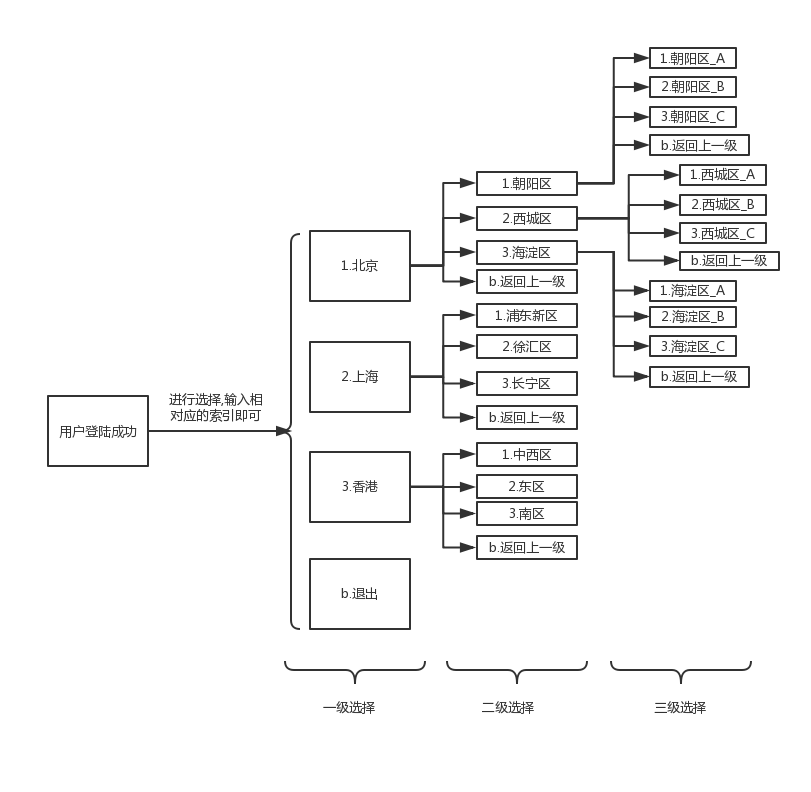
与上图对应,实现方式图解:
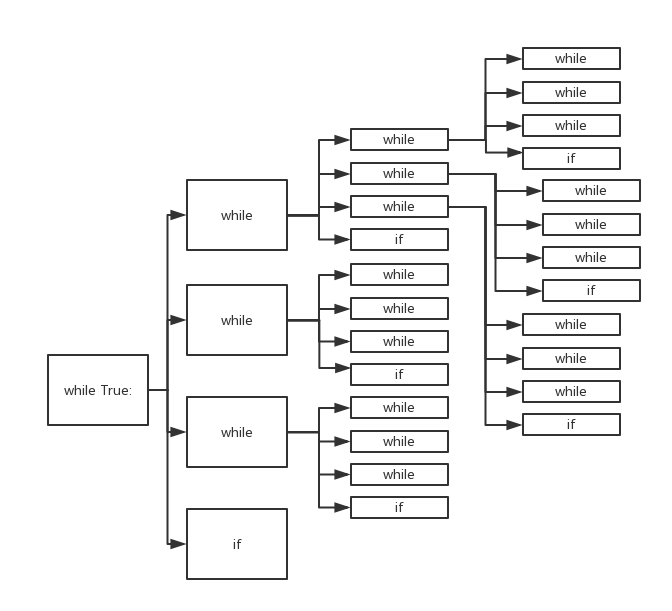
while用来判断输入的数据和允许输入数据中的哪一项匹配,if来进行判断是否退出本次循环,
三:具体实现代码:
1.没有使用列表字典
 #三级菜单 输入都是用一个变量   0120使用字典,列表

 #思路:while

 #定义一级菜单

 msg='''

 请输入你要进行的操作前面的索引(1,2,3,b):

     1.北京

     2.上海

     3.香港

     b.退出

 '''

 #定义二级菜单

 msg_1='''

     1.朝阳区

     2.西城区

     3.海淀区

     b.返回上一级

 '''

 msg_2_2='''

     1.西城区_A

     2.西城区_B

     3.西城区_C

     b.返回上一级

 '''

 #定义三级菜单

 msg_2_1='''

     1.朝阳区_A

     2.朝阳区_B

     3.朝阳区_C

     b.返回上一级

 '''

 while True:

     #输出一级菜单:

     print(msg)

     select_input=input("请输入你的选择:")

     #选项一

     while select_input== "":

         print(msg_1)

         select_input_1 = input("请输入你的选择:")

         while select_input_1 == "":

             print(msg_2_1)

             select_input_2 = input("请输入你的选择:")

             if select_input_2=="b":

                 break

         while select_input_1 == "":

             print(msg_2_2)

             select_input_2 = input("请输入你的选择:")

             if select_input_2 == "b":

                 break

         while select_input_1 == "":

             print(msg_2_2)

             select_input_2 = input("请输入你的选择:")

             if select_input_2 == "b":

                 break

         if select_input_1== "b":

             break

     #选项二

     while select_input == "":

         print(msg_1)

         select_input_1 = input("请输入你的选择:")

         while select_input_1 == "":

             print(msg_2_1)

             select_input_2 = input("请输入你的选择:")

             if select_input_2 == "b":

                 break

         while select_input_1 == "":

             print(msg_2_2)

             select_input_2 = input("请输入你的选择:")

             if select_input_2 == "b":

                 break

         while select_input_1 == "":

             print(msg_2_2)

             select_input_2 = input("请输入你的选择:")

             if select_input_2 == "b":

                 break

         if select_input_1 == "b":

             break

     #选项三

     while select_input == "":

         print(msg_1)

         select_input_1 = input("请输入你的选择:")

         while select_input_1 == 1:

             print(msg_2_1)

             select_input_2 = input("请输入你的选择:")

             if select_input_2 == "b":

                 break

         while select_input_1 == "":

             print(msg_2_2)

             select_input_2 = input("请输入你的选择:")

             if select_input_2 == "b":

                 break

         while select_input_1 == "":

             print(msg_2_2)

             select_input_2 = input("请输入你的选择:")

             if select_input_2 == "b":

                 break

         if select_input_1 == "b":

             break

     #选项四

     if select_input=="b":

         break

 print("本次使用结束!")
2.使用列表
 # 三级菜单 输入都是用一个变量   0120使用字典,列表

 # 思路:while

 # 通过定义列表进行选项存储

 list=["北京","上海","香港","退出"]

 list_1=["朝阳区","西城区","海淀区","返回上一级"]

 list_1_1=["朝阳区_A","朝阳区_B","朝阳区_C","返回上一级"]

 list_1_2=["西城区_A","西城区_B","西城区_C","返回上一级"]

 while True:

     # 输出一级菜单:

     for i in list:

         print(" \n%s: %s"%(list.index(i)+1,i))

     select_input = input("请输入你的选择:")

     # 选项一

     while select_input == "":

         for i in list_1:

             print(" \n%s: %s" % (list_1.index(i) + 1, i))

         select_input_1 = input("请输入你的选择:")

         while select_input_1 == "":

             for i in list_1_1:

                 print(" \n%s: %s" % (list_1_1.index(i) + 1, i))

             select_input_2 = input("请输入你的选择:")

             if select_input_2 == "":

                 break

         while select_input_1 == "":

             for i in list_1_2:

                 print(" \n%s: %s" % (list_1_2.index(i) + 1, i))

             select_input_2 = input("请输入你的选择:")

             if select_input_2 == "":

                 break

         while select_input_1 == "":

             for i in list_1_2:

                 print(" \n%s: %s" % (list_1_2.index(i) + 1, i))

             select_input_2 = input("请输入你的选择:")

             if select_input_2 == "":

                 break

         if select_input_1 == "":

             break

     # 选项二

     while select_input == "":

         for i in list_1:

             print(" \n%s: %s" % (list_1.index(i) + 1, i))

         select_input_1 = input("请输入你的选择:")

         while select_input_1 == "":

             for i in list_1_2:

                 print(" \n%s: %s" % (list_1_2.index(i) + 1, i))

             select_input_2 = input("请输入你的选择:")

             if select_input_2 == "":

                 break

         while select_input_1 == "":

             for i in list_1_2:

                 print(" \n%s: %s" % (list_1_2.index(i) + 1, i))

             select_input_2 = input("请输入你的选择:")

             if select_input_2 == "":

                 break

         while select_input_1 == "":

             for i in list_1_2:

                 print(" \n%s: %s" % (list_1_2.index(i) + 1, i))

             select_input_2 = input("请输入你的选择:")

             if select_input_2 == "":

                 break

         if select_input_1 == "":

             break

     # 选项三

     while select_input == "":

         for i in list_1:

             print(" \n%s: %s" % (list_1.index(i) + 1, i))

         select_input_1 = input("请输入你的选择:")

         while select_input_1 == 1:

             for i in list_1_2:

                 print(" \n%s: %s" % (list_1_2.index(i) + 1, i))

             select_input_2 = input("请输入你的选择:")

             if select_input_2 == "":

                 break

         while select_input_1 == "":

             for i in list_1_2:

                 print(" \n%s: %s" % (list_1_2.index(i) + 1, i))

             select_input_2 = input("请输入你的选择:")

             if select_input_2 == "":

                 break

         while select_input_1 == "":

             for i in list_1_2:

                 print(" \n%s: %s" % (list_1_2.index(i) + 1, i))

             select_input_2 = input("请输入你的选择:")

             if select_input_2 == "":

                 break

         if select_input_1 == "":

             break

     # 选项四

     if select_input == "":

         break

 print("本次使用结束!")
使用列表运行效果和第一种方法类似,只不过把返回的值改成了4,
3.使用字典
# 三级菜单 输入都是用一个变量   0120使用字典,列表

# 思路:while

# 通过字典进行选项存储

dic={

    "1.北京":{

        "1.朝阳区":["朝阳区_A","朝阳区_B","朝阳区_C","返回上一级"],

        "2.西城区":["西城区_A","西城区_B","西城区_C","返回上一级"],

        "3.海淀区":[],

        "4.返回上一级":[]

    },

    "2.上海":{},

    "3.香港":{},

    "b.退出":{}

}

while True:

    # 输出一级菜单:

    print(dic.keys())

    select_input = input("请输入你的选择:")

    # 选项一

    while select_input == "":

        print(dic["1.北京"].keys())

        select_input_1 = input("请输入你的选择:")

        while select_input_1 == "":

            print(dic["1.北京"]["1.朝阳区"])

            select_input_2 = input("请输入你的选择:")

            if select_input_2 == "b":

                break

        while select_input_1 == "":

            print(dic["1.北京"]["1.朝阳区"])

            select_input_2 = input("请输入你的选择:")

            if select_input_2 == "b":

                break

        while select_input_1 == "":

            print(dic["1.北京"]["1.朝阳区"])

            select_input_2 = input("请输入你的选择:")

            if select_input_2 == "b":

                break

        if select_input_1 == "b":

            break

    # 选项二

    while select_input == "":

        print(dic["1.北京"].keys)

        select_input_1 = input("请输入你的选择:")

        while select_input_1 == "":

            print(dic["1.北京"]["1.朝阳区"])

            select_input_2 = input("请输入你的选择:")

            if select_input_2 == "b":

                break

        while select_input_1 == "":

            print(dic["1.北京"]["1.朝阳区"])

            select_input_2 = input("请输入你的选择:")

            if select_input_2 == "b":

                break

        while select_input_1 == "":

            print(dic["1.北京"]["1.朝阳区"])

            select_input_2 = input("请输入你的选择:")

            if select_input_2 == "b":

                break

        if select_input_1 == "b":

            break

    # 选项三

    while select_input == "":

        print(dic["1.北京"].keys)

        select_input_1 = input("请输入你的选择:")

        while select_input_1 == 1:

            print(dic["1.北京"]["1.朝阳区"])

            select_input_2 = input("请输入你的选择:")

            if select_input_2 == "b":

                break

        while select_input_1 == "":

            print(dic["1.北京"]["1.朝阳区"])

            select_input_2 = input("请输入你的选择:")

            if select_input_2 == "b":

                break

        while select_input_1 == "":

            print(dic["1.北京"]["1.朝阳区"])

            select_input_2 = input("请输入你的选择:")

            if select_input_2 == "b":

                break

        if select_input_1 == "b":

            break

    # 选项四

    if select_input == "b":

        break

print("本次使用结束!")
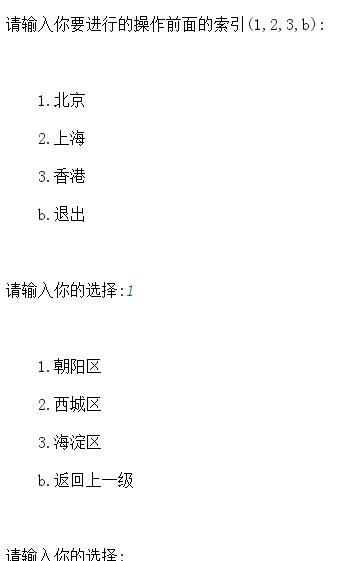
四:运行效果截图(第一种方法):

五:注意事项
  1.Python虽然简单,但是一定要熟练掌握格式,有的时候差一个空格都会出错而且还不容易排除错误.
  2.关于语句:
    select_input=b
    while int(select_input)==1
    运行报错:ValueError: invalid literal for int() with base 10: 'b',
    语法错误
    出错原因:Python3.0以后的版本不能进行字符串转换类型之后与数字之间的比较与判断
    所以改成:select_input=="1"
Python_简单三级菜单制作的更多相关文章
- HTML+CSS实现简单三级菜单
<!DOCTYPE html> <html lang="en"> <head> <meta charset="UTF-8&quo ...
- python三级菜单制作 day4
需求:可依次选择进入各子菜单可从任意一层往回退到上一层可从任意一层退出程序所需新知识点:列表.字典 数据结构: menu = { '北京':{ '海淀':{ ...
- python_入门_三级菜单
'''程序:三级菜单要求:1.打印省.市.县三级菜单2.可返回上一级3.可随时退出程序''' # -*- coding: utf-8 -*- # __author__ = 'qi' prov_city ...
- Python学习-------------------三级菜单简单版
题目: 多级菜单 1.三级菜单 2.可依次选择进入的各子菜单 3.所需新知识点:列表.字典 ReadMe: 这个做循环,比较绕脑子 点开运行即可 Min ...
- Python3学习之路~2.5 简单的三级菜单程序
程序:三级菜单 需求: 1.打印省.市.县三级菜单2.可返回上一级3.可随时退出程序 代码1: data={ "山东":{ "济南":["历下区&qu ...
- vue的递归组件以及三级菜单的制作
js里面有递归算法,同时,我们也可以利用props来实现vue模板的递归调用,但是前提是组件拥有 name 属性 父组件:slotDemo.vue: <template> <div& ...
- python(5)- 简单练习:python三级菜单优化
python三级菜单优化,菜鸟版链接:http://www.cnblogs.com/xuyaping/p/6648170.html menu = { '北京':{ '海淀':{ '五道口':{ 'so ...
- 纯css制作三级菜单
<!DOCTYPE html> <html> <head> <title>三级菜单</title> <meta charset=&qu ...
- css三级菜单效果
一个简单实用的css三级菜单效果 <!doctype html> <html> <head> <meta charset="utf-8"& ...
随机推荐
- css格式比较及选择器类型总结
在前端入门的前三天把网页制作过程中常用的一些标签和属性都认识和练习了一遍,能够做出简单模块的框架.就像老师说的网页制作就像建一栋大楼,html是砖和水泥,css是精装,js是完善各个功能.现在就开始进 ...
- git配置全局用户名
点击右键 ,点击git bash here 在控制面板输入 git config --global user.name "xxx" git config --global user ...
- PMP学习总结(1) -- 引论
3月18日考试,1个月后出的成绩,当我拿到Pass的结果的时候还是蛮开心的,因为在备考期间,公司项目十分紧急,经常加班到晚上9,10点,而且宝贝女儿也在这个期间出生,所以备考是十分辛苦的,经常晚上11 ...
- C++的学习心得
由于我们大一就学习的c++,跳过了c语言,VB的学习,在很多方面我们掌握的并不是特别好,在这几种语言中,几乎有时候会产生混淆,通过做大量的c++的题目感觉在题目中应用的最多的就是数组.指针.对类的应用 ...
- CLion之C++框架篇-优化框架,单元测试(二)
背景 结合上一篇CLion之C++框架篇-安装工具,基础框架的搭建(一),继续进行框架优化! googletest(GTest)是Google开源的C++测试框架,与CLion组合,对C++环 ...
- Android插件化的兼容性(上):Android O的适配
首先声明,<Android插件化开发指南>这本书所介绍的Android底层是基于Android6.0(API level 23)的,而本书介绍的各种插件化解决方案,以及配套的70多个例子, ...
- MySQL优化技巧
目录 MySQL的特点 数据类型优化 整型类型 小数类型 字符串类型 时间类型 主键类型的选择 特殊类型的数据 索引优化 一个使用Hash值创建索引的技巧 前缀索引 多列索引 聚簇索引 覆盖索引 重复 ...
- 快速找出网站中可能存在的XSS漏洞实践(一)
一.背景 笔者最近在慕课录制了一套XSS跨站漏洞 加强Web安全视频教程,课程当中有讲到XSS的挖掘方式,所以在录制课程之前需要做大量实践案例,最近视频已经录制完成,准备将这些XSS漏洞的挖掘过程记录 ...
- Android 9.0/P 版本推荐使用 HttpURLConnection
早在几年前,谷歌就推荐在Android2.3版本以上使用HttpURLConnection,而在即将正式发布的 Android P 版本中,谷歌彻底取消了对Apache HTTPClient的支持,针 ...
- Cannot load php5apache2_4.dll into server
配置PHP开发环境的时候,当进行到在Apache的httpd.conf文件中配置加载PHP模块时发生如下错误 httpd: Syntax error on line 185 of D:/wamp/Ap ...